


微信小程序canvas实现签名
话不多说,先看效果
图1.签名样式
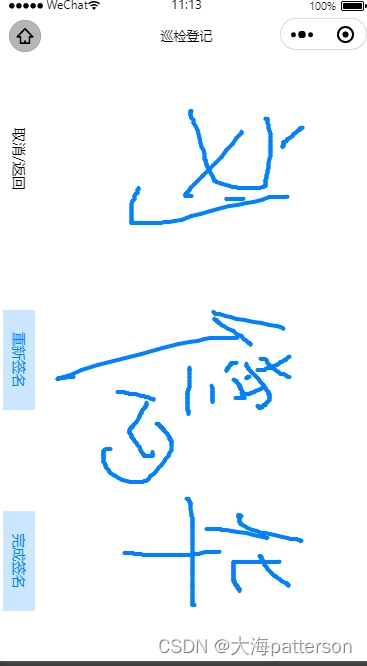
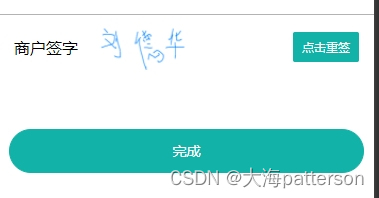
图2.页面展示效果
下面是具体代码
canvas.wxml
<view class="signBox border">
<view class="flex-center">
<view>商户签字</view>
<van-image style="padding-left:30rpx" wx:if="{
{sign}}" src="{
{sign}}" width="100" height="50" fit="contain"/>
</view>
<van-button type="primary" size="small" color="#12b2a8" bind:click="toSign">{
{form.sign == '' ? '点击签名' : '点击重签'}}
</van-button>
<!-- <button style="margin-top: 30rpx;" bindtap="submitSignature" disabled="{
{!isSignatureFinish}}">提交保存</button> -->
</view>
<view class="bottom">
<van-button block round type="primary" color="#12b2a8" bind:click="makeEOrder">
完成</van-button>
</view>
<page-container show="{
{showPage}}" overlay="{
{false}}" round="{
{false}}" close-on-slideDown="{
{false}}" z-index="1000">
<view class="flex" style="height: 100vh;">
<view class="sign-btn-container">
<view class="cu-btn" bindtap="hideSignPage">取消/返回</view>
<view class="cu-btn {
{isSignatureFinish?'bg-blue light':''}}" bindtap="clearCanvas">重新签名</view>
<view class="cu-btn {
{isSignatureFinish?'bg-blue light':''}}" bindtap="co 最低0.47元/天 解锁文章






 扫一扫
扫一扫


 4381
4381

 被折叠的 条评论
为什么被折叠?
被折叠的 条评论
为什么被折叠?
 到【灌水乐园】发言





