


 本文通过R语言处理NC文件中的土地利用数据,分析了1980年至2016年间林地和农田的土地利用变化趋势,并绘制了趋势图及统计了显著变化的比例。
一.数据准备
NC文件指的是土地利用(Land use and land cover)数据(全球尺度),一般从网上就能下载,这里提供几个下载地址,时间跨度为850-2018:
1.土地使用状态数据(具体类别下面会讲)
2.土地类型转移数据
3.土地管理数据
直接点击链接就会下载。这里以最常用的土地使用状态数据为例绘制林地和农田的变化趋势图。
二、数据处理
1.数据下载后格式为nc,可以放到R的工作目录下,或者在一开始设置工作目录为nc文件所在文件夹。比如我放在了E盘的rroom文件夹下:

数据处理部分的代码如下:
setwd("E:/rroom")  #当前工作目录
#需要用到的包
library(RColorBrewer)
library(lattice)
library(trend)
library(magrittr)
library(raster)
library(ggplot2)
library(rnaturalearth)
library(ncdf4)
library(cowplot)
library(dplyr)
rm(list = ls())
#***********************数据处理***************************
ncdata <- nc_open("states.nc")
打开nc文件后可以看到具体的值,维度为3,1维是纬度,二维是经度,三维是时间,年份为850-2018,可根据自己的需要切割。
states文件中主要包括14种土地类型
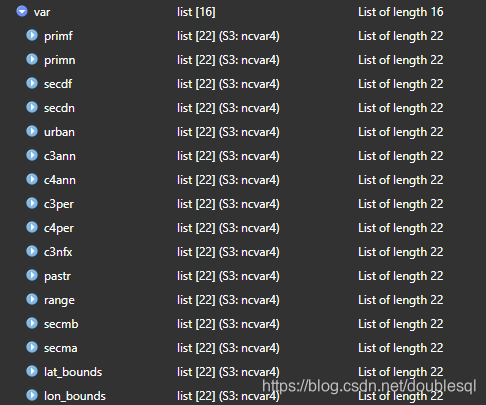
可以点开查看全名,这次的林地用到原始林地数据(primf)和次生林地(secdf),农田用到C3类一年生作物(c3ann)和C4(c4ann)类一年生作物。
lon <- ncvar_get(ncdata,'lon') #ncvar_get get the value data
lat <- ncvar_get(ncdata,'lat') # get longitude and latitude
time<-ncvar_get(ncdata,'time') # time from 1 to 1169
primf<- ncvar_get(ncdata,'primf',start = c(1,1,1131)) #get primf from 1980 to 2016
secdf<- ncvar_get(ncdata,'secdf',start = c(1,1,1131))
c3ann<- ncvar_get(ncdata,'c3ann',start = c(1,1,1131))
c4ann<- ncvar_get(ncdata,'c4ann',start = c(1,1,1131))
#calculate the slope and p value
primf<-primf[,,1:37]  #取1980年到2016年37年的数据
secdf<-secdf[,,1:37]
c3ann<-c3ann[,,1:37]
c4ann<-c4ann[,,1:37]
is.array(c3ann)
forest<-array(NA,dim=c(1440,720,37))
cropland<-array(NA,dim=c(1440,720,37))
forest<-primf+secdf
cropland<-c3ann+c4ann
vec_forest<- apply(forest, 3, function(x) as.vector(x))
vec_cropland<- apply(cropland, 3, function(x) as.vector(x))
dim(vec_forest)
dim(vec_cropland)
#计算趋势V和P-value值的函数
Slope<- function(x) ifelse(sum(!is.na(x)) < 5, NA, sens.slope(na.omit(x))$estimates)
Sign <- function(x) ifelse(sum(!is.na(x)) < 10, NA, sens.slope(na.omit(x))$p.value)
Trends_forest <- apply(vec_forest, 1, Slope)
Trends_cropland <- apply(vec_cropland, 1, Slope)
Pvalue_forest <- apply(vec_forest, 1, Sign)
Pvalue_cropland <- apply(vec_cropland, 1, Sign)
#最后的单位应该是100%,所以乘以100
Sen_forest<- data.frame(Slope = Trends_forest*100, Pvalue = Pvalue_forest)
Sen_cropland<-data.frame(Slope = Trends_cropland*100, Pvalue = Pvalue_cropland)
#这里查看最大最小值是为了画图的时候封顶
max(na.omit(Sen_forest$Slope))
min(na.omit(Sen_forest$Slope))
max(na.omit(Sen_cropland$Slope))
min(na.omit(Sen_cropland$Slope))
三、图形绘制
#绘制网格
grid <- expand.grid(y = lon, x = lat)
P1_0.05 <- Sen_forest$Pvalue
P1_0.05[P1_0.05 > 0.05] <- NA
z1 <- Sen_forest$Slope
z1[z1 > 1.2] <- 1.8
z1[z1< -1.2] <- -1.8
P2_0.05 <- Sen_cropland$Pvalue
P2_0.05[P2_0.05 > 0.05] <- NA
z2 <- Sen_cropland$Slope
z2[z2 > 1.2] <- 1.8
z2[z2< -1.2] <- -1.8
#Points_del <- rep(c(1, rep(NA, 9)), length(P1_0.05)/10)
grid$Slope_forest<- z1
grid$Pvalue_forest <- P1_0.05
grid$slope_cropland<-z2
grid$Pvalue_cropland<-P2_0.05
rwg.colors <- colorRampPalette(c(brewer.pal(9,'GnBu')[9:5],brewer.pal(9,'OrRd')[c(5:9)]))
x_sel <- (grid$x%%1 == 0.875 & ifelse(floor(grid$x) %%2 == 0, TRUE, FALSE))
y_sel <- (grid$y%%1 == 0.875 & ifelse(floor(grid$y) %%2 == 0, TRUE, FALSE))
grid2 <- grid[x_sel &  y_sel & !is.na(grid$Pvalue_forest),]
grid3 <- grid[x_sel &  y_sel & !is.na(grid$Pvalue_cropland),]
P1 <-
  ggplot()+
  geom_raster(data = grid, aes(y, x,fill = Slope_forest))+
  #geom_point(data =  grid2, aes(y, x, fill = Pvalue_forest), size = 0.1, shape = 16)+
  scale_fill_gradientn(colours = c('green', '#00A08A', 'lightgray','white','#FF0000','red','red3'),  na.value = 'transparent')+ # gray50
  ylim(-60,90)+  xlim(-170,180)+
  coord_fixed()+
  guides(fill = guide_colorbar(barwidth = 0.5, barheight = 17), title="Slope")+
  theme(panel.background = element_rect(fill = 'transparent',color = 'black'), #gray50
        axis.title = element_blank(),
        axis.text = element_text(size = rel(1),face = "bold"),
        strip.text = element_text(size = rel(1),face = "bold"),
        legend.text = element_text(size = rel(1),face = "bold"),
        legend.title= element_blank())
P1
P2 <-
  ggplot()+
  geom_raster(data = grid, aes(y, x,fill = slope_cropland))+
  #geom_point(data =  grid3, aes(y, x, fill = Pvalue_cropland), size = 0.1, shape = 16)+
  scale_fill_gradientn(colours = c('green4','green2', 'green', 'lightgreen','gray80','gray95','#FF0000','orangered','red'),  na.value = 'transparent')+
  ylim(-60,90)+  xlim(-170,180)+
  coord_fixed()+
  guides(fill = guide_colorbar(barwidth = 0.5, barheight = 17), title="Slope")+
  theme(panel.background = element_rect(fill = 'transparent',color = 'black'), #gray50
        axis.title = element_blank(),
        axis.text = element_text(size = rel(1),face = "bold"),
        strip.text = element_text(size = rel(1),face = "bold"),
        legend.text = element_text(size = rel(1),face = "bold"),
        legend.title= element_blank())
P2

#---------------------------------- 1b. Summary the percentage with Sign.

Trends1 <- Sen_forest$Slope
Pvalue1 <- Sen_forest$Pvalue
y <- c( mean(Trends1 <0 & Pvalue1 < 0.05, na.rm = T),
        mean(Trends1 < 0 & Pvalue1 > 0.05, na.rm = T),
        mean(Trends1 > 0 & Pvalue1 >0.05, na.rm = T),
        mean(Trends1 > 0 & Pvalue1 <0.05, na.rm = T))
# Name <- c("Sinificant decrease", "Decrease", "increase", "Sinificant increase")
Name <- c("- -", "-", "+", "+ +")
Name <- c("SD", "D", "I", "SI")
Perc <- data.frame(Name, y = y*100)
Perc$Name <- factor(Perc$Name, levels = Name, ordered = T)
label <- paste(Name, '(',scales::percent(round(y/100,2)),')', sep='')
Trends2 <- Sen_cropland$Slope
Pvalue2 <- Sen_cropland$Pvalue
y2 <- c( mean(Trends2 < 0 & Pvalue1 < 0.05, na.rm = T),
         mean(Trends2 < 0 & Pvalue1 > 0.05, na.rm = T),
         mean(Trends2 > 0 & Pvalue1 > 0.05, na.rm = T),
         mean(Trends2 > 0 & Pvalue1 < 0.05, na.rm = T))
Perc2 <- data.frame(Name, y2 = y2*100)
Perc2$Name <- factor(Perc2$Name, levels = Name, ordered = T)
label2 <- paste(Name, '(',scales::percent(round(y2/100,2)),')', sep='')
mycolor = colorRampPalette(brewer.pal(11,'RdYlGn'))(39)
windowsFonts(Arial=windowsFont('Arial'))
P11<-
  ggplot(Perc, aes(x = Name, y = y, fill = Name))+
  coord_fixed(ratio = 0.06)+
  geom_bar(stat = "identity", width = 0.45, position = 'dodge')+
  ylab('Percentages')+xlab('')+
  scale_fill_manual(values =  c('green', '#00A08A', '#FF0000', 'red'))+
  scale_y_continuous(limits = c(0,50),expand = c(0,0))+
  theme_cowplot()+
  guides(fill = FALSE)+
  theme(axis.title = element_text(size = rel(0.8), face = "bold"),
        axis.text = element_text(size = rel(0.7),face = "bold"))
P22<-
  ggplot(Perc2, aes(x = Name, y = y2, fill = Name))+
  coord_fixed(ratio = 0.06)+
  geom_bar(stat = "identity", width = 0.45, position = 'dodge')+
  ylab('Percentages')+xlab('')+
  scale_fill_manual(values =  c('green4', 'green', '#FF0000', 'red'))+
  scale_y_continuous(limits = c(0,50),expand = c(0,0))+
  theme_cowplot()+
  guides(fill = FALSE)+
  theme(axis.title = element_text(size = rel(0.8), face = "bold"),
        axis.text = element_text(size = rel(0.7),face = "bold"))

P22
#**************************************??????*********************************
fig1<- ggdraw()+
  draw_plot(P1 + theme(legend.justification = "bottom"),0,0,1,1)+
  draw_plot(P11+ theme(legend.justification = "top"), x = 0.02, y = -0.03,
            width = 0.25, height = 0.67, scale = 0.8)
fig2<- ggdraw()+
  draw_plot(P2 + theme(legend.justification = "bottom"),0,0,1,1)+
  draw_plot(P22+ theme(legend.justification = "top"), x = 0.02, y = -0.03,
            width = 0.25, height = 0.67, scale = 0.8)
library(patchwork)
png('E:/rroom/1980-2016 forest and cropland trend.png',
    width = 9, height = 11, res = 300, units = 'in')
fig1+ fig2+ plot_layout(nrow = 2,byrow = TRUE)+
  plot_annotation(tag_prefix = '(', tag_levels = 'a', tag_suffix = ')')
dev.off()
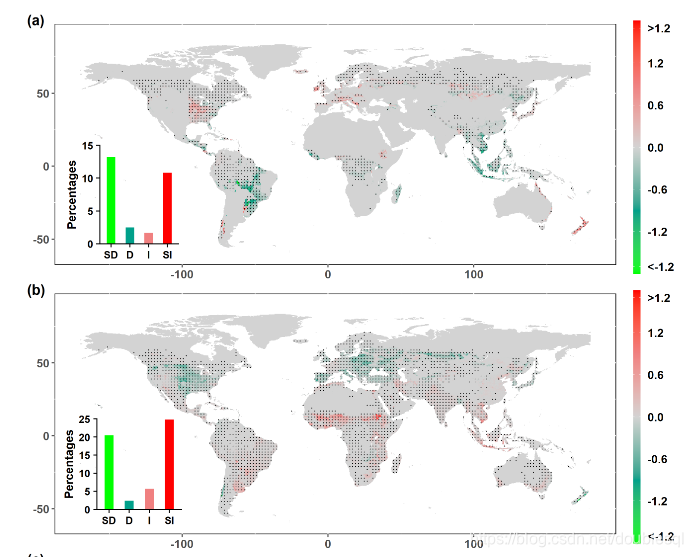
最后的图类似这样:





 扫一扫
扫一扫


 1381
1381

 被折叠的 条评论
为什么被折叠?
被折叠的 条评论
为什么被折叠?
 到【灌水乐园】发言





