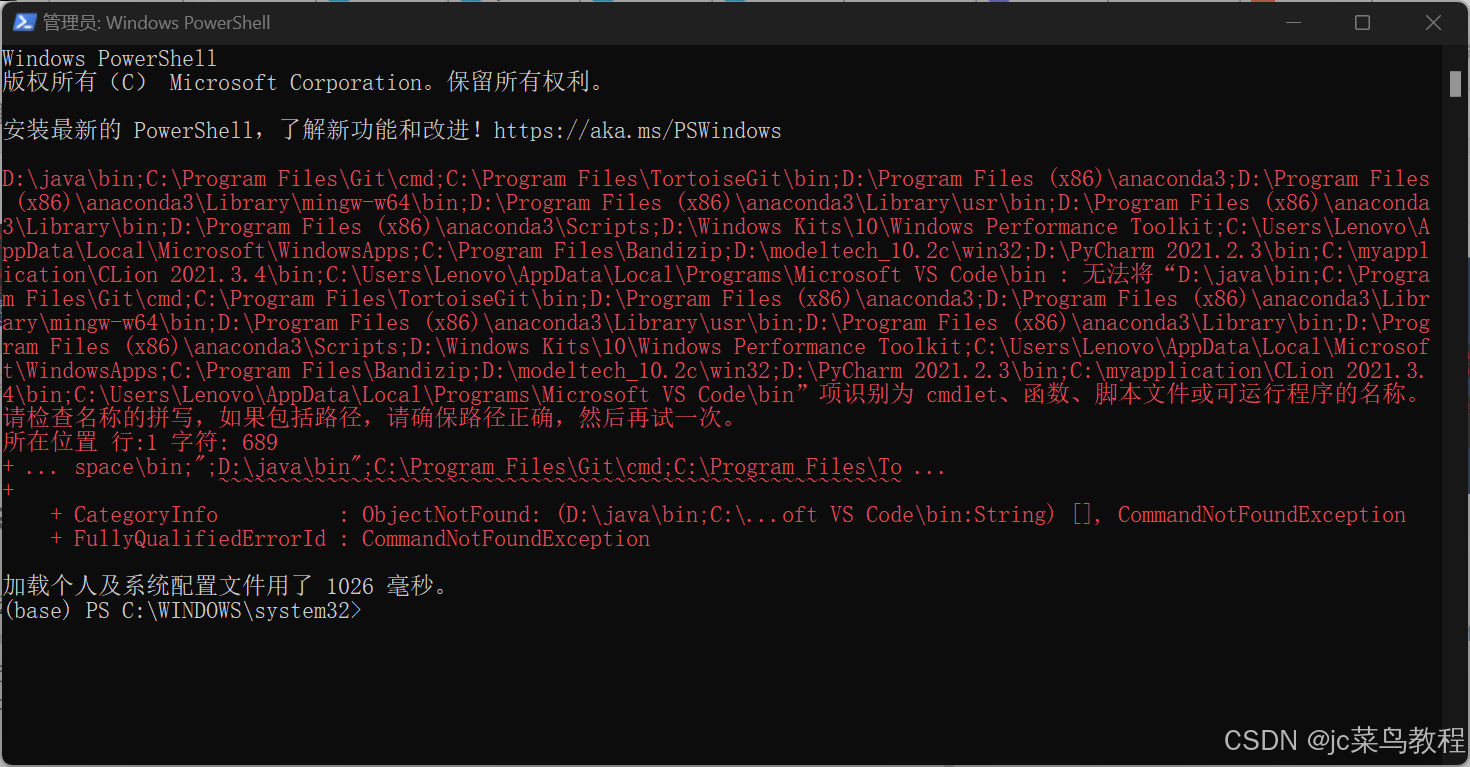
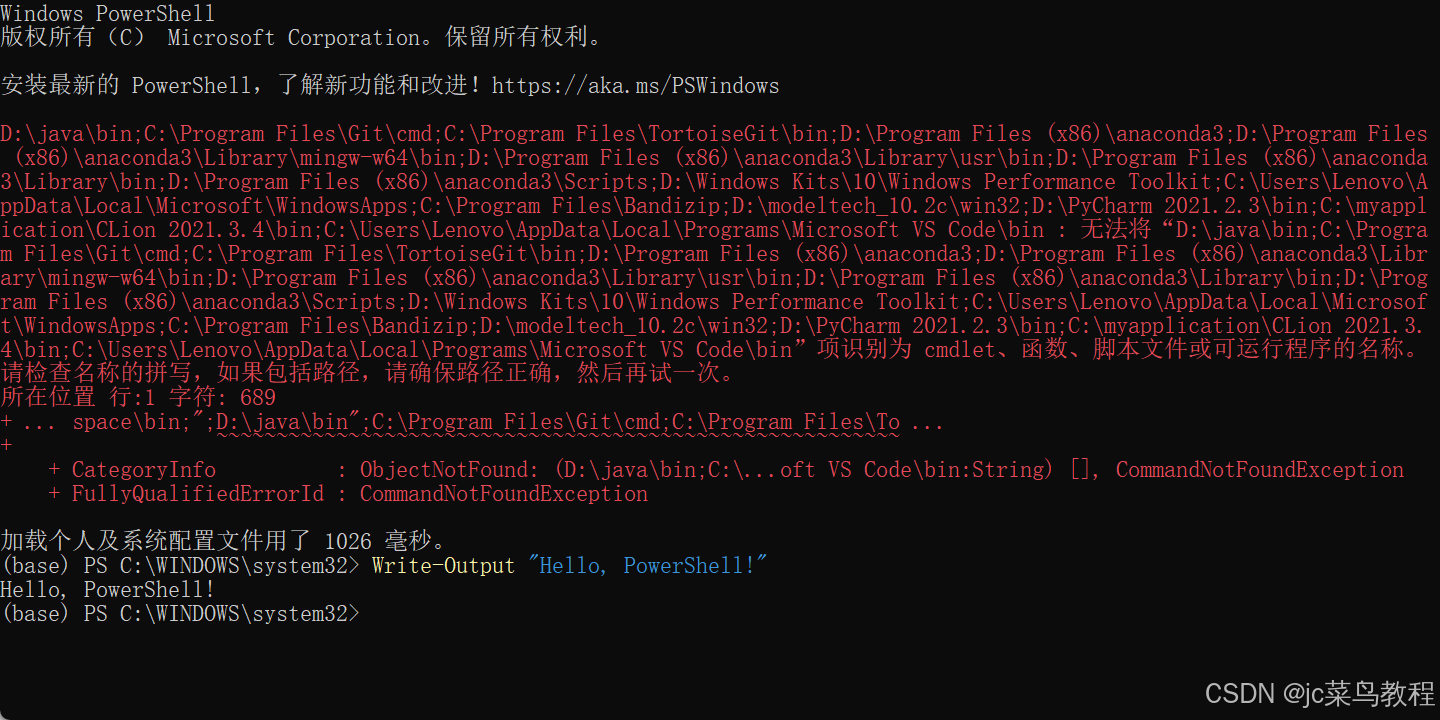
【问题待解决】无法加载文件 WindowsPowerShell\profile.ps1系统编译问题

PS C:\Users\Administrator\Desktop> cd E:\PyTorch_Build\pytorch PS E:\PyTorch_Build\pytorch> python -m venv rtx5070_env Error: [Errno 13] Permission denied: 'E:\\PyTorch_Build\\pytorch\\rtx5070_env\\Scripts\\python.exe' PS E:\PyTorch_Build\pytorch> .\rtx5070_env\Scripts\activate (rtx5070_env) PS E:\PyTorch_Build\pytorch> # 修复 PowerShell 配置文件错误 (rtx5070_env) PS E:\PyTorch_Build\pytorch> # Step 1: 备份当前配置文件 (rtx5070_env) PS E:\PyTorch_Build\pytorch> $backupPath = "$env:USERPROFILE\Documents\WindowsPowerShell\Microsoft.PowerShell_profile.bak" (rtx5070_env) PS E:\PyTorch_Build\pytorch> Copy-Item $PROFILE $backupPath -Force (rtx5070_env) PS E:\PyTorch_Build\pytorch> Write-Host "✅ 配置文件已备份至: $backupPath" -ForegroundColor Green ✅ 配置文件已备份至: C:\Users\Administrator\Documents\WindowsPowerShell\Microsoft.PowerShell_profile.bak (rtx5070_env) PS E:\PyTorch_Build\pytorch> (rtx5070_env) PS E:\PyTorch_Build\pytorch> # Step 2: 清理冲突的类型定义 (rtx5070_env) PS E:\PyTorch_Build\pytorch> $newProfileContent = @" >> # 清理后的 PowerShell 配置文件 >> Import-Module Microsoft.PowerShell.Security -ErrorAction Stop -SkipEditionCheck >> Get-Module | Where-Object {`$_.Name -ne 'Microsoft.PowerShell.Security'} | Import-Module -Force >> "@ (rtx5070_env) PS E:\PyTorch_Build\pytorch> (rtx5070_env) PS E:\PyTorch_Build\pytorch> # Step 3: 创建新的配置文件 (rtx5070_env) PS E:\PyTorch_Build\pytorch> $newProfileContent | Out-File $PROFILE -Encoding UTF8 -Force (rtx5070_env) PS E:\PyTorch_Build\pytorch> (rtx5070_env) PS E:\PyTorch_Build\pytorch> # Step 4: 加载修复后的配置文件 (rtx5070_env) PS E:\PyTorch_Build\pytorch> . $PROFILE (rtx5070_env) PS E:\PyTorch_Build\pytorch> Write-Host "✅ PowerShell 配置文件已成功修复" -ForegroundColor Green ✅ PowerShell 配置文件已成功修复 (rtx5070_env) PS E:\PyTorch_Build\pytorch> (rtx5070_env) PS E:\PyTorch_Build\pytorch> # Step 5: 验证修复 (rtx5070_env) PS E:\PyTorch_Build\pytorch> Get-TypeData -TypeName System.Security.AccessControl.ObjectSecurity -ErrorAction SilentlyContinue TypeName Members -------- ------- System.Security.AccessControl.ObjectSecurity {[Path, System.Management.Automation.Runspaces.CodePropertyData], [Owner,… (rtx5070_env) PS E:\PyTorch_Build\pytorch> if (-not $?) { >> Write-Host "❌ 修复失败,尝试替代方案..." -ForegroundColor Yellow >> # 替代方案:禁用冲突模块 >> Disable-Module Microsoft.PowerShell.Security -Force >> Import-Module Microsoft.PowerShell.Utility -Force >> } (rtx5070_env) PS E:\PyTorch_Build\pytorch> # cudnn_validator.ps1 (rtx5070_env) PS E:\PyTorch_Build\pytorch> $cudnnBase = "E:\Program Files\NVIDIA\CUDNN\v9.12" (rtx5070_env) PS E:\PyTorch_Build\pytorch> $cudaVersion = "13.0" (rtx5070_env) PS E:\PyTorch_Build\pytorch> $binPath = Join-Path $cudnnBase "bin\$cudaVersion" (rtx5070_env) PS E:\PyTorch_Build\pytorch> (rtx5070_env) PS E:\PyTorch_Build\pytorch> # 使用 LiteralPath 处理特殊字符路径 (rtx5070_env) PS E:\PyTorch_Build\pytorch> $dllFiles = Get-ChildItem -LiteralPath $binPath -Filter "*.dll" -ErrorAction Stop (rtx5070_env) PS E:\PyTorch_Build\pytorch> (rtx5070_env) PS E:\PyTorch_Build\pytorch> if (-not $dllFiles) { >> throw "❌ 在 $binPath 中未找到任何 DLL 文件" >> } (rtx5070_env) PS E:\PyTorch_Build\pytorch> (rtx5070_env) PS E:\PyTorch_Build\pytorch> # 查找特定模式的文件 (rtx5070_env) PS E:\PyTorch_Build\pytorch> $targetDll = $dllFiles | Where-Object { $_.Name -match "cudnn_ops_infer\d+_8\.dll" } | Select-Object -First 1 (rtx5070_env) PS E:\PyTorch_Build\pytorch> (rtx5070_env) PS E:\PyTorch_Build\pytorch> if (-not $targetDll) { >> # 尝试更宽松的匹配 >> $targetDll = $dllFiles | Where-Object { $_.Name -like "cudnn_ops_infer*.dll" } | Select-Object -First 1 >> >> if (-not $targetDll) { >> # 列出所有找到的 DLL 文件 >> Write-Host "🔍 在 $binPath 中找到以下 DLL 文件:" -ForegroundColor Cyan >> $dllFiles | ForEach-Object { Write-Host " - $($_.Name)" } >> >> # 尝试查找任意 cuDNN DLL >> $targetDll = $dllFiles | Where-Object { $_.Name -like "cudnn*.dll" } | Select-Object -First 1 >> } >> } 🔍 在 E:\Program Files\NVIDIA\CUDNN\v9.12\bin\13.0 中找到以下 DLL 文件: - cudnn_adv64_9.dll - cudnn_cnn64_9.dll - cudnn_engines_precompiled64_9.dll - cudnn_engines_runtime_compiled64_9.dll - cudnn_graph64_9.dll - cudnn_heuristic64_9.dll - cudnn_ops64_9.dll - cudnn64_9.dll (rtx5070_env) PS E:\PyTorch_Build\pytorch> (rtx5070_env) PS E:\PyTorch_Build\pytorch> if ($targetDll) { >> # 创建所需的符号链接 >> $linkPath = Join-Path $binPath "cudnn_ops_infer64_8.dll" >> if (-not (Test-Path $linkPath)) { >> cmd /c mklink "$linkPath" "$($targetDll.FullName)" > $null >> } >> >> Write-Host "✅ 使用文件: $($targetDll.FullName)" -ForegroundColor Green >> Write-Host "✅ 已创建符号链接: $linkPath" -ForegroundColor Green >> } else { >> throw "❌ 错误: 未找到任何匹配的 cuDNN DLL 文件" >> } ✅ 使用文件: E:\Program Files\NVIDIA\CUDNN\v9.12\bin\13.0\cudnn_adv64_9.dll ✅ 已创建符号链接: E:\Program Files\NVIDIA\CUDNN\v9.12\bin\13.0\cudnn_ops_infer64_8.dll (rtx5070_env) PS E:\PyTorch_Build\pytorch> # enhanced_repair.ps1 (rtx5070_env) PS E:\PyTorch_Build\pytorch> function Invoke-SafeRepair { >> param([string]$OperationName, [ScriptBlock]$ScriptBlock) >> >> try { >> # 减少内存占用 >> [System.GC]::Collect() >> [System.GC]::WaitForPendingFinalizers() >> >> # 设置内存限制 >> $process = Get-Process -Id $PID >> $process.PriorityClass = [System.Diagnostics.ProcessPriorityClass]::BelowNormal >> >> Write-Host "🛠️ 开始操作: $OperationName" -ForegroundColor Cyan >> >> # 执行操作 >> & $ScriptBlock >> >> Write-Host "✅ 操作成功: $OperationName" -ForegroundColor Green >> return $true >> } >> catch { >> Write-Host "❌ 操作失败: $OperationName" -ForegroundColor Red >> Write-Host "错误详情: $_" -ForegroundColor DarkRed >> >> # 创建错误报告 >> $errorReport = @" >> 操作: $OperationName >> 时间: $(Get-Date) >> 错误: $($_.Exception.Message) >> 堆栈跟踪: $($_.ScriptStackTrace) >> "@ >> >> $reportPath = "E:\PyTorch_Build\error_$((Get-Date).ToString('yyyyMMdd_HHmmss')).log" >> $errorReport | Out-File $reportPath >> Write-Host "错误报告已保存至: $reportPath" -ForegroundColor Yellow >> >> return $false >> } >> finally { >> # 恢复内存优先级 >> if ($process) { >> $process.PriorityClass = [System.Diagnostics.ProcessPriorityClass]::Normal >> } >> } >> } (rtx5070_env) PS E:\PyTorch_Build\pytorch> (rtx5070_env) PS E:\PyTorch_Build\pytorch> # 示例使用 (rtx5070_env) PS E:\PyTorch_Build\pytorch> Invoke-SafeRepair "cuDNN 配置验证" { >> .\cudnn_validator.ps1 >> } 🛠️ 开始操作: cuDNN 配置验证 ❌ 操作失败: cuDNN 配置验证 错误详情: The term '.\cudnn_validator.ps1' is not recognized as a name of a cmdlet, function, script file, or executable program. Check the spelling of the name, or if a path was included, verify that the path is correct and try again. 错误报告已保存至: E:\PyTorch_Build\error_20250904_001636.log False (rtx5070_env) PS E:\PyTorch_Build\pytorch> (rtx5070_env) PS E:\PyTorch_Build\pytorch> Invoke-SafeRepair "页面文件设置" { >> .\memory_protection_v4.ps1 >> } 🛠️ 开始操作: 页面文件设置 ❌ 操作失败: 页面文件设置 错误详情: The term '.\memory_protection_v4.ps1' is not recognized as a name of a cmdlet, function, script file, or executable program. Check the spelling of the name, or if a path was included, verify that the path is correct and try again. 错误报告已保存至: E:\PyTorch_Build\error_20250904_001636.log False (rtx5070_env) PS E:\PyTorch_Build\pytorch> (rtx5070_env) PS E:\PyTorch_Build\pytorch> Invoke-SafeRepair "编译过程" { >> .\safe_build_v4.ps1 >> } 🛠️ 开始操作: 编译过程 ❌ 操作失败: 编译过程 错误详情: The term '.\safe_build_v4.ps1' is not recognized as a name of a cmdlet, function, script file, or executable program. Check the spelling of the name, or if a path was included, verify that the path is correct and try again. 错误报告已保存至: E:\PyTorch_Build\error_20250904_001636.log False (rtx5070_env) PS E:\PyTorch_Build\pytorch> # memory_protection_v4.ps1 (rtx5070_env) PS E:\PyTorch_Build\pytorch> $pageFileSettings = @{ >> InitialSize = 16384 # 16GB >> MaximumSize = 32768 # 32GB >> } (rtx5070_env) PS E:\PyTorch_Build\pytorch> (rtx5070_env) PS E:\PyTorch_Build\pytorch> try { >> # 使用 WMI 替代方案 >> $pageFile = Get-WmiObject -Class Win32_PageFileSetting >> >> if ($pageFile) { >> # 使用 PowerShell 直接修改注册表(更可靠) >> $regPath = "HKLM:\SYSTEM\CurrentControlSet\Control\Session Manager\Memory Management" >> Set-ItemProperty -Path $regPath -Name "PagingFiles" -Value "$env:SystemDrive\pagefile.sys $($pageFileSettings.InitialSize) $($pageFileSettings.MaximumSize)" -Force >> >> Write-Host "✅ 页面文件设置已更新通过注册表" -ForegroundColor Green >> } >> else { >> Write-Host "⚠️ 未找到现有页面文件配置,创建新配置..." -ForegroundColor Yellow >> Set-WmiInstance -Class Win32_PageFileSetting -Arguments @{ >> Name = "$env:SystemDrive\pagefile.sys" >> InitialSize = $pageFileSettings.InitialSize >> MaximumSize = $pageFileSettings.MaximumSize >> } >> } >> >> # 重启内存管理服务 >> Restart-Service -Name "SysMain" -Force -ErrorAction SilentlyContinue >> } >> catch { >> Write-Host "❌ 页面文件配置失败: $_" -ForegroundColor Red >> Write-Host "⚠️ 尝试手动设置页面文件..." -ForegroundColor Yellow >> >> # 手动设置页面文件 >> $manualSettings = @" >> Windows Registry Editor Version 5.00 >> >> [HKEY_LOCAL_MACHINE\SYSTEM\CurrentControlSet\Control\Session Manager\Memory Management] >> "PagingFiles"="$env:SystemDrive\pagefile.sys $($pageFileSettings.InitialSize) $($pageFileSettings.MaximumSize)" >> "@ >> >> $regFilePath = "E:\PyTorch_Build\pagefile_settings.reg" >> $manualSettings | Out-File $regFilePath >> Start-Process "regedit.exe" -ArgumentList "/s `"$regFilePath`"" -Wait >> } ✅ 页面文件设置已更新通过注册表 (rtx5070_env) PS E:\PyTorch_Build\pytorch> # Step 1: 修复 PowerShell 环境 (rtx5070_env) PS E:\PyTorch_Build\pytorch> .\fix_powershell_profile.ps1 .\fix_powershell_profile.ps1: The term '.\fix_powershell_profile.ps1' is not recognized as a name of a cmdlet, function, script file, or executable program. Check the spelling of the name, or if a path was included, verify that the path is correct and try again. (rtx5070_env) PS E:\PyTorch_Build\pytorch> (rtx5070_env) PS E:\PyTorch_Build\pytorch> # Step 2: 验证 CUDA/cuDNN 安装 (rtx5070_env) PS E:\PyTorch_Build\pytorch> Invoke-SafeRepair "cuDNN 配置" { .\cudnn_validator.ps1 } 🛠️ 开始操作: cuDNN 配置 ❌ 操作失败: cuDNN 配置 错误详情: The term '.\cudnn_validator.ps1' is not recognized as a name of a cmdlet, function, script file, or executable program. Check the spelling of the name, or if a path was included, verify that the path is correct and try again. 错误报告已保存至: E:\PyTorch_Build\error_20250904_001651.log False (rtx5070_env) PS E:\PyTorch_Build\pytorch> (rtx5070_env) PS E:\PyTorch_Build\pytorch> # Step 3: 设置内存保护 (rtx5070_env) PS E:\PyTorch_Build\pytorch> Invoke-SafeRepair "内存配置" { .\memory_protection_v4.ps1 } 🛠️ 开始操作: 内存配置 ❌ 操作失败: 内存配置 错误详情: The term '.\memory_protection_v4.ps1' is not recognized as a name of a cmdlet, function, script file, or executable program. Check the spelling of the name, or if a path was included, verify that the path is correct and try again. 错误报告已保存至: E:\PyTorch_Build\error_20250904_001651.log False (rtx5070_env) PS E:\PyTorch_Build\pytorch> (rtx5070_env) PS E:\PyTorch_Build\pytorch> # Step 4: 执行安全编译 (rtx5070_env) PS E:\PyTorch_Build\pytorch> Invoke-SafeRepair "PyTorch 编译" { .\safe_build_v4.ps1 } 🛠️ 开始操作: PyTorch 编译 ❌ 操作失败: PyTorch 编译 错误详情: The term '.\safe_build_v4.ps1' is not recognized as a name of a cmdlet, function, script file, or executable program. Check the spelling of the name, or if a path was included, verify that the path is correct and try again. 错误报告已保存至: E:\PyTorch_Build\error_20250904_001651.log False (rtx5070_env) PS E:\PyTorch_Build\pytorch> (rtx5070_env) PS E:\PyTorch_Build\pytorch> # Step 5: 安装 PyTorch (rtx5070_env) PS E:\PyTorch_Build\pytorch> Set-Location E:\PyTorch_Build\pytorch (rtx5070_env) PS E:\PyTorch_Build\pytorch> pip install -v . Using pip 22.3.1 from E:\PyTorch_Build\pytorch\rtx5070_env\lib\site-packages\pip (python 3.10) Looking in indexes: https://pypi.tuna.tsinghua.edu.cn/simple Processing e:\pytorch_build\pytorch
09-05
评论
成就一亿技术人!
拼手气红包6.0元
还能输入1000个字符
 
红包 添加红包
表情包 插入表情
 条评论被折叠 查看
添加红包

请填写红包祝福语或标题

红包个数最小为10个

红包金额最低5元

当前余额3.43前往充值 >
需支付:10.00
成就一亿技术人!
领取后你会自动成为博主和红包主的粉丝 规则
hope_wisdom
发出的红包
实付
使用余额支付
点击重新获取
扫码支付
钱包余额 0

抵扣说明:

1.余额是钱包充值的虚拟货币,按照1:1的比例进行支付金额的抵扣。
2.余额无法直接购买下载,可以购买VIP、付费专栏及课程。

余额充值