



 本文详细介绍了在SublimeText中遇到的编码错误问题及其解决方案。通过修改exec.py文件,增加gbk编码尝试,解决了“[Decodeerror-outputnotutf-8]”或“[Decode error-outputnotgbk]”的报错,适用于脚本输出信息编码不匹配的情况。
如题,在Sublime Text运行时报错,提示“[Decode error - output not utf-8]”或“[Decode error - output not gbk]”,错误信息是脚本输出的信息不是某种指定编码。
解决问题思路:在解码输出文字编码出错时使用gbk试试,相当于utf-8和gbk两种编码都试试,这样可以解决编码错误的问题。
解决方法如下:
1.在Sublime Text的安装目录下的Pristine Packages目录下找到Default.sublime-package,将这个复制出来,将后缀改名为zip,如图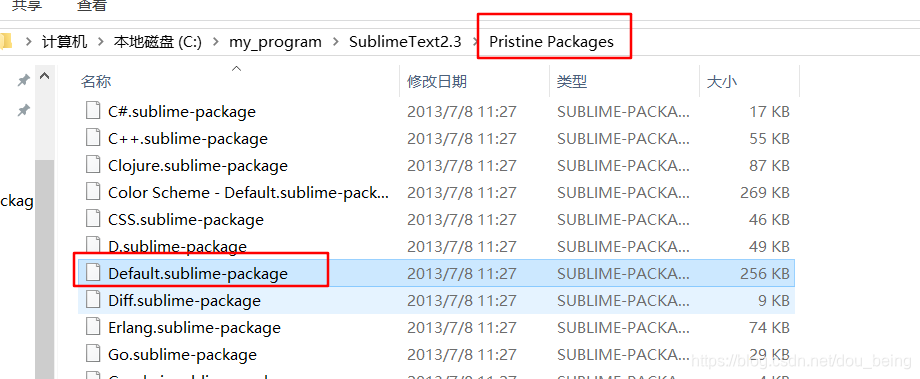

2.解压,然后将其中的exec.py文件放到sublime text的Data\Packages\User\目录下,如图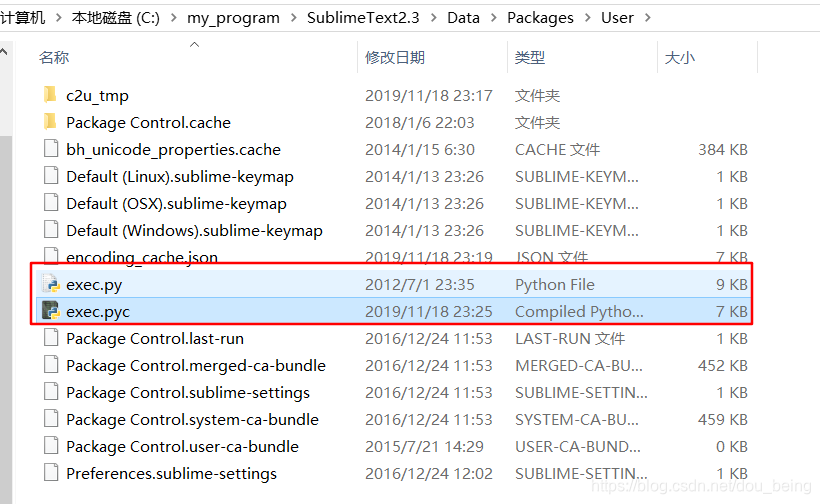
3.打开exec.py.找到类ExecCommand的append_data函数,在以下位置添加代码
   def append_data(self, proc, data):
        if proc != self.proc:
            # a second call to exec has been made before the first one
            # finished, ignore it instead of intermingling the output.
            if proc:
                proc.kill()
            return

        #add start
        is_decode_ok = True;
        try:
            str = data.decode(self.encoding)
        except:
            is_decode_ok = False
        if is_decode_ok==False:
            try:
                str = data.decode("gbk")
            except:
                str = "[Decode error - output not " + self.encoding + " and gbk]\n"
                proc = None

        # Normalize newlines, Sublime Text always uses a single \n separator
        # in memory.
        str = str.replace('\r\n', '\n').replace('\r', '\n')

        self.output_view.run_command('append', {'characters': str, 'force': True, 'scroll_to_end': True})





 扫一扫
扫一扫


 3563
3563


 到【灌水乐园】发言



