



1 Feign
1.1 定义
1.1.1 简介
Feign是一个声明式的Web Service客户端,通过声明RESTful请求客户端Spring Cloud集成了Ribbon和Eureka,可在使用Feign时提供负载均衡的http客户端
微服务直接调用使用RestTemplate进行远程调用,非常方便,那么有了RestTemplate为什么还要有Feign,因为RestTemplate有一个致命的问题:硬编码。
点击了解Spring之RestTemplate
在 RestTemplate 调用中,我们每个调用远程接口的方法,都将远程接口对应的 ip、端口,或 service-id 硬编码到了 URL 中,如果远程接口的 ip、端口、service-id 有修改的话,需要将所有的调用都修改一遍,这样难免会出现漏改、错改等问题,且代码不便于维护。为了解决这个问题,Netflix 推出了 Feign 来统一管理远程调用
1.1.2 属性介绍
@FeignClient标签的常用属性如下:
name:指定FeignClient的名称,如果项目使用了Ribbon,name属性会作为微服务的名称,用于服务发现value: 调用服务名称,和name属性相同url:url一般用于调试,可以手动指定@FeignClient调用的地址decode404: 当发生http 404错误时,如果该字段位true,会调用decoder进行解码,否则抛出FeignExceptionconfiguration:Feign配置类,可以自定义Feign的Encoder、Decoder、LogLevel、Contractfallback: 定义容错的处理类,当调用远程接口失败或超时时,会调用对应接口的容错逻辑,fallback指定的类必须实现@FeignClient标记的接口
熔断机制,调用失败时,走的一些回退方法,可以用来抛出异常或给出默认返回数据。底层依赖hystrix,启动类要加上@EnableHystrixfallbackFactory: 工厂类,用于生成fallback类示例,通过这个属性我们可以实现每个接口通用的容错逻辑,减少重复的代码path: 定义当前FeignClient的统一前缀primary: 默认值true,Feign会自动生成FeignClient,也就是接口的jdk代理实现
注意:name/value和url同时存在生效问题
name/value属性:这两个的作用是一样的,指定的是调用服务的微服务名称url:指定调用服务的全路径,经常用于本地测试- 如果同时指定
name和url属性: 则以url属性为准,name属性指定的值便当做客户端的名称
1.1.3 原理解析
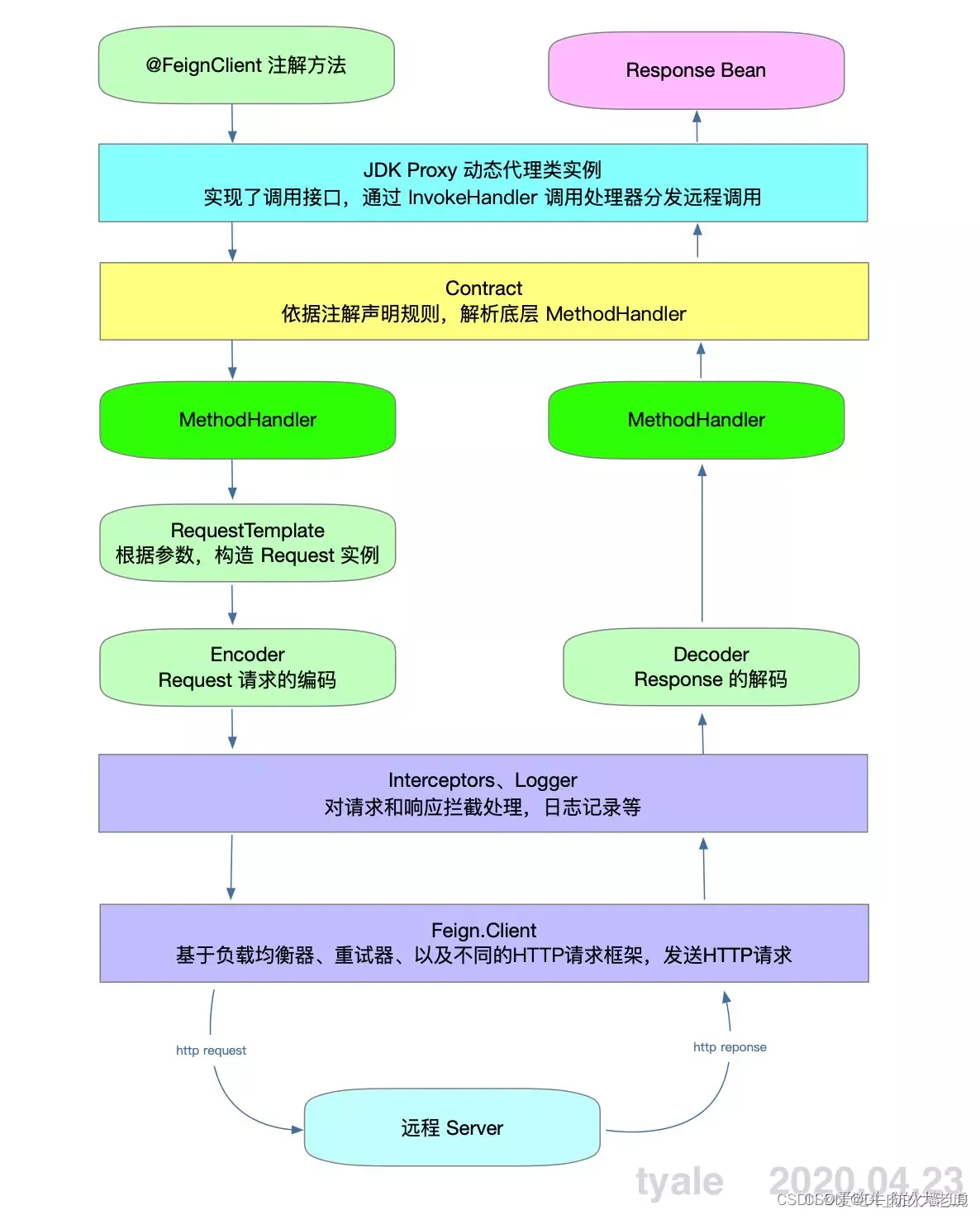
Feign调用步骤:
- 程序启动时,扫描所有的
@FeignClient注解 - 当接口方法被调用时,通过
JDK代理来生成RequestTemplate模板 - 根据
RequestTemplate模板生成Http请求的Request对象 Request对象交给Client去处理,其中Client的网络请求框架可以是HttpURLConnection、HttpClient、OKHttp- 最后
client封装成LoadBaLanceClient,结合ribbon负载均衡地发起调用
1.2 Feign准备工作
1.2.1 引入依赖
在Spring Cloud项目中引入Feign依赖,但是因为feign底层是使用了ribbon作为负载均衡的客户端,而ribbon的负载均衡也是依赖于eureka获得各个服务的地址,所以要引入eureka-client
<dependency>
    <groupId>org.springframework.cloud</groupId>
    <artifactId>spring-cloud-starter-openfeign</artifactId>
    随便写的版本号
    <version>2.0.2.RELEASE</version>
</dependency>
<dependency>
    <groupId>org.springframework.cloud</groupId>
    <artifactId>spring-cloud-starter-netflix-eureka-client</artifactId>
    随便写的版本号
    <version>2.0.2.RELEASE</version>
</dependency>
1.2.2 启动类和yml文件
需要在启动类上添加注解@EnableFeignClients以及@EnableDiscoveryClient
@EnableFeignClients
@EnableDiscoveryClient
@SpringBootApplication
public class ProductApplication {

    public static void main(String[] args) {
        SpringApplication.run(ProductApplication.class, args);
    }
}
server:
  port: 8082

#配置eureka
eureka:
  client:
    service-url:
      defaultZone: http://localhost:8761/eureka
  instance:
    status-page-url-path: /info
    health-check-url-path: /health

#服务名称
spring:
  application:
    name: product
  profiles:
    active: ${boot.profile:dev}
#feign的配置,连接超时及读取超时配置
feign:
  client:
    config:
      default:
        connectTimeout: 5000
        readTimeout: 5000
        loggerLevel: basic
1.3 使用Feign
1.3.1 简单使用@FeignClient
@FeignClient(value = "CART",fallback=Hysitx.class,configuration = FeignConfiguration.class)
public interface CartFeignClient {

    @PostMapping("/cart/{productId}")
    Long addCart(@PathVariable("productId")Long productId);
}
编写熔断类,发生错误时回调
import java.util.List;
import org.springframework.stereotype.Component;
@Component
public class Hysitx implements IRemoteCallService{
    @Override
    public List<String> test(String[] names) {
        System.out.println("接口调用失败");
        return null;
    }
}
引入FeignAutoConfiguration配置
@Import(FeignAutoConfiguration.class)
@Configuration
public class FeignConfiguration{
    ...
}
上面是最简单的feign client的使用,声明完为feign client后,其他spring管理的类,如service就可以直接注入使用了,例如:
//这里直接注入feign client
@Autowired
private CartFeignClient cartFeignClient;

@PostMapping("/toCart/{productId}")
public ResponseEntity addCart(@PathVariable("productId") Long productId){
    Long result = cartFeignClient.addCart(productId);
    return ResponseEntity.ok(result);
}
1.3.2 @RequestLine
Feign为什么用的是@RequestLine
- 这和
open-feign的Contract设计有关系,Contract是一个注解解析接口,它决定了接口可以使用什么注解转换到http请求。open-feign在使用@FeignClient的情况下,使用的是SpringMvcContract,它使得被@FeignClient修饰的接口,可以使用@GetMapping,@PostMapping等Spring Mvc注解。
如果我们要使用@RequestLine,则需要替换open-Feign的MVC解析器
// 在feign上写上配置
@FeignClient(name = "test-center", configuration = TestFeignConfig .class)
@Configuration// 配置类
public class TestFeignConfig {
    @Bean
    public Contract feignContract() {
    // 配置feign的注释解析器为feign默认解析器而不是mvc解析器
        return new feign.Contract.Default();
    }
}
如果我们不单独配置,则会使用FeignClientsConfiguration中默认配置的SpringMvcContract
@Bean
@ConditionalOnMissingBean
public Contract feignContract(ConversionService feignConversionService) {
    return new SpringMvcContract(this.parameterProcessors, feignConversionService);
}
@RequestLine与其它请求不同,只需要简单写请求方式和路径就能达到请求其它服务的目的
@FeignClient(value = "feign-server",configuration = FeignConfig.class)  //需要一个配置文件
public interface TestService {
    @RequestLine("POST /feign/test")    //对应请求方式和路径
    String feign(@RequestBody UserDO userDO);
}
配置文件
@EnableFeignClients
@SpringBootConfiguration
public class FeignConfig {
    @Bean
    public Contract contract(){
        return new feign.Contract.Default();
    }
}
@SpringBootConfiguration
- 标注这个类是一个配置类;
- 它只是
@Configuration注解的派生注解; - 它与
@Configuration注解的功能一致; - 只不过
@SpringBootConfiguration是springboot的注解,而@Configuration是spring的注解
1.4 OpenFeign添加header信息
在微服务间使用Feign进行远程调用时需要在header中添加信息,那么 springcloud open feign如何设置 header 呢?有5种方式可以设置请求头信息:
- 在
@RequestMapping注解里添加headers属性 - 在方法参数前面添加
@RequestHeader注解 - 在方法或者类上添加
@Headers的注解 - 在方法参数前面添加
@HeaderMap注解 - 实现
RequestInterceptor接口
1.4.1 在@RequestMapping注解里添加headers属性
在application.yml中配置
app.secret: appSecretVal
@PostMapping(value = "/book/api", headers = {"Content-Type=application/json;charset=UTF-8", "App-Secret=${app.secret}"})
void saveBook(@RequestBody BookDto condition);
1.4.2 在方法参数前面添加@RequestHeader注解
设置单个header属性
@GetMapping(value = "/getStuDetail")
public StudentVo getStudentDetail(@RequestBody StudentDto condition, @RequestHeader("Authorization") String token);
设置多个header属性
@PostMapping(value = "/card")
public CardVo createCard(@RequestBody CardDto condition, @RequestHeader MultiValueMap<String, String> headers);
1.4.3 在方法或者类上添加@Headers的注解
使用feign自带契约
@Configuration
public class FooConfiguration {
    @Bean
    public Contract feignContract() {
        return new feign.Contract.Default();
    }
}
FeignClient使用@RequestLine注解, 而未配置feign自带契约Contract时, @Headers不会起作用, 而且启动项目会报错:
Method xxx not annotated with HTTP method type (ex. GET, POST)
@RequestLine is a core Feign annotation, but you are using the Spring Cloud @FeignClientwhich uses Spring MVC annotations.
配置@Headers注解
@FeignClient(url = "${user.api.url}", name = "user", configuration = FooConfiguration.class)
public interface UserFeignClient {
    @RequestLine("GET /simple/{id}")
    @Headers({"Content-Type: application/json;charset=UTF-8", "Authorization: {token}"})
    public User findById(@Param("id") String id, @Param("token") String token);
}
使用@Param可以动态配置Header属性
网上很多在说 @Headers不起作用,其实@Headers注解没有生效的原因是:官方的Contract没有生效导致的
1.4.4 在方法参数前面添加@HeaderMap注解
使用feign自带契约
配置@HeaderMap注解
@FeignClient(url = "${user.api.url}", name = "user", configuration = FooConfiguration.class)
public interface UserFeignClient {
    @RequestLine("GET /simple/{id}")
    public User findById(@Param("id") String id, @HeaderMap HttpHeaders headers);
}
1.4.5 实现RequestInterceptor接口
值得注意的一点是:
如果FeignRequestInterceptor注入到spring容器的话就会全局生效, 就是说即使在没有指定configuration属性的FeignClient该配置也会生效
配置@Component或@Service或@Configuration就可以将该配置注入spring容器中, 即可实现全局配置, 从而该项目中的所有FeignClient的feign接口都可以使用该配置.
如果只想给指定FeignClient的feign接口使用该配置, 请勿将该类配置注入spring中.
@Configuration
public class FeignRequestInterceptor implements RequestInterceptor {

    @Override
    public void apply(RequestTemplate template) {
        template.header(HttpHeaders.AUTHORIZATION, "tokenVal");
    }

}
1.5 其他操作
1.5.1 使用OKhttp
Feign底层默认是使用jdk中的HttpURLConnection发送HTTP请求,feign也提供了OKhttp来发送请求,具体配置如下
feign:
  client:
    config:
      default:
        connectTimeout: 5000
        readTimeout: 5000
        loggerLevel: basic
  okhttp:
    enabled: true
  hystrix:
    enabled: true
1.5.2 开启GZIP压缩
Spring Cloud Feign支持对请求和响应进行GZIP压缩,以提高通信效率。application.yml配置信息如下:
feign:
  compression:
    request: #请求
      enabled: true #开启
      mime-types: text/xml,application/xml,application/json #开启支持压缩的MIME TYPE
      min-request-size: 2048 #配置压缩数据大小的下限
    response: #响应
      enabled: true #开启响应GZIP压缩
注意:
由于开启GZIP压缩之后,Feign之间的调用数据通过二进制协议进行传输,返回值需要修改为ResponseEntity<byte[]>才可以正常显示,否则会导致服务之间的调用乱码。
示例如下:
@PostMapping("/order/{productId}")
ResponseEntity<byte[]> addCart(@PathVariable("productId") Long productId);
2 Feign拦截器RequestInterceptor
2.1 定义
在使用feign做服务间调用的时候,如何修改请求的头部或编码信息呢,可以通过实现RequestInterceptor接口的apply方法,feign在发送请求之前都会调用该接口的apply方法,所以我们也可以通过实现该接口来记录请求发出去的时间点
2.2 RequestInterceptor
public interface RequestInterceptor {

  /**
   * Called for every request. Add data using methods on the supplied {@link RequestTemplate}.
   */
  void apply(RequestTemplate template);
}
RequestInterceptor接口定义了apply方法,其参数为RequestTemplate;它有一个抽象类为BaseRequestInterceptor,还有几个实现类分别为BasicAuthRequestInterceptor、FeignAcceptGzipEncodingInterceptor、FeignContentGzipEncodingInterceptor
BasicAuthRequestInterceptor: 实现了RequestInterceptor接口,其apply方法往RequestTemplate添加名为Authorization的headerBaseRequestInterceptor: 定义了addHeader方法,往requestTemplate添加非重名的headerFeignAcceptGzipEncodingInterceptor: 继承了BaseRequestInterceptor,它的apply方法往RequestTemplate添加了名为Accept-Encoding,值为gzip,deflate的headerFeignContentGzipEncodingInterceptor: 继承了BaseRequestInterceptor,其apply方法先判断是否需要compression,即mimeType是否符合要求以及content大小是否超出阈值,需要compress的话则添加名为Content-Encoding,值为gzip,deflate的header
2.3 配置RequestInterceptor
可以通过配置类和配置文件两种方式注册RequestInterceptor
- 通过配置类配置时,通过
FeignContext获取RequestInterceptor bean; - 通过配置文件注册时,通过
ApplicationContext获取RequestInterceptor bean
通过配置类进行配置
设置配置类有两种方式。
2.3.1 通过@EnableFeignClients的defaultConfiguration属性配置
@EnableFeignClients注解的 defaultConfiguration 属性值为 @Configuration 注解的配置类,配置类内定义的 bean 会注册为所有 @FeignClient 的默认配置。
配置信息会保存为FeignClientSpecification对象。
2.3.2 通过@FeignClient的configuration属性配置
@FeignClient注解的 configuration 属性值为 @Configuration 注解的配置类,其定义的 bean 为每个FeignClient 的专有 bean
FeignContext 为每一个 @FeignClient 注解的接口提供独立的AnnotationConfigApplicationContext,其中包含 FeignClient 的私有bean 和 EnableFeignClient 的默认 bean。
2.3.3 通过配置文件配置
@Component
public class DpAuthFeignReqInterceptor implements RequestInterceptor {

    @Override
    public void apply(RequestTemplate template) {
        ServletRequestAttributes attributes = (ServletRequestAttributes) RequestContextHolder.getRequestAttributes();
        if (attributes != null) {
            HttpServletRequest request = attributes.getRequest();
            String jwtToken = request.getHeader(JWTTokenConstant.TOKEN_NAME);
            //传递token  给下游
            template.header(JWTTokenConstant.TOKEN_NAME, jwtToken);

        }
    }
}
转载
作者:景宗会
链接:https://www.jianshu.com/p/92d0537de737
来源:简书
著作权归作者所有。商业转载请联系作者获得授权,非商业转载请注明出处。





 扫一扫
扫一扫


 4083
4083

 被折叠的 条评论
为什么被折叠?
被折叠的 条评论
为什么被折叠?
 到【灌水乐园】发言





