



 这篇博客介绍了如何在Django框架中实现搜索功能。首先在Model部分对表单进行搜索操作,接着在View层实例化表单,然后创建一个search.html模板来展示搜索结果,最后配置URL路径完成整个搜索功能。
django框架是基于MVT模式开发
Model-View-Template
Model:对表单进行搜索
编辑blog项目的forms.py文件
class SearchForm(forms.Form):
    query = forms.CharField() #使用户产生查询项
View:实例化表单
编辑views.py文件
'''
实例化表单
#并利用get方法提交表单
最终url里包含query参数
'''
def post_search(request):
    form = SearchForm()
    query = None
    results = []
    if 'query' in request.GET:
        form = SearchForm(request.GET)   #实例化表单
        if form.is_valid():
            query = form.cleaned_data['query']
            results = Post.objects.annotate(search=SearchVector('title','body'),).filter(search=query) #检索帖子
    return render(request,'blog/post/search.html',{'form':form,'query':query,'results':results})
Template:创建一个模板,用以显示结果
在blog/post目录下新建search.html文件
{% extends "blog/base.html" %}

{% block title %}Search{% endblock %}

{% block content %}
    {% if query %}
        <h1>Post containing "{{ query }}"</h1>
        <h3>
            {% with results.count as total_results %}
                Found{{ total_results }} result{{ total_results|pluralize }}
            {% endwith %}
        </h3>
        {% for post in results %}
            <h4><a href="{{ post.get_absolute_url }}">{{ post.title }}</a></h4>
            {{ post.body|truncatewords:5 }}
        {% empty %}
            <p>There are no result for your query.</p>
        {% endfor %}
        <p><a href="{% url "blog:post_search" %}">Search again</a></p>
     {% else %}
        <h1>Search for posts</h1>
        <form action="." method="get">
            {{ form.as_p }}
            <input type="submit" value="Search">
        </form>
    {% endif %}

{% endblock %}
最后添加url路径
path('search/',views.post_search,name='post_search')
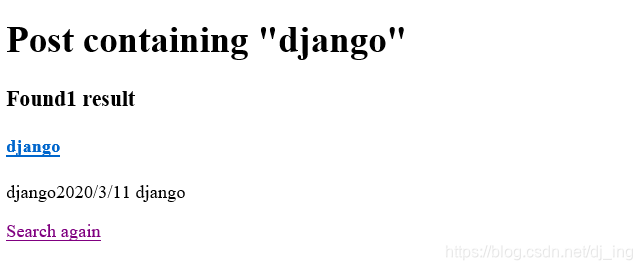
搜索结果:





 扫一扫
扫一扫


 被折叠的 条评论
为什么被折叠?
被折叠的 条评论
为什么被折叠?
 到【灌水乐园】发言





