


前期准备
创建StorageClass,支持动态pvc创建,StorageClass使用nfs-client,同时使用华为云sfs作为数据持久化存储目录
etcd部署步骤
- 角色认证(rabc.yaml)
kind: ClusterRole
apiVersion: rbac.authorization.k8s.io/v1
metadata:
  name: nfs-client-provisioner-runner
rules:
 2. apiGroups: [""]
  resources: ["persistentvolumes"]
  verbs: ["get", "list", "watch", "create", "delete"]
 3. apiGroups: [""]
  resources: ["persistentvolumeclaims"]
  verbs: ["get", "list", "watch", "update"]
 4. apiGroups: [""]
  resources: ["endpoints"]
  verbs: ["get", "list", "watch", "create", "update", "patch"]
 5. apiGroups: ["storage.k8s.io"]
  resources: ["storageclasses"]
  verbs: ["get", "list", "watch"]
 6. apiGroups: [""]
  resources: ["events"]
  verbs: ["create", "update", "patch"]
---
kind: ClusterRoleBinding
apiVersion: rbac.authorization.k8s.io/v1
metadata:
  name: run-nfs-client-provisioner
subjects:
 7. kind: ServiceAccount
  name: nfs-client-provisioner
  namespace: default
roleRef:
  kind: ClusterRole
  name: nfs-client-provisioner-runner
  apiGroup: rbac.authorization.k8s.io
---
kind: Role
apiVersion: rbac.authorization.k8s.io/v1
metadata:
  name: leader-locking-nfs-client-provisioner
rules:
 8. apiGroups: [""]
  resources: ["endpoints"]
  verbs: ["get", "list", "watch", "create", "update", "patch"]
---
kind: RoleBinding
apiVersion: rbac.authorization.k8s.io/v1
metadata:
  name: leader-locking-nfs-client-provisioner
subjects:
 9. kind: ServiceAccount
  name: nfs-client-provisioner
  # replace with namespace where provisioner is deployed
  namespace: default
roleRef:
  kind: Role
  name: leader-locking-nfs-client-provisioner
  apiGroup: rbac.authorization.k8s.io
- 创建nfs-provisioner(nfs-provisioner.yaml)
apiVersion: v1
kind: ServiceAccount
metadata:
  name: nfs-client-provisioner
---
apiVersion: apps/v1
kind: Deployment
metadata:
  name: nfs-client-provisioner
  labels:
    app: nfs-client-provisioner
  # replace with namespace where provisioner is deployed
  namespace: default
spec:
  replicas: 1
  strategy:
    type: Recreate
  selector:
    matchLabels:
      app: nfs-client-provisioner
  template:
    metadata:
      labels:
        app: nfs-client-provisioner
    spec:
      serviceAccountName: nfs-client-provisioner
      containers:
        - name: nfs-client-provisioner
          image: vbouchaud/nfs-client-provisioner:latest
          volumeMounts:
            - name: nfs-client-root
              mountPath: /persistentvolumes
          env:
            - name: PROVISIONER_NAME
              value: fuseim.pri/ifs  #外部制备器名称,根据情况修改
            - name: NFS_SERVER
              value: 172.18.0.181      # NFS服务器地址
            - name: NFS_PATH
              value: /          # NFS共享的目录
      volumes:
        - name: nfs-client-root
          nfs:
            server: 172.18.0.181      # NFS服务器地址
            path: /
- 设置nfs-client(nfs-client.yaml)
apiVersion: storage.k8s.io/v1
kind: StorageClass
metadata:
  name: nfs-client
provisioner: fuseim.pri/ifs  # 外部制备器提供者,需要与nfs-provisioner.yaml deploy中保持一致
parameters:
  archiveOnDelete: "false"  # 是否存档,false表示不存档,会删除oldPath下面的数据,true表示存档,会重命名路径
reclaimPolicy: Retain    # 回收策略,默认为Delete,可配置为Retain
volumeBindingMode: Immediate   # 默认为Immediate,表示创建PVC立即进行绑定
- 创建svc,后续apisix中会使用到(svc.yaml)
apiVersion: v1
kind: Service
metadata:
  name: apisix-etcd-headless
  namespace: default
  labels:
    app.kubernetes.io/instance: apisix-etcd
    app.kubernetes.io/name: apisix-etcd
spec:
  ports:
 1. name: client
    port: 2379
    protocol: TCP
    targetPort: 2379
 2. name: peer
    port: 2380
    protocol: TCP
    targetPort: 2380
  clusterIP: None
  selector:
    app.kubernetes.io/instance: apisix-etcd
    app.kubernetes.io/name: apisix-etcd
  publishNotReadyAddresses: true
---
apiVersion: v1
kind: Service
metadata:
  name: apisix-etcd
  namespace: default
  labels:
    app.kubernetes.io/instance: apisix-etcd
    app.kubernetes.io/name: apisix-etcd
spec:
  ports:
 3. name: client
    port: 2379
    protocol: TCP
    targetPort: 2379
 4. name: peer
    port: 2380
    protocol: TCP
    targetPort: 2380
  selector:
    app.kubernetes.io/instance: apisix-etcd
    app.kubernetes.io/name: apisix-etcd
-
挨个执行以上yaml文件,kubectl apply -f ***.yaml
-
创建etcd有状态服务(etcd.yaml)
apiVersion: apps/v1
kind: StatefulSet
metadata:
  name: apisix-etcd
  namespace: default
  labels:
    app.kubernetes.io/instance: apisix-etcd
    app.kubernetes.io/name: apisix-etcd
spec:
  podManagementPolicy: Parallel
  replicas: 3
  serviceName: apisix-etcd-headless
  selector:
    matchLabels:
      app.kubernetes.io/instance: apisix-etcd
      app.kubernetes.io/name: apisix-etcd
  template:
    metadata:
      labels:
        app.kubernetes.io/instance: apisix-etcd
        app.kubernetes.io/name: apisix-etcd
    spec:
      affinity:
        podAntiAffinity:
          preferredDuringSchedulingIgnoredDuringExecution:
          - podAffinityTerm:
              labelSelector:
                matchLabels:
                  app.kubernetes.io/instance: apisix-etcd
                  app.kubernetes.io/name: apisix-etcd
              topologyKey: kubernetes.io/hostname
            weight: 1
      containers:
      - name: apisix-etcd-app
        image: bitnami/etcd:3.4.24
        imagePullPolicy: IfNotPresent
        ports:
        - containerPort: 2379
          name: client
          protocol: TCP
        - containerPort: 2380
          name: peer
          protocol: TCP
        env:
        - name: BITNAMI_DEBUG
          value: 'false'
        - name: MY_POD_IP
          valueFrom:
            fieldRef:
              apiVersion: v1
              fieldPath: status.podIP
        - name: MY_POD_NAME
          valueFrom:
            fieldRef:
              apiVersion: v1
              fieldPath: metadata.name
        - name: MY_STS_NAME
          value: apisix-etcd
        - name: ETCDCTL_API
          value: '3'
        - name: ETCD_ON_K8S
          value: 'yes'
        - name: ETCD_START_FROM_SNAPSHOT
          value: 'no'
        - name: ETCD_DISASTER_RECOVERY
          value: 'no'
        - name: ETCD_NAME
          value: $(MY_POD_NAME)
        - name: ETCD_DATA_DIR
          value: /bitnami/etcd/data
        - name: ETCD_LOG_LEVEL
          value: info
        - name: ALLOW_NONE_AUTHENTICATION
          value: 'yes'
        - name: ETCD_ADVERTISE_CLIENT_URLS
          value: http://$(MY_POD_NAME).apisix-etcd-headless.default.svc.cluster.local:2379
        - name: ETCD_LISTEN_CLIENT_URLS
          value: http://0.0.0.0:2379
        - name: ETCD_INITIAL_ADVERTISE_PEER_URLS
          value: http://$(MY_POD_NAME).apisix-etcd-headless.default.svc.cluster.local:2380
        - name: ETCD_LISTEN_PEER_URLS
          value: http://0.0.0.0:2380
        - name: ETCD_INITIAL_CLUSTER_TOKEN
          value: apisix-etcd-cluster-k8s
        - name: ETCD_INITIAL_CLUSTER_STATE
          value: new
        - name: ETCD_INITIAL_CLUSTER
          value: apisix-etcd-0=http://apisix-etcd-0.apisix-etcd-headless.default.svc.cluster.local:2380,apisix-etcd-1=http://apisix-etcd-1.apisix-etcd-headless.default.svc.cluster.local:2380,apisix-etcd-2=http://apisix-etcd-2.apisix-etcd-headless.default.svc.cluster.local:2380
        - name: ETCD_CLUSTER_DOMAIN
          value: apisix-etcd-headless.default.svc.cluster.local
        volumeMounts:
        - name: data
          mountPath: /bitnami/etcd
        lifecycle:
          preStop:
            exec:
              command:
              - /opt/bitnami/scripts/etcd/prestop.sh
        livenessProbe:
          exec:
            command:
            - /opt/bitnami/scripts/etcd/healthcheck.sh
          initialDelaySeconds: 60
          timeoutSeconds: 5
          periodSeconds: 30
          successThreshold: 1
          failureThreshold: 5
        readinessProbe:
          exec:
            command:
            - /opt/bitnami/scripts/etcd/healthcheck.sh
          initialDelaySeconds: 60
          timeoutSeconds: 5
          periodSeconds: 10
          successThreshold: 1
          failureThreshold: 5
      securityContext:
        fsGroup: 1001
  volumeClaimTemplates:
 1. metadata:
      name: data
    spec:
      accessModes:
      - ReadWriteOnce
      storageClassName: nfs-client
      resources:
        requests:
          storage: 1Gi


apisix部署
- apisix-admin(apisix.yaml)
kind: Deployment
apiVersion: apps/v1
metadata:
  name: apisix
  namespace: default
  labels:
    app.kubernetes.io/instance: apisix
    app.kubernetes.io/name: apisix
    app.kubernetes.io/version: 2.10.0
spec:
  replicas: 2
  selector:
    matchLabels:
      app.kubernetes.io/instance: apisix
      app.kubernetes.io/name: apisix
  template:
    metadata:
      creationTimestamp: null
      labels:
        app.kubernetes.io/instance: apisix
        app.kubernetes.io/name: apisix
    spec:
      volumes:
        - name: apisix-config
          configMap:
            name: apisix
            defaultMode: 420
      initContainers:
        - name: wait-etcd
          image: busybox:1.28
          command:
            - sh
            - '-c'
            - >-
              until nc -z 172.18.0.14 2379; do echo
              waiting for etcd `date`; sleep 2; done;
          resources: {}
          terminationMessagePath: /dev/termination-log
          terminationMessagePolicy: File
          imagePullPolicy: IfNotPresent
      containers:
        - name: apisix
          image: apache/apisix:2.10.0-alpine
          ports:
            - name: http
              containerPort: 9080
              protocol: TCP
            - name: tls
              containerPort: 9443
              protocol: TCP
            - name: admin
              containerPort: 9180
              protocol: TCP
          resources: {}
          volumeMounts:
            - name: apisix-config
              mountPath: /usr/local/apisix/conf/config.yaml
              subPath: config.yaml
          readinessProbe:
            tcpSocket:
              port: 9080
            initialDelaySeconds: 10
            timeoutSeconds: 1
            periodSeconds: 10
            successThreshold: 1
            failureThreshold: 6
          lifecycle:
            preStop:
              exec:
                command:
                  - /bin/sh
                  - '-c'
                  - sleep 30
          terminationMessagePath: /dev/termination-log
          terminationMessagePolicy: File
          imagePullPolicy: IfNotPresent
      restartPolicy: Always
      terminationGracePeriodSeconds: 30
      dnsPolicy: ClusterFirst
      securityContext: {}
      schedulerName: default-scheduler
  strategy:
    type: RollingUpdate
    rollingUpdate:
      maxUnavailable: 25%
      maxSurge: 25%
  revisionHistoryLimit: 10
  progressDeadlineSeconds: 600
---
kind: ConfigMap
apiVersion: v1
metadata:
  name: apisix
  namespace: default
data:
  config.yaml: >-
    apisix:
      node_listen: 9080             # APISIX listening port
      enable_heartbeat: true
      enable_admin: true
      enable_admin_cors: true
      enable_debug: false
      enable_dev_mode: false          # Sets nginx worker_processes to 1 if set to true
      enable_reuseport: true          # Enable nginx SO_REUSEPORT switch if set to true.
      enable_ipv6: true
      config_center: etcd             # etcd: use etcd to store the config value
      proxy_cache:                     # Proxy Caching configuration
        cache_ttl: 10s                 # The default caching time if the upstream does not specify the cache time
        zones:                         # The parameters of a cache
        - name: disk_cache_one         # The name of the cache, administrator can be specify
          memory_size: 50m             # The size of shared memory, it's used to store the cache index
          disk_size: 1G                # The size of disk, it's used to store the cache data
          disk_path: "/tmp/disk_cache_one" # The path to store the cache data
          cache_levels: "1:2"           # The hierarchy levels of a cache
      allow_admin:                  # http://nginx.org/en/docs/http/ngx_http_access_module.html#allow
        - 127.0.0.1/24
      port_admin: 9180
      admin_key:
        # admin: can everything for configuration data
        - name: "admin"
          key: edd1c9f034335f136f87ad84b625c8f1
          role: admin
        # viewer: only can view configuration data
        - name: "viewer"
          key: 4054f7cf07e344346cd3f287985e76a2
          role: viewer
      router:
        http: 'radixtree_uri'         # radixtree_uri: match route by uri(base on radixtree)
                                      # radixtree_host_uri: match route by host + uri(base on radixtree)
        ssl: 'radixtree_sni'          # radixtree_sni: match route by SNI(base on radixtree)
      dns_resolver_valid: 30
      resolver_timeout: 5
      ssl:
        enable: false
        enable_http2: true
        listen_port: 9443
        ssl_protocols: "TLSv1 TLSv1.1 TLSv1.2 TLSv1.3"
        ssl_ciphers: "ECDHE-ECDSA-AES128-GCM-SHA256:ECDHE-RSA-AES128-GCM-SHA256:ECDHE-ECDSA-AES256-GCM-SHA384:ECDHE-RSA-AES256-GCM-SHA384:ECDHE-ECDSA-CHACHA20-POLY1305:ECDHE-RSA-CHACHA20-POLY1305:DHE-RSA-AES128-GCM-SHA256:DHE-RSA-AES256-GCM-SHA384:DHE-RSA-CHACHA20-POLY1305:ECDHE-ECDSA-AES128-SHA256:ECDHE-RSA-AES128-SHA256:ECDHE-ECDSA-AES128-SHA:ECDHE-RSA-AES128-SHA:ECDHE-ECDSA-AES256-SHA384:ECDHE-RSA-AES256-SHA384:ECDHE-ECDSA-AES256-SHA:ECDHE-RSA-AES256-SHA:DHE-RSA-AES128-SHA256:DHE-RSA-AES256-SHA256:AES128-GCM-SHA256:AES256-GCM-SHA384:AES128-SHA256:AES256-SHA256:AES128-SHA:AES256-SHA:DES-CBC3-SHA"
    discovery:
      nacos:
        host:
          - "http://nacos:nacos.123qwe.@172.18.0.127:8848"
        prefix: "/nacos/v1/"
        fetch_interval: 30
        weight: 100
        timeout:
          connect: 2000
          send: 2000
          read: 5000
    nginx_config:                     # config for render the template to
    genarate nginx.conf
      error_log: "/dev/stderr"
      error_log_level: "warn"         # warn,error
      worker_rlimit_nofile: 20480     # the number of files a worker process can open, should be larger than worker_connections
      event:
        worker_connections: 10620
      http:
        access_log: "/dev/stdout"
        keepalive_timeout: 60s         # timeout during which a keep-alive client connection will stay open on the server side.
        client_header_timeout: 60s     # timeout for reading client request header, then 408 (Request Time-out) error is returned to the client
        client_body_timeout: 60s       # timeout for reading client request body, then 408 (Request Time-out) error is returned to the client
        send_timeout: 10s              # timeout for transmitting a response to the client.then the connection is closed
        underscores_in_headers: "on"   # default enables the use of underscores in client request header fields
        real_ip_header: "X-Real-IP"    # http://nginx.org/en/docs/http/ngx_http_realip_module.html#real_ip_header
        real_ip_from:                  # http://nginx.org/en/docs/http/ngx_http_realip_module.html#set_real_ip_from
          - 127.0.0.1
          - 'unix:'

    etcd:
      host:                                 # it's possible to define multiple etcd hosts addresses of the same etcd cluster.
        - "http://172.18.0.14:2379" #etcd集群,作者将etcd服务端口 通过svc映射出来,绑定到华文云elbs上,此ip为elb地址
      prefix: "/apisix"     # apisix configurations prefix
      timeout: 30   # 30 seconds
    plugins:                          # plugin list
      - api-breaker
      - authz-keycloak
      - basic-auth
      - batch-requests
      - consumer-restriction
      - cors
      - echo
      - fault-injection
      - grpc-transcode
      - hmac-auth
      - http-logger
      - ip-restriction
      - ua-restriction
      - jwt-auth
      - kafka-logger
      - key-auth
      - limit-conn
      - limit-count
      - limit-req
      - node-status
      - openid-connect
      - authz-casbin
      - prometheus
      - proxy-cache
      - proxy-mirror
      - proxy-rewrite
      - redirect
      - referer-restriction
      - request-id
      - request-validation
      - response-rewrite
      - serverless-post-function
      - serverless-pre-function
      - sls-logger
      - syslog
      - server-info
      - tcp-logger
      - udp-logger
      - uri-blocker
      - wolf-rbac
      - zipkin
      - server-info
      - traffic-split
      - gzip
      - real-ip
    stream_plugins:
      - mqtt-proxy
      - ip-restriction
      - limit-conn
    plugin_attr:
      server-info:
        report_interval: 60
        report_ttl: 3600
---
kind: Service
apiVersion: v1
metadata:
  name: apisix-admin
  namespace: default
  labels:
    app.kubernetes.io/instance: apisix
    app.kubernetes.io/name: apisix
    app.kubernetes.io/version: 2.10.0
spec:
  ports:
    - name: apisix-admin
      protocol: TCP
      port: 9180
      targetPort: 9180
  selector:
    app.kubernetes.io/instance: apisix
    app.kubernetes.io/name: apisix
  type: ClusterIP
---
kind: Service
apiVersion: v1
metadata:
  name: apisix-gateway
  namespace: default
  labels:
    app.kubernetes.io/instance: apisix
    app.kubernetes.io/name: apisix
    app.kubernetes.io/version: 2.10.0
spec:
  ports:
    - name: apisix-gateway
      protocol: TCP
      port: 80
      targetPort: 9080
      nodePort: 31684
  selector:
    app.kubernetes.io/instance: apisix
    app.kubernetes.io/name: apisix
  type: NodePort
  sessionAffinity: None
  externalTrafficPolicy: Cluster
- 部署apisix dashboard(apisix-dashboard)
kind: Deployment
apiVersion: apps/v1
metadata:
  name: apisix-dashboard
  namespace: default
  labels:
    app.kubernetes.io/instance: apisix-dashboard
    app.kubernetes.io/name: apisix-dashboard
    app.kubernetes.io/version: 2.9.0
spec:
  replicas: 1
  selector:
    matchLabels:
      app.kubernetes.io/instance: apisix-dashboard
      app.kubernetes.io/name: apisix-dashboard
  template:
    metadata:
      creationTimestamp: null
      labels:
        app.kubernetes.io/instance: apisix-dashboard
        app.kubernetes.io/name: apisix-dashboard
    spec:
      volumes:
        - name: apisix-dashboard-config
          configMap:
            name: apisix-dashboard
            defaultMode: 420
      containers:
        - name: apisix-dashboard
          image: apache/apisix-dashboard:2.9.0
          ports:
            - name: http
              containerPort: 9000
              protocol: TCP
          resources: {}
          volumeMounts:
            - name: apisix-dashboard-config
              mountPath: /usr/local/apisix-dashboard/conf/conf.yaml
              subPath: conf.yaml
          livenessProbe:
            httpGet:
              path: /ping
              port: http
              scheme: HTTP
            timeoutSeconds: 1
            periodSeconds: 10
            successThreshold: 1
            failureThreshold: 3
          readinessProbe:
            httpGet:
              path: /ping
              port: http
              scheme: HTTP
            timeoutSeconds: 1
            periodSeconds: 10
            successThreshold: 1
            failureThreshold: 3
          terminationMessagePath: /dev/termination-log
          terminationMessagePolicy: File
          imagePullPolicy: IfNotPresent
          securityContext: {}
      restartPolicy: Always
      terminationGracePeriodSeconds: 30
      dnsPolicy: ClusterFirst
      serviceAccountName: apisix-dashboard
      serviceAccount: apisix-dashboard
      securityContext: {}
      schedulerName: default-scheduler
  strategy:
    type: RollingUpdate
    rollingUpdate:
      maxUnavailable: 25%
      maxSurge: 25%
  revisionHistoryLimit: 10
  progressDeadlineSeconds: 600
---
#kind: Service #此处注释是因为作者直接在华为cce控制台手动创建svc,将dashboard的9000端口映射出来绑定到elb上面
#apiVersion: v1
#metadata:
#  name: apisix-dashboard
#  namespace: default
#  labels:
#    app.kubernetes.io/instance: apisix-dashboard
#    app.kubernetes.io/name: apisix-dashboard
#    app.kubernetes.io/version: 2.9.0
#spec:
#  ports:
#    - name: http
#      protocol: TCP
#      port: 80
#      targetPort: http
#  selector:
#    app.kubernetes.io/instance: apisix-dashboard
#    app.kubernetes.io/name: apisix-dashboard
#  type: ClusterIP
---
kind: ConfigMap
apiVersion: v1
metadata:
  name: apisix-dashboard
  namespace: default
  labels:
    app.kubernetes.io/instance: apisix-dashboard
    app.kubernetes.io/name: apisix-dashboard
    app.kubernetes.io/version: 2.9.0
data:
  conf.yaml: |-
    conf:
      listen:
        host: 0.0.0.0
        port: 9000
      etcd:
        endpoints:
          - 172.18.0.170:2379
      log:
        error_log:
          level: warn
          file_path: /dev/stderr
        access_log:
          file_path: /dev/stdout
    authentication:
      secert: secert
      expire_time: 3600
      users:
        - username: admin
          password: admin
---
apiVersion: v1
kind: ServiceAccount
metadata:
  name: apisix-dashboard
  namespace: default
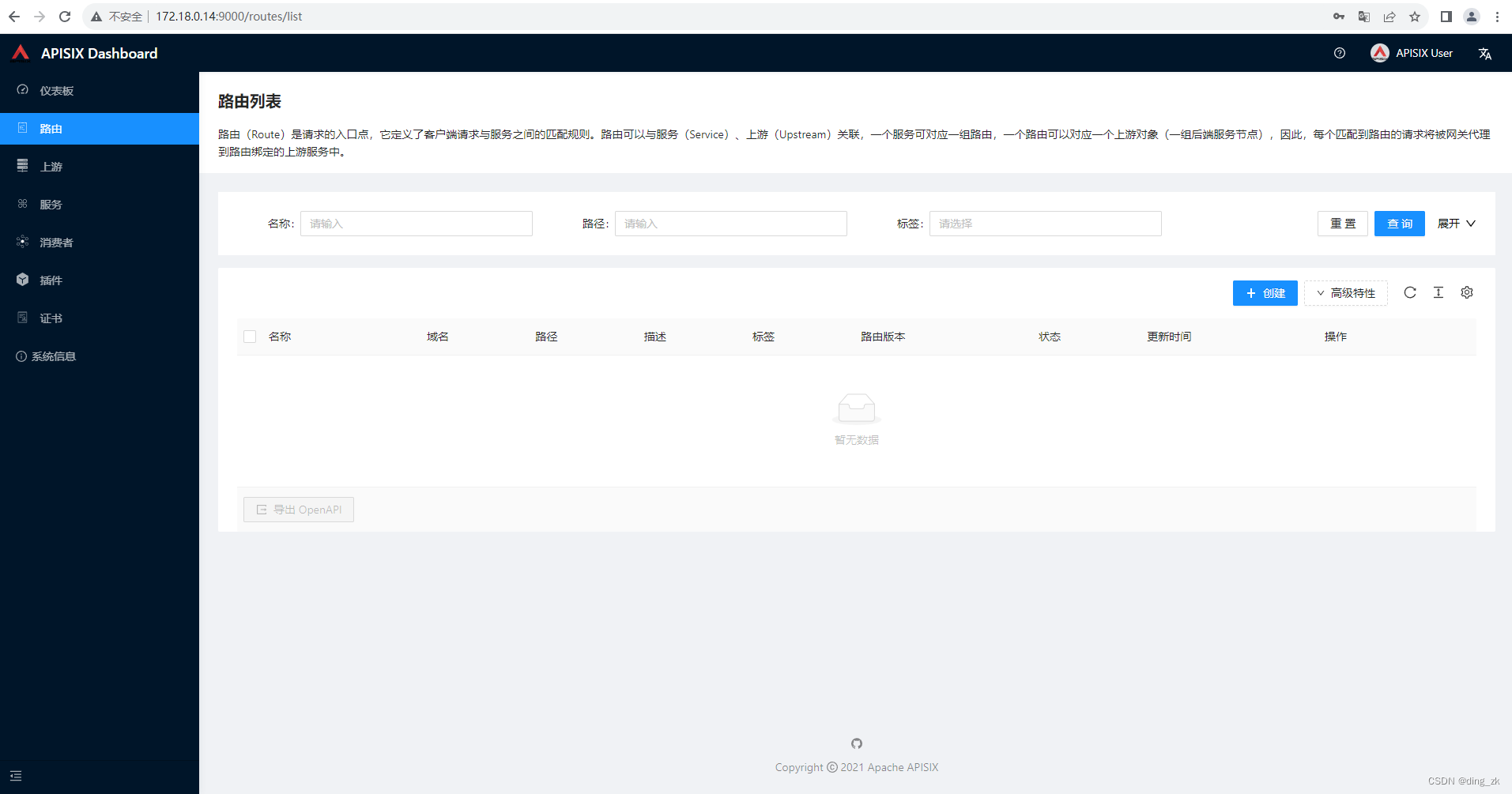
#本文用到的公共资源:elb、sfs共享存储,不足之处请多多评论指出






 扫一扫
扫一扫


 1207
1207

 被折叠的 条评论
为什么被折叠?
被折叠的 条评论
为什么被折叠?
 到【灌水乐园】发言





