


springboot+ueditor+前后端分离
简介
- 项目采用前后端分离,故通过jsp+java的方式实现UEditor的集成
1. 官网下载ueditor资源,完整版
https://ueditor.baidu.com/website/download.html
2. 把相应文件拷贝到前端项目(net,php,jsp文件夹这里用不到)

3. 把jsp下面的源码,以及config.json文件拷贝到后台项目

4. 修改前台配置
4.1 页面
<script type="text/javascript" src="lib/config.js"></script>
<script type="text/javascript" charset="utf-8" src="lib/ueditor/1.4.3/ueditor.config.js"></script>
<script type="text/javascript" charset="utf-8" src="lib/ueditor/1.4.3/ueditor.all.js"></script>
<script type="text/javascript" charset="utf-8" src="lib/ueditor/1.4.3/lang/zh-cn/zh-cn.js"></script>
<div class="formControls col-xs-8">
    <input name="text" id="text" value="" type="hidden"/>
     <script id="editor" type="text/plain"></script>
</div>
初始化
<script>
   var content = "";
   var editor;
   UE.Editor.prototype._bkGetActionUrl = UE.Editor.prototype.getActionUrl;
   UE.Editor.prototype.getActionUrl = function(action) {
   	//只有在自己写后台代码实现的时候才需要这一块儿
       if (action == 'uploadimage' /*|| action == 'uploadscrawl'*/ ) {
           return domainDb + "operate-db/ueditor/uploadimage";
       } else {
           return this._bkGetActionUrl.call(this, action);
       }
   }
   $(function () {
       $("input[name='operator']").val(userName);
       editor = UE.getEditor('editor');    //获取富文本
       //初始化编辑器 (该处用于设置编辑器回显值)
       editor.ready(function () {
           editor.setContent(content);
       });
   })
   </script>
4.2 config.js路径配置
//UEditor图片上传用到
var domainPage = "http://localhost:63342/operate-page/";
var domainDb = "http://localhost:8081/";
4.3 修改ueditor.config.js

4.4 修改ueditor.all.js
//设置图片最大宽度,以免撑出滚动条
 'img{max-width:100%;}' +

5. 修改后台配置
5.1 配置application-dev.yml中路径
systemconfig:
##服务器路径
#static_server_path: /usr/local/operate/static
#static_server_domain: http://118.126.142.184:8080/static
#config_json_path: /usr/local/tomcat-1/webapps/operate-db/WEB-INF/classes/config.json
##本地路径
##上传路径
static_server_path: D:\java\apache-tomcat-7.0.91\webapps\tenxSteel4\pages\static
##读取路径
static_server_domain: http://localhost:8085/tenxSteel4/pages/static
config_json_path: src/main/resources/config.json
5.2 SystemConfig工具类读取dev配置文件中的路径
import org.springframework.beans.factory.annotation.Value;
import org.springframework.context.annotation.Configuration;
import tenx.operate.common.util.StringUtils;

import java.util.ResourceBundle;

@Configuration
public class SystemConfig {
   // 抽数据URL
  	public static String URL;
   /**
   * 数据库名称
   */
   public static String STATIC_SEVER_PATH;
   public static String STATIC_SEVER_DOMAIN;
   public static String CONFIG_JSON_PATH;
   @Value("${systemconfig.static_server_path}")
   public void setStaticServerPath(String staticServerPath) {
       SystemConfig.STATIC_SEVER_PATH = staticServerPath;
   }

   @Value("${systemconfig.config_json_path}")
   public void setConfigJsonPath(String configJsonPath) { SystemConfig.CONFIG_JSON_PATH = configJsonPath;
   }

   @Value("${systemconfig.static_server_domain}")
   public void setStaticSeverDomain(String staticServerDomain) { SystemConfig.STATIC_SEVER_DOMAIN = staticServerDomain;
   }

   /**
    * 转换静态资源路径
    * @param path
    * @return
    */
   public static String convertToUrl(String path){

       if(StringUtils.isNullOrEmpty(path)){
           return path;
       }
       return path.replaceAll("fs:",STATIC_SEVER_DOMAIN);
   }

   public static String convertToFile(String path){

       if(StringUtils.isNullOrEmpty(path)){
           return path;
       }
       return path.replaceAll("fs:",STATIC_SEVER_PATH);
   }
}
5.3 修改ConfigManager
- 修改rootPath为dev中配置的图片上传路径
originalPath为dev中配置的config.json所在的路径
注:Linux为/usr/local/tomcat-1/webapps/operate-db/WEB-INF/classes/config.json
本地环境为:src/main/resources/config.json

5.4 修改BinaryUploader中的save方法
- 如果不做修改的话上传会报错(未找到上传数据)
原因:SpringMVC框架对含字节流的request进行了处理,此处传的是处理过的request,故获取不到字节流。
故修改原有代码,采用SpringMVC框架的解析器multipartResolverpublic static final State save(HttpServletRequest request, Map<String, Object> conf) { // FileItemStream fileStream = null; // boolean isAjaxUpload = request.getHeader( "X_Requested_With" ) != null; if (!ServletFileUpload.isMultipartContent(request)) { return new BaseState(false, AppInfo.NOT_MULTIPART_CONTENT); } // ServletFileUpload upload = new ServletFileUpload( // new DiskFileItemFactory()); // // if ( isAjaxUpload ) { // upload.setHeaderEncoding( "UTF-8" ); // } try { // FileItemIterator iterator = upload.getItemIterator(request); // // while (iterator.hasNext()) { // fileStream = iterator.next(); // // if (!fileStream.isFormField()) // break; // fileStream = null; // } // // if (fileStream == null) { // return new BaseState(false, AppInfo.NOTFOUND_UPLOAD_DATA); // } MultipartHttpServletRequest multipartRequest = (MultipartHttpServletRequest) request; MultipartFile multipartFile = multipartRequest.getFile(conf.get("fieldName").toString()); if(multipartFile==null){ return new BaseState(false, AppInfo.NOTFOUND_UPLOAD_DATA); } String savePath = (String) conf.get("savePath"); //String originFileName = fileStream.getName(); String originFileName = multipartFile.getOriginalFilename(); String suffix = FileType.getSuffixByFilename(originFileName); originFileName = originFileName.substring(0, originFileName.length() - suffix.length()); savePath = savePath + suffix; long maxSize = ((Long) conf.get("maxSize")).longValue(); if (!validType(suffix, (String[]) conf.get("allowFiles"))) { return new BaseState(false, AppInfo.NOT_ALLOW_FILE_TYPE); } savePath = PathFormat.parse(savePath, originFileName); String physicalPath = (String) conf.get("rootPath") + savePath; //InputStream is = fileStream.openStream(); InputStream is = multipartFile.getInputStream(); State storageState = StorageManager.saveFileByInputStream(is, physicalPath, maxSize); is.close(); if (storageState.isSuccess()) { storageState.putInfo("url", PathFormat.format(savePath)); storageState.putInfo("type", suffix); storageState.putInfo("original", originFileName + suffix); } return storageState; // } catch (FileUploadException e) { // return new BaseState(false, AppInfo.PARSE_REQUEST_ERROR); } catch (IOException e) { } return new BaseState(false, AppInfo.IO_ERROR); }
5.5 修改config.json
/* 前后端通信相关的配置,注释只允许使用多行方式 */
{
   /*服务器路径:http://118.126.142.184:8080/static*/
   /*本地路径:http://localhost:8085/tenxSteel4/pages/static*/
   /* 上传图片配置项 */
   "imageActionName": "uploadimage", /* 执行上传图片的action名称 */
   "imageFieldName": "upfile", /* 提交的图片表单名称 */
   "imageMaxSize": 2048000, /* 上传大小限制,单位B */
   "imageAllowFiles": [".png", ".jpg", ".jpeg", ".gif", ".bmp"], /* 上传图片格式显示 */
   "imageCompressEnable": true, /* 是否压缩图片,默认是true */
   "imageCompressBorder": 600, /* 图片压缩最长边限制 */
   "imageInsertAlign": "none", /* 插入的图片浮动方式 */
   "imageUrlPrefix": "http://localhost:8085/tenxSteel4/pages/static", /* 图片访问路径前缀 */
   "imagePathFormat": "/attachment/image/{yyyy}/{mm}/{dd}/{hh}/{ii}/{time}{rand:6}", /* 上传保存路径,可以自定义保存路径和文件名格式 */
   /* {filename} 会替换成原文件名,配置这项需要注意中文乱码问题 */
   /* {rand:6} 会替换成随机数,后面的数字是随机数的位数 */
   /* {time} 会替换成时间戳 */
   /* {yyyy} 会替换成四位年份 */
   /* {yy} 会替换成两位年份 */
   /* {mm} 会替换成两位月份 */
   /* {dd} 会替换成两位日期 */
   /* {hh} 会替换成两位小时 */
   /* {ii} 会替换成两位分钟 */
   /* {ss} 会替换成两位秒 */
   /* 非法字符 \ : * ? " < > | */
   /* 具请体看线上文档: fex.baidu.com/ueditor/#use-format_upload_filename */

   /* 涂鸦图片上传配置项 */
   "scrawlActionName": "uploadscrawl", /* 执行上传涂鸦的action名称 */
   "scrawlFieldName": "upfile", /* 提交的图片表单名称 */
   "scrawlPathFormat": "/attachment/image/{yyyy}/{mm}/{dd}/{hh}/{ii}/{time}{rand:6}", /* 上传保存路径,可以自定义保存路径和文件名格式 */
   "scrawlMaxSize": 2048000, /* 上传大小限制,单位B */
   /*"scrawlUrlPrefix": "http://localhost:8085/tenxSteel4/pages/tenxSteel4/pages/static/",*/ /* 图片访问路径前缀 */
   "scrawlUrlPrefix": "http://localhost:8085/tenxSteel4/pages/static", /* 图片访问路径前缀 */
   "scrawlInsertAlign": "none",

   /* 截图工具上传 */
   "snapscreenActionName": "uploadimage", /* 执行上传截图的action名称 */
   "snapscreenPathFormat": "/static/upload/image/{yyyy}{mm}{dd}/{time}{rand:6}", /* 上传保存路径,可以自定义保存路径和文件名格式 */
   "snapscreenUrlPrefix": "http://localhost:8085/tenxSteel4/pages/static", /* 图片访问路径前缀 */
   "snapscreenInsertAlign": "none", /* 插入的图片浮动方式 */

   /* 抓取远程图片配置 */
   "catcherLocalDomain": ["127.0.0.1", "localhost", "img.baidu.com"],
   "catcherActionName": "catchimage", /* 执行抓取远程图片的action名称 */
   "catcherFieldName": "source", /* 提交的图片列表表单名称 */
   "catcherPathFormat": "/attachment/image/{yyyy}/{mm}/{dd}/{hh}/{ii}/{time}{rand:6}", /* 上传保存路径,可以自定义保存路径和文件名格式 */
   "catcherUrlPrefix": "http://localhost:8085/tenxSteel4/pages/static", /* 图片访问路径前缀 */
   "catcherMaxSize": 2048000, /* 上传大小限制,单位B */
   "catcherAllowFiles": [".png", ".jpg", ".jpeg", ".gif", ".bmp"], /* 抓取图片格式显示 */

   /* 上传视频配置 */
   "videoActionName": "uploadvideo", /* 执行上传视频的action名称 */
   "videoFieldName": "upfile", /* 提交的视频表单名称 */
   "videoPathFormat": "/attachment/image/{yyyy}/{mm}/{dd}/{hh}/{ii}/{time}{rand:6}", /* 上传保存路径,可以自定义保存路径和文件名格式 */
   "videoUrlPrefix": "http://localhost:8085/tenxSteel4/pages/static", /* 视频访问路径前缀 */
   "videoMaxSize": 102400000, /* 上传大小限制,单位B,默认100MB */
   "videoAllowFiles": [
       ".flv", ".swf", ".mkv", ".avi", ".rm", ".rmvb", ".mpeg", ".mpg",
       ".ogg", ".ogv", ".mov", ".wmv", ".mp4", ".webm", ".mp3", ".wav", ".mid"], /* 上传视频格式显示 */

   /* 上传文件配置 */
   "fileActionName": "uploadfile", /* controller里,执行上传视频的action名称 */
   "fileFieldName": "upfile", /* 提交的文件表单名称 */
   "filePathFormat": "/attachment/image/{yyyy}/{mm}/{dd}/{hh}/{ii}/{time}{rand:6}", /* 上传保存路径,可以自定义保存路径和文件名格式 */
   "fileUrlPrefix": "http://localhost:8085/tenxSteel4/pages/static", /* 文件访问路径前缀 */
   "fileMaxSize": 51200000, /* 上传大小限制,单位B,默认50MB */
   "fileAllowFiles": [
       ".png", ".jpg", ".jpeg", ".gif", ".bmp",
       ".flv", ".swf", ".mkv", ".avi", ".rm", ".rmvb", ".mpeg", ".mpg",
       ".ogg", ".ogv", ".mov", ".wmv", ".mp4", ".webm", ".mp3", ".wav", ".mid",
       ".rar", ".zip", ".tar", ".gz", ".7z", ".bz2", ".cab", ".iso",
       ".doc", ".docx", ".xls", ".xlsx", ".ppt", ".pptx", ".pdf", ".txt", ".md", ".xml"
   ], /* 上传文件格式显示 */

   /* 列出指定目录下的图片 */
   "imageManagerActionName": "listimage", /* 执行图片管理的action名称 */
   /*"imageManagerListPath": "/static/upload/image/",*/ /* 指定要列出图片的目录 */
   "imageManagerListPath": "/attachment/image/{yyyy}/{mm}/{dd}/{hh}/{ii}/{time}{rand:6}", /* 指定要列出图片的目录 */
   "imageManagerListSize": 20, /* 每次列出文件数量 */
   "imageManagerUrlPrefix": "http://localhost:8085/tenxSteel4/pages/static", /* 图片访问路径前缀 */
   "imageManagerInsertAlign": "none", /* 插入的图片浮动方式 */
   "imageManagerAllowFiles": [".png", ".jpg", ".jpeg", ".gif", ".bmp"], /* 列出的文件类型 */

   /* 列出指定目录下的文件 */
   "fileManagerActionName": "listfile", /* 执行文件管理的action名称 */
   /*"fileManagerListPath": "/static/upload/file/",*/ /* 指定要列出文件的目录 */
   "fileManagerListPath": "/attachment/image/{yyyy}/{mm}/{dd}/{hh}/{ii}/{time}{rand:6}", /* 指定要列出文件的目录 */
   "fileManagerUrlPrefix": "http://localhost:8085/tenxSteel4/pages/static", /* 文件访问路径前缀 */
   "fileManagerListSize": 20, /* 每次列出文件数量 */
   "fileManagerAllowFiles": [
       ".png", ".jpg", ".jpeg", ".gif", ".bmp",
       ".flv", ".swf", ".mkv", ".avi", ".rm", ".rmvb", ".mpeg", ".mpg",
       ".ogg", ".ogv", ".mov", ".wmv", ".mp4", ".webm", ".mp3", ".wav", ".mid",
       ".rar", ".zip", ".tar", ".gz", ".7z", ".bz2", ".cab", ".iso",
       ".doc", ".docx", ".xls", ".xlsx", ".ppt", ".pptx", ".pdf", ".txt", ".md", ".xml"
   ] /* 列出的文件类型 */
}
5.6UeditorController
package tenx.operate.db.controller;
import java.io.IOException;
import java.io.PrintWriter;
import java.io.UnsupportedEncodingException;
import java.util.Date;
import java.util.HashMap;
import java.util.Map;
import javax.servlet.http.HttpServletRequest;
import javax.servlet.http.HttpServletResponse;

import org.json.JSONException;
import org.springframework.beans.factory.annotation.Autowired;
import org.springframework.stereotype.Controller;
import org.springframework.web.bind.annotation.CrossOrigin;
import org.springframework.web.bind.annotation.RequestMapping;

import com.baidu.ueditor.ActionEnter;
import org.springframework.web.bind.annotation.RequestParam;
import org.springframework.web.bind.annotation.ResponseBody;
import org.springframework.web.multipart.MultipartFile;
import tenx.operate.db.config.SystemConfig;
import tenx.operate.db.config.upload.IUploader;

/**
 * @author: dyf
 * @version: v1.0
 * @date:2019/4/9 18:10
 */
@Controller
@CrossOrigin
@RequestMapping("/ueditor")
public class UeditorController {
    @Autowired
    private IUploader uploader;

    @RequestMapping("/config")
    public void config(HttpServletRequest request,HttpServletResponse response) throws UnsupportedEncodingException, JSONException{
        response.setContentType("application/json");
        String rootPath = request.getSession().getServletContext().getRealPath("/");
        try {
            //
            ActionEnter actionEnter = new ActionEnter(request, rootPath);
            String exec=actionEnter.exec();
            PrintWriter writer = response.getWriter();
            writer.write(exec);
            writer.flush();
            writer.close();
        } catch (IOException e) {
            e.printStackTrace();
        };
    }
   @RequestMapping("/uploadimage")
   @ResponseBody
   public Map<String,Object> uploadImage(HttpServletRequest request, @RequestParam(value = "upfile",required = true) MultipartFile multipartFile){
       Map<String,Object> res = new HashMap<>();
       try{
           //封装的图片上传方法
           String path = this.uploader.upload(multipartFile.getInputStream(), SystemConfig.STATIC_SEVER_PATH,"image",
                   multipartFile.getOriginalFilename());
           String path1 = SystemConfig.convertToUrl(path);
           res.put("url", path1);//上传的图片路径
           res.put("state", "SUCCESS");
           res.put("title", multipartFile.getOriginalFilename());
           res.put("original", multipartFile.getOriginalFilename());
           return res ;
       }catch(Exception e){
           e.printStackTrace();
           return res;
       }
   }
}
5.7 pom文件添加相关依赖
<!-- 上传组件包 -->
   <dependency>
       <groupId>commons-fileupload</groupId>
       <artifactId>commons-fileupload</artifactId>
       <version>1.3.1</version>
   </dependency>
   <dependency>
       <groupId>commons-io</groupId>
       <artifactId>commons-io</artifactId>
       <!--<version>1.3.2</version>-->
       <version>2.4</version>
   </dependency>
   <dependency>
       <groupId>commons-codec</groupId>
       <artifactId>commons-codec</artifactId>
       <version>1.9</version>
   </dependency>
   <dependency>
       <groupId>org.json</groupId>
       <artifactId>json</artifactId>
       <version>20180813</version>
   </dependency>
5.8 LocalUploader
import org.springframework.stereotype.Service;
import tenx.operate.common.util.DateUtil;
import tenx.operate.common.util.FileUtil;
import tenx.operate.common.util.StringUtils;

import java.io.InputStream;
import java.util.Calendar;
import java.util.Date;

/**
 * 文件上传具体实现类
 */
@Service("uploader")
public class LocalUploader implements IUploader {
    @Override
    public String upload(InputStream stream,String static_server_path, String subFolder, String fileName) {
        /**
         * 参数校验
         */
        if(stream==null || subFolder == null){
            throw new IllegalArgumentException("file or filename object is null");
        }
        if(!FileUtil.isAllowUpImg(fileName)){
            throw new IllegalArgumentException("不被允许的上传文件类型");
        }
        /**
         * 组合文件名
         */
        String ext = FileUtil.getFileExt(fileName);
        fileName = DateUtil.toString(new Date(), "mmss") + StringUtils.getRandStr(4) + "." + ext;
        String filePath =  static_server_path + "/attachment/";
        if(subFolder!=null){
            filePath+=subFolder +"/";
        }
        String timePath=this.getTimePath();
        String path  ="fs:"+ "/attachment/" +(subFolder==null?"":subFolder)+"/"+timePath+"/"+fileName;
        filePath +=timePath;
        filePath += fileName;
        /**
         * 写入文件
         */
        FileUtil.write(stream, filePath);
        return path;
    }
    /**
     * 上传app
     */
    @Override
    public String uploadApk(InputStream stream,String static_server_path,String subFolder,
                            String fileName) {
        /**
         * 参数校验
         */
        if(stream==null){
            throw new IllegalArgumentException("file or filename object is null");
        }
        if(subFolder == null){
            throw new IllegalArgumentException("subFolder is null");
        }

        // String name = null;
        String filePath = "";
        // String ext = FileUtil.getFileExt(fileName);
        // name = DateUtil.toString(new Date(), "mmss") + StringUtils.getRandStr(4) + "." + ext;

        filePath = static_server_path+ "/attachment/";
        if(subFolder!=null){
            filePath+=subFolder +"/";
        }
        String timePath=this.getTimePath();
        String path  ="fs:"+ "/attachment/" +(subFolder==null?"":subFolder)+"/"+timePath+"/"+fileName;
        filePath += timePath;
        filePath += fileName;
        FileUtil.createFile(stream, filePath);
        return path;
    }
    private String getTimePath(){
        Calendar now = Calendar.getInstance();
        int year=now.get(Calendar.YEAR);
        int month=now.get(Calendar.MONTH) + 1;
        int date=now.get(Calendar.DAY_OF_MONTH);
        //Calendar.HOUR 12小时制  Calendar.DAY_OF_MONTH 24小时制
        int hour=now.get(Calendar.HOUR_OF_DAY);
        int minute=now.get(Calendar.MINUTE);
        String filePath="";
        if(year!=0){
            filePath+=year+"/";
        }
        if(month!=0){
            filePath+=(month<10?("0"+month):month)+"/";
        }
        if(date!=0){
            filePath+=(date<10?("0"+date):date)+"/";
        }
        if(hour!=0){
            filePath+=(hour<10?("0"+hour):hour)+"/";
        }
        if(minute!=0){
            filePath+=(minute<10?("0"+minute):minute)+"/";
        }
        return  filePath;
    }
}
5.9 IUploader
public interface IUploader {
   /**
    *
    * @param stream	文件流
    * @param  static_server_path 地址
    * @param subFolder	子文件夹
    * @param fileName	 图片名称
    * @return
    */
   public String upload(InputStream stream, String static_server_path, String subFolder, String fileName);
   /**
    * 上传app安装包
    * @param stream 文件流
    * @param static_server_path 地址
    * @param subFolder 子文件夹
    * @param fileName 文件名称
    * @return
    */
   public String uploadApk(InputStream stream, String static_server_path, String subFolder, String fileName);
}
5.10 FileUtil
import org.springframework.web.multipart.MultipartFile;
import javax.swing.*;
import java.awt.*;
import java.awt.image.BufferedImage;
import java.io.*;
import org.apache.commons.io.FileUtils;
/**
 * 上传工具类
 */
public class FileUtil {

    private FileUtil() {
    }

    public static BufferedImage toBufferedImage(Image image) {
        if (image instanceof BufferedImage) {
            return (BufferedImage) image;
        }

        // This code ensures that all the pixels in the image are loaded
        image = new ImageIcon(image).getImage();

        // Determine if the image has transparent pixels; for this method's
        // implementation, see e661 Determining If an Image Has Transparent
        // Pixels
        // boolean hasAlpha = hasAlpha(image);

        // Create a buffered image with a format that's compatible with the
        // screen
        BufferedImage bimage = null;
        GraphicsEnvironment ge = GraphicsEnvironment.getLocalGraphicsEnvironment();
        try {
            // Determine the type of transparency of the new buffered image
            int transparency = Transparency.OPAQUE;
			/*
			 * if (hasAlpha) { transparency = Transparency.BITMASK; }
			 */

            // Create the buffered image
            GraphicsDevice gs = ge.getDefaultScreenDevice();
            GraphicsConfiguration gc = gs.getDefaultConfiguration();
            bimage = gc.createCompatibleImage(image.getWidth(null),image.getHeight(null), transparency);
        } catch (HeadlessException e) {
            // The system does not have a screen
        } catch (Exception e){
            e.printStackTrace();
        }

        if (bimage == null) {
            // Create a buffered image using the default color model
            int type = BufferedImage.TYPE_INT_RGB;
            // int type = BufferedImage.TYPE_3BYTE_BGR;//by wang
			/*
			 * if (hasAlpha) { type = BufferedImage.TYPE_INT_ARGB; }
			 */
            bimage = new BufferedImage(image.getWidth(null),image.getHeight(null), type);
        }

        // Copy image to buffered image
        Graphics g = bimage.createGraphics();

        // Paint the image onto the buffered image
        g.drawImage(image, 0, 0, null);
        g.dispose();

        return bimage;
    }


    public static void createFile(InputStream in, String filePath) {
        if(in==null) throw new RuntimeException("create file error: inputstream is null");
        int potPos = filePath.lastIndexOf('/') + 1;
        String folderPath = filePath.substring(0, potPos);
        createFolder(folderPath);
        FileOutputStream outputStream = null;
        try {
            outputStream = new FileOutputStream(filePath);
            byte[] by = new byte[1024];
            int c;
            while ((c = in.read(by)) != -1) {
                outputStream.write(by, 0, c);
            }
        } catch (IOException e) {
            e.getStackTrace().toString();
        }
        try {
            outputStream.close();
        } catch (IOException e) {
            e.printStackTrace();
        }
        try {
            in.close();
        } catch (IOException e) {
            e.printStackTrace();
        }
    }
    /**
     * 是否是允许上传文件
     *
     * @param logoFileName
     * @return
     */
    public static boolean isAllowUp(String logoFileName) {
        logoFileName = logoFileName.toLowerCase();
        String allowTYpe = "gif,jpg,jpeg,bmp,swf,png,rar,doc,docx,xls,xlsx,pdf,zip,ico,txt,mp4";
        if (!logoFileName.trim().equals("") && logoFileName.length() > 0) {
            String ex = logoFileName.substring(logoFileName.lastIndexOf(".") + 1, logoFileName.length());
			//return allowTYpe.toString().indexOf(ex) >= 0;
            //lzf edit 20110717
            //解决只认小写问题
            //同时加入jpeg扩展名/png扩展名
            return allowTYpe.toUpperCase().indexOf(ex.toUpperCase()) >= 0;
        } else {
            return false;
        }
    }
    /**
     * 是否是允许上传的图片
     * @param imgFileName
     * @return
     */
    public static boolean isAllowUpImg(String imgFileName){
        imgFileName = imgFileName.toLowerCase();
        String allowTYpe = "jpg,png,jpeg";
        if (!imgFileName.trim().equals("") && imgFileName.length() > 0) {
            String ex = imgFileName.substring(imgFileName.lastIndexOf(".") + 1, imgFileName.length());
            return allowTYpe.toUpperCase().indexOf(ex.toUpperCase()) >= 0;
        } else {
            return false;
        }
    }
    /**
     * 是否是允许上传app安装包
     * @param apkFileName
     * @return
     */
    public static boolean isAllowUpApk(String apkFileName){
        apkFileName = apkFileName.toLowerCase();
        String allowTYpe = "apk";
        if (!apkFileName.trim().equals("") && apkFileName.length() > 0) {
            String ex = apkFileName.substring(apkFileName.lastIndexOf(".") + 1, apkFileName.length());
            return allowTYpe.toUpperCase().indexOf(ex.toUpperCase()) >= 0;
        } else {
            return false;
        }
    }
    /**
     * 是否是允许上传Excel
     *
     * @param logoFileName
     * @return
     */
    public static boolean isAllowUpExcel(String logoFileName) {
        logoFileName = logoFileName.toLowerCase();
        String allowTYpe = "xls";
        if (!logoFileName.trim().equals("") && logoFileName.length() > 0) {
            String ex = logoFileName.substring(logoFileName.lastIndexOf(".") + 1, logoFileName.length());
			return allowTYpe.toString().indexOf(ex) >= 0;
            //lzf edit 20110717
            //解决只认小写问题
            //同时加入jpeg扩展名/png扩展名
            return allowTYpe.toUpperCase().indexOf(ex.toUpperCase()) >= 0;
        } else {
            return false;
        }
    }
    /**
     * 把内容写入文件
     *
     * @param filePath
     * @param fileContent
     */
    public static void write(String filePath, String fileContent) {

        try {
            FileOutputStream fo = new FileOutputStream(filePath);
            OutputStreamWriter out = new OutputStreamWriter(fo, "UTF-8");

            out.write(fileContent);

            out.close();
        } catch (IOException ex) {

            System.err.println("Create File Error!");
            ex.printStackTrace();
        }
    }


    /**
     * 将inputstream写入文件
     * @param file 文件
     * @param path 要写入的文件路径
     */
    public static void write(MultipartFile file, String path){
        try {
            FileUtils.copyInputStreamToFile(file.getInputStream(), new File(path));
        } catch (IOException e) {
            // TODO Auto-generated catch block
            e.printStackTrace();
        }

    }

    /**
     * 将inputstream写入文件
     * @param stream 文件流
     * @param path 要写入的文件路径
     */
    public static void write(InputStream stream,String path){
        try {
            FileUtils.copyInputStreamToFile(stream, new File(path));
        } catch (IOException e) {
            e.printStackTrace();
        }

    }
    /**
     * 读取文件内容 默认是UTF-8编码
     *
     * @param filePath
     * @return
     */
    public static String read(String filePath, String code) {
        if (code == null || code.equals("")) {
            code = "UTF-8";
        }
        String fileContent = "";
        File file = new File(filePath);
        try {
            InputStreamReader read = new InputStreamReader(new FileInputStream(
                    file), code);
            BufferedReader reader = new BufferedReader(read);
            String line;
            while ((line = reader.readLine()) != null) {
                fileContent = fileContent + line + "\n";
            }
            read.close();
            read = null;
            reader.close();
            read = null;
        } catch (Exception ex) {
            ex.printStackTrace();
            fileContent = "";
        }
        return fileContent;
    }

    /**
     * 删除文件或文件夹
     *
     * @param filePath
     */
    public static void delete(String filePath) {
        try {
            File file = new File(filePath);
            if (file.exists()){
                if(file.isDirectory()){
                    FileUtils.deleteDirectory(file);
                }else{
                    file.delete();
                }
            }
        } catch (Exception ex) {
            ex.printStackTrace();
        }
    }

    public static boolean exist(String filepath) {
        File file = new File(filepath);

        return file.exists();
    }

    /**
     * 创建文件夹
     *
     * @param filePath
     */
    public static void createFolder(String filePath) {
        try {
            File file = new File(filePath);
            if (!file.exists()) {
                file.mkdirs();
            }
        } catch (Exception ex) {
            System.err.println("Make Folder Error:" + ex.getMessage());
        }
    }

    /**
     * 重命名文件、文件夹
     * @param from
     * @param to
     */
    public static void renameFile(String from, String to) {
        try {
            File file = new File(from);
            if(file.exists()){
                file.renameTo(new File(to));
            }
        }catch (Exception ex) {
            System.err.println("Rename File/Folder Error:" + ex.getMessage());
        }
    }

    /**
     * 得到文件的扩展名
     *
     * @param fileName
     * @return
     */
    public static String getFileExt(String fileName) {

        int potPos = fileName.lastIndexOf('.') + 1;
        String type = fileName.substring(potPos, fileName.length());
        return type;
    }

    /**
     * 通过File对象创建文件
     *
     * @param file
     * @param filePath
     */
    public static void createFile(File file, String filePath) {
        int potPos = filePath.lastIndexOf('/') + 1;
        String folderPath = filePath.substring(0, potPos);
        createFolder(folderPath);
        FileOutputStream outputStream = null;
        FileInputStream fileInputStream = null;
        try {
            outputStream = new FileOutputStream(filePath);
            fileInputStream = new FileInputStream(file);
            byte[] by = new byte[1024];
            int c;
            while ((c = fileInputStream.read(by)) != -1) {
                outputStream.write(by, 0, c);
            }
        } catch (IOException e) {
            e.getStackTrace().toString();
        }
        try {
            outputStream.close();
        } catch (IOException e) {
            e.printStackTrace();
        }
        try {
            fileInputStream.close();
        } catch (IOException e) {
            e.printStackTrace();
        }
    }

    public static String readFile(String resource) {
        InputStream stream = getResourceAsStream(resource);
        String content = readStreamToString(stream);

        return content;

    }

    public static InputStream getResourceAsStream(String resource) {
        String stripped = resource.startsWith("/") ? resource.substring(1)
                : resource;

        InputStream stream = null;
        ClassLoader classLoader = Thread.currentThread()
                .getContextClassLoader();
        if (classLoader != null) {
            stream = classLoader.getResourceAsStream(stripped);

        }

        return stream;
    }

    public static String readStreamToString(InputStream stream) {
        String fileContent = "";

        try {
            InputStreamReader read = new InputStreamReader(stream, "utf-8");
            BufferedReader reader = new BufferedReader(read);
            String line;
            while ((line = reader.readLine()) != null) {
                fileContent = fileContent + line + "\n";
            }
            read.close();
            read = null;
            reader.close();
            read = null;
        } catch (Exception ex) {
            fileContent = "";
        }
        return fileContent;
    }

    /**
     * delete file folder
     *
     * @param path
     */
    public static void removeFile(File path) {

        if (path.isDirectory()) {
            try {
                FileUtils.deleteDirectory(path);
            } catch (IOException e) {
                e.printStackTrace();
            }
        }

    }

    public static void copyFile(String srcFile,String destFile){
        try {
            if(FileUtil.exist(srcFile)){
                FileUtils.copyFile(new File(srcFile),new File( destFile ));
            }
        } catch (IOException e) {

            e.printStackTrace();
        }
    }

    public static void copyFolder(String sourceFolder, String destinationFolder)
    {
        ////System.out.println("copy " + sourceFolder + " to " + destinationFolder);
        try{
            File sourceF = new File(sourceFolder);
            if (sourceF.exists())
                FileUtils.copyDirectory(new File(sourceFolder), new File(
                        destinationFolder));
        }catch(Exception e){
            e.printStackTrace();
            throw new RuntimeException("copy file error");
        }
    }


    /**
     * 拷贝源文件夹至目标文件夹
     * 只拷贝新文件
     * @param sourceFolder
     * @param targetFolder
     */
    public static void copyNewFile(String sourceFolder, String targetFolder){
        try{
            File sourceF = new File(sourceFolder);

            if(!targetFolder.endsWith("/")) targetFolder=targetFolder+"/";

            if (sourceF.exists()){
                File[] filelist = sourceF.listFiles();
                for(File f:filelist){
                    File targetFile = new File(targetFolder+f.getName());

                    if(  f.isFile()){
                        //如果目标文件比较新,或源文件比较新,则拷贝,否则跳过
                        if(!targetFile.exists() || FileUtils.isFileNewer(f, targetFile)){
                            FileUtils.copyFileToDirectory(f, new File(targetFolder));
                            ////System.out.println("copy "+ f.getName());
                        }else{
                            //	//System.out.println("skip  "+ f.getName());
                        }
                    }
                }
            }


        }catch(Exception e){
            e.printStackTrace();
            throw new RuntimeException("copy file error");
        }
    }

	/*
	public static void unZip(String zipPath,String targetFolder,boolean cleanZip){
		File folderFile =new File(targetFolder);
		File zipFile = new File(zipPath);
		Project prj = new Project();
		Expand expand = new Expand();
		expand.setEncoding("UTF-8");
		expand.setProject(prj);
		expand.setSrc(zipFile);
		expand.setOverwrite(true);
		expand.setDest(folderFile);
		expand.execute();

		if(cleanZip){
			//清除zip包
			Delete delete = new Delete();
			delete.setProject(prj);
			delete.setDir(zipFile);
			delete.execute();
		}
	}
	*/
}
5.11 DateUtil
import java.text.SimpleDateFormat;
import java.util.Calendar;
import java.util.Date;

/**
 * 日期工具类
 */
public class DateUtil {
    /**
     * 获取某个日期days天后的日期
     * @param date 日期
     * @param days 时间间隔 天数
     * @return
     */
    public static Date getDateAfterDays(Date date,int days){
        Calendar  calendar  =  Calendar.getInstance();
        calendar.setTime(date);
        calendar.add(Calendar.DATE,days);
        return calendar.getTime();
    }

    /**
     * 获取今天凌晨日期
     * @return date类型
     */
    public static Date getToday(){
        Date now =new Date();
        Calendar c = Calendar.getInstance();
        c.setTime(now);
        c.set(Calendar.HOUR_OF_DAY,0);
        c.set(Calendar.MINUTE,0);
        c.set(Calendar.SECOND,0);
        c.set(Calendar.MILLISECOND,0);
        // SimpleDateFormat sdf = new SimpleDateFormat("yyyy-MM-dd HH:mm:ss");
        return c.getTime();
    }

    /**
     * 转换字符串为日期格式
     * @param dateStr 时间字符串
     * @param pattern 格式化标准
     * @return
     */
    public static Date toDate(String dateStr,String pattern){
        if (StringUtils.isNullOrEmpty(dateStr)){
            return null;
        }
        if (pattern == null){
            pattern ="yyyy-MM-dd HH:mm:ss";
        }
        Date date = null;
        SimpleDateFormat sdf = new SimpleDateFormat(pattern);
        try {
            date =  sdf.parse(dateStr);
        } catch (Exception ex) {
            ex.printStackTrace();
        }
        return date;
    }

    /**
     * 把日期转换成字符串型
     * @param date 日期
     * @param pattern 格式化标准
     * @return
     */
    public static String toString(Date date, String pattern){
        if(date == null){
            return "";
        }
        if(pattern == null){
            pattern = "yyyy-MM-dd";
        }
        String dateString = "";
        SimpleDateFormat sdf = new SimpleDateFormat(pattern);
        try {
            dateString = sdf.format(date);
        } catch (Exception ex) {
            ex.printStackTrace();
        }
        return dateString;
    }

    /**
     * 拿time1和time2比较</br>
     * time1和time2比较 : <1分钟时显示为刚刚;</br>
     * time1和time2比较 : ≥1分钟,<1小时时,显示为:*分钟前;</br>
     * time1和time2比较 : ≥1小时,<1天时,显示为:*小时前;</br>
     * time1和time2比较 : ≥1天时,显示格式:YY-MM-DD
     * @param time1 一般是评论日期,文章日期
     * @param time2 一般是当前时间
     * @return 指定的时间
     */
    public static String compare(Date time1, Long time2){
        Long diff = time2 - time1.getTime();
        if(diff >=3600000L && diff < 86400000L){
            return (diff/3600000L)+"小时前";
        } else if (diff >= 60000L && diff <3600000L){
            return (diff/60000L)+"分钟前";
        } else if (diff < 60000L){
            return "刚刚";
        } else {
            return new SimpleDateFormat("yyyy-MM-dd").format(time1);
        }
    }

    private static void convertWeekByDate(Date time) {
        SimpleDateFormat sdf = new SimpleDateFormat("yyyy-MM-dd"); //设置时间格式 Calendar cal = Calendar.getInstance(); cal.setTime(time); //判断要计算的日期是否是周日,如果是则减一天计算周六的,否则会出问题,计算到下一周去了 int dayWeek = cal.get(Calendar.DAY_OF_WEEK);//获得传入日期是一个星期的第几天 if(1 == dayWeek) { cal.add(Calendar.DAY_OF_MONTH, -1); } System.out.println("要计算日期为:"+sdf.format(cal.getTime())); //输出要计算日期 cal.setFirstDayOfWeek(Calendar.MONDAY);//设置一个星期的第一天,按中国的习惯一个星期的第一天是星期一 int day = cal.get(Calendar.DAY_OF_WEEK);//获得传入日期是一个星期的第几天 cal.add(Calendar.DATE, cal.getFirstDayOfWeek()-day);//根据日历的规则,给传入日期减去星期几与一个星期第一天的差值 String Monday = sdf.format(cal.getTime()); System.out.println("所在周星期一的日期:"+Monday); cal.add(Calendar.DATE, 1); String Tuesday = sdf.format(cal.getTime()); System.out.println("所在周星期二的日期:"+Tuesday); cal.add(Calendar.DATE, 1); String Wednesday = sdf.format(cal.getTime()); System.out.println("所在周星期三的日期:"+Wednesday); cal.add(Calendar.DATE, 1); String Thursday = sdf.format(cal.getTime()); System.out.println("所在周星期四的日期:"+Thursday); cal.add(Calendar.DATE, 1); String Friday = sdf.format(cal.getTime()); System.out.println("所在周星期五的日期:"+Friday); cal.add(Calendar.DATE, 1); String Saturday = sdf.format(cal.getTime()); System.out.println("所在周星期六的日期:"+Saturday); cal.add(Calendar.DATE, 1); String Sunday = sdf.format(cal.getTime()); System.out.println("所在周星期日的日期:"+Sunday); }

    }


        public static void main(String[] args) throws Exception{
        SimpleDateFormat sdf = new SimpleDateFormat("yyyy-MM-dd HH:mm:ss");
        Date d1 = sdf.parse("2018-01-15 01:08:00");
        Date d2 = sdf.parse("2018-01-16 18:57:20");
        System.out.println(compare(d1,d2.getTime()));
    }

}
6. bug汇总
6.1 单图上传提示"上传错误",但是图片已经上传成功
- 定位如下
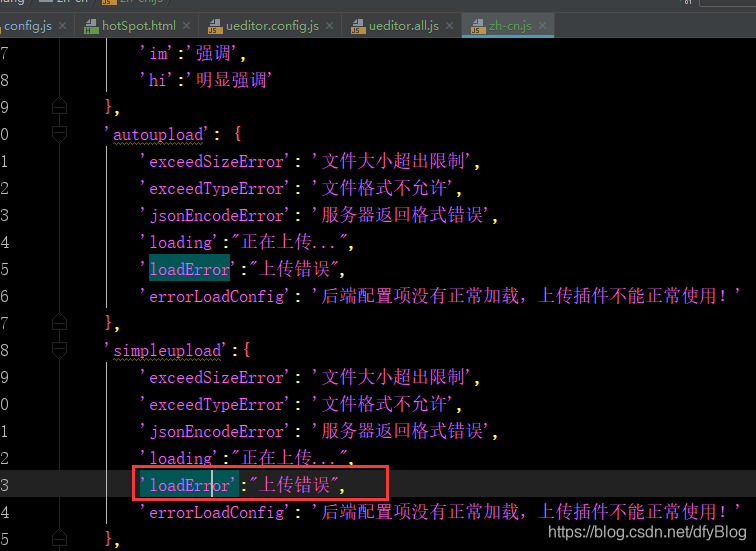
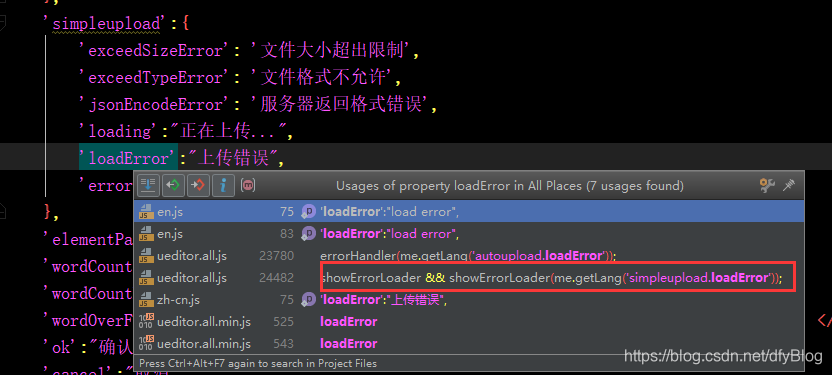
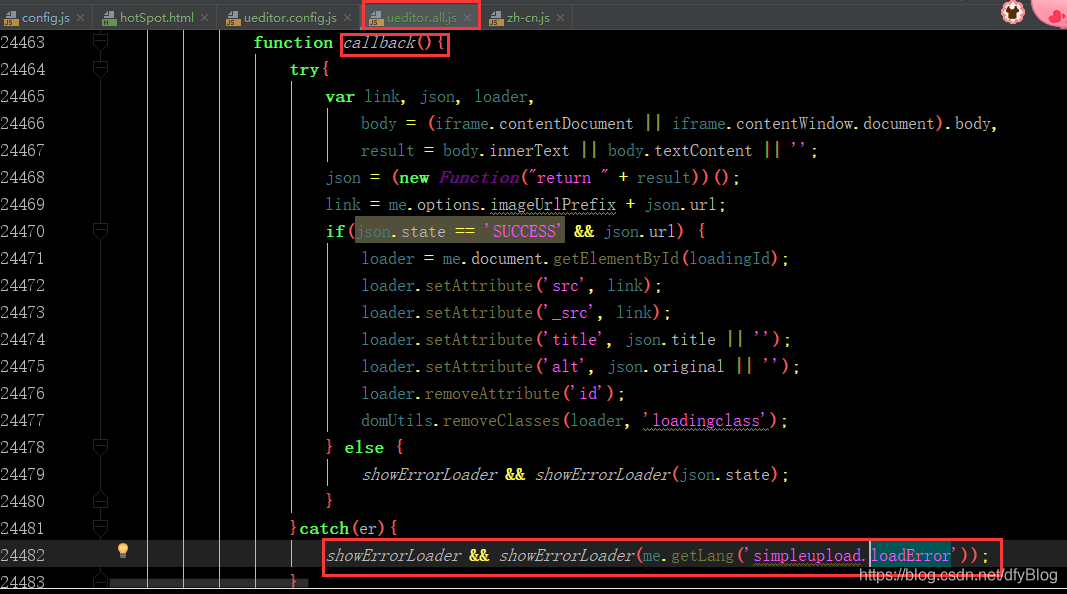
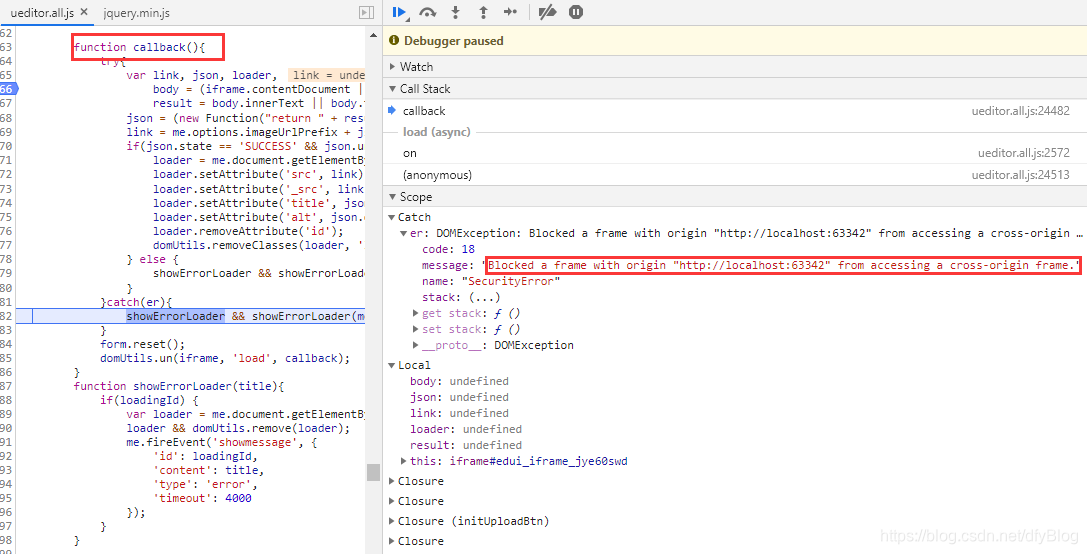
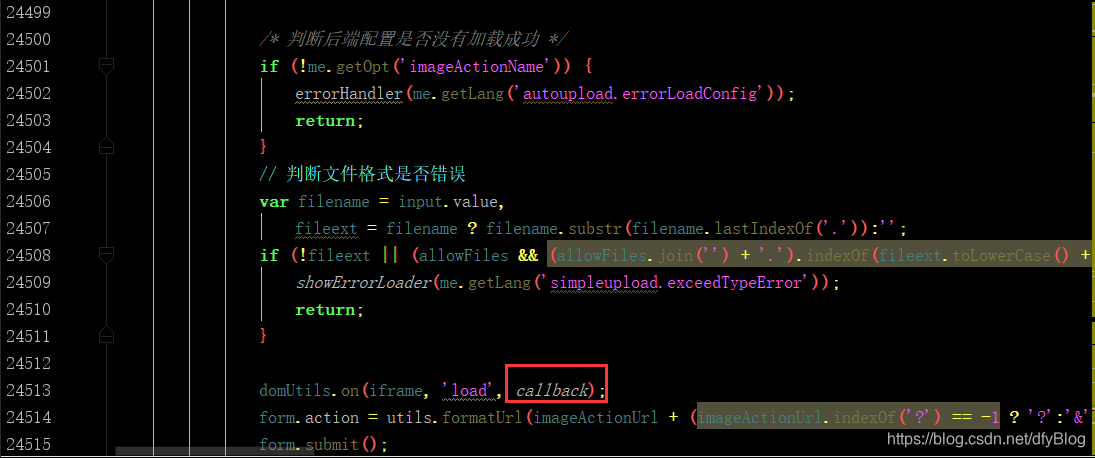
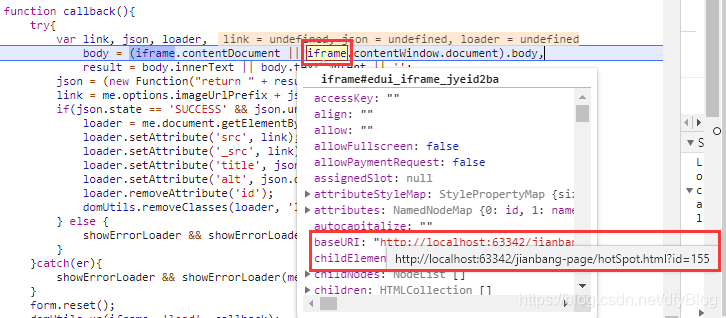
- 全局搜索"上传错误",定位到simpleupload.loadError,form表单提交出现跨域的情况导致的,父页面http://localhost:63342/jianbang-page/hotSpot.html,子页面:http://localhost:8088/jianbang-report/ueditor/config?action=uploadimage。
因为浏览器的保护机制,在跨域的情况下是不能读取iframe里的内容的。这是为了防止一个网站读取另一个网站里的信息。所以这就造成了UEditor在上传的时候因为读不到iframe内容而提示“上传错误”这种错觉,但实际上已经上传成功了。故此时通过iframe.contentWindow.document是读取不到子页面上传结果信息的。

- 解决方案:舍弃callback回调,通过ajax提交的方式,在success中做上传后的处理逻辑
注释掉原来form提交逻辑// domUtils.on(iframe, 'load', callback); // form.action = utils.formatUrl(imageActionUrl + (imageActionUrl.indexOf('?') == -1 ? '?':'&') + params); // form.submit(); - 添加ajax提交方式
var params = utils.serializeParam(me.queryCommandValue('serverparam')) || ''; var action = utils.formatUrl(imageActionUrl + (imageActionUrl.indexOf('?') == -1 ? '?' : '&') + params); var formData = new FormData(); formData.append("upfile", form[0].files[0] ); $.ajax({ url: action, type: 'POST', cache: false, data: formData, processData: false, contentType: false, success: function (data) { // data = JSON.parse(data); var link, loader, body = (iframe.contentDocument || iframe.contentWindow.document).body, result = body.innerText || body.textContent || ''; link = me.options.imageUrlPrefix + data.url; if(data.state == 'SUCCESS' && data.url) { loader = me.document.getElementById(loadingId); loader.setAttribute('src', link); loader.setAttribute('_src', link); loader.setAttribute('title', data.title || ''); loader.setAttribute('alt', data.original || ''); loader.removeAttribute('id'); domUtils.removeClasses(loader, 'loadingclass'); } else { showErrorLoader && showErrorLoader(data.state); } form.reset(); } }); - 此外,也可以通过重定向的方法,参考https://blog.youkuaiyun.com/lnkToKing/article/details/79091753

 2466


 扫一扫


 被折叠的 条评论
为什么被折叠?
 到【灌水乐园】发言


