



 本文介绍如何在SpringBoot项目中实现国际化功能,通过自定义LocaleResolver实现动态切换语言,使用Thymeleaf展示不同语言的页面内容。
SpringBoot学习笔记—Day07
国际化
首先先编写国际化配置文件
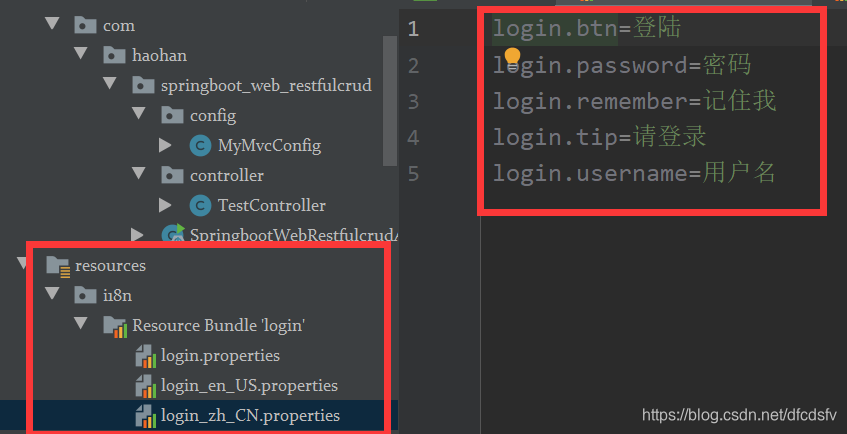
在Resource Bundle视图中写更加方便,之后将数据添加到页面中,我这里用的thymeleaf方法添加的
<!DOCTYPE html>
<html lang="en" xmlns:th="http://www.thymeleaf.org">
	<head>
		<meta http-equiv="Content-Type" content="text/html; charset=UTF-8">
		<meta name="viewport" content="width=device-width, initial-scale=1, shrink-to-fit=no">
		<meta name="description" content="">
		<meta name="author" content="">
		<title>Signin Template for Bootstrap</title>
		<!-- Bootstrap core CSS -->
		<link href="../static/asserts/css/bootstrap.min.css" th:href="@{/webjars/bootstrap/4.5.0/dist/css/bootstrap.css}" rel="stylesheet">
		<!-- Custom styles for this template -->
		<link href="../static/asserts/css/signin.css" th:href="@{/asserts/css/signin.css}" rel="stylesheet">
	</head>
	<body class="text-center">
		<form class="form-signin" action="dashboard.html">
			<img class="mb-4" src="../static/asserts/img/bootstrap-solid.svg" th:src="@{asserts/img/bootstrap-solid.svg}" alt="" width="72" height="72">
			<h1 class="h3 mb-3 font-weight-normal" th:text="#{login.tip}">Please sign in</h1>
			<label class="sr-only" th:text="#{login.username}">Username</label>
			<input type="text" class="form-control" placeholder="Username" th:placeholder="#{login.username}" required="" autofocus="">
			<label class="sr-only" th:text="#{login.password}">Password</label>
			<input type="password" class="form-control" placeholder="Password" th:placeholder="#{login.password}" required="">
			<div class="checkbox mb-3">
				<label>
          <input type="checkbox" value="remember-me"> [[#{login.remember}]]
        </label>
			</div>
			<button class="btn btn-lg btn-primary btn-block" type="submit" th:text="#{login.btn}">Sign in</button>
			<p class="mt-5 mb-3 text-muted">© 2017-2018</p>
			<a class="btn btn-sm">中文</a>
			<a class="btn btn-sm">English</a>
		</form>
	</body>
</html>
注意编码
原理
国际化Locale(区域信息对象),在springMVC里面有一个区域信息组件LocaleResolver
他的作用是获取区域信息对象
在WebMvcAutoConfiguration这个类中,有这样一个组件
		@Bean
		@ConditionalOnMissingBean
		@ConditionalOnProperty(prefix = "spring.mvc", name = "locale")
		public LocaleResolver localeResolver() {
			if (this.mvcProperties.getLocaleResolver() == WebMvcProperties.LocaleResolver.FIXED) {
				return new FixedLocaleResolver(this.mvcProperties.getLocale());
			}
			AcceptHeaderLocaleResolver localeResolver = new AcceptHeaderLocaleResolver();
			localeResolver.setDefaultLocale(this.mvcProperties.getLocale());
			return localeResolver;
		}
		//默认就是根据请求头带来的请求信息,进行国际化
可以看到上面这个localeResolver方法上有个@ConditionalOnMissingBean这个注解,意思是如果容器中没有这个Bean,判断为true,如果有,判断为false
接着要实现的功能是,我需要点击英文按钮,显示英文界面,点击中文按钮,显示中文界面
在login.html中修改
<a class="btn btn-sm" th:href="@{/index.html(l='zh_CN')}">中文</a>
<a class="btn btn-sm" th:href="@{/index.html(l='zh_US')}">English</a>
接着编写一个LocaleResolver的实现类
public class MyLocaleResolver implements LocaleResolver {

    /**
     * 解析区域信息
     * @param request
     * @return
     */
    @Override
    public Locale resolveLocale(HttpServletRequest request) {
        String l = request.getParameter("l");
        Locale locale = Locale.getDefault();
        if (!StringUtils.isEmpty(l)){
            String[] split = l.split("_");
            locale = new Locale(split[0], split[1]);
        }
        return locale;
    }

    @Override
    public void setLocale(HttpServletRequest request, HttpServletResponse response, Locale locale) {
    }
}
将该实现类加入到容器中
@Configuration
public class MyMvcConfig implements WebMvcConfigurer {

    //实现视图映射
    @Override
    public void addViewControllers(ViewControllerRegistry registry) {
        //  /hh请求会发往success页面
        ViewControllerRegistration viewControllerRegistration = registry.addViewController("/index.html");
        viewControllerRegistration.setViewName("login");
    }

    @Bean
    public LocaleResolver localeResolver(){
        return new MyLocaleResolver();
    }
}





 扫一扫
扫一扫


 810
810

 被折叠的 条评论
为什么被折叠?
被折叠的 条评论
为什么被折叠?
 到【灌水乐园】发言





