TB_DrawRing 表示绘制圆环类,在 QLabel 上实现绘制功能。其中,拖到p0 点能实现圆环的移动;拖到 p1、p2、p3、p4 能实现圆环内圆半径大小的变化;拖到 p5、p6、p7、p8能实现圆环外圆半径大小的变化。
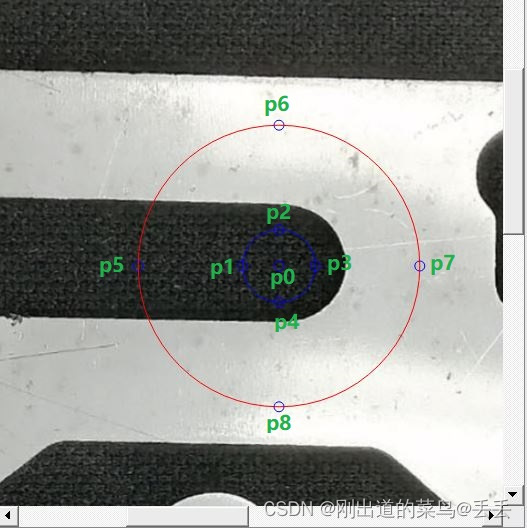
QScrollArea* qScrollArea=new QScrollArea(ui->framePicture);
QHBoxLayout* layout=new QHBoxLayout(ui->framePicture);
layout->addWidget(qScrollArea);
QLabel* qLabelView=new QLabel(qScrollArea);
qLabelView->setScaledContents(true);
qLabelView->setBackgroundRole(QPalette::Background);
qLabelView->setFrameStyle(QFrame::StyledPanel);
qLabelView->setFrameShadow(QFrame::Sunken);
qLabelView->setGeometry(0, 0, qScrollArea->width(), qScrollArea->height());
qScrollArea->setWidget(qLabelView);
GRing ring;
Mat image;
TB_DrawRing* qDrawView=new TB_DrawRing(qLabelView, &ring, &image);
qDrawView->setParent(qLabelView);
qDrawView->setWindowFlags(Qt::WindowStaysOnTopHint);
qDrawView->setAttribute(Qt::WA_TranslucentBackground,true);
qDrawView->setStyleSheet("background-color:transparent");
GRing 类对象表示圆环的参数对象
#define MOUSE_LENGTH_LEN 10
#define MOUSE_RADIU_LEN 5
class GRing
{
public:
GRing();
~GRing(){}
private:
Point2f p0;
Point2f p1;
Point2f p2;
Point2f p3;
Point2f p4;
Point2f p5;
Point2f p6;
Point2f p7;
Point2f p8;
void UpdataPoint2fApi();
public:
void SetPosLimit(Size imageSize);
void DragPointApi(QPointF point, Size imageSize, Size labelSize);
void DrawApi(QPainter* painter, QColor color1, QColor color2, Size imageSize, Size labelSize);
public:
Point2f p0_;
float measureRadiu1;
float measureRadiu2;
};
GRing::GRing()
{
measureRadiu1=50;
measureRadiu2=100;
p0_=Point2f(100, 100);
p0=p0_;
}
void GRing::UpdataPoint2fApi()
{
p1=Point2f(p0.x, p0.y - measureRadiu1);
p2=Point2f(p0.x, p0.y + measureRadiu1);
p3=Point2f(p0.x - measureRadiu1, p0.y);
p4=Point2f(p0.x + measureRadiu1, p0.y);
p5=Point2f(p0.x, p0.y - measureRadiu2);
p6=Point2f(p0.x, p0.y + measureRadiu2);
p7=Point2f(p0.x - measureRadiu2, p0.y);
p8=Point2f(p0.x + measureRadiu2, p0.y);
}
void GRing::SetPosLimit(Size imageSize)
{
int w=imageSize.width;
int h=imageSize.height;
if(w==0 || h==0)
return;
p0.x = p0.x<0 ? 0 : (p0.x>=w ? w-1 : p0.x);
p0.y = p0.y<0 ? 0 : (p0.y>=h ? h-1 : p0.y);
float r=(float)sqrt((double)(w*w + h*h))/2;
measureRadiu1 = measureRadiu1>r ? r : measureRadiu1;
measureRadiu2 = measureRadiu2>r ? r : measureRadiu2;
measureRadiu1 = measureRadiu1>=measureRadiu2 ? measureRadiu2/2 : measureRadiu1;
}
void GRing::DragPointApi(QPointF point, Size imageSize, Size labelSize)
{
float sX=(float)imageSize.width/labelSize.width;
float sY=(float)imageSize.height/labelSize.height;
float sZ=(sX + sY)/2;
Point2f p(point.x()*sX, point.y()*sY);
vector<Point2f> sorts;
sorts.push_back(p0);
sorts.push_back(p1);
sorts.push_back(p2);
sorts.push_back(p3);
sorts.push_back(p4);
sorts.push_back(p5);
sorts.push_back(p6);
sorts.push_back(p7);
sorts.push_back(p8);
float length=10e9;
int index=-1;
for(size_t i=0;i<sorts.size();i++)
{
float l=cvPointDistance(p, sorts[i]);
if(l<=length)
{
length=l;
index=(int)i;
}
}
if(length<=(MOUSE_LENGTH_LEN*sZ))
{
switch(index)
{
case 0:
{
p0=Point2f(p.x, p.y);
break;
}
case 1:
case 2:
case 3:
case 4:
{
float drag=cvPointDistance(p, p0);
if(drag>=measureRadiu2)
return;
measureRadiu1=drag;
break;
}
case 5:
case 6:
case 7:
case 8:
{
float drag=cvPointDistance(p, p0);
if(drag<=measureRadiu1)
return;
measureRadiu2=drag;
break;
}
default:
break;
}
}
this->SetPosLimit(imageSize);
}
void GRing::DrawApi(QPainter* painter, QColor color1, QColor color2, Size imageSize, Size labelSize)
{
if(!(labelSize.width>0 && imageSize.width>0))
return;
float sX=(float)imageSize.width/labelSize.width;
float sY=(float)imageSize.height/labelSize.height;
this->UpdataPoint2fApi();
float sZ=(sX + sY)/2;
QPointF P0(p0.x/sX, p0.y/sY);
QPointF P1(p1.x/sX, p1.y/sY);
QPointF P2(p2.x/sX, p2.y/sY);
QPointF P3(p3.x/sX, p3.y/sY);
QPointF P4(p4.x/sX, p4.y/sY);
QPointF P5(p5.x/sX, p5.y/sY);
QPointF P6(p6.x/sX, p6.y/sY);
QPointF P7(p7.x/sX, p7.y/sY);
QPointF P8(p8.x/sX, p8.y/sY);
float radiu1=measureRadiu1/sZ;
float radiu2=measureRadiu2/sZ;
painter->setRenderHint(QPainter::Antialiasing, true);
painter->setPen(color1);
QRectF R0(P0.x()-MOUSE_RADIU_LEN, P0.y()-MOUSE_RADIU_LEN, 2*MOUSE_RADIU_LEN, 2*MOUSE_RADIU_LEN);
QRectF R1(P1.x()-MOUSE_RADIU_LEN, P1.y()-MOUSE_RADIU_LEN, 2*MOUSE_RADIU_LEN, 2*MOUSE_RADIU_LEN);
QRectF R2(P2.x()-MOUSE_RADIU_LEN, P2.y()-MOUSE_RADIU_LEN, 2*MOUSE_RADIU_LEN, 2*MOUSE_RADIU_LEN);
QRectF R3(P3.x()-MOUSE_RADIU_LEN, P3.y()-MOUSE_RADIU_LEN, 2*MOUSE_RADIU_LEN, 2*MOUSE_RADIU_LEN);
QRectF R4(P4.x()-MOUSE_RADIU_LEN, P4.y()-MOUSE_RADIU_LEN, 2*MOUSE_RADIU_LEN, 2*MOUSE_RADIU_LEN);
QRectF R5(P0.x()-radiu1, P0.y()-radiu1, 2*radiu1, 2*radiu1);
painter->drawEllipse(R0);
painter->drawEllipse(R1);
painter->drawEllipse(R2);
painter->drawEllipse(R3);
painter->drawEllipse(R4);
painter->drawEllipse(R5);
QRectF R6(P5.x()-MOUSE_RADIU_LEN, P5.y()-MOUSE_RADIU_LEN, 2*MOUSE_RADIU_LEN, 2*MOUSE_RADIU_LEN);
QRectF R7(P6.x()-MOUSE_RADIU_LEN, P6.y()-MOUSE_RADIU_LEN, 2*MOUSE_RADIU_LEN, 2*MOUSE_RADIU_LEN);
QRectF R8(P7.x()-MOUSE_RADIU_LEN, P7.y()-MOUSE_RADIU_LEN, 2*MOUSE_RADIU_LEN, 2*MOUSE_RADIU_LEN);
QRectF R9(P8.x()-MOUSE_RADIU_LEN, P8.y()-MOUSE_RADIU_LEN, 2*MOUSE_RADIU_LEN, 2*MOUSE_RADIU_LEN);
painter->drawEllipse(R6);
painter->drawEllipse(R7);
painter->drawEllipse(R8);
painter->drawEllipse(R9);
painter->setPen(color2);
QRectF R10(P0.x()-radiu2, P0.y()-radiu2, 2*radiu2, 2*radiu2);
painter->drawEllipse(R10);
}
TB_DrawRing 类实现拖到、绘制等功能
class TB_DrawRing : public QWidget
{
Q_OBJECT
public:
explicit TB_DrawRing(QWidget* parent, GRing* ring, Mat* image);
void mouseMoveEvent(QMouseEvent *e);
void mouseReleaseEvent(QMouseEvent *e);
void paintEvent(QPaintEvent *event);
~TB_DrawRing(){}
public:
GRing* pGraphic;
Mat* pImageSize;
};
TB_DrawRing::TB_DrawRing(QWidget* parent, GRing* ring, Mat* image) : QWidget(parent), pImageSize(image), pGraphic(ring)
{}
void TB_DrawRing::mouseMoveEvent(QMouseEvent *e)
{
if(!(e->buttons() & Qt::LeftButton))
return;
int x=e->x();
int y=e->y();
if(x<0 || y<0 || x>this->width() || y>this->height() || !pImageSize)
return;
QPointF point(x, y);
Size imageSize(pImageSize->cols, pImageSize->rows);
Size labelSize(this->width(), this->height());
pGraphic->DragPointApi(point, imageSize, labelSize);
}
void TB_DrawRing::mouseReleaseEvent(QMouseEvent *e)
{
e->accept();
}
void TB_DrawRing::paintEvent(QPaintEvent* event)
{
Q_UNUSED(event);
QPainter painter(this);
if(!pImageSize)
return;
Size imageSize(pImageSize->cols, pImageSize->rows);
Size labelSize(this->width(), this->height());
pGraphic->DrawApi(&painter, Qt::blue, Qt::red, imageSize, labelSize);
this->update();
}





 文章介绍了如何使用TB_DrawRing类在QLabel上实现圆环的绘制和动态调整,包括圆环的位置移动、内外圆半径变化,以及鼠标事件的处理和绘图功能。





 扫一扫
扫一扫


 1744
1744

 被折叠的 条评论
为什么被折叠?
被折叠的 条评论
为什么被折叠?
 到【灌水乐园】发言





