


 本文详细解析了Apache启动失败的问题,特别是在端口被VMware等应用占用的情况。提供了修改配置文件properties.ini的具体步骤,将Apache的端口从80更改为8080,SSL端口从443更改为4433,从而解决端口冲突,确保Apache服务正常运行。
Apache启动提示
20:39:02 [Apache] Error: Apache shutdown unexpectedly.
20:39:02 [Apache] This may be due to a blocked port, missing dependencies,
20:39:02 [Apache] improper privileges, a crash, or a shutdown by another method.
20:39:02 [Apache] Press the Logs button to view error logs and check
20:39:02 [Apache] the Windows Event Viewer for more clues
20:39:02 [Apache] If you need more help, copy and post this
20:39:02 [Apache] entire log window on the forums
20:46:47 [Apache] Problem detected!
20:46:47 [Apache] Port 443 in use by ""D:\Program Files (x86)\VMware\VMware Workstation\vmware-hostd.exe" -u "C:\ProgramData\VMware\hostd\config.xml"" with PID 9168!
20:46:47 [Apache] Apache WILL NOT start without the configured ports free!
20:46:47 [Apache] You need to uninstall/disable/reconfigure the blocking application
20:46:47 [Apache] or reconfigure Apache and the Control Panel to listen on a different port
上面说明VMware占用了443端口
以下通过修改配置文件来修改默认端口(当没有安装VMware不会占用端口)
2.httpd-ssl.conf(修改无效)
3.修改properties.ini
右键记事本打开或notepad++打开properties.ini
[General]
installdir=D:\xampp
base_stack_name=XAMPP
base_stack_version=1.8.3-1
base_stack_platform=windows
require_root_privileges=1
[Apache]
apache_server_port=80
apache_server_ssl_port=443
apache_root_directory=/xampp/apache
apache_htdocs_directory=D:\xampp/htdocs
apache_domainname=127.0.0.1
apache_configuration_directory=D:\xampp/apache/conf
apache_unique_service_name=
[MySQL]
mysql_port=3306
mysql_host=localhost
mysql_root_directory=D:\xampp\mysql
mysql_binary_directory=D:\xampp\mysql\bin
mysql_data_directory=D:\xampp\mysql\data
mysql_arguments=-u root -P3306
mysql_unique_service_name=
[PHP]
php_binary_directory=D:\xampp\php
php_configuration_directory=D:\xampp\php
修改成(默认除apache,禁止修改其他内容,如悉例外)
apache_server_port=8080
apache_server_ssl_port=4433
ctrl+S保存
star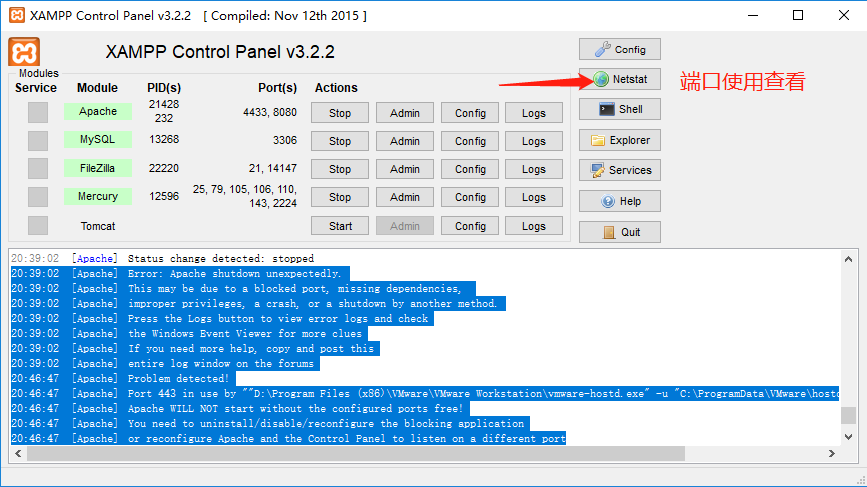
当然也有其他方法,只是有些方法效率不高则不做修改方法





 扫一扫
扫一扫


 638
638

 被折叠的 条评论
为什么被折叠?
被折叠的 条评论
为什么被折叠?
 到【灌水乐园】发言





