



 本文介绍了一个使用C++封装的MySQL接口类,包括连接、创建数据库、创建表、写入数据和读取数据等操作。此外,还展示了如何进行事务处理,包括关闭自动提交、开始事务、回滚和提交事务,以及事务在多条SQL语句执行时的性能优势。
MySQL C++ 封装接口
头文件 MySQLInterface.h 如下:
#ifndef __MYSQL_INTERFACE_H__
#define __MYSQL_INTERFACE_H__

#include "winsock.h"
#include <iostream>
#include <string>
#include "mysql.h"
#include <vector>
#include <string>

#pragma comment(lib, "ws2_32.lib")
using namespace std;

#define DLL_EXPORT __declspec(dllexport)

class MySQLInterface
{
public:
	DLL_EXPORT MySQLInterface();
	DLL_EXPORT virtual ~MySQLInterface();

	DLL_EXPORT bool connectMySQL(char* server, char* username, char* password, char* database,int port);
	DLL_EXPORT bool createDatabase(std::string& dbname);
	DLL_EXPORT bool createdbTable(const std::string& query);

	DLL_EXPORT bool setAutocommit(bool status){return mysql_autocommit(&mysqlInstance, status);}

	DLL_EXPORT void errorIntoMySQL();
	DLL_EXPORT bool writeDataToDB(string queryStr);
	DLL_EXPORT bool getDatafromDB(string queryStr, std::vector<std::vector<std::string> >& data);
	DLL_EXPORT void closeMySQL();

public:
	int errorNum;                    //错误代号
	const char* errorInfo;             //错误提示

private:
	MYSQL mysqlInstance;                      //MySQL对象,必备的一个数据结构
	MYSQL_RES *result;                 //用于存放结果 建议用char* 数组将此结果转存
};

#endif
MySQLInterface.cpp 如下:
#include "MySQLInterface.h"

//构造函数 初始化各个变量和数据
MySQLInterface::MySQLInterface():
	errorNum(0),errorInfo("ok")
{
	mysql_library_init(0,NULL,NULL);
	mysql_init(&mysqlInstance);
	mysql_options(&mysqlInstance,MYSQL_SET_CHARSET_NAME,"gbk");
}

MySQLInterface::~MySQLInterface()
{

}

//连接MySQL
bool MySQLInterface::connectMySQL(char* server, char* username, char* password, char* database,int port)
{
	if(mysql_real_connect(&mysqlInstance,server,username,password,database,port,0,0) != NULL)
		return true;
	else
		errorIntoMySQL();
	return false;
}
//判断数据库是否存在,不存在则创建数据库,并打开
bool MySQLInterface::createDatabase(std::string& dbname)
{
	std::string queryStr = "create database if not exists ";
	queryStr += dbname;
	if (0 == mysql_query(&mysqlInstance,queryStr.c_str()))
	{
		queryStr = "use ";
		queryStr += dbname;
		if (0 == mysql_query(&mysqlInstance,queryStr.c_str()))
		{
			return true;
		}

	}
	errorIntoMySQL();
	return false;
}
//判断数据库中是否存在相应表,不存在则创建表
bool MySQLInterface::createdbTable(const std::string& query)
{
	if (0 == mysql_query(&mysqlInstance,query.c_str()))
	{
		return true;
	}
	errorIntoMySQL();
	return false;
}

//写入数据
bool MySQLInterface::writeDataToDB(string queryStr)
{
	if(0==mysql_query(&mysqlInstance,queryStr.c_str()))
		return true;
	else
		errorIntoMySQL();
	return false;
}
//读取数据
bool MySQLInterface::getDatafromDB(string queryStr, std::vector<std::vector<std::string> >& data)
{
	if(0!=mysql_query(&mysqlInstance,queryStr.c_str()))
	{
		errorIntoMySQL();
		cout<<"errorNum :"<<errorNum<<endl;
		cout<<"errorInfo :"<<errorInfo<<endl;
		return false;
	}

	result=mysql_store_result(&mysqlInstance);

	int row=mysql_num_rows(result);
	int field=mysql_num_fields(result);

	MYSQL_ROW line=NULL;
	line=mysql_fetch_row(result);

	int j=0;
	std::string temp;
	while(NULL!=line)
	{
		std::vector<std::string> linedata;
		for(int i=0; i<field;i++)
		{
			if(line[i])
			{
				temp = line[i];
				linedata.push_back(temp);
			}
			else
			{
				temp = "";
				linedata.push_back(temp);
			}
		}
		line=mysql_fetch_row(result);
		data.push_back(linedata);
	}
	return true;
}

//错误信息
void MySQLInterface::errorIntoMySQL()
{
	errorNum=mysql_errno(&mysqlInstance);
	errorInfo=mysql_error(&mysqlInstance);
}

//断开连接
void MySQLInterface::closeMySQL()
{
	mysql_close(&mysqlInstance);
}
测试代码如下:
#include "MySQLInterface.h"

#include <iostream>
using namespace std;

int _tmain(int argc, _TCHAR* argv[])
{
	char *host = "172.16.88.122";
	char *user = "root";
	char *pwd  = "******";
	char *dbname = "test";
	int	 port = 3306;

	MySQLInterface *mysql_obj = new MySQLInterface();

	bool bConnFlag = mysql_obj->connectMySQL(host, user, pwd, dbname, port);

	if(!bConnFlag)
	{
		return -1;
	}

	mysql_obj->setAutocommit(true); //关闭自动提交

	char *sql1 = "show variables like 'autocommit';";

	vector<vector<string>> resultData;

	bool bGetRet = mysql_obj->getDatafromDB(string(sql1), resultData);
	if(bGetRet)
	{
		for(int i = 0; i < resultData.size(); ++i)
		{
			cout<< resultData[i][0]<<" : " << resultData[i][1] << endl;
		}
	}


	mysql_obj->closeMySQL();

	system("pause");

	return 0;
}
运行结果如下:
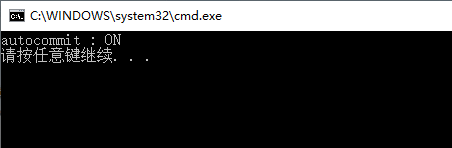
mysql的事务验证
- mysql事务支持的引擎是InnoDB
- 默认情况下autocommit的值为ON(开启状态)
正常情况下的多条数据插入代码案例如下:
#include "MySQLInterface.h"

#include <iostream>
using namespace std;

int _tmain(int argc, _TCHAR* argv[])
{
	char *host = "172.16.88.122";
	char *user = "root";
	char *pwd	 = "******";
	char *dbname = "test";
	int	 port = 3306;

	MySQLInterface *mysql_obj = new MySQLInterface();

	bool bConnFlag = mysql_obj->connectMySQL(host, user, pwd, dbname, port);

	if(!bConnFlag)
	{
		return -1;
	}

	mysql_obj->setAutocommit(true); //关闭自动提交

	char *sql1 = "show variables like 'autocommit';";

	char *sql2 = "TRUNCATE TABLE `stu`;";

	char *sql3 = "INSERT INTO `test`.`stu` (`id`, `name`, `age`) VALUES ('%d', 'test', '%d');";
	vector<vector<string>> resultData;

	bool bGetRet = mysql_obj->getDatafromDB(string(sql1), resultData);
	if(bGetRet)
	{
		for(int i = 0; i < resultData.size(); ++i)
		{
			cout<< resultData[i][0]<<" : " << resultData[i][1] << endl;
		}
	}

	if(mysql_obj->writeDataToDB(string(sql2)))
	{
		cout<<"clean table `stu` success!!!"<<endl;
	}
	else
	{
		cout<<"clean table `stu` failed!!!"<<endl;
	}

	unsigned long dwTick1 = GetTickCount();

	int iCount = 5;
	char sql_str[256] = {0};
	bool extRet = false;

	for(int i = 1; i <= iCount; i++)
	{
		sprintf(sql_str, sql3, i, i%10);
		if(!mysql_obj->writeDataToDB(string(sql_str)))
		{
			cout<<"Error : sql failed!"<<endl;
		}

		cout<<"this is test : "<<i<<endl;
		Sleep(10000);
	}

	unsigned long dwTick2 = GetTickCount();

	cout<<"cost time:"<<dwTick2 - dwTick1<<endl;

	mysql_obj->closeMySQL();

	system("pause");

	return 0;
}
执行过程中的截图如下:(插入一条语句提交一次事务,可以实时查询更新)

先插入数据,后体提交事务代码案例如下:
#include "MySQLInterface.h"

#include <iostream>
using namespace std;

int _tmain(int argc, _TCHAR* argv[])
{
	char *host = "172.16.88.122";
	char *user = "root";
	char *pwd  = "******";
	char *dbname = "test";
	int	 port = 3306;

	MySQLInterface *mysql_obj = new MySQLInterface();

	bool bConnFlag = mysql_obj->connectMySQL(host, user, pwd, dbname, port);

	if(!bConnFlag)
	{
		return -1;
	}

	mysql_obj->setAutocommit(true);

	char *sql1 = "show variables like 'autocommit';";

	char *sql2 = "TRUNCATE TABLE `stu`;";

	char *sql3 = "INSERT INTO `test`.`stu` (`id`, `name`, `age`) VALUES ('%d', 'test', '%d');";
	vector<vector<string>> resultData;

	bool bGetRet = mysql_obj->getDatafromDB(string(sql1), resultData);
	if(bGetRet)
	{
		for(int i = 0; i < resultData.size(); ++i)
		{
			cout<< resultData[i][0]<<" : " << resultData[i][1] << endl;
		}
	}

	if(mysql_obj->writeDataToDB(string(sql2)))
	{
		cout<<"clean table `stu` success!!!"<<endl;
	}
	else
	{
		cout<<"clean table `stu` failed!!!"<<endl;
	}

	unsigned long dwTick1 = GetTickCount();

	int iCount = 5;
	char sql_str[256] = {0};
	bool extRet = false;

	if(mysql_obj->writeDataToDB(string("begin ;")))
	{
		for(int i = 1; i <= iCount; i++)
		{
			sprintf(sql_str, sql3, i, i%10);
			if(!mysql_obj->writeDataToDB(string(sql_str)))
			{
				cout<<"Error : sql failed!"<<endl;
				if(mysql_obj->writeDataToDB(string("rollback;")))
				{
					cout<<"Success : rollback success!"<<endl;
				}
				else
				{
					cout<<"Error : rollback Error!"<<endl;
				}
			}

			cout<<"this is test : "<<i<<endl;
			Sleep(10000);
		}

		if(mysql_obj->writeDataToDB(string("commit ;")))
		{
			cout<<"Success : commit success!"<<endl;
		}
		else
		{
			cout<<"Error : commit Error!"<<endl;
		}
	}
	else
	{
		cout<<"Error : begin Error!"<<endl;
	}


	unsigned long dwTick2 = GetTickCount();

	cout<<"cost time:"<<dwTick2 - dwTick1<<endl;

	mysql_obj->closeMySQL();

	system("pause");

	return 0;
}
执行过程中的截图如下:(插入完成后一次性提交事务,提交后才可以查询更新)
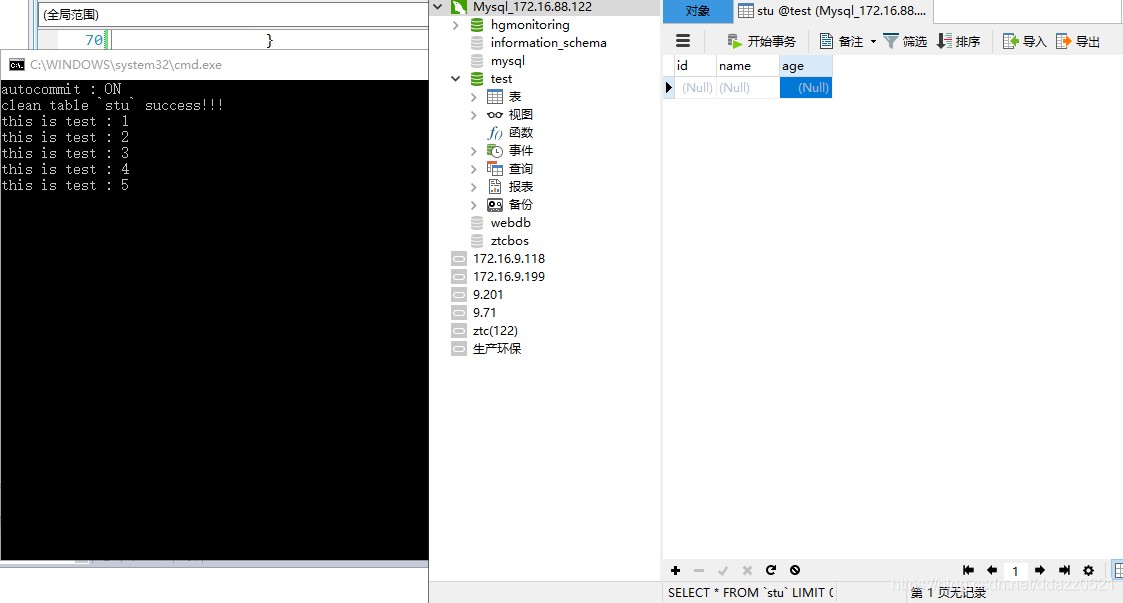
事务的提交次数减少执行sql语句条数多时可以明显缩短执行时间,执行失败可以回滚,体现了事务的原子性。





 扫一扫
扫一扫


 被折叠的 条评论
为什么被折叠?
被折叠的 条评论
为什么被折叠?
 到【灌水乐园】发言





