


 本文介绍了如何克隆并安装Cypress官方项目cypress-example-recipes,通过npm install进行依赖安装,并展示了安装过程中的详细步骤和输出。在项目中,每个子项目都有独立的前后端实现。文章还提供了一个测试用例示例,展示了如何编写测试登录功能的Cypress脚本,并利用Cypress的强大Debug能力进行测试调试,包括命令快照、网络请求跟踪、暂停和单步执行等。
前言
阅读本篇博文前,请确保已经阅读过自动化测试框架[Cypress概述]
阅读本篇博文前,请确保已经阅读过自动化测试框架[各自动化测试框架大比拼]
阅读本篇博文前,请确保已经阅读过自动化测试框架[Cypress环境搭建与配置详解]
克隆官方项目
执行命令git clone https://github.com/cypress-io/cypress-example-recipes.git,将官方配到的被测项目克隆到本地,GIT的使用在此不多赘述,然后命令行进入到克隆下来的项目目录中,执行命令npm install
C:\cypress-example-recipes>npm install

> deasync@0.1.20 install C:\cypress-example-recipes\node_modules\deasync
> node ./build.js

`win32-x64-node-14` exists; testing
Binary is fine; exiting

> husky@4.0.0 install C:\cypress-example-recipes\node_modules\husky
> node husky install

husky > Setting up git hooks
husky > Done

> core-js@3.6.5 postinstall C:\cypress-example-recipes\node_modules\@jimp\bmp\node_modules\core-js
> node -e "try{require('./postinstall')}catch(e){}"

Thank you for using core-js ( https://github.com/zloirock/core-js ) for polyfilling JavaScript standard library!

The project needs your help! Please consider supporting of core-js on Open Collective or Patreon:
> https://opencollective.com/core-js
> https://www.patreon.com/zloirock

Also, the author of core-js ( https://github.com/zloirock ) is looking for a good job -)


> core-js@3.6.5 postinstall C:\cypress-example-recipes\node_modules\@jimp\core\node_modules\core-js
> node -e "try{require('./postinstall')}catch(e){}"


> core-js@3.6.5 postinstall C:\cypress-example-recipes\node_modules\@jimp\custom\node_modules\core-js
> node -e "try{require('./postinstall')}catch(e){}"


> core-js@3.6.5 postinstall C:\cypress-example-recipes\node_modules\@jimp\gif\node_modules\core-js
> node -e "try{require('./postinstall')}catch(e){}"


> core-js@3.6.5 postinstall C:\cypress-example-recipes\node_modules\@jimp\jpeg\node_modules\core-js
> node -e "try{require('./postinstall')}catch(e){}"


> core-js@3.6.5 postinstall C:\cypress-example-recipes\node_modules\@jimp\plugin-blit\node_modules\core-js
> node -e "try{require('./postinstall')}catch(e){}"


> core-js@3.6.5 postinstall C:\cypress-example-recipes\node_modules\@jimp\plugin-blur\node_modules\core-js
> node -e "try{require('./postinstall')}catch(e){}"


> core-js@3.6.5 postinstall C:\cypress-example-recipes\node_modules\@jimp\plugin-circle\node_modules\core-js
> node -e "try{require('./postinstall')}catch(e){}"


> core-js@3.6.5 postinstall C:\cypress-example-recipes\node_modules\@jimp\plugin-color\node_modules\core-js
> node -e "try{require('./postinstall')}catch(e){}"


> core-js@3.6.5 postinstall C:\cypress-example-recipes\node_modules\@jimp\plugin-contain\node_modules\core-js
> node -e "try{require('./postinstall')}catch(e){}"


> core-js@3.6.5 postinstall C:\cypress-example-recipes\node_modules\@jimp\plugin-cover\node_modules\core-js
> node -e "try{require('./postinstall')}catch(e){}"


> core-js@3.6.5 postinstall C:\cypress-example-recipes\node_modules\@jimp\plugin-crop\node_modules\core-js
> node -e "try{require('./postinstall')}catch(e){}"


> core-js@3.6.5 postinstall C:\cypress-example-recipes\node_modules\@jimp\plugin-displace\node_modules\core-js
> node -e "try{require('./postinstall')}catch(e){}"


> core-js@3.6.5 postinstall C:\cypress-example-recipes\node_modules\@jimp\plugin-dither\node_modules\core-js
> node -e "try{require('./postinstall')}catch(e){}"


> core-js@3.6.5 postinstall C:\cypress-example-recipes\node_modules\@jimp\plugin-fisheye\node_modules\core-js
> node -e "try{require('./postinstall')}catch(e){}"


> core-js@3.6.5 postinstall C:\cypress-example-recipes\node_modules\@jimp\plugin-flip\node_modules\core-js
> node -e "try{require('./postinstall')}catch(e){}"


> core-js@3.6.5 postinstall C:\cypress-example-recipes\node_modules\@jimp\plugin-gaussian\node_modules\core-js
> node -e "try{require('./postinstall')}catch(e){}"


> core-js@3.6.5 postinstall C:\cypress-example-recipes\node_modules\@jimp\plugin-invert\node_modules\core-js
> node -e "try{require('./postinstall')}catch(e){}"


> core-js@3.6.5 postinstall C:\cypress-example-recipes\node_modules\@jimp\plugin-mask\node_modules\core-js
> node -e "try{require('./postinstall')}catch(e){}"


> core-js@3.6.5 postinstall C:\cypress-example-recipes\node_modules\@jimp\plugin-normalize\node_modules\core-js
> node -e "try{require('./postinstall')}catch(e){}"


> core-js@3.6.5 postinstall C:\cypress-example-recipes\node_modules\@jimp\plugin-print\node_modules\core-js
> node -e "try{require('./postinstall')}catch(e){}"


> core-js@3.6.5 postinstall C:\cypress-example-recipes\node_modules\@jimp\plugin-resize\node_modules\core-js
> node -e "try{require('./postinstall')}catch(e){}"


> core-js@3.6.5 postinstall C:\cypress-example-recipes\node_modules\@jimp\plugin-rotate\node_modules\core-js
> node -e "try{require('./postinstall')}catch(e){}"


> core-js@3.6.5 postinstall C:\cypress-example-recipes\node_modules\@jimp\plugin-scale\node_modules\core-js
> node -e "try{require('./postinstall')}catch(e){}"


> core-js@3.6.5 postinstall C:\cypress-example-recipes\node_modules\@jimp\plugin-shadow\node_modules\core-js
> node -e "try{require('./postinstall')}catch(e){}"


> core-js@3.6.5 postinstall C:\cypress-example-recipes\node_modules\@jimp\plugin-threshold\node_modules\core-js
> node -e "try{require('./postinstall')}catch(e){}"


> core-js@3.6.5 postinstall C:\cypress-example-recipes\node_modules\@jimp\plugins\node_modules\core-js
> node -e "try{require('./postinstall')}catch(e){}"


> core-js@3.6.5 postinstall C:\cypress-example-recipes\node_modules\@jimp\png\node_modules\core-js
> node -e "try{require('./postinstall')}catch(e){}"


> core-js@3.6.5 postinstall C:\cypress-example-recipes\node_modules\@jimp\tiff\node_modules\core-js
> node -e "try{require('./postinstall')}catch(e){}"


> core-js@3.6.5 postinstall C:\cypress-example-recipes\node_modules\@jimp\types\node_modules\core-js
> node -e "try{require('./postinstall')}catch(e){}"


> core-js@3.6.5 postinstall C:\cypress-example-recipes\node_modules\@jimp\utils\node_modules\core-js
> node -e "try{require('./postinstall')}catch(e){}"


> core-js@2.6.11 postinstall C:\cypress-example-recipes\node_modules\babel-register\node_modules\core-js
> node -e "try{require('./postinstall')}catch(e){}"


> core-js@2.6.10 postinstall C:\cypress-example-recipes\node_modules\babel-runtime\node_modules\core-js
> node postinstall || echo "ignore"


> core-js-pure@3.6.0 postinstall C:\cypress-example-recipes\node_modules\core-js-pure
> node -e "try{require('./postinstall')}catch(e){}"


> core-js@3.6.5 postinstall C:\cypress-example-recipes\node_modules\jimp\node_modules\core-js
> node -e "try{require('./postinstall')}catch(e){}"


> core-js@2.6.11 postinstall C:\cypress-example-recipes\node_modules\parcel-bundler\node_modules\core-js
> node -e "try{require('./postinstall')}catch(e){}"


> core-js@3.6.0 postinstall C:\cypress-example-recipes\node_modules\react-app-polyfill\node_modules\core-js
> node -e "try{require('./postinstall')}catch(e){}"


> core-js@2.6.10 postinstall C:\cypress-example-recipes\node_modules\start-server-and-test\node_modules\core-js
> node postinstall || echo "ignore"


> core-js@2.6.10 postinstall C:\cypress-example-recipes\node_modules\wait-on\node_modules\core-js
> node postinstall || echo "ignore"


> @cypress/snapshot@2.1.7 postinstall C:\cypress-example-recipes\node_modules\@cypress\snapshot
> node src/add-initial-snapshot-file.js


> cypress@6.0.0 postinstall C:\cypress-example-recipes\node_modules\cypress
> node index.js --exec install

Installing Cypress (version: 6.0.0)

  √  Downloaded Cypress
  √  Unzipped Cypress
  √  Finished Installation C:\Users\Administrator\AppData\Local\Cypress\Cache\6.0.0

You can now open Cypress by running: node_modules\.bin\cypress open

https://on.cypress.io/installing-cypress


> husky@4.0.0 postinstall C:\cypress-example-recipes\node_modules\husky
> opencollective-postinstall || exit 0

Thank you for using husky!
If you rely on this package, please consider supporting our open collective:
> https://opencollective.com/husky/donate


> nodemon@1.18.11 postinstall C:\cypress-example-recipes\node_modules\nodemon
> node bin/postinstall || exit 0

Love nodemon? You can now support the project via the open collective:
 > https://opencollective.com/nodemon/donate


> parcel-bundler@1.12.4 postinstall C:\cypress-example-recipes\node_modules\parcel-bundler
> node -e "console.log('\u001b[35m\u001b[1mLove Parcel? You can now donate to our open collective:\u001b[22m\u001b[39m\n > \u001b[34mhttps://opencollective.com/parcel/donate\u001b[0m')"

Love Parcel? You can now donate to our open collective:
 > https://opencollective.com/parcel/donate

> styled-components@4.4.0 postinstall C:\cypress-example-recipes\node_modules\styled-components
> node ./scripts/postinstall.js || exit 0

Use styled-components at work? Consider supporting our development efforts at https://opencollective.com/styled-components

> webpack-cli@3.3.3 postinstall C:\cypress-example-recipes\node_modules\webpack-cli
> node ./bin/opencollective.js


                            Thanks for using Webpack!
                 Please consider donating to our Open Collective
                        to help us maintain this package.


                 Donate: https://opencollective.com/webpack/donate


npm WARN optional SKIPPING OPTIONAL DEPENDENCY: fsevents@2.1.2 (node_modules\react-scripts\node_modules\fsevents):
npm WARN notsup SKIPPING OPTIONAL DEPENDENCY: Unsupported platform for fsevents@2.1.2: wanted {"os":"darwin","arch":"any"} (current: {"os":"win32","arch":"x64"})
npm WARN optional SKIPPING OPTIONAL DEPENDENCY: fsevents@1.2.9 (node_modules\fsevents):
npm WARN notsup SKIPPING OPTIONAL DEPENDENCY: Unsupported platform for fsevents@1.2.9: wanted {"os":"darwin","arch":"any"} (current: {"os":"win32","arch":"x64"})

added 3597 packages from 1615 contributors and audited 3680 packages in 940.515s

55 packages are looking for funding
  run `npm fund` for details

found 40231 vulnerabilities (40138 low, 48 moderate, 44 high, 1 critical)
  run `npm audit fix` to fix them, or `npm audit` for details
安装成功后,目录结构如下所示:
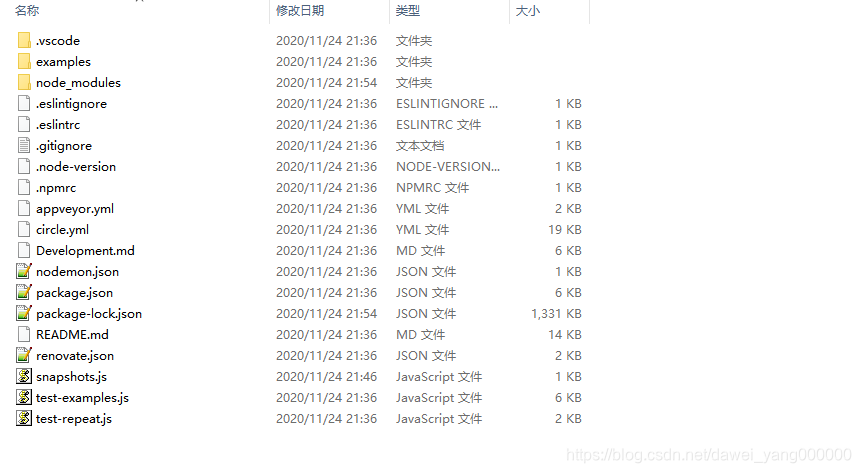
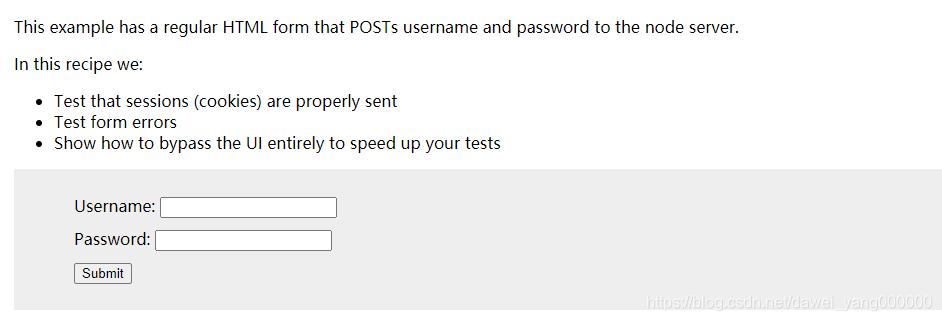
cypress-esample-recipes测试项目的examples文件夹内包括了很多子项目,每个子项目都相对独立,有自己的前后端实现,例如进入C:\cypress-example-recipes\examples\logging-in__html-web-forms路径下,然后运行命令npm start启动这个子项目
C:\cypress-example-recipes\examples\logging-in__html-web-forms>npm start

> logging-in-html-web-form@1.0.0 start C:\cypress-example-recipes\examples\logging-in__html-web-forms
> node server.js --port 7077
使用浏览器访问http://localhost:7077,页面如下所示
测试实例
Cypress安装完成后即可直接创建测试用例用于测试,假设测试如下几个功能点:
- 访问
http://localhost:7077 - 输入用户名密码,单击登陆按钮
- 如果用户名和密码正确则登陆成功,否则登陆失败
Cypress安装完成后,会自动生成一个路径,即
C:\cypress\node_modules\.bin\cypress\integration,它是Cypress默认存放测试用例的根目录,任何创建在此路径下的文件将被当作测试用例
在该路径下创建一个js文件,例如testLogin.js,然后将如下代码写入
// testLogin.js
///<reference types="cypress"/>
describe('登陆', function(){
	// 此用户名密码为本地服务器默认
	const username = 'jane.lane'
	const password = 'password123'
	context('HTML表单登陆测试', function(){
		it('登陆成功, 跳转到dashboard页', function(){
			cy.visit('http://localhost:7077/login')
			cy.get('input[name=username]').type(username)
			cy.get('input[name=password]').type(password)
			cy.get('form').submit()
			// 断言,验证登陆成功则跳转到dashboard页面
			// 断言,验证用户名存在
			cy.url().should('include', '/dashboard')
			cy.get('h1').should('contain', 'jane.lane')
			})
		})
	})
然后启动Cypress
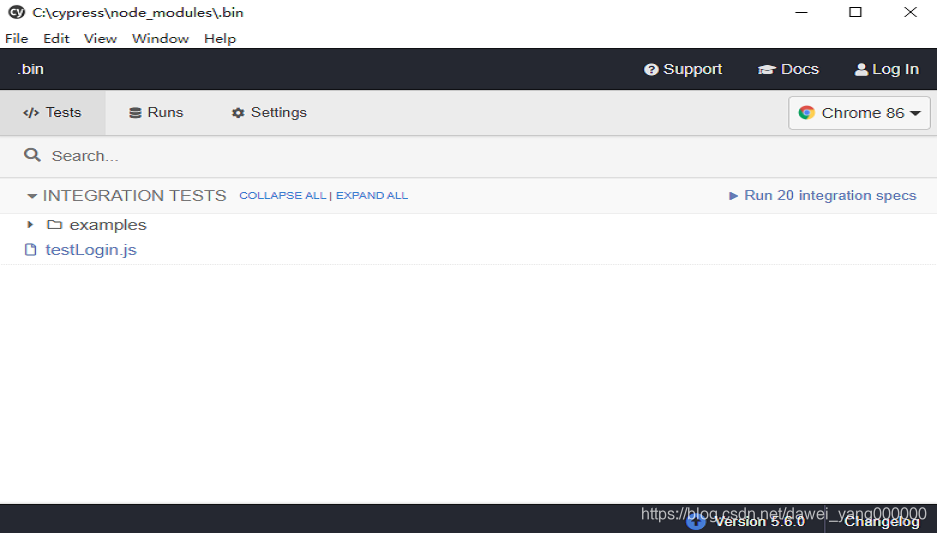
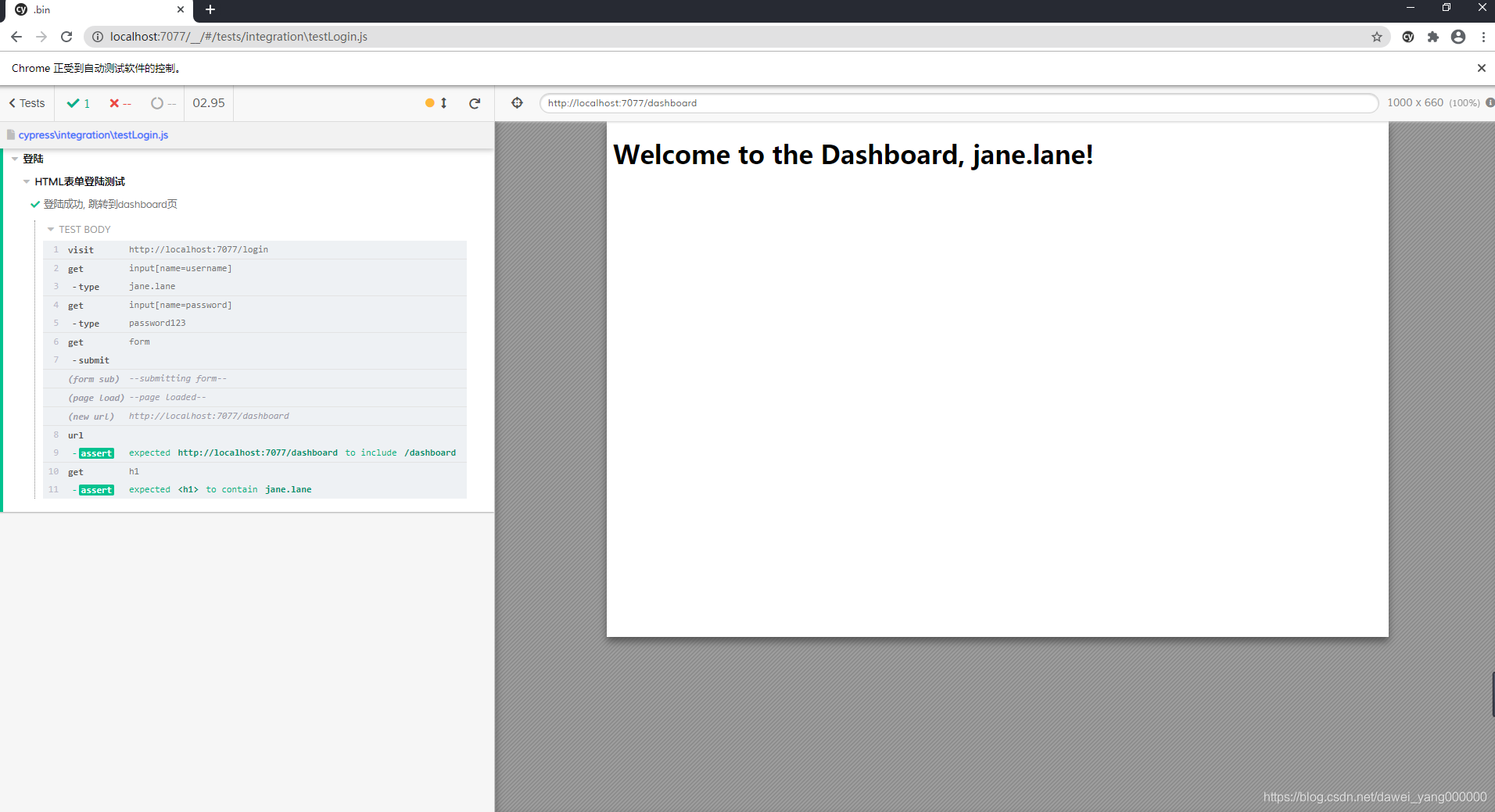
单击窗口中刚刚创建的js文件,Cypress便会启动测试并执行该js文件完成测试任务,执行完成后,如下图所示
Cypress强大的Debug能力
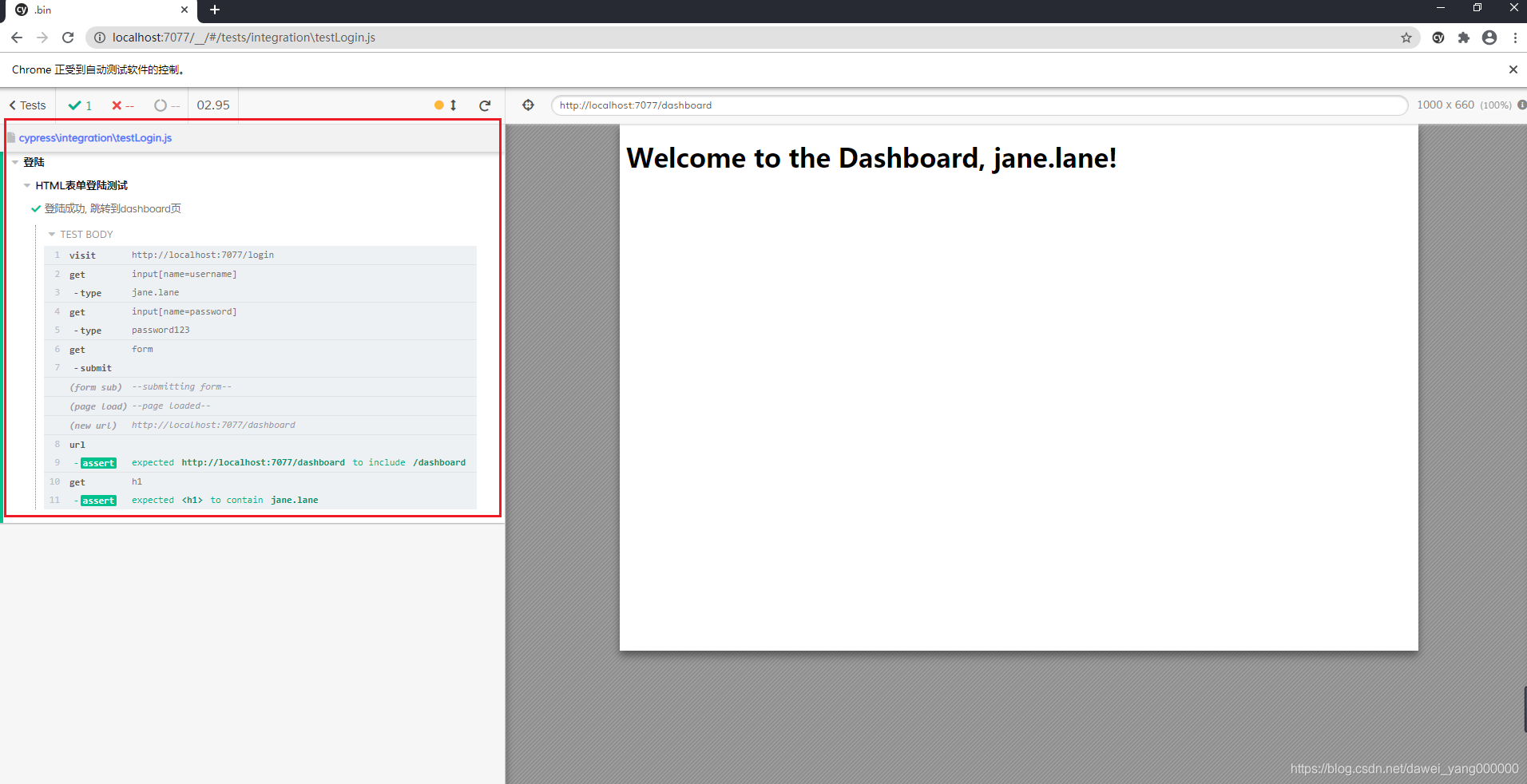
如图红色圈出的部分,每一步都可以点击查看详细信息,具体情况如下:
- 每个命令(Command)均有快照且支持回放,并支持在不同的操作命令快照之间切换,方便开发者了解整个测试的上下文
- 支持查看测试运行时发生的特殊页面事件(例如网络请求),Cypress会记录测试运行时发生的特殊页面事件,包括网络XHR请求、URL哈希更改、页面加载、表格提交,如下图所示表单提交请求
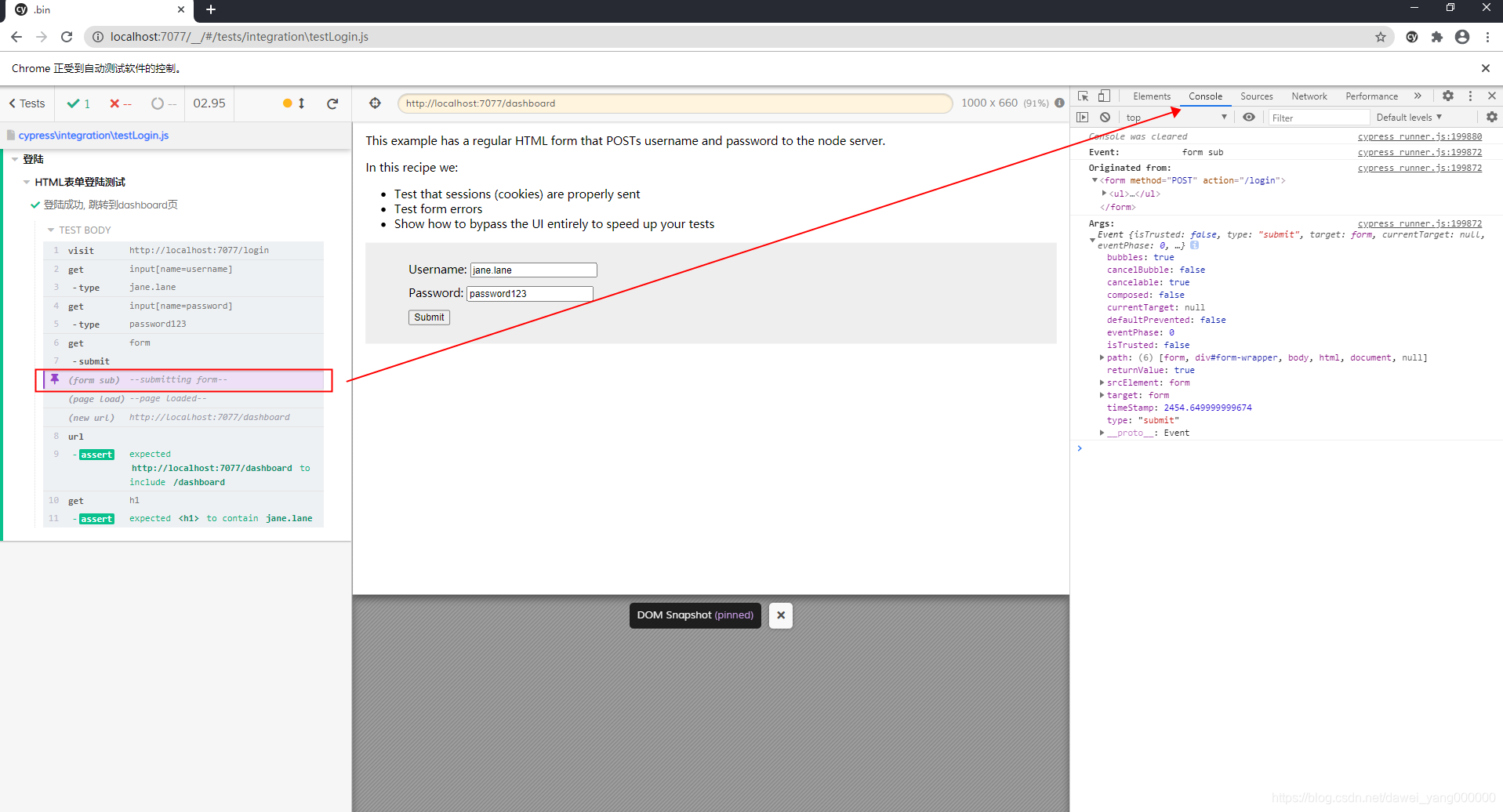
- Console输出每个命令(Command)的详细信息
- 暂停命令并单布/恢复执行,在调试测试代码时,Cypress提供了命令来暂停即
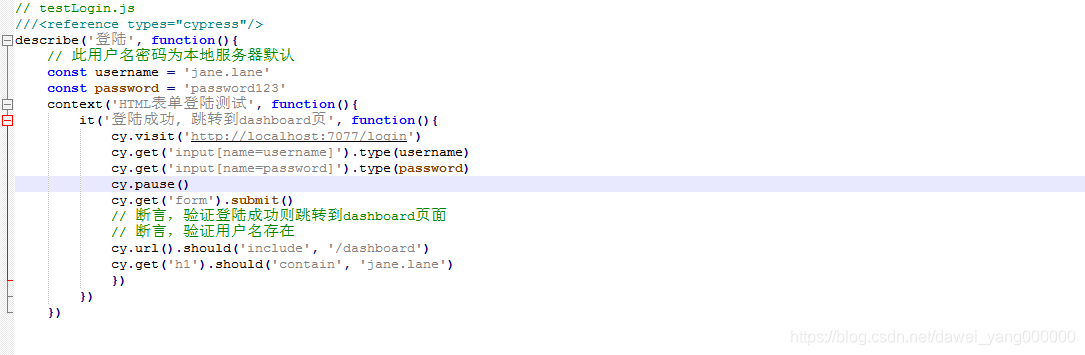
cy.pause(),比如将它添加到js文件,位于cy.get('form').submit()之前,再次执行代码,如图所示结果
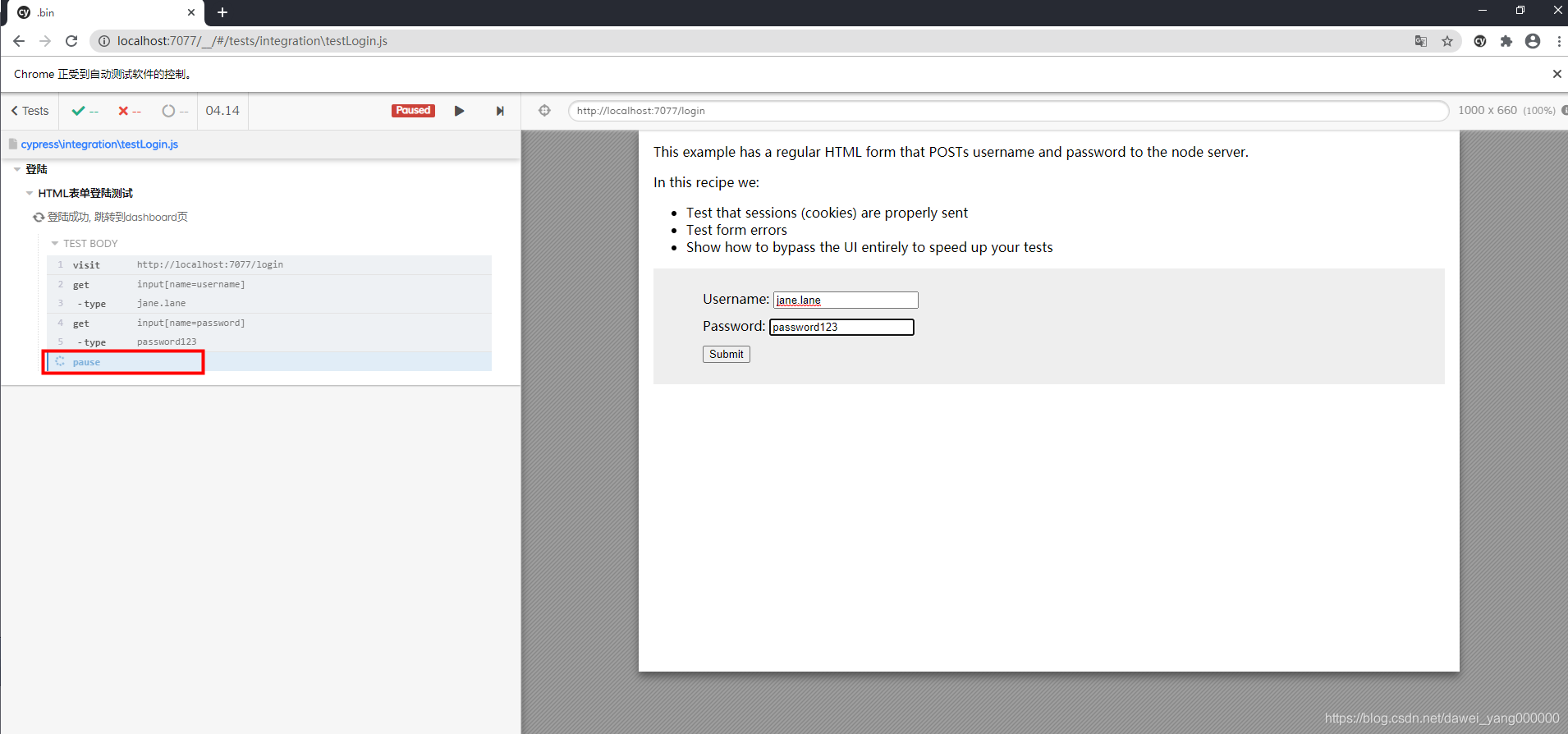
于此同时,在页面的上方也多出来Paused标记和Resume和Next:'get'按钮
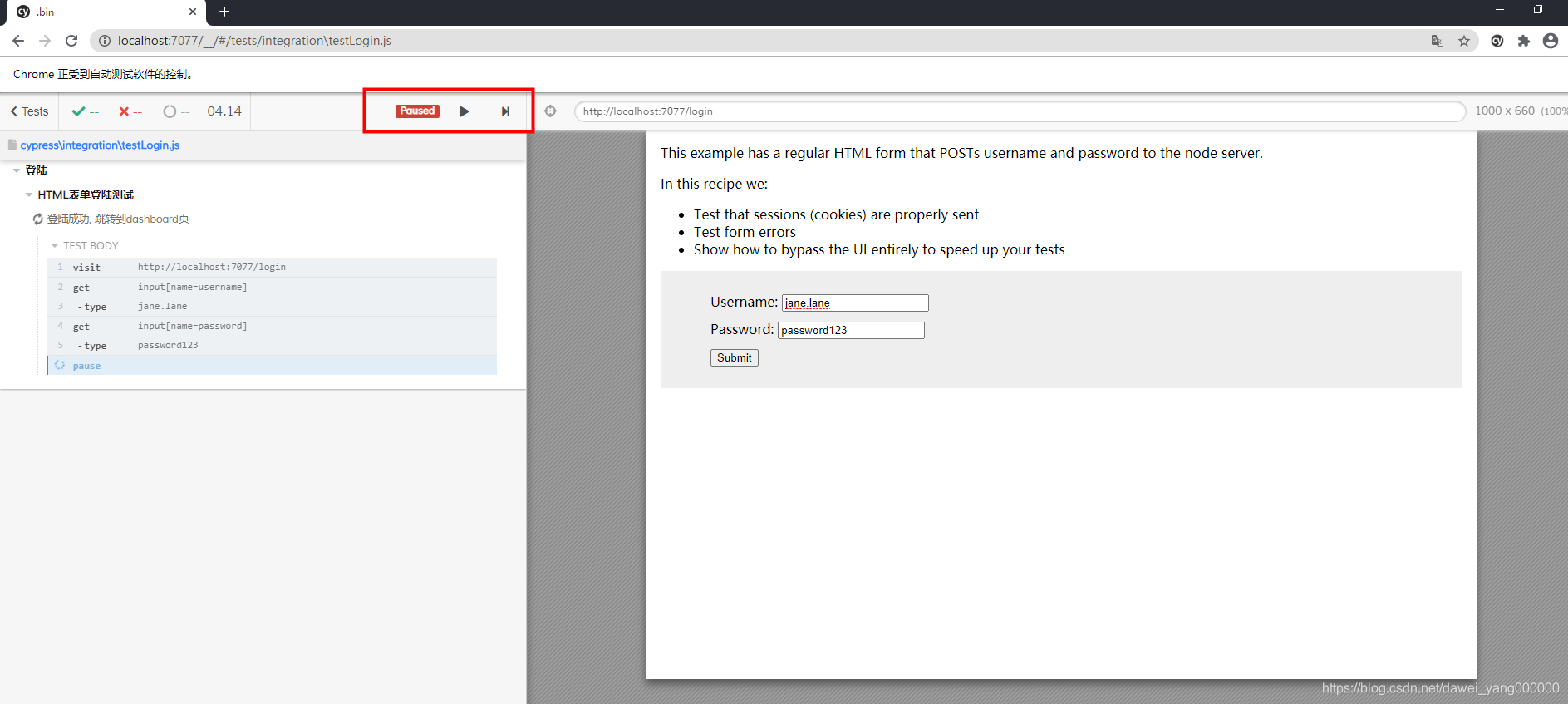
此时如果点击Resume按钮,测试将恢复运行直至结束或下一次暂停,如果选择Next:'get'按钮,则测试会单步执行 - 还可以使用
cy.debug()命令实现暂停,写法稍微不同
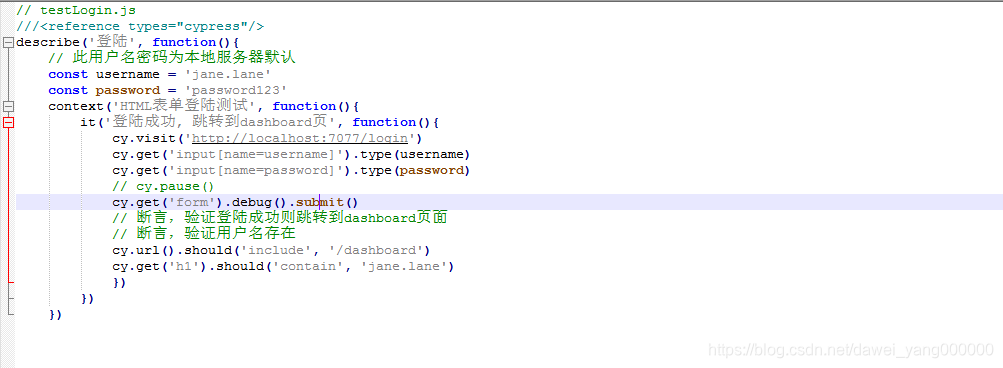
再次执行测试,发现直接执行完毕到了最后,但是打开F12,然后点击Run All Tests按钮
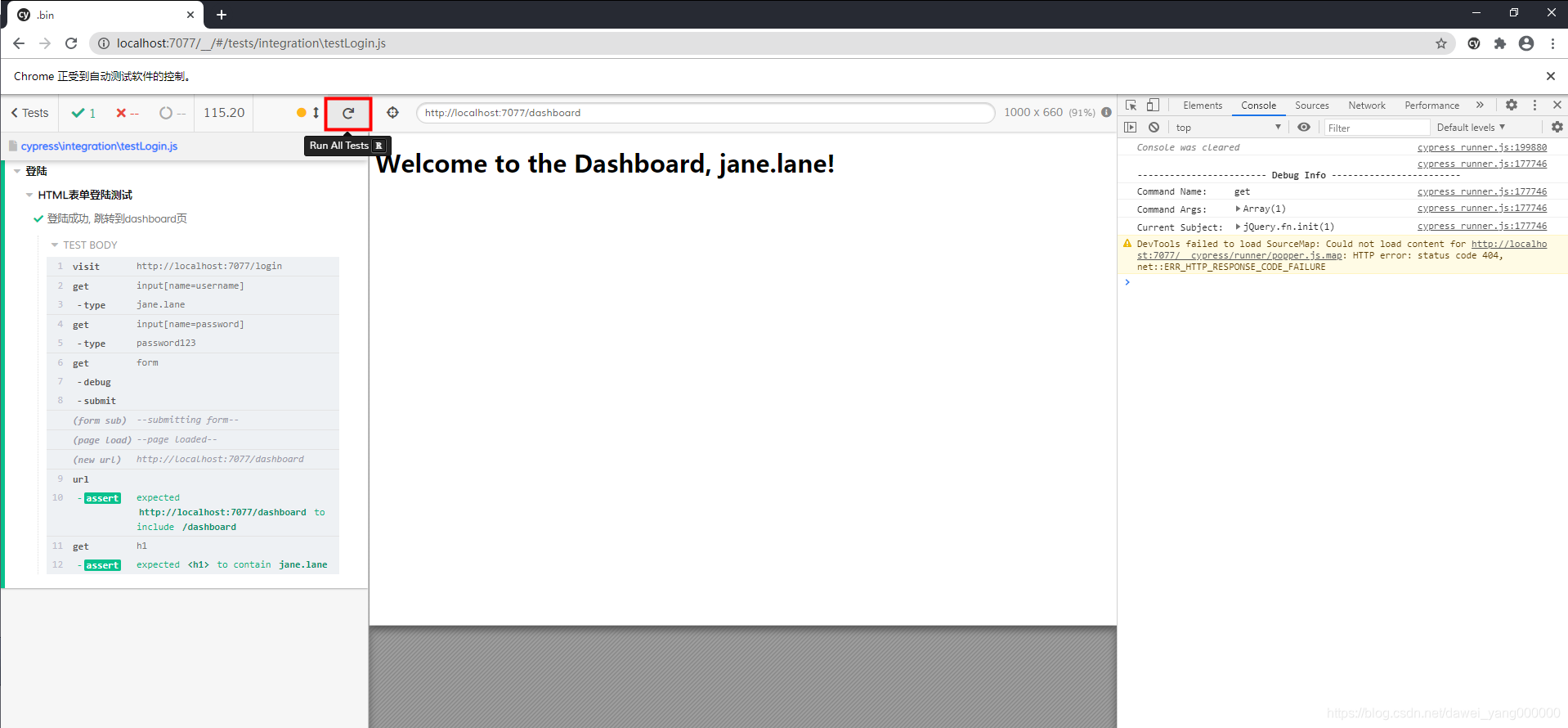
便会进入如页面所示的Debug模式
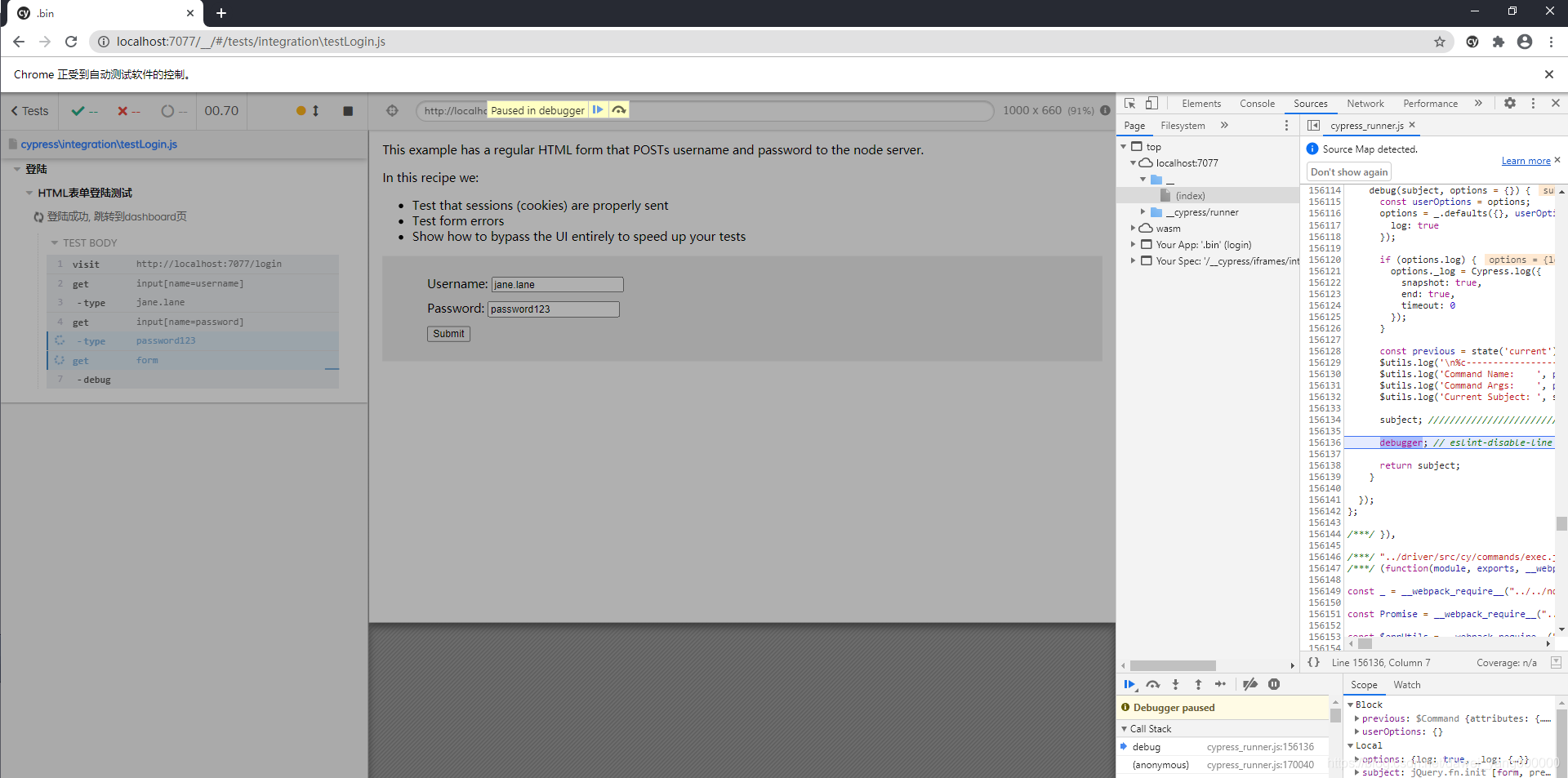
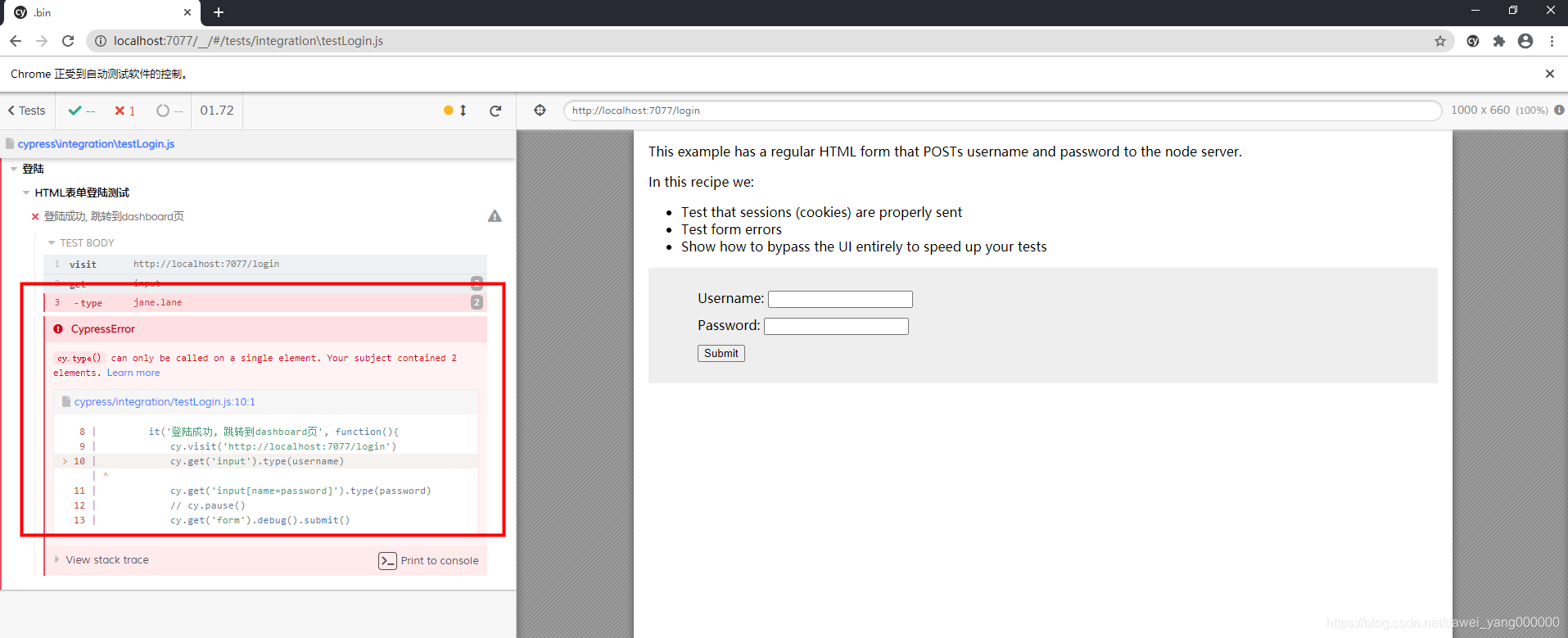
在Paused in debugger后有两个按钮,一个是Resume Script Execution(F8),单击此按钮测试将恢复运行直至结束或下一个暂停或下一个debug命令,第二个按钮是Step Over next function call(F10),单击此按钮测试会跳转到下一个函数调用里 - 当找到隐藏或多个元素时候可视化,修改一下代码,当username定位到不止一个页面元素,然后再次执行测试
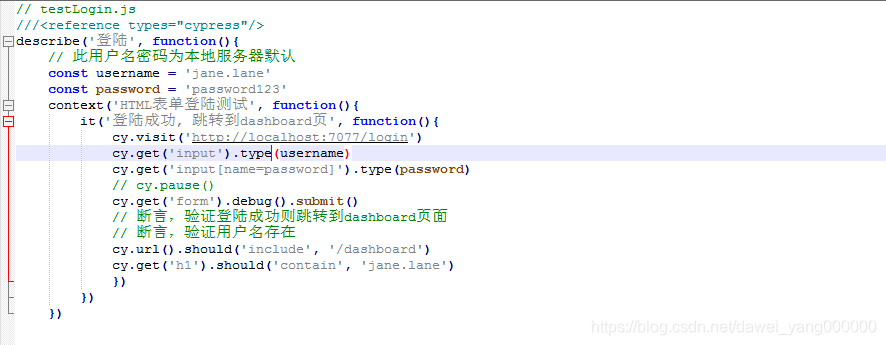
找到了两个页面元素,因此执行失败,可以非常直观的看到
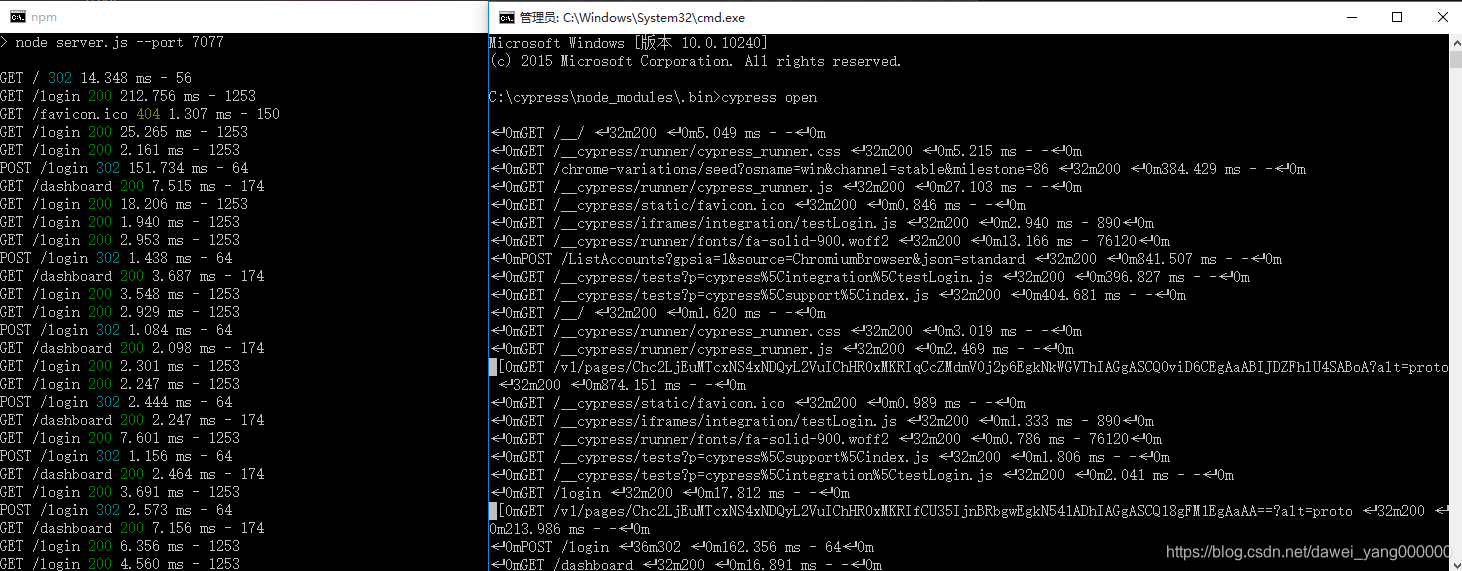
在一系列测试执行后,还可以看到命令行窗口的日志






 扫一扫
扫一扫


 2539
2539

 被折叠的 条评论
为什么被折叠?
被折叠的 条评论
为什么被折叠?
 到【灌水乐园】发言





