表单校验--数组各项独立校验

写需求时遇到一个这样的问题,就是校样项是多个的,但是其字段名称相同

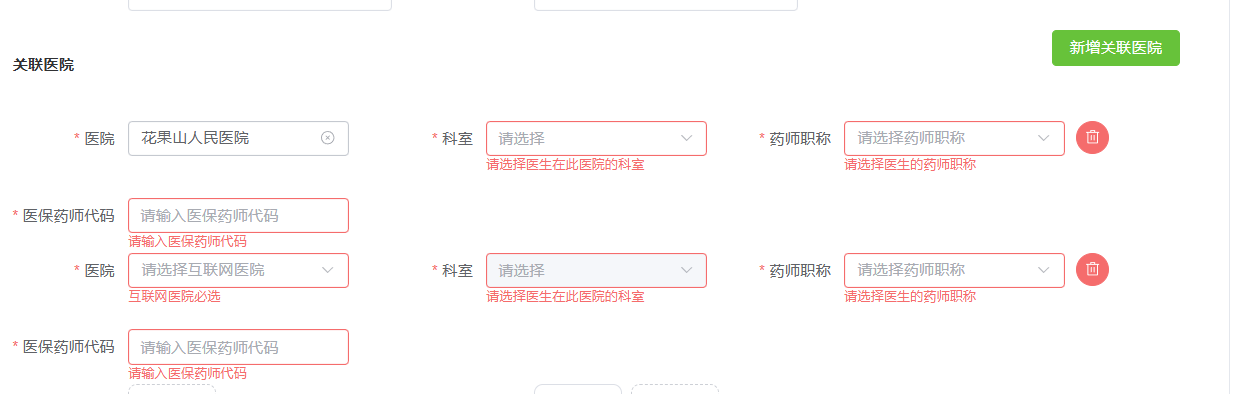
这时我们可以这样校验,注意字段之间的关联性

 <div v-for="(item,index) in formData.hospitalDoctorList" :key="item.key || index">

<el-form-item label="科室"
              :prop="'hospitalDoctorList.' + index + '.hospitalDeptRelationId'"
              :rules="[{ required: true, message: '请选择医生在此医院的科室'
                       , trigger:['change','blur'] }]">
                      <el-cascader
                        v-model="item.hospitalDeptRelationId"
                        :disabled="!item.hospitalPref"
                        @change="deptChange(item, index)"
                        :options="item.deptList"
                        :props="deptStrictlyProps"
                        collapse-tags
                        clearable
                      />
                     </el-form-item>

在 el-form-item 组件中,:prop 属性用于指定该表单项对应的校验字段路径。

这里的写法是字符串拼接,最终会生成类似 hospitalDoctorList.0.hospitalDeptRelationId、hospitalDoctorList.1.hospitalDeptRelationId 这样的路径。

  • hospitalDoctorList 是一个数组,里面存放着多个医生(或药师)的信息对象。
  • index 是当前循环的索引(比如 0、1、2...),通常在 v-for 循环中传入。
  • hospitalDeptRelationId 是每个医生(药师)对象中的一个字段,表示“药师id”。

所以,:prop="'hospitalDoctorList.' + index + '.hospitalDeptRelationId'"

就是告诉表单校验系统:当前这个表单项对应的数据字段是 hospitalDoctorList 数组中第 index 个对象的 hospitalDeptRelationId 字段。

这样做的好处是,表单校验(比如 required 校验)可以精确地作用到每个医生(药师)对象的 hospitalDeptRelationId 字段上,实现动态表单校验。

可以实现这样的效果:
### 如何使用 `v-decorator` 对数组进行校验 在 Ant Design Vue 中,`v-decorator` 可用于表单组件的数据绑定和校验功能。当处理数组类型的字段时,可以通过动态生成唯一键名并结合 `v-decorator` 来实现对数组项的校验。 以下是具体实现方式: #### 动态生成唯一键名 为了确保每个数组项都能被独立校验,需要为每一项生成唯一的键名。这通常通过索引来完成[^5]。例如,在循环渲染列表时,可以将索引附加到字段名称上以区分不同的数组项。 #### 示例代码 以下是一个完整的示例,展示如何使用 `v-decorator` 对数组中的每一项进行校验: ```vue <template> <a-form :form="form"> <div v-for="(item, index) in fields" :key="index"> <!-- 使用 `${prefix}-${index}` 构造唯一字段名 --> <a-form-item label="输入框" :required="true"> <a-input v-decorator=[`${'field'}-${index}`, { rules: [{ required: true, message: '请输入内容!' }] }] /> </a-form-item> <button type="button" @click="removeField(index)">删除</button> </div> <button type="button" @click="addField">新增</button> <a-button type="primary" html-type="submit" @click.prevent="handleSubmit">提交</a-button> </a-form> </template> <script> export default { data() { return { fields: [], // 存储当前数组项的数量 }; }, beforeCreate() { this.form = this.$form.createForm(this); }, methods: { addField() { const newKey = Date.now(); // 创建新键值防止重复 this.fields.push(newKey); // 添加新的字段 }, removeField(index) { this.fields.splice(index, 1); // 移除指定位置的字段 }, handleSubmit() { this.form.validateFields((err, values) => { if (!err) { console.log('提交成功:', values); } }); }, }, }; </script> ``` #### 关键点解析 1. **唯一字段名** 在模板中,通过 `${prefix}-${index}` 的形式构造了每一条记录对应的字段名,从而实现了对不同数组项的单独管理。 2. **校验规则配置** 每一项都设置了 `{ required: true }` 的校验规则,并提供了错误提示消息 `'请输入内容!'`[^1]。 3. **动态增删操作** 提供了 `addField` 方法用于增加新条目,以及 `removeField` 方法用于移除已有条目。这些方法均需重新触发视图更新以便同步状态变化[^4]。 4. **警告规避** 如果尝试在未渲染的情况下修改某个字段,则可能会收到类似 “You cannot set a form field before rendering”的警告。此时应改用 `getFieldDecorator` 进行预注册[^3]。 --- ###
评论
添加红包

请填写红包祝福语或标题

红包个数最小为10个

红包金额最低5元

当前余额3.43前往充值 >
需支付:10.00
成就一亿技术人!
领取后你会自动成为博主和红包主的粉丝 规则
hope_wisdom
发出的红包
实付
使用余额支付
点击重新获取
扫码支付
钱包余额 0

抵扣说明:

1.余额是钱包充值的虚拟货币,按照1:1的比例进行支付金额的抵扣。
2.余额无法直接购买下载,可以购买VIP、付费专栏及课程。

余额充值


