





1. ESA SNAP 与FUI水色指数
SNAP (Sentinel Application Platform) 哨兵数据应用平台,是欧空局针对哥白尼计划中哨兵数据任务开发的免费开源的软件。详细了解点击这里。
SNAP 软件中集成了多种算法的实现,我要介绍的是 FUI 水色指数,它被集成在 Optical / Thematic Water Processing / FU Classification 模块中。与水温,盐度和透明度一起,水体颜色属于最古老的时间序列水质数据之一 ,水中的三种主要光学物质—叶绿素、非藻类悬浮物和 CDOM 以及水分子本身的吸收和散射作用共同决定了水体呈现出的颜色,基于 Forel-Ule 比色表将水体颜色从深蓝 色到红棕色划分为 21 个等级。研究表明,由于涵盖非常广泛的自然水体光学特征,FUI 水色指数在区域和全球长时间尺度上监测反演水体水质方面具有强大潜力和优势。
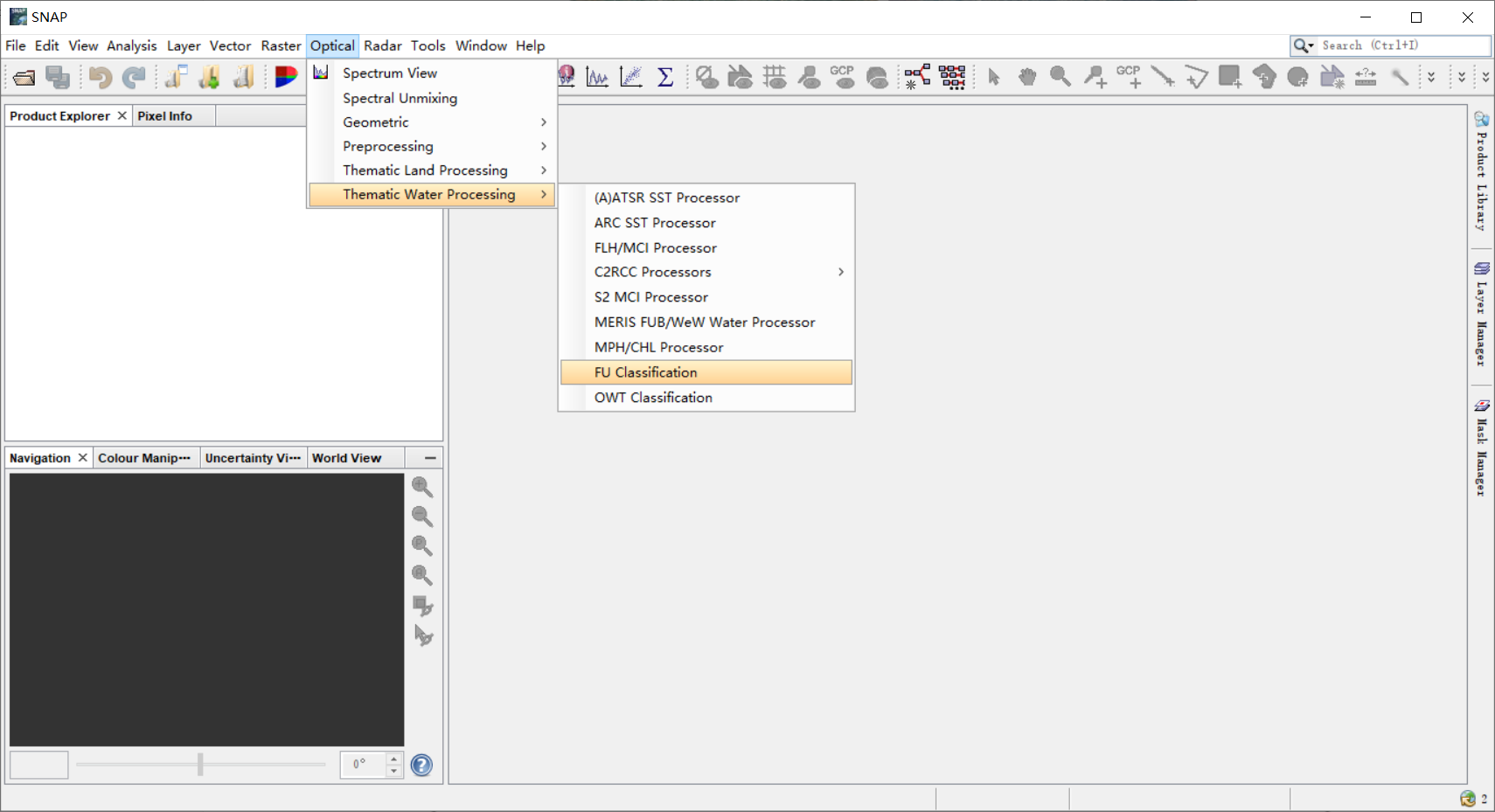
基于卫星图像的 FUI 水色指数和色度角度的系统研究始于 2012 年欧洲Citclops 项目。在该项目中,Wernand 和 Novoa 等逐步完善了 Forel-Ule 比色液的颜色光谱分析,构建了完整的 FUI 指数 CIE 色度坐标点。以下为基于卫星影像的 FUI 水色指数计算流程。
[外链图片转存失败,源站可能有防盗链机制,建议将图片保存下来直接上传(img-6hrDKkGQ-1637637812526)(https://raw.githubusercontent.com/cyandee/Image/main/imgFUI.png)]
针对不同遥感影像,根据不同波段系数计算得到颜色三刺激值 XYZ,将其归一化为二维点坐标 (chrx,chry),计算其与等能白光点(x=y=1/3) 沿着 X 正轴方向逆时针旋转所得的夹角α,称其为色度角,色度角按照 FUI 指数查找表重分类为 FUI 水色指数的 21 个等级,完成 FUI 水色指数的计算(值得注意的是,不同传感器由于自身波段离散的特点,R、G、B 三波段中心波长与 CIE-XYZ 系统定义的 R(645)、G(555)、B(469)并不是一一对应,因此,多光谱图像计算所得色度角与高光谱波谱的积分结果相比必然会有一定的系统误差,需要进行色度角校正)。
上述算法在 ESA SNAP 中已经内置,直接输入影像运算可直接得到计算结果。而我们在对某湖库的水色状况进分析时,一般需要计算其长时间序列的水色指数,使用 SNAP 虽然可以便捷的计算单景影像的 FU 结果,但是长时序分析计算需要下载处理多景影像,本地计算耗时费力。因此,考虑将 ESA SNAP 中内置的算法移植到 GEE 平台中。 SNAP的源代码在 GitHub 开源,可以找到 FU 计算的核心代码:
package org.esa.s3tbx.fu;

import com.bc.ceres.core.Assert;

class FuAlgo {

    private static final double HUE_MIN = 45.0;
    private static final double HUE_MAX = 234.0;
    public static final byte MAX_FU_VALUE = 21;
    public static final byte MIN_FU_VALUE = 0;

    //等能白光点
    private static final double CONST_WHITE_POINT = 0.333333;
    //FUI指数查找表
    private static final double[] ANGLE_OF_TRANSITIONS = new double[]{
            232.0, 227.168, 220.977, 209.994, 190.779, 163.084, 132.999,
            109.054, 94.037, 83.346, 74.572, 67.957, 62.186, 56.435,
            50.665, 45.129, 39.769, 34.906, 30.439, 26.337, 22.741, 19.0, 19.0
    };
    private DominantLambdaLookup lambdaLookup;

    //三刺激值
    private double[] x3Factors;
    private double[] y3Factors;
    private double[] z3Factors;
    //色度角校正值
    private double[] polyCoeffs;

    FuAlgo(Instrument instrument, boolean includeDominantLambda) {
        x3Factors = instrument.getXFactors();
        y3Factors = instrument.getYFactors();
        z3Factors = instrument.getZFactors();
        polyCoeffs = instrument.getPolynomCoefficients();
        if (includeDominantLambda) {
            lambdaLookup = new DominantLambdaLookup();
        }
    }

    // just for testing
    FuAlgo() {
    }


    void setPolyCoeffs(double[] polyCoeffs) {
        this.polyCoeffs = polyCoeffs;
    }

    void setZ3Factors(double[] z3Factors) {
        this.z3Factors = z3Factors;
    }

    void setY3Factors(double[] y3Factors) {
        this.y3Factors = y3Factors;
    }

    void setX3Factors(double[] x3Factors) {
        this.x3Factors = x3Factors;
    }

    public FuResult compute(double[] spectrum) {
        final double x3 = getTristimulusValue(spectrum, x3Factors);
        final double y3 = getTristimulusValue(spectrum, y3Factors);
        final double z3 = getTristimulusValue(spectrum, z3Factors);

        final double denominator = x3 + y3 + z3;

        final double chrX = x3 / denominator;
        final double chrY = y3 / denominator;

        double hue = getHue(chrX, chrY);
        final double polyCorr;
        if (hue < HUE_MIN || hue > HUE_MAX) {
            hue = Double.NaN;
            polyCorr = Double.NaN;
        } else {
            final double hue100 = hue / 100;
            polyCorr = getPolyCorr(hue100, polyCoeffs);
        }

        FuResultImpl result = new FuResultImpl();
        result.x3 = x3;
        result.y3 = y3;
        result.z3 = z3;
        result.chrX = chrX;
        result.chrY = chrY;
        result.hue = hue;
        result.polyCorr = polyCorr;
        result.hueAngle = hue + polyCorr;
        result.fuValue = getFuValue(result.hueAngle);
        if (lambdaLookup != null) {
            result.domLambda = lambdaLookup.getDominantLambda(result.hueAngle);
        }
        return result;
    }

    static byte getFuValue(final double hueAngle) {
        if (Double.isNaN(hueAngle)) {
            return MIN_FU_VALUE;
        }
        for (byte i = 0; i < ANGLE_OF_TRANSITIONS.length; i++) {
            if (hueAngle > ANGLE_OF_TRANSITIONS[i]) {
                return i;
            }
        }
        return MAX_FU_VALUE;
    }

    double getTristimulusValue(double[] spectrum, double[] factors) {
        if (spectrum.length != factors.length) {
            throw new IllegalArgumentException("The spectrum must have equal length as factors.");
        }
        double summation = 0;
        for (int i = 0; i < spectrum.length; i++) {
            summation = (spectrum[i] * factors[i]) + summation;
        }
        return summation;
    }

    double getHue(double chrX, double chrY) {
        double atan2 = Math.atan2((chrY - CONST_WHITE_POINT), (chrX - CONST_WHITE_POINT));
        final double hue = (180 * atan2) / Math.PI;
        return hue < 0 ? hue + 360 : hue;
    }

    double getPolyCorr(double hue100, double[] constPolyHue) {
        Assert.argument(constPolyHue.length == 6, "constPolyHue.length == 6");
        double value = 0.0;
        for (int i = 0; i < constPolyHue.length; i++) {
            if ((i + 1) == constPolyHue.length) {
                value += constPolyHue[i];
                break;
            }
            value += constPolyHue[i] * Math.pow(hue100, 5 - i);
        }
        return value;
    }
}
2. FUI 反演算法在 GEE 中的实现
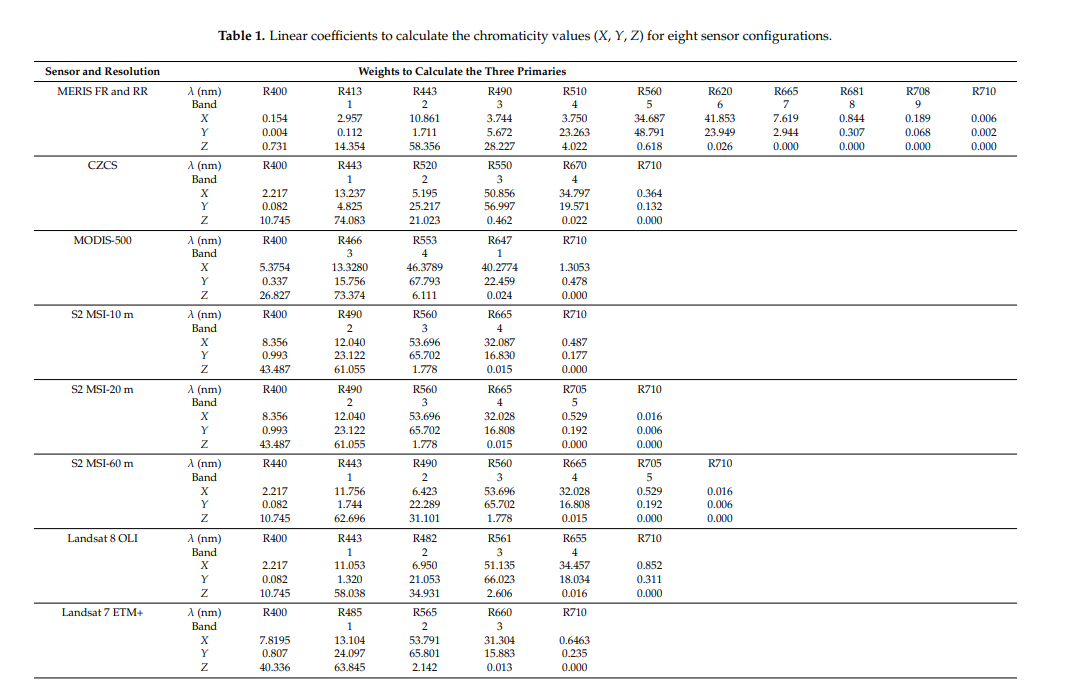
参考论文中针对不同传感器的参数,可在 GEE 中实现基于 Landsat 系列,Sentinel-2 的 FUI 水色反演。下图为不同传感器在计算三刺激值时所对应的波段系数。
下图为不同传感器的色度角校正系数。
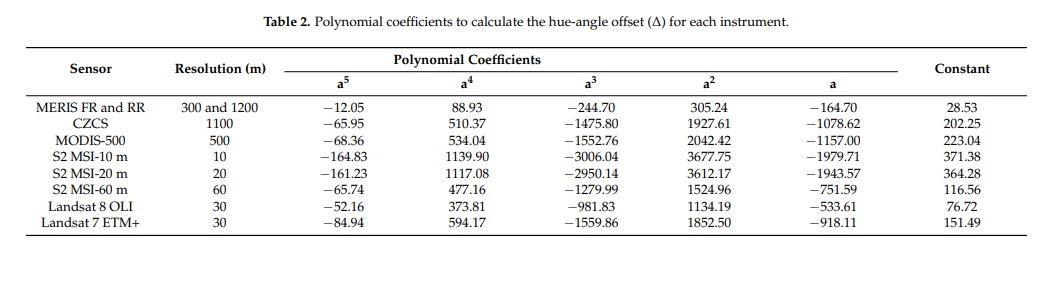
根据论文中的波段系数,结合 SNAP 开源代码,可以方便的将 FUI 计算流程移植到 GEE 平台中,借助 GEE 平台海量的数据和强大的运算能力,轻松计算某地长时间序列水色结果。
var getFU = function(image){
  var X = image.expression('11.053 * b1 + 6.950 * b2 + 51.135 * b3 + 34.457 * b4',{
      b1:image.select('B1'),
      b2: image.select('B2'),
      b3: image.select('B3'),
      b4: image.select('B4')
    }).rename('X');

  var Y = image.expression('1.32 * b1 + 21.053 * b2 + 66.023 * b3 + 18.034 * b4',{
    b1:image.select('B1'),
    b2: image.select('B2'),
    b3: image.select('B3'),
    b4: image.select('B4')
  }).rename('Y');

  var Z = image.expression('58.038 * b1 + 34.931 * b2 + 2.606 * b3 + 0.016 * b4',{
    b1: image.select('B1'),
    b2: image.select('B2'),
    b3: image.select('B3'),
    b4: image.select('B4')
  }).rename('Z');

  var chrx = X.divide((X.add(Y).add(Z))).rename('chrx');
  var chry = Y.divide((X.add(Y).add(Z))).rename('chry');
  var atan2 = chrx.subtract(0.3333).atan2((chry).subtract(0.3333)).rename('atan2');
  var hue_pre = atan2.multiply(ee.Number(180)).divide(Math.PI).rename('hue_pre');
  var hue = hue_pre < 0 ? (hue_pre + 360) : hue_pre.rename('hue');
  var a = hue.divide(100).rename('a');
  var cor = a.pow(5).multiply(-52.16).add(a.pow(4).multiply(373.81))
    .add(a.pow(3).multiply(-981.3)).add(a.pow(2).multiply(1134.19))
    .add(a.multiply(-533.61)).add(76.72).rename('cor');
  var hueAngle = hue.add(cor).rename('hueAngle');

  /*
    var angle_tran = ee.List([232.0, 227.168, 220.977, 209.994, 190.779,
    163.084, 132.999,109.054, 94.037, 83.346, 74.572, 67.957, 62.186, 56.435,50.665,
    45.129, 39.769, 34.906, 30.439, 26.337, 22.741, 19.0, 19.0]);
  */

  /*
    static byte getFuValue(final double hueAngle) {
        for (byte i = 0; i < ANGLE_OF_TRANSITIONS.length; i++) {
            if (hueAngle > ANGLE_OF_TRANSITIONS[i]) {
                return i;
            }
        }
        return MAX_FU_VALUE;
    }
  */
  var FU = a
    .where(hueAngle.gt(19.0).and(hueAngle.lte(22.741)),1)
    .where(hueAngle.gt(22.741).and(hueAngle.lte(26.337)),2)
    .where(hueAngle.gt(26.337).and(hueAngle.lte(30.439)),3)
    .where(hueAngle.gt(30.439).and(hueAngle.lte(34.906)),4)
    .where(hueAngle.gt(34.906).and(hueAngle.lte(39.769)),5)
    .where(hueAngle.gt(39.769).and(hueAngle.lte(45.129)),6)
    .where(hueAngle.gt(45.129).and(hueAngle.lte(50.665)),7)
    .where(hueAngle.gt(50.665).and(hueAngle.lte(56.435)),8)
    .where(hueAngle.gt(56.435).and(hueAngle.lte(62.186)),9)
    .where(hueAngle.gt(62.186).and(hueAngle.lte(67.957)),10)
    .where(hueAngle.gt(67.957).and(hueAngle.lte(74.572)),11)
    .where(hueAngle.gt(74.572).and(hueAngle.lte(83.346)),12)
    .where(hueAngle.gt(83.346).and(hueAngle.lte(94.037)),13)
    .where(hueAngle.gt(94.037).and(hueAngle.lte(109.054)),14)
    .where(hueAngle.gt(109.054).and(hueAngle.lte(132.999)),15)
    .where(hueAngle.gt(132.999).and(hueAngle.lte(163.084)),16)
    .where(hueAngle.gt(163.084).and(hueAngle.lte(190.779)),17)
    .where(hueAngle.gt(190.779).and(hueAngle.lte(209.994)),18)
    .where(hueAngle.gt(209.994).and(hueAngle.lte(220.977)),19)
    .where(hueAngle.gt(220.977).and(hueAngle.lte(227.168)),20)
    .where(hueAngle.gt(227.168),21).rename('FU');

  return image.addBands(FU);
}
以下为 FUI 指数查找表和不同等级 FUI 对应的 RGB数据和颜色代码:
[外链图片转存失败,源站可能有防盗链机制,建议将图片保存下来直接上传(img-VGv0RLoJ-1637637812529)(https://raw.githubusercontent.com/cyandee/Image/main/imgFUI%E6%9F%A5%E6%89%BE%E8%A1%A8.png)]
| FUI | R | G | B | 十六进制颜色代码 | FUI | R | G | B | 十六进制颜色代码 |
|---|---|---|---|---|---|---|---|---|---|
| 1 | 33 | 88 | 188 | #2158BC | 12 | 148 | 182 | 96 | #94B660 |
| 2 | 49 | 109 | 197 | #316DC5 | 13 | 165 | 188 | 118 | #A5BC75 |
| 3 | 50 | 124 | 187 | #327CBB | 14 | 170 | 184 | 109 | #AAB86D |
| 4 | 75 | 128 | 160 | #4B80A0 | 15 | 173 | 181 | 95 | #ADB55F |
| 5 | 86 | 143 | 150 | #568F96 | 16 | 168 | 169 | 101 | #A8A965 |
| 6 | 109 | 146 | 152 | #6D9298 | 17 | 174 | 159 | 92 | #AE9F5C |
| 7 | 105 | 140 | 134 | #698C86 | 18 | 179 | 160 | 83 | #B3A053 |
| 8 | 117 | 158 | 114 | #759E75 | 19 | 175 | 138 | 68 | #AF8A44 |
| 9 | 123 | 166 | 84 | #7BA654 | 20 | 164 | 96 | 10 | #A4600A |
| 10 | 125 | 174 | 56 | #7DAE38 | 21 | 164 | 83 | 8 | #A45308 |
| 11 | 149 | 182 | 69 | #95B645 |
附上之前在 GEE 里做的一个小试验:https://code.earthengine.google.com/7b0b97aa01a0f86dcf64e10e1dc4869f
另外,中科院王胜蕾的博士论文中提到了另一种色度角的计算方式和新的FUI指数查找表,并对色度角校正方法进行了详细的阐述,感兴趣的同学可自行探索。
参考论文地址
- https://www.mdpi.com/2072-4292/10/2/180
- https://www.mdpi.com/1424-8220/15/10/25663
- http://www.jeos.org/index.php/jeos_rp/article/view/13057
- https://journals.plos.org/plosone/article?id=10.1371/journal.pone.0063766
- https://kns-cnki-net-443.v.cnu.edu.cn/kcms/detail/detail.aspx?dbcode=CDFD&dbname=CDFDLAST2019&filename=1018995624.nh&uniplatform=NZKPT&v=8jR0NvYJM7ur0xgkduGfdTUjQK55ycqt2kmy2mmpMUjOJcydchiAcvB9pLactvP7
欢迎关注公众号:卫星环境应用






 扫一扫
扫一扫


 863
863


 到【灌水乐园】发言



