



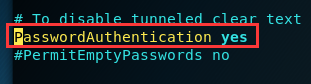
1.修改/etc/ssh/sshd_config的配置文件,找到#PasswordAuthentication yes,把前边的#去掉
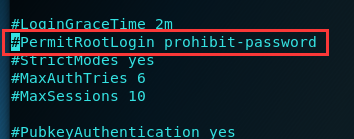
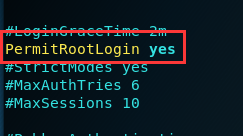
2.找到#PermitRootLogin prohibit-password,将其改为PermitRootLogin yes,并将其前边的#去掉
3.重启ssh:/etc/init.d/ssh restart

4.设置开机自动启动:update-rc.d ssh enable
5.重启系统即可
 本文详细介绍了如何通过修改SSH配置文件实现远程登录功能,包括开启密码验证、允许root用户登录、重启SSH服务及设置开机自动启动等步骤。
1.修改/etc/ssh/sshd_config的配置文件,找到#PasswordAuthentication yes,把前边的#去掉
2.找到#PermitRootLogin prohibit-password,将其改为PermitRootLogin yes,并将其前边的#去掉
3.重启ssh:/etc/init.d/ssh restart
4.设置开机自动启动:update-rc.d ssh enable
5.重启系统即可
 2793
1765
710
2793
1765
710

 被折叠的 条评论
为什么被折叠?
被折叠的 条评论
为什么被折叠?
 到【灌水乐园】发言








 扫一扫
扫一扫


