



 该博客详细介绍了将BMP图像转换为YUV格式的过程,包括BMP文件结构、RGB到YUV的转换算法以及C++代码实现。实验要求涉及创建多个带有标识信息的BMP文件,并通过命令行设置帧数,最终生成YUV序列文件。通过代码调试和播放验证了转换的正确性。
文章目录
一、实验要求
(1)在图像处理软件中自行生成多个BMP文件,至少含5个不同的场景画面,要求带含有班级、学号后四位和本人姓名(缩写或昵称均可)的logo。(基本要求为24bit的BMP,进阶要求为支持小于24bit的BMP。)
(2)编写将第一步所生成的多个BMP文件转化为YUV文件,要求可在命令行中设置每个画面出现的帧数。最后形成的YUV文件应至少包含200帧。重点掌握函数定义、缓冲区分配、 倒序读写、结构体的操作。
(3)对整个程序进行调试,并将生成的YUV文件用播放软件观看,验证是否正确。
二、实验思路
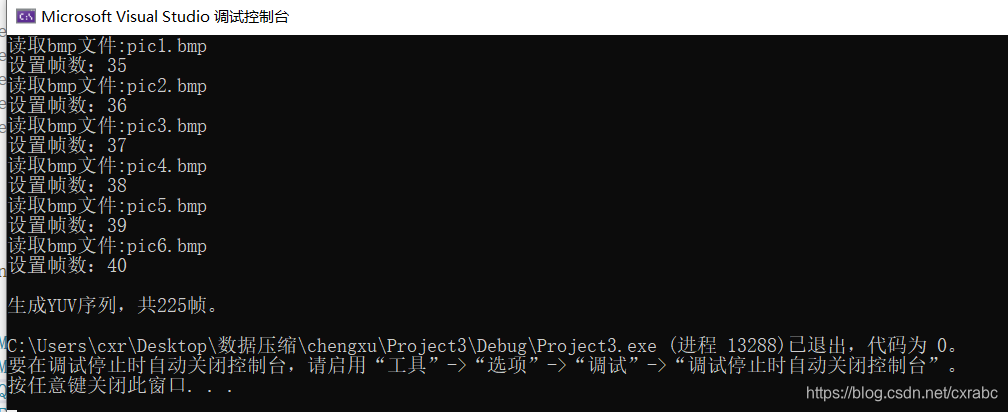
绘制6张BMP图像(宽度为256像素,高度为256像素,位深度为24位真彩色),将BMP图像转为RGB图像,再由RGB图像转为YUV图像,自定义帧数分别为35、36、37、38、39、40帧,生成总帧数为225帧的YUV序列。
BMP文件的组成结构
(1)位图头文件数据结构,它包含 BMP 图像文件的类型、显示内容等信息;
(2)位图信息数据结构,它包含有 BMP 图像的宽、高、压缩方法,以及定义颜色等信
息;
(3)调色板,这个部分是可选的,有些位图需要调色板,有些位图,比如真彩色图(24
位的 BMP)就不需要调色板;
(4)位图数据,这部分的内容根据 BMP 位图使用的位数不同而不同,在 24 位图中直接
使用 RGB,而其他的小于 24 位的使用调色板中颜色索引值。
在实现 BMP 文件头信息的写入和读出时,需要注意整数保存时的字节序。例如:文件大
小是以 Intel 序保存的。在编程前先用二进制打开方式观察 BMP 文件各个部分的数据存储格
式。
BMP文件转RGB文件
BMP的数据是自左向右、自下向上依次存放的。
对于24位BMP文件,位图有效数据就是RGB;对于16位,8位,4位,1位BMP文件,要构造调色板。
RGB文件转YUV文件
具体原理及实现见彩色空间转换(编程实现YUV与RGB文件格式的相互转换)
三、代码实现
1. 头文件 bmp2yuv.h
#pragma once

#ifndef BMP2YUV_H_
#define BMP2YUV_H_

typedef struct bit32Mask
{
    unsigned int rgbRed;
    unsigned int rgbGreen;
    unsigned int rgbBlue;
    unsigned int reserved;
}Mas32;
typedef struct bit16Mask
{
    unsigned int rgbRed;
    unsigned int rgbGreen;
    unsigned int rgbBlue;
}Mas16;


int BMP2RGB24bit(int bitcount, int x_dim, int y_dim, void* bmpbuf, void* rgbbuf);
int RGB2YUV(int x_dim, int y_dim, void* bmp, void* y_out, void* u_out, void* v_out, int flip);
void InitLookupTable();
void adjust(unsigned char* b, unsigned char* g, unsigned char* r, unsigned char* y, unsigned char* u, unsigned char* v);
#endif
2. 源文件bmp2rgb.cpp
#include "stdlib.h"
#include "bmp2yuv.h"
#include <windows.h>
#include <math.h>

int BMP2RGB24bit(int bitcount, int x_dim, int y_dim, void* bmpbuf, void* rgbbuf)
{
    long i;
    unsigned char* rgb;
    unsigned char* bmp;
    long size = x_dim * y_dim;
    rgb = (unsigned char*)rgbbuf;
    bmp = (unsigned char*)bmpbuf;
    for (i = 0; i < size * 3; i++)
    {
        *(rgb + i) = *(bmp + i);
    }
    return 0;
}
3. 源文件rgb2yuv.cpp
#include "stdlib.h"
#include "bmp2yuv.h"

static float RGBYUV02990[256], RGBYUV05870[256], RGBYUV01140[256];
static float RGBYUV01684[256], RGBYUV03316[256];
static float RGBYUV04187[256], RGBYUV00813[256];

int RGB2YUV(int x_dim, int y_dim, void* bmp, void* y_out, void* u_out, void* v_out, int flip)
{
    static int init_done = 0;

    long i, j, size;
    unsigned char* r, * g, * b;
    unsigned char* y, * u, * v;
    unsigned char* pu1, * pu2, * pv1, * pv2, * psu, * psv;
    unsigned char* y_buffer, * u_buffer, * v_buffer;
    unsigned char* sub_u_buf, * sub_v_buf;

    if (init_done == 0)
    {
        InitLookupTable();
        init_done = 1;
    }

    // check to see if x_dim and y_dim are divisible by 2
    if ((x_dim % 2) || (y_dim % 2)) return 1;
    size = x_dim * y_dim;

    // allocate memory
    y_buffer = (unsigned char*)y_out;
    sub_u_buf = (unsigned char*)u_out;
    sub_v_buf = (unsigned char*)v_out;
    u_buffer = (unsigned char*)malloc(size * sizeof(unsigned char));
    v_buffer = (unsigned char*)malloc(size * sizeof(unsigned char));
    if (!(u_buffer && v_buffer))
    {
        if (u_buffer) free(u_buffer);
        if (v_buffer) free(v_buffer);
        return 2;
    }

    b = (unsigned char*)bmp;
    y = y_buffer;
    u = u_buffer;
    v = v_buffer;

    // convert RGB to YUV
    if (!flip)
    {
        for (j = 0; j < y_dim; j++)
        {
            y = y_buffer + (y_dim - j - 1) * x_dim;
            u = u_buffer + (y_dim - j - 1) * x_dim;
            v = v_buffer + (y_dim - j - 1) * x_dim;

            for (i = 0; i < x_dim; i++) {
                g = b + 1;
                r = b + 2;
                adjust(b, g, r, y, u, v);
                b += 3;
                y++;
                u++;
                v++;
            }
        }
    }
    else {
        for (i = 0; i < size; i++)
        {
            g = b + 1;
            r = b + 2;
            adjust(b, g, r, y, u, v);
            b += 3;
            y++;
            u++;
            v++;
        }
    }
    // subsample UV
    for (j = 0; j < y_dim / 2; j++)
    {
        psu = sub_u_buf + j * x_dim / 2;
        psv = sub_v_buf + j * x_dim / 2;
        pu1 = u_buffer + 2 * j * x_dim;
        pu2 = u_buffer + (2 * j + 1) * x_dim;
        pv1 = v_buffer + 2 * j * x_dim;
        pv2 = v_buffer + (2 * j + 1) * x_dim;
        for (i = 0; i < x_dim / 2; i++)
        {
            *psu = (*pu1 + *(pu1 + 1) + *pu2 + *(pu2 + 1)) / 4;
            *psv = (*pv1 + *(pv1 + 1) + *pv2 + *(pv2 + 1)) / 4;
            psu++;
            psv++;
            pu1 += 2;
            pu2 += 2;
            pv1 += 2;
            pv2 += 2;
        }
    }
    free(u_buffer);
    free(v_buffer);
    return 0;
}

void InitLookupTable()
{
    int i;

    for (i = 0; i < 256; i++) RGBYUV02990[i] = (float)0.2990 * i;
    for (i = 0; i < 256; i++) RGBYUV05870[i] = (float)0.5870 * i;
    for (i = 0; i < 256; i++) RGBYUV01140[i] = (float)0.1140 * i;
    for (i = 0; i < 256; i++) RGBYUV01684[i] = (float)0.1684 * i;
    for (i = 0; i < 256; i++) RGBYUV03316[i] = (float)0.3316 * i;
    for (i = 0; i < 256; i++) RGBYUV04187[i] = (float)0.4187 * i;
    for (i = 0; i < 256; i++) RGBYUV00813[i] = (float)0.0813 * i;
}

void adjust(unsigned char* b, unsigned char* g, unsigned char* r, unsigned char* y, unsigned char* u, unsigned char* v)
{
    float temp = 0;
    temp = (float)(RGBYUV02990[*r] + RGBYUV05870[*g] + RGBYUV01140[*b]);
    temp = temp > 235 ? 235 : temp;
    temp = temp < 16 ? 16 : temp;
    *y = (unsigned char)temp;

    temp = (float)(-RGBYUV01684[*r] - RGBYUV03316[*g] + (*b) / 2 + 128);
    temp = temp > 240 ? 240 : temp;
    temp = temp < 16 ? 16 : temp;
    *u = (unsigned char)temp;

    temp = (float)((*r) / 2 - RGBYUV04187[*g] - RGBYUV00813[*b] + 128);
    temp = temp > 240 ? 240 : temp;
    temp = temp < 16 ? 16 : temp;
    *v = (unsigned char)temp;
}
4. 源文件main.cpp
#include <stdio.h>
#include <stdlib.h>
#include <windows.h>
#include <math.h>
#include "bmp2yuv.h"

#define u_int8_t    unsigned __int8
#define u_int       unsigned __int32
#define u_int32_t   unsigned __int32

int main(int argc, char** argv)
{
    int count;
    BITMAPFILEHEADER File_header;
    BITMAPINFOHEADER Info_header;
    RGBQUAD* pRGB = NULL;
    FILE* bmp = NULL;
    FILE* yuvFile = NULL;


    u_int8_t* yBuf = NULL;
    u_int8_t* uBuf = NULL;
    u_int8_t* vBuf = NULL;
    u_int8_t* rgbBuf = NULL;
    u_int8_t* bmpBuf = NULL;
    u_int8_t* mask = NULL;
    u_int frameWidth;       /* --width=<uint> */
    u_int frameHeight;
    u_int bitcount;
    u_int py;
    u_int m;
    u_int8_t i;
    int sum = 0;

    char bmpf[][40] = { "pic1.bmp", "pic2.bmp", "pic3.bmp", "pic4.bmp", "pic5.bmp", "pic6.bmp" };
    char yuvname[40] = "picYUV.yuv";
    FILE* yuv = NULL;
    int framenumber;

    fopen_s(&yuv, yuvname, "wb+");

    for (i = 0; i < 6; i++)
    {

        count = 0;
        framenumber = atoi(argv[i + 1]);
        //open the bmp file
        fopen_s(&bmp, bmpf[i], "rb");


        printf("读取bmp文件:%s", bmpf[i]);
        fread(&File_header, sizeof(BITMAPFILEHEADER), 1, bmp);
        fread(&Info_header, sizeof(BITMAPINFOHEADER), 1, bmp);


        frameWidth = Info_header.biWidth;           /* --width=<uint> */
        frameHeight = Info_header.biHeight;
        py = File_header.bfOffBits;
        bitcount = Info_header.biBitCount;


        yBuf = (u_int8_t*)malloc(frameWidth * frameHeight);
        uBuf = (u_int8_t*)malloc((frameWidth * frameHeight) / 4);
        vBuf = (u_int8_t*)malloc((frameWidth * frameHeight) / 4);

        bmpBuf = (u_int8_t*)malloc(frameWidth * frameHeight * bitcount / 8);
        rgbBuf = (u_int8_t*)malloc(frameWidth * frameHeight * 3);

                if (rgbBuf == NULL || yBuf == NULL || uBuf == NULL || vBuf == NULL || bmpBuf == NULL)
                {
                    printf("no enought memory\n");
                    exit(1);
                }

                    while (framenumber)
                    {
                        fseek(bmp, py, SEEK_SET);
                        fread(bmpBuf, 1, frameWidth * frameHeight * bitcount / 8, bmp);

                         if (bitcount == 24)
                        {//真彩位图
                             BMP2RGB24bit(bitcount, frameWidth, frameHeight, bmpBuf, rgbBuf);

                        }

                        // RGB2YUV
                            if (RGB2YUV(frameWidth, frameHeight, rgbBuf, yBuf, uBuf, vBuf, 0/*flip=0*/))//bmp图像格式从最后一行起逐行扫描
                            {
                                printf("RGB2YUV program runs error!");
                                return 0;
                            }
                        fwrite(yBuf, 1, frameWidth * frameHeight, yuv);
                        fwrite(uBuf, 1, (frameWidth * frameHeight) / 4, yuv);
                        fwrite(vBuf, 1, (frameWidth * frameHeight) / 4, yuv);

                        ++count;
                        framenumber--;
                    }
                printf("\n设置帧数:%u  \n", count);
                sum += count;


        }

    printf("\n生成YUV序列,共%d帧。\n", sum);

    //关闭文件,释放内存
    fclose(bmp);
    fclose(yuv);

    if (yBuf) { free(yBuf); }
    if (uBuf) { free(uBuf); }
    if (vBuf) { free(vBuf); }
    if (rgbBuf) { free(rgbBuf); }
    if (bmpBuf) { free(bmpBuf); }
    if (pRGB) { free(pRGB); }

    return 0;
}
四、结果分析
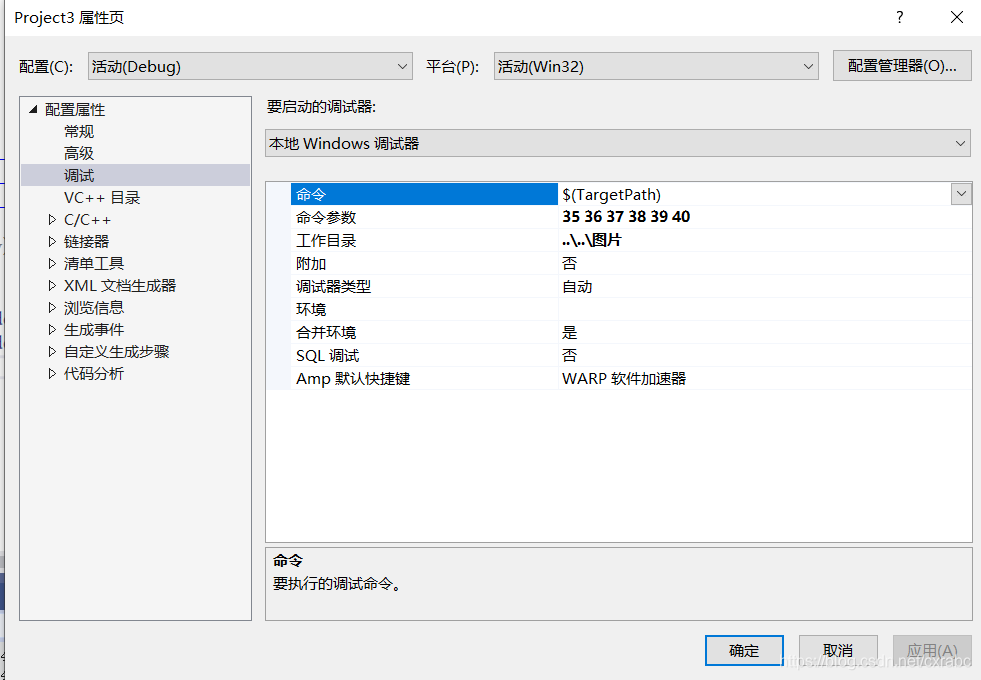
1. 设置参数
设置六张bmp图片的帧数分别为35、36、37、38、39、40.
2. 运行程序
控制台界面输出如下
3. 结果展示
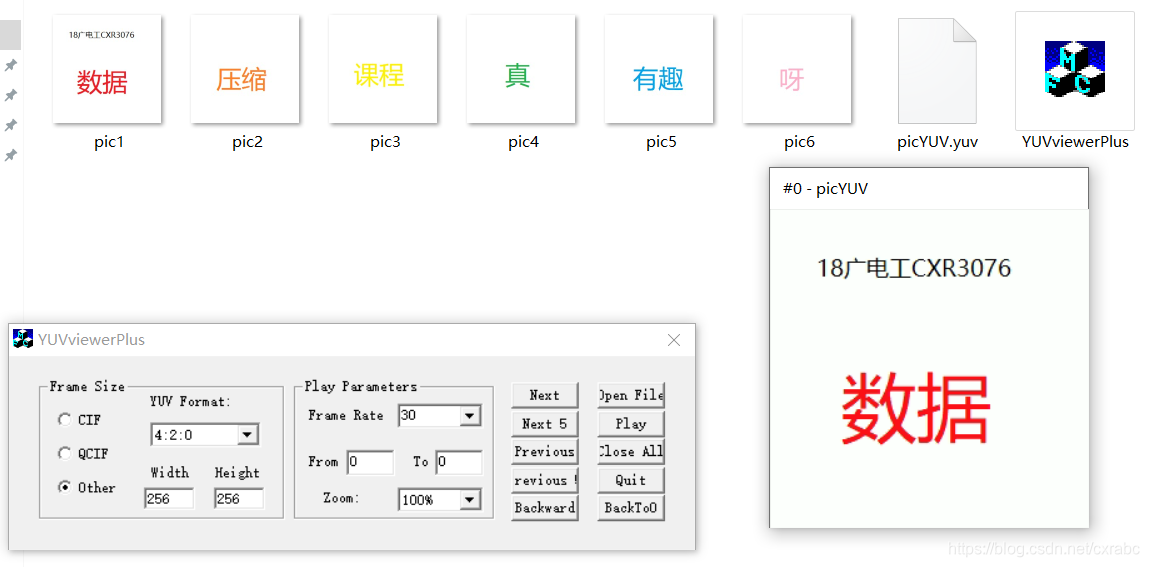
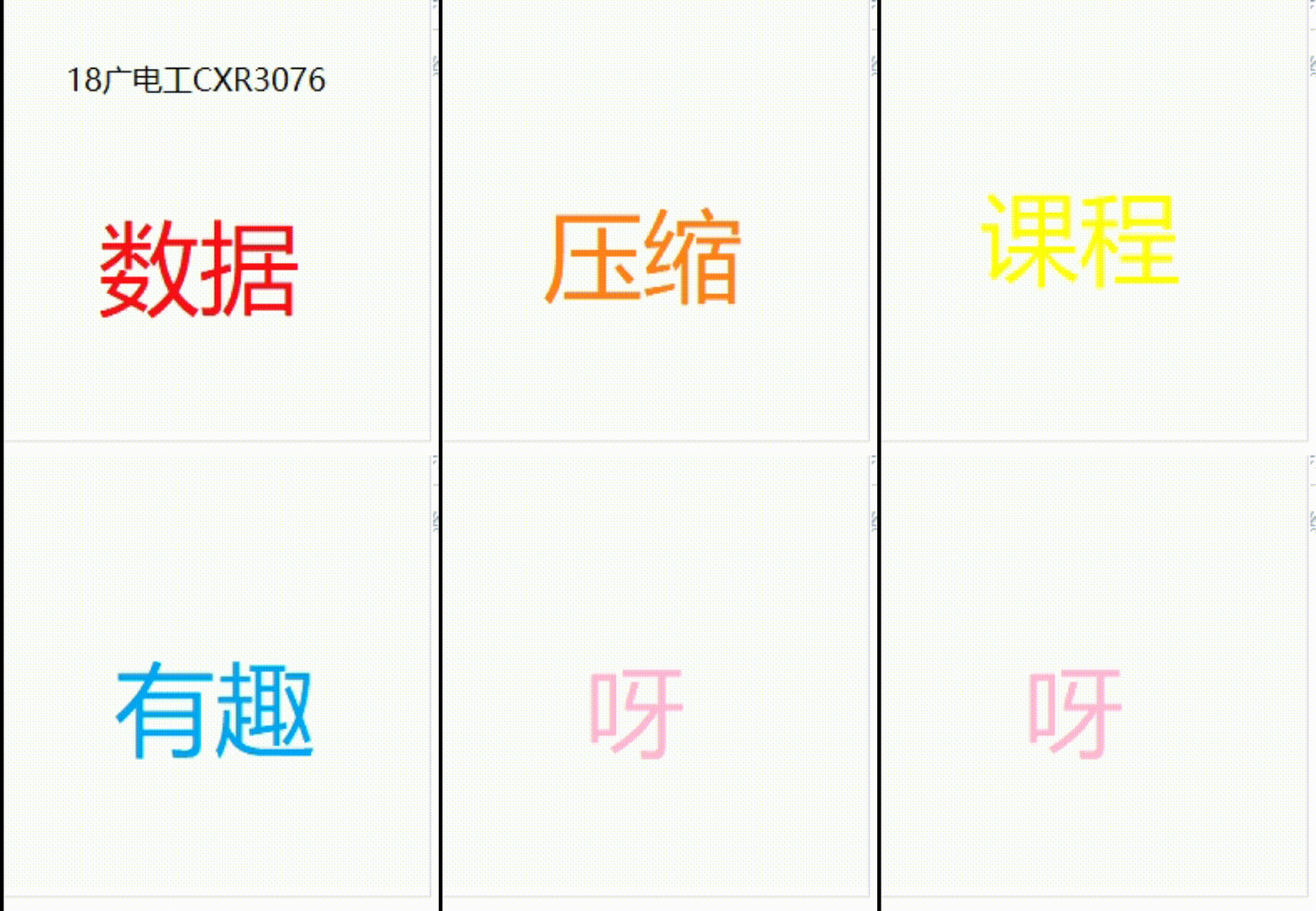
输入的bmp序列为pic1、pic2、pic3、pic4、pic5、pic6.
输出的yuv文件为picYUV.yuv





 扫一扫
扫一扫


 463
463

 被折叠的 条评论
为什么被折叠?
被折叠的 条评论
为什么被折叠?
 到【灌水乐园】发言





