



CefSharp从51版本以后开始支持AnyCpu编译模式
第一步:App.config的configuration下增加一个配置:
<runtime>
    <assemblyBinding xmlns="urn:schemas-microsoft-com:asm.v1">
        <probing privatePath="x86"/>
    </assemblyBinding>
</runtime>
第二步:编辑项目的csproj文件(可以用记事本,也可以先右键卸载项目,然后再右键选编辑项目)
在csproj文件的PropertyGroup节点下第一行增加一个配置项
<CefSharpAnyCpuSupport>true</CefSharpAnyCpuSupport>
第三步:Program.cs的内容如下:
static class Program
{
/// <summary>
/// 应用程序的主入口点。
/// </summary>
[STAThread]
static void Main()
{
AppDomain.CurrentDomain.AssemblyResolve += Resolver;
LoadApp();
}
[MethodImpl(MethodImplOptions.NoInlining)]
private static void LoadApp()
{
Application.EnableVisualStyles();
Application.SetCompatibleTextRenderingDefault(false);
CefSettings settings = new CefSettings
{
Locale = "zh-CN",
BrowserSubprocessPath = @"x86\CefSharp.BrowserSubprocess.exe"
};
Cef.Initialize(settings, performDependencyCheck: false, browserProcessHandler: null);
Application.Run(new Login());
}
// Will attempt to load missing assembly from either x86 or x64 subdir
private static Assembly Resolver(object sender, ResolveEventArgs args)
{
if (args.Name.StartsWith("CefSharp"))
{
string assemblyName = args.Name.Split(new[] { ',' }, 2)[0] + ".dll";
string archSpecificPath = Path.Combine(AppDomain.CurrentDomain.SetupInformation.ApplicationBase,
Environment.Is64BitProcess ? "x64" : "x86",
assemblyName);
return File.Exists(archSpecificPath)
? Assembly.LoadFile(archSpecificPath)
: null;
}
return null;
}
}
参考:https://github.com/cefsharp/CefSharp/issues/1714
-----------------------------------------------------------------------------------------------------------------------
本篇博客讲述如何在AnyCPU模式下使用CefSharp
因为在某些情况下,不得不用AnyCPU,但是CefSharp支持的是86和64位俩种模式,所以在我查阅了很多国内外的资料下,总结出来的一些精华
参考地址:
https://ourcodeworld.com/articles/read/173/how-to-use-cefsharp-chromium-embedded-framework-csharp-in-a-winforms-application
https://github.com/cefsharp/CefSharp/issues/1714
https://github.com/cefsharp/CefSharp.MinimalExample/blob/demo/anycpu/CefSharp.MinimalExample.Wpf/App.xaml.cs
三篇结合就可以实现在AnyCPU下使用CefSharp
简单步骤记录
第一篇博客取其第二个,更改配置的那一块,这块不改,下面的没用,项目起不起来
简述一下:
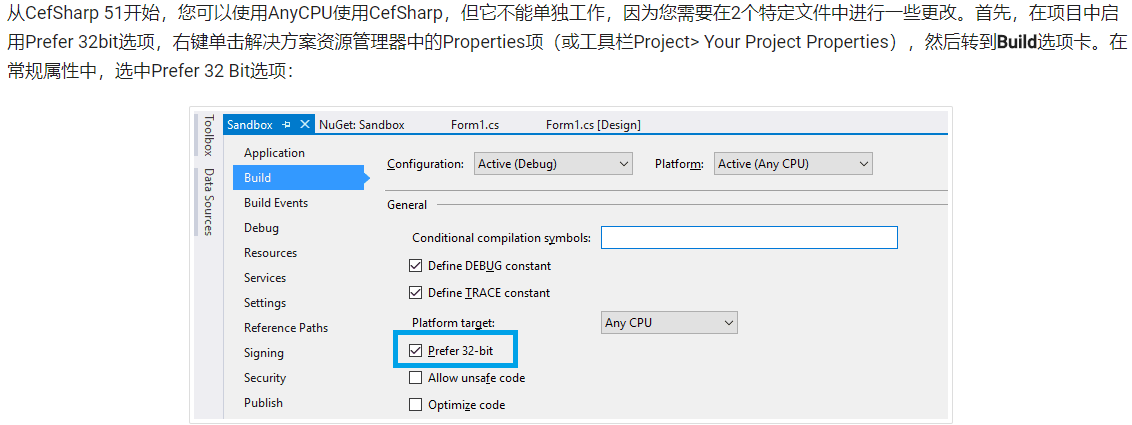
1.修改为首选32位,
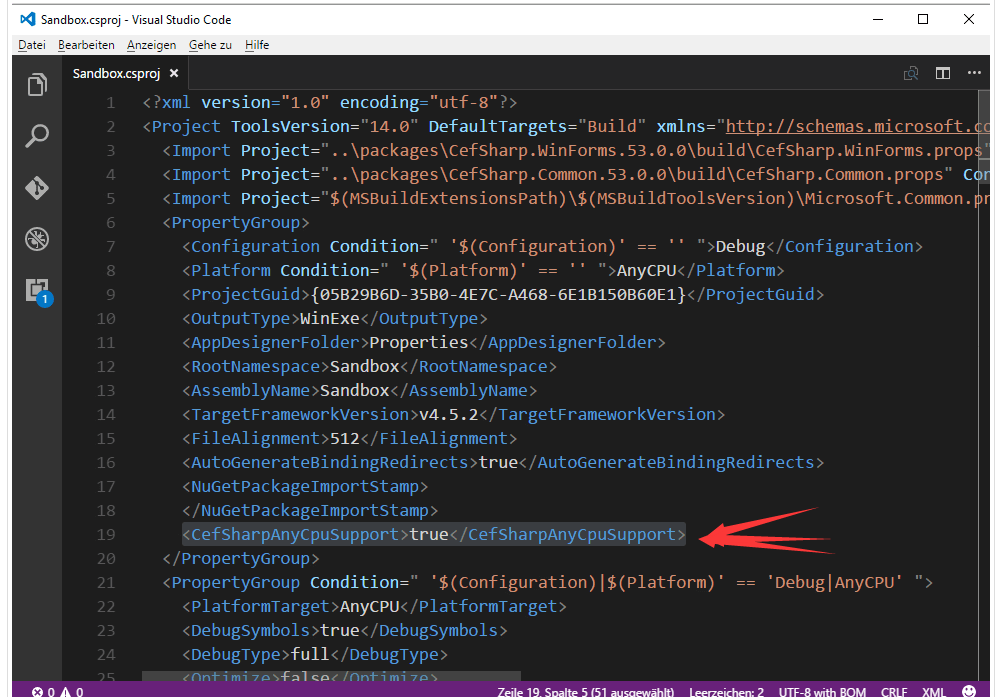
2.在你项目名.csproj文件下,加一段
<CefSharpAnyCpuSupport>true</CefSharpAnyCpuSupport>
位置如下:
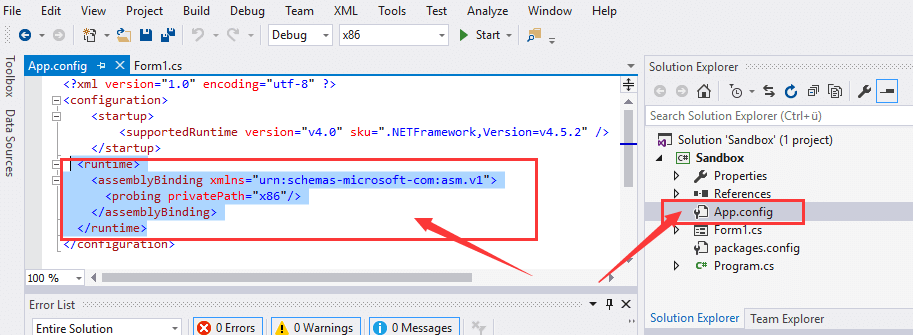
3.在App.config下加一端
<runtime>
<assemblyBinding xmlns="urn:schemas-microsoft-com:asm.v1">
<probing privatePath="x86"/>
</assemblyBinding>
</runtime>
位置如下:
第二篇博客取的精髓在这块,我给放过来
public partial class App : Application
{
    public App()
    {
        //Add Custom assembly resolver
        AppDomain.CurrentDomain.AssemblyResolve += Resolver;

        //Any CefSharp references have to be in another method with NonInlining
        // attribute so the assembly rolver has time to do it's thing.
        InitializeCefSharp();
    }

    [MethodImpl(MethodImplOptions.NoInlining)]
    private static void InitializeCefSharp()
    {
        var settings = new CefSettings();

        // Set BrowserSubProcessPath based on app bitness at runtime
        settings.BrowserSubprocessPath = Path.Combine(AppDomain.CurrentDomain.SetupInformation.ApplicationBase,
                                               Environment.Is64BitProcess ? "x64" : "x86",
                                               "CefSharp.BrowserSubprocess.exe");

        // Make sure you set performDependencyCheck false
        Cef.Initialize(settings, performDependencyCheck: false, browserProcessHandler: null);
    }

    // Will attempt to load missing assembly from either x86 or x64 subdir
    // Required by CefSharp to load the unmanaged dependencies when running using AnyCPU
    private static Assembly Resolver(object sender, ResolveEventArgs args)
    {
        if (args.Name.StartsWith("CefSharp"))
        {
            string assemblyName = args.Name.Split(new[] { ',' }, 2)[0] + ".dll";
            string archSpecificPath = Path.Combine(AppDomain.CurrentDomain.SetupInformation.ApplicationBase,
                                                   Environment.Is64BitProcess ? "x64" : "x86",
                                                   assemblyName);

            return File.Exists(archSpecificPath)
                       ? Assembly.LoadFile(archSpecificPath)
                       : null;
        }

        return null;
    }
}
第三篇博客 就是告诉你using指令怎么引,以及详细的写法,要用的话,还是用第二篇博客的这段代码
using System;
using System.IO;
using System.Reflection;
using System.Runtime.CompilerServices;
using System.Windows;

namespace CefSharp.MinimalExample.Wpf
{
    public partial class App : Application
    {
        public App()
        {
            //Add Custom assembly resolver
            AppDomain.CurrentDomain.AssemblyResolve += Resolver;

            //Any CefSharp references have to be in another method with NonInlining
            // attribute so the assembly rolver has time to do it's thing.
            InitializeCefSharp();
        }

        [MethodImpl(MethodImplOptions.NoInlining)]
        private static void InitializeCefSharp()
        {
            //Perform dependency check to make sure all relevant resources are in our output directory.
            var settings = new CefSettings();
            settings.BrowserSubprocessPath = Path.Combine(AppDomain.CurrentDomain.SetupInformation.ApplicationBase,
                                                   Environment.Is64BitProcess ? "x64" : "x86",
                                                   "CefSharp.BrowserSubprocess.exe");

            Cef.Initialize(settings, performDependencyCheck: false, browserProcessHandler:null);
        }

        // Will attempt to load missing assembly from either x86 or x64 subdir
        // Required by CefSharp to load the unmanaged dependencies when running using AnyCPU
        private static Assembly Resolver(object sender, ResolveEventArgs args)
        {
            if (args.Name.StartsWith("CefSharp"))
            {
                string assemblyName = args.Name.Split(new[] { ',' }, 2)[0] + ".dll";
                string archSpecificPath = Path.Combine(AppDomain.CurrentDomain.SetupInformation.ApplicationBase,
                                                       Environment.Is64BitProcess ? "x64" : "x86",
                                                       assemblyName);

                return File.Exists(archSpecificPath)
                           ? Assembly.LoadFile(archSpecificPath)
                           : null;
            }

            return null;
        }
    }
}
三套组合拳打完,CefSharp就可以在AnyCPU模式下使用了





 扫一扫
扫一扫


 906
906

 被折叠的 条评论
为什么被折叠?
被折叠的 条评论
为什么被折叠?
 到【灌水乐园】发言





