


 文章介绍了ViewFs作为HDFSFederation的解决方案,它作为一个中间层连接多个NameNode,通过配置core-site.xml和hfds-site.xml来实现数据融合。文章还讨论了如何在core-site.xml中设置fs.defaultFS和mounttable,以实现跨集群的数据访问和视图逻辑统一。
序言
ViewFs 是在Federation的基础上提出的,用于通过一个HDFS路径来访问多个NameSpace,同时与ViewFs搭配的技术是client-side mount table(这个就是具体的规则配置信息可以放置在core.xml中,也可以放置在mountTable.xml中).
总的来说ViewFs的其实就是一个中间层,用于去连接不同的Namenode,然后返还给我们的客户端程序. 所以ViewFs必须要实现HDFS的所有接口,这样才能来做转发管理. 这样就会有一些问题,比如不同的NameNode版本带来的问题,就没法解决cuiyaonan2000@163.com
Federation Of HDFS
只是单纯的搭建联盟其实比较简单.
core.xml
<?xml version="1.0" encoding="UTF-8"?>
<?xml-stylesheet type="text/xsl" href="configuration.xsl"?>
<!--
  Licensed under the Apache License, Version 2.0 (the "License");
  you may not use this file except in compliance with the License.
  You may obtain a copy of the License at

    http://www.apache.org/licenses/LICENSE-2.0

  Unless required by applicable law or agreed to in writing, software
  distributed under the License is distributed on an "AS IS" BASIS,
  WITHOUT WARRANTIES OR CONDITIONS OF ANY KIND, either express or implied.
  See the License for the specific language governing permissions and
  limitations under the License. See accompanying LICENSE file.
-->

<!-- Put site-specific property overrides in this file. -->

<configuration>


    <property>
        <name>hadoop.tmp.dir</name>
        <value>/soft/hadoop/data_hadoop</value>
    </property>


    <!-- 这里的ip要改成对应的namenode地址 -->
    <property>
        <name>fs.defaultFS</name>
        <value>hdfs://hadoop:9000/</value>
    </property>


</configuration>
hfds-site.xml
<?xml version="1.0" encoding="UTF-8"?>
<?xml-stylesheet type="text/xsl" href="configuration.xsl"?>
<!--
  Licensed under the Apache License, Version 2.0 (the "License");
  you may not use this file except in compliance with the License.
  You may obtain a copy of the License at

    http://www.apache.org/licenses/LICENSE-2.0

  Unless required by applicable law or agreed to in writing, software
  distributed under the License is distributed on an "AS IS" BASIS,
  WITHOUT WARRANTIES OR CONDITIONS OF ANY KIND, either express or implied.
  See the License for the specific language governing permissions and
  limitations under the License. See accompanying LICENSE file.
-->

<!-- Put site-specific property overrides in this file. -->

<configuration>


    <property>
        <name>dfs.replication</name>
        <value>2</value>
    </property>


    <property>
        <name>dfs.namenode.name.dir</name>
        <value>file:/soft/hadoop/data_hadoop/datanode</value>
    </property>

    <property>
        <name>dfs.datanode.data.dir</name>
        <value>file:/soft/hadoop/data_hadoop/namenode</value>
    </property>


    <property>
        <name>dfs.permissions</name>
        <value>false</value>
    </property>


    <property>
        <name>dfs.nameservices</name>
        <value>ns1,ns2</value>
    </property>

    <property>
        <name>dfs.namenode.rpc-address.ns1</name>
        <value>hadoop:9000</value>
    </property>

    <property>
        <name>dfs.namenode.http-address.ns1</name>
        <value>hadoop:50070</value>
    </property>

    <property>
        <name>dfs.namenode.secondaryhttp-address.ns1</name>
        <value>hadoop:50090</value>
    </property>


    <property>
        <name>dfs.namenode.rpc-address.ns2</name>
        <value>hadoop1:9000</value>
    </property>

    <property>
        <name>dfs.namenode.http-address.ns2</name>
        <value>hadoop1:50070</value>
    </property>

    <property>
        <name>dfs.namenode.secondaryhttp-address.ns2</name>
        <value>hadoop1:50090</value>
    </property>

</configuration>
启动
首先就是需要格式化namenode,这个很常规 hdfs namenode -format
关于联盟版本的创建则需要设置联盟的id,所以需要再格式化namenode 的时候指定
hdfs namenode -format -clusterId cui
验证
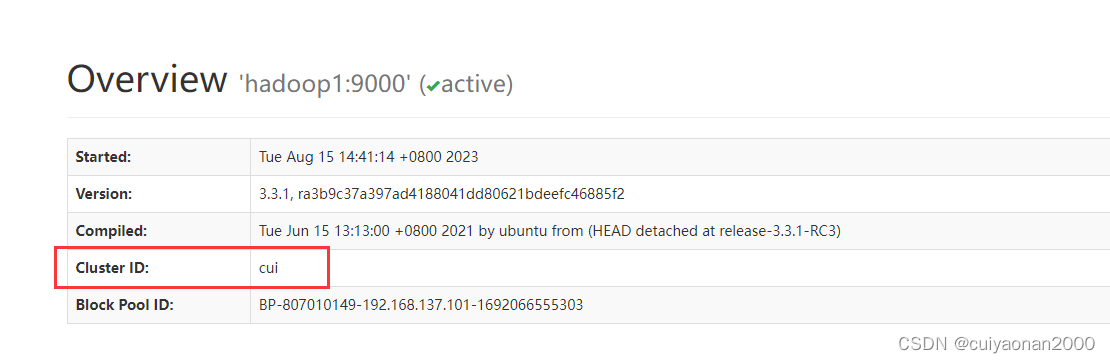
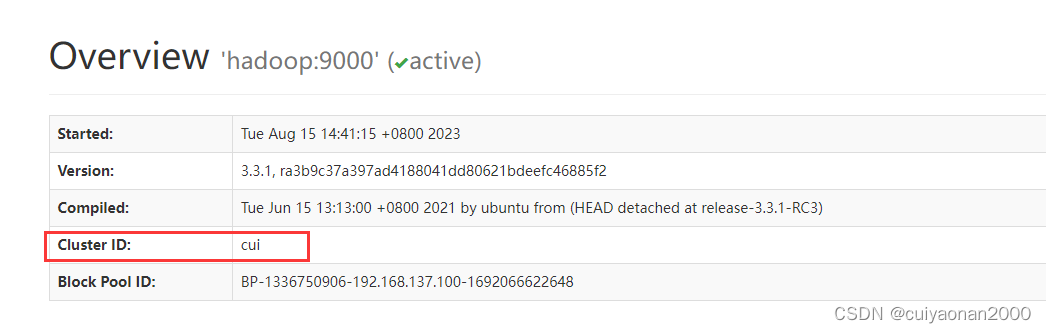
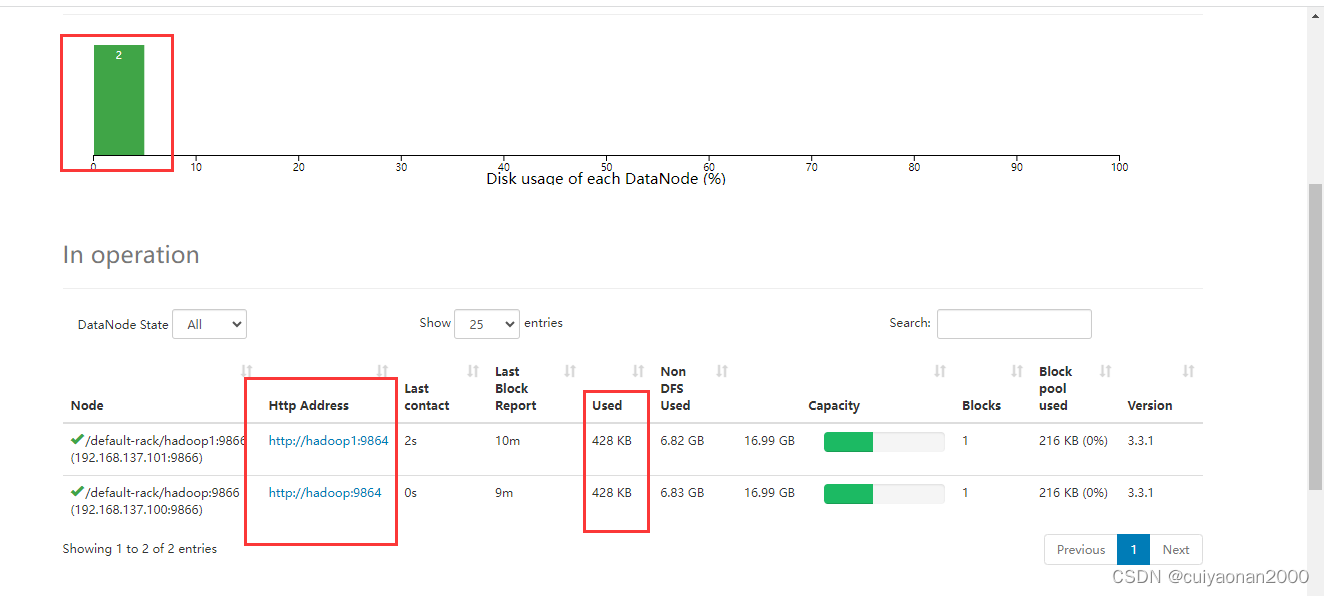
最主要的就是共用DataNode,即他们的DataNode 信息一样
ViewFs Of HDFS
在很多时候,我们会碰到数据融合的需求,比如说原先有A集群,B集群,后来管理员认为有2套集群,数据访问不方便,于是设法将A,B集群融合为一个更大的集群,将他们的数据都放在同一套集群上.一种办法就是用Hadoop自带的DistCp工具,将数据进行跨集群的拷贝.当然这会带来很多的问题,如果数据量非常庞大的话.
,ViewFileSystem,姑且可以叫做视图文件系统.大意就是让不同集群间维持视图逻辑上的唯一性,不同集群间还是各管各的.
ViewFileSystem不是一个新的文件系统,只是逻辑上的一个视图文件系统,在逻辑上是唯一的.将各个集群的真实文件路径与ViewFileSystem的新定义的路径进行关联映射
viewfs总来的说非常简单. viewfs其实就是个实现了所有hdfs接口的客户端. 使用它来连接各个namenode服务,屏蔽了我们同时连接多个namenode,并进行操作的问题.
core-site.xml
只需要修改core-site.xml就可以了
 <!--    <property>
            <name>fs.defaultFS</name>
            <value>hdfs://hadoop:9000/</value>
        </property>
    -->

    <property>
        <name>fs.defaultFS</name>
        <value>viewfs://666</value>
    </property>


 <property>
        <name>fs.viewfs.mounttable.666.link./viewmusic</name>
        <value>hdfs://hadoop:9000/music</value>
    </property>
如上:
- 首先声明viewfs的地址
- 然后让viewmusic 挂在到了hadoop:9000/music
在部署了viewmusic的hdfs上查看目录/viewmusic下的内容

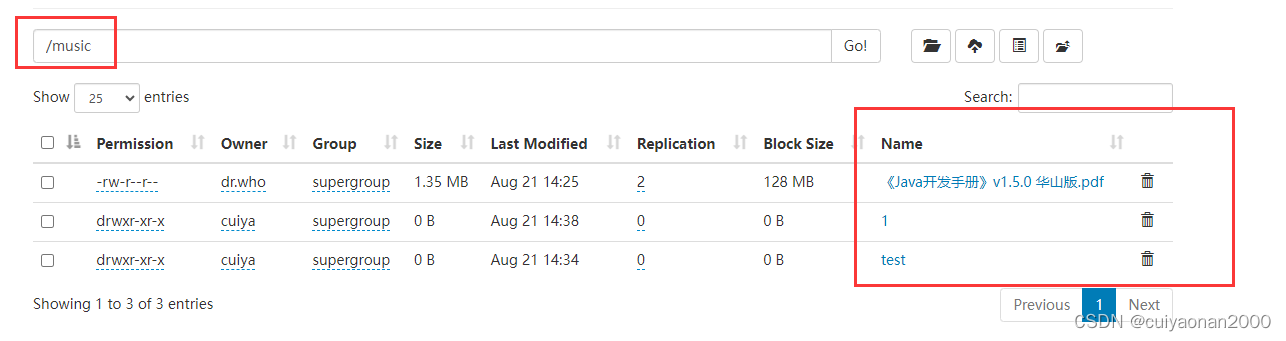
hadoop:9000/music的目录下内容如下所示:
另一种写法
可以把挂载的信息独立成一个xml文档然后再core-site.xml中引用就可以了
引用方式如下所示
<xi:include href="mountTable.xml" />







 扫一扫
扫一扫


 1721
1721

 被折叠的 条评论
为什么被折叠?
被折叠的 条评论
为什么被折叠?
 到【灌水乐园】发言





