


一、实验前瞻。
本实验聚焦于IS-IS与OSPF动态路由协议间的路由重分发技术,旨在通过实践掌握多协议协同组网的核心配置方法。实验基于典型网络拓扑,首先完成设备基础配置(重命名、IP地址分配),并分别在指定设备上启用OSPF与IS-IS协议,构建初始路由环境。随后,通过关键步骤实现双向路由引入:在R3上将IS-IS路由注入OSPF域(import-route isis),并将OSPF路由回灌至IS-IS域(import-route ospf),最终验证路由表的动态更新效果。
二、综合实验
1、实验拓扑
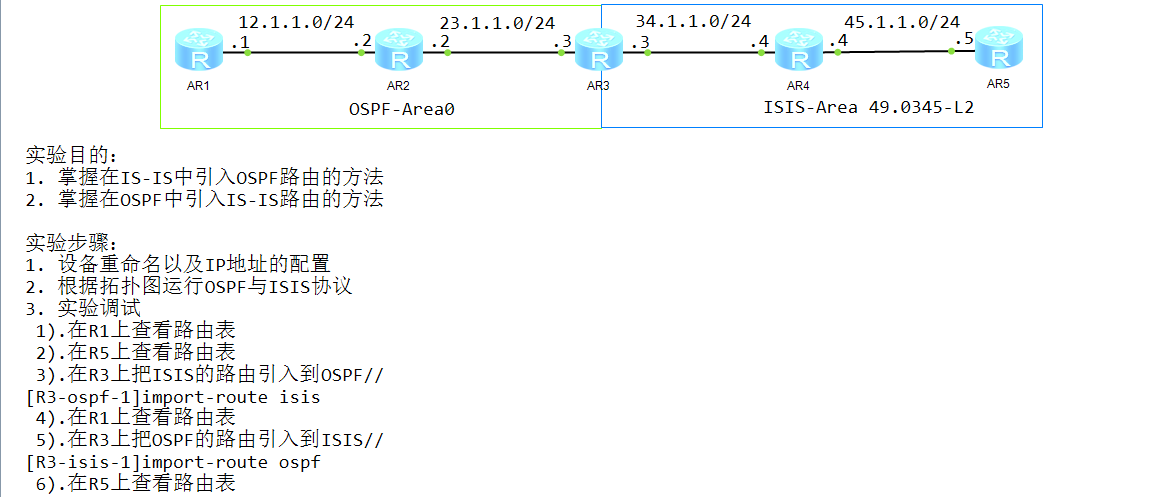
2、配置命令
<Huawei>sys
[Huawei]un in e
[Huawei]sysname r1
[r1]inter
[r1]interface g0/0/0
[r1-GigabitEthernet0/0/0]ip address 12.1.1.1 24
[r1-GigabitEthernet0/0/0]quit
[r1]inter loo
[r1]inter LoopBack 0
[r1-LoopBack0]ip address 1.1.1.1 32
[r1-LoopBack0]quit
[r1]ospf router-id 1.1.1.1
[r1-ospf-1]area 0
[r1-ospf-1-area-0.0.0.0]network 12.1.1.0 0.0.0.255
[r1-ospf-1-area-0.0.0.0]network 1.1.1.1 0.0.0.0
[r1-ospf-1-area-0.0.0.0]quit
[r1]display ip routing-table
<Huawei>sys
[Huawei]un in e
[Huawei]sysname r2
[r2]undo info-center enable
[r2]interface g0/0/1
[r2-GigabitEthernet0/0/1]ip address 12.1.1.2 24
[r2-GigabitEthernet0/0/1]quit
[r2]interface g0/0/0
[r2-GigabitEthernet0/0/0]ip address 23.1.1.2 24
[r2-GigabitEthernet0/0/0]quit
[r2]int
[r2]interface loo
[r2]interface LoopBack 0
[r2-LoopBack0]ip address 2.2.2.2 32
[r2-LoopBack0]quit
[r2]ospf router-id 2.2.2.2
[r2-ospf-1]area 0
[r2-ospf-1-area-0.0.0.0]network 12.1.1.0 0.0.0.255
[r2-ospf-1-area-0.0.0.0]network 23.1.1.0 0.0.0.255
[r2-ospf-1-area-0.0.0.0]network 2.2.2.2 0.0.0.0
[r2-ospf-1-area-0.0.0.0]quit
[Huawei]un in e
[Huawei]sysname r3
[r3]interface g0/0/1
[r3-GigabitEthernet0/0/1]ip address 23.1.1.3 24
[r3-GigabitEthernet0/0/1]quit
[r3]interface g0/0/0
[r3-GigabitEthernet0/0/0]ip address 34.1.1.3 24
[r3-GigabitEthernet0/0/0]quit
[r3]interface LoopBack 0
[r3-Lo 最低0.47元/天 解锁文章






 扫一扫
扫一扫


 1407
1407

 被折叠的 条评论
为什么被折叠?
被折叠的 条评论
为什么被折叠?
 到【灌水乐园】发言





