



一、数据库管理器SQLiteDatabase
1、SQLiteDatabase是SQLite的数据库管理类,它提供了若干操作数据表的API
2、管理类API,用于数据库层面的操作
(1)openDatabase:打开指定路径的数据库
(2)isOpen:判断数据库是否已打开
(3)close:关闭数据库
(4)getVersion:获取数据库的版本号
(5)setVersion:设置数据库的版本号
3、事务类API,用于事务层面的操作
(1)beginTransaction:开始事务
(2)setTransactionSuccessful:设置事务的成功标志
(3)endTransaction:结束事务
4、数据处理类API,用于数据表层面的操作
(1)execSQL:执行拼接好的SQL语句
(2)delete:删除符合条件的记录
(3)update:更新符合条件的记录
(4)insert:插入一条记录
(5)query:执行查询操作,返回结果集的游标
(6)rawQuery:执行拼接好的SQL查询语句,返回结果集的游标
5、openOrCreateDatabase
创建或打开数据库,数据库如果不存在就创建它,如果存在就打开它
public SQLiteDatabase openOrCreateDatabase(String name, int mode, SQLiteDatabase.CursorFactory factory)
说明:
(1)name:数据库路径
(2)mode:打开模式
(2)factory:返回数据集的游标工厂
6、deleteDatabase
删除数据库
7、例子
activity_datebase.xml
<?xml version="1.0" encoding="utf-8"?>
<LinearLayout xmlns:android="http://schemas.android.com/apk/res/android"
    xmlns:app="http://schemas.android.com/apk/res-auto"
    xmlns:tools="http://schemas.android.com/tools"
    android:layout_width="match_parent"
    android:layout_height="match_parent"
    android:orientation="vertical"
    tools:context=".DatabaseActivity">

    <LinearLayout
        android:layout_width="match_parent"
        android:layout_height="wrap_content"
        android:orientation="horizontal">

        <Button
            android:id="@+id/btn_database_create"
            android:layout_width="0dp"
            android:layout_height="wrap_content"
            android:layout_weight="1"
            android:text="创建数据库"
            android:textSize="17sp"/>

        <Button
            android:id="@+id/btn_database_delete"
            android:layout_width="0dp"
            android:layout_height="wrap_content"
            android:layout_weight="1"
            android:text="删除数据库"
            android:textSize="17sp"/>
    </LinearLayout>

    <TextView
        android:id="@+id/tv_database"
        android:layout_width="match_parent"
        android:layout_height="wrap_content"/>

</LinearLayout>
DatabaseActivity.java
package com.example.chapter06;

import androidx.appcompat.app.AppCompatActivity;

import android.content.Context;
import android.database.sqlite.SQLiteDatabase;
import android.os.Bundle;
import android.view.View;
import android.widget.Button;
import android.widget.TextView;

public class DatabaseActivity extends AppCompatActivity implements View.OnClickListener {

    private TextView tv_database;
    private String mDatabaseName;

    @Override
    protected void onCreate(Bundle savedInstanceState) {
        super.onCreate(savedInstanceState);
        setContentView(R.layout.activity_datebase);

        tv_database = findViewById(R.id.tv_database);

        Button btn_database_create = findViewById(R.id.btn_database_create);
        Button btn_database_delete = findViewById(R.id.btn_database_delete);

        btn_database_create.setOnClickListener(this);
        btn_database_delete.setOnClickListener(this);

        // 生成一个测试数据库的完整路径
        mDatabaseName = getFilesDir() + "/test.db";

    }

    @Override
    public void onClick(View view) {
        String desc = null;

        if (view.getId() == R.id.btn_database_create) {
            // 创建或打开数据库,数据库如果不存在就创建它,如果存在就打开它
            SQLiteDatabase db = openOrCreateDatabase(mDatabaseName, Context.MODE_PRIVATE, null);
            desc = String.format("数据库%s创建%s", mDatabaseName, (db!=null) ? "成功" : "失败");
            tv_database.setText(desc);

        } else if (view.getId() == R.id.btn_database_delete) {
            // 删除数据库
            boolean result = deleteDatabase(mDatabaseName);
            desc = String.format("数据库%s删除%s", mDatabaseName, result ? "成功" : "失败");
            tv_database.setText(desc);
        }
    }
}
8、运行结果
创建数据库

/data/data/包名/files目录下
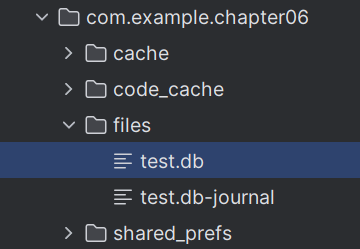
删除数据库

二、数据库帮助器SQLiteOpenHelper
1、SQLiteOpenHelper是Android提供的数据库辅助工具,用于指导开发者进行SQLite的合理使用
2、SQLiteOpenHelper的具体使用步骤如下
(1)新建一个继承自SQLiteOpenHelper的数据库操作类,提示重写onCreate和onUpgrade两个方法
(2)封装保证数据库安全的必要方法
(3)提供对表记录进行增加、删除、修改、查询的操作方法
3、由于读和写的锁是不一样的,所以要提供两个SQLiteDatabase实例
4、SQLiteOpenHelper的onCreate方法只会在数据库第一次被创建时执行一次。当你首次创建数据库时,系统会调用这个方法来创建所有必要的表和初始化数据库结构。如果数据库已经存在,onCreate将不会被再次调用
5、SQLiteDatabase类的insert方法说明
insert方法说明
public long insert(String table, String nullColumnHack, ContentValues values)
执行插入记录动作,该语句返回插入记录的行号
参数说明:
(1)table:表名
(2)nullColumnHack:作用是如果第三个参数ContentValues为空,则没有字段插入。所以这里要指定一个字段设置为NULL
(3)values:键值对
返回值:
返回行的rowID,如果返回-1则添加失败
delete方法说明
public int delete(String table, String whereClause, String[] whereArgs)
参数说明:
(1)table:表名
(2)whereClause:where条件字段
(3)whereArgs:where传入的参数
返回值:
返回影响的行数
update方法说明
public int update(String table, ContentValues values, String whereClause, String[] whereArgs)
参数说明:
(1)table:表名
(2)values:
(3)whereClause:where条件字段
(4)whereArgs:where传入的参数
返回值:
返回影响的行数
query方法说明
public Cursor query(String table, String[] columns, String selection, String[] selectionArgs, String groupBy, String having, String orderBy)
参数说明:
(1)table:表名
(2)columns:列名
(3)selection:选项
(4)selectionArgs:选项参数
(5)groupBy:groupBy参数
(6)having:having参数
(7)orderBy:orderBy参数
返回值:
返回结果集的游标
6、例子
数据库工具类UserDBHelper.java
package com.example.chapter06.database;

import android.content.ContentValues;
import android.content.Context;
import android.database.Cursor;
import android.database.sqlite.SQLiteDatabase;
import android.database.sqlite.SQLiteOpenHelper;

import androidx.annotation.Nullable;

import com.example.chapter06.entity.User;

import java.time.LocalDateTime;
import java.util.ArrayList;
import java.util.List;

public class UserDBHelper extends SQLiteOpenHelper {

    private static final String DB_NAME = "user.db";
    private static final String TABLE_NAME = "user_info";
    private static final int DB_VERSION = 1;
    private static UserDBHelper mHelper = null;
    private SQLiteDatabase mRDB = null;
    private SQLiteDatabase mWDB = null;

    private UserDBHelper(@Nullable Context context) {
        super(context, DB_NAME, null, DB_VERSION);
    }

    // 利用单例模式获取数据库帮助器的唯一实例
    public static UserDBHelper getInstance(Context context) {
        if (mHelper == null) {
            mHelper = new UserDBHelper(context);
        }
        return mHelper;
    }

    // 打开数据库的读连接
    public SQLiteDatabase openReadLink() {
        if (mRDB == null || !mRDB.isOpen()) {
            mRDB = mHelper.getReadableDatabase();
        }
        return mRDB;
    }

    // 打开数据库的写连接
    public SQLiteDatabase openWriteLink() {
        if (mWDB == null || !mWDB.isOpen()) {
            mWDB = mHelper.getWritableDatabase();
        }
        return mWDB;
    }

    // 关闭数据库连接
    public void closeLink() {
        if (mRDB != null) {
            mRDB.close();
            mRDB = null;
        }

        if (mWDB != null) {
            mWDB.close();
            mWDB = null;
        }
    }

    // 创建数据库,执行建表语句
    @Override
    public void onCreate(SQLiteDatabase sqLiteDatabase) {
        String sql = "CREATE TABLE IF NOT EXISTS " + TABLE_NAME + " (" +
                "_id INTEGER PRIMARY KEY AUTOINCREMENT NOT NULL," +
                "name VARCHAR NOT NULL," +
                "age INTEGER NOT NULL," +
                "height FLOAT NOT NULL," +
                "weight FLOAT NOT NULL," +
                "married INTEGER NOT NULL," +
                "update_time VARCHAR NOT NULL);";
        sqLiteDatabase.execSQL(sql);
    }

    @Override
    public void onUpgrade(SQLiteDatabase sqLiteDatabase, int i, int i1) {

    }

    public long insert(User user) {
        ContentValues values = new ContentValues();
        values.put("name", user.getName());
        values.put("age", user.getAge());
        values.put("height", user.getHeight());
        values.put("weight", user.getWeight());
        values.put("married", user.isMarried());
        values.put("update_time", LocalDateTime.now().toString());

        return mWDB.insert(TABLE_NAME, null, values);
    }

    public int deleteByName(String name) {
        return mWDB.delete(TABLE_NAME, "name=?", new String[]{name});
    }

    public int update(User user) {
        ContentValues values = new ContentValues();
        if (user.getAge() > 0) {
            values.put("age", user.getAge());
        }
        if (user.getHeight() > 0f) {
            values.put("height", user.getHeight());
        }
        if (user.getWeight() > 0f) {
            values.put("weight", user.getWeight());
        }
        values.put("married", user.isMarried());
        values.put("update_time", LocalDateTime.now().toString());
        return mWDB.update(TABLE_NAME, values, "name=?", new String[]{user.getName()});
    }

    public List<User> queryAll() {
        List<User> list = new ArrayList<>();
        // 执行记录查询,返回结果集的游标
        Cursor cursor = mRDB.query(TABLE_NAME, null, null, null, null, null, null);
        // 循环取出游标指向的每条记录
        while (cursor.moveToNext()) {
            User user = new User(
                    cursor.getInt(0),
                    cursor.getString(1),
                    cursor.getInt(2),
                    cursor.getFloat(3),
                    cursor.getFloat(4),
                    // SQLite没有布尔类型,用0表示false,用1表示true
                    cursor.getInt(5) == 1
            );
            list.add(user);
        }
        cursor.close();

        return list;
    }
}
实体类User.java
package com.example.chapter06.entity;

import androidx.annotation.NonNull;

public class User {
    private int id; // 序号
    private String name; // 姓名
    private int age; // 年龄
    private float height; // 升高
    private float weight; // 体重
    private boolean married; // 婚否

    public int getId() {
        return id;
    }

    public void setId(int id) {
        this.id = id;
    }

    public String getName() {
        return name;
    }

    public void setName(String name) {
        this.name = name;
    }

    public int getAge() {
        return age;
    }

    public void setAge(int age) {
        this.age = age;
    }

    public float getHeight() {
        return height;
    }

    public void setHeight(float height) {
        this.height = height;
    }

    public float getWeight() {
        return weight;
    }

    public void setWeight(float weight) {
        this.weight = weight;
    }

    public boolean isMarried() {
        return married;
    }

    public void setMarried(boolean married) {
        this.married = married;
    }

    public User(String name, int age, float height, float weight, boolean married) {
        this.name = name;
        this.age = age;
        this.height = height;
        this.weight = weight;
        this.married = married;
    }

    public User(int id, String name, int age, float height, float weight, boolean married) {
        this.id = id;
        this.name = name;
        this.age = age;
        this.height = height;
        this.weight = weight;
        this.married = married;
    }

    @NonNull
    @Override
    public String toString() {
        return "User{" +
                "id=" + id +
                ", name='" + name + '\'' +
                ", age=" + age +
                ", height=" + height +
                ", weight=" + weight +
                ", married=" + married +
                '}';
    }
}
布局文件activity_sqlite_helper.xml
<?xml version="1.0" encoding="utf-8"?>
<LinearLayout xmlns:android="http://schemas.android.com/apk/res/android"
    xmlns:app="http://schemas.android.com/apk/res-auto"
    xmlns:tools="http://schemas.android.com/tools"
    android:layout_width="match_parent"
    android:layout_height="match_parent"
    android:orientation="vertical"
    tools:context=".SQLiteHelperActivity">

    <GridLayout
        android:layout_width="match_parent"
        android:layout_height="wrap_content"
        android:columnCount="2"
        android:rowCount="4">

        <TextView
            android:layout_width="60dp"
            android:layout_height="wrap_content"
            android:text="姓名:"
            android:textSize="17sp"/>

        <EditText
            android:id="@+id/et_name"
            android:layout_width="0dp"
            android:layout_height="wrap_content"
            android:layout_columnWeight="1"
            android:inputType="text"
            android:hint="请输入姓名"/>

        <TextView
            android:layout_width="60dp"
            android:layout_height="wrap_content"
            android:text="年龄:"
            android:textSize="17sp"/>

        <EditText
            android:id="@+id/et_age"
            android:layout_width="0dp"
            android:layout_height="wrap_content"
            android:layout_columnWeight="1"
            android:inputType="number"
            android:maxLength="3"
            android:hint="请输入年龄"/>

        <TextView
            android:layout_width="60dp"
            android:layout_height="wrap_content"
            android:text="身高:"
            android:textSize="17sp"/>

        <EditText
            android:id="@+id/et_height"
            android:layout_width="0dp"
            android:layout_height="wrap_content"
            android:layout_columnWeight="1"
            android:inputType="numberDecimal"
            android:maxLength="6"
            android:hint="请输入身高"/>

        <TextView
            android:layout_width="60dp"
            android:layout_height="wrap_content"
            android:text="体重:"
            android:textSize="17sp"/>

        <EditText
            android:id="@+id/et_weight"
            android:layout_width="0dp"
            android:layout_height="wrap_content"
            android:layout_columnWeight="1"
            android:inputType="numberDecimal"
            android:maxLength="6"
            android:hint="请输入体重"/>

    </GridLayout>

    <CheckBox
        android:id="@+id/ck_married"
        android:layout_width="match_parent"
        android:layout_height="wrap_content"
        android:text="已婚"
        android:textSize="17sp"/>

    <Button
        android:id="@+id/btn_save"
        android:layout_width="match_parent"
        android:layout_height="wrap_content"
        android:text="添加"
        android:textSize="17sp"/>

    <Button
        android:id="@+id/btn_delete"
        android:layout_width="match_parent"
        android:layout_height="wrap_content"
        android:text="删除"
        android:textSize="17sp"/>

    <Button
        android:id="@+id/btn_update"
        android:layout_width="match_parent"
        android:layout_height="wrap_content"
        android:text="修改"
        android:textSize="17sp"/>

    <Button
        android:id="@+id/btn_query"
        android:layout_width="match_parent"
        android:layout_height="wrap_content"
        android:text="查询"
        android:textSize="17sp"/>

</LinearLayout>
SQLiteHelperActivity.java
package com.example.chapter06;

import androidx.appcompat.app.AppCompatActivity;

import android.database.sqlite.SQLiteDatabase;
import android.os.Bundle;
import android.text.TextUtils;
import android.util.Log;
import android.view.View;
import android.widget.CheckBox;
import android.widget.EditText;

import com.example.chapter06.database.UserDBHelper;
import com.example.chapter06.entity.User;
import com.example.chapter06.util.ToastUtil;

import java.time.LocalDateTime;
import java.util.ArrayList;
import java.util.List;

public class SQLiteHelperActivity extends AppCompatActivity implements View.OnClickListener {

    private EditText et_name;
    private EditText et_age;
    private EditText et_height;
    private EditText et_weight;
    private CheckBox ck_married;
    private UserDBHelper mHelper;
    private SQLiteDatabase mWDB;
    private SQLiteDatabase mRDB;

    @Override
    protected void onCreate(Bundle savedInstanceState) {
        super.onCreate(savedInstanceState);
        setContentView(R.layout.activity_sqlite_helper);

        et_name = findViewById(R.id.et_name);
        et_age = findViewById(R.id.et_age);
        et_height = findViewById(R.id.et_height);
        et_weight = findViewById(R.id.et_weight);
        ck_married = findViewById(R.id.ck_married);

        findViewById(R.id.btn_save).setOnClickListener(this);
        findViewById(R.id.btn_delete).setOnClickListener(this);
        findViewById(R.id.btn_update).setOnClickListener(this);
        findViewById(R.id.btn_query).setOnClickListener(this);

    }

    // onCreate执行后,执行onStart
    @Override
    protected void onStart() {
        super.onStart();
        // 获得数据库帮助器的实例
        mHelper = UserDBHelper.getInstance(this);
        // 打开数据库帮助器的读写连接
        mWDB = mHelper.openWriteLink();
        mRDB = mHelper.openReadLink();
    }

    // 界面不可见时,退出到后台时执行
    @Override
    protected void onStop() {
        super.onStop();
        // 关闭数据库连接
        mHelper.closeLink();
    }

    @Override
    public void onClick(View view) {
        String name = et_name.getText().toString();
        if (TextUtils.isEmpty(name)) {
            name = "";
        }
        String age = et_age.getText().toString();
        if (TextUtils.isEmpty(age)) {
            age = "0";
        }
        String height = et_height.getText().toString();
        if (TextUtils.isEmpty(height)) {
            height = "0";
        }
        String weight = et_weight.getText().toString();
        if (TextUtils.isEmpty(weight)) {
            weight = "0";
        }
        User user = null;
        if (view.getId() == R.id.btn_save) {
            user = new User(name,
                    Integer.parseInt(age),
                    Float.parseFloat(height),
                    Float.parseFloat(weight),
                    ck_married.isChecked());

            if (mHelper.insert(user) > 0) {
                ToastUtil.show(this, "添加成功");
            }

        } else if (view.getId() == R.id.btn_delete) {
            if (mHelper.deleteByName(name) > 0) {
                ToastUtil.show(this, "删除成功");
            } else {
                ToastUtil.show(this, "记录不存在");
            }

        } else if (view.getId() == R.id.btn_update) {
            user = new User(name,
                    Integer.parseInt(age),
                    Float.parseFloat(height),
                    Float.parseFloat(weight),
                    ck_married.isChecked());

            int i = mHelper.update(user);
            ToastUtil.show(this, "更新行数:" + i);

        } else if (view.getId() == R.id.btn_query) {
            List<User> users = mHelper.queryAll();
            for (User u : users) {
                Log.d("sam", u.toString());
            }
        }
    }
}
工具类ToastUtil.java,显示短的提示条
package com.example.chapter06.util;

import android.content.Context;
import android.widget.Toast;

public class ToastUtil {

    public static void show(Context ctx, String message) {
        Toast.makeText(ctx, message, Toast.LENGTH_SHORT).show();
    }
}
7、用Android Studio自带工具查看表结构
左上角View -> Tool Windows -> App Inspection,选Database Inspector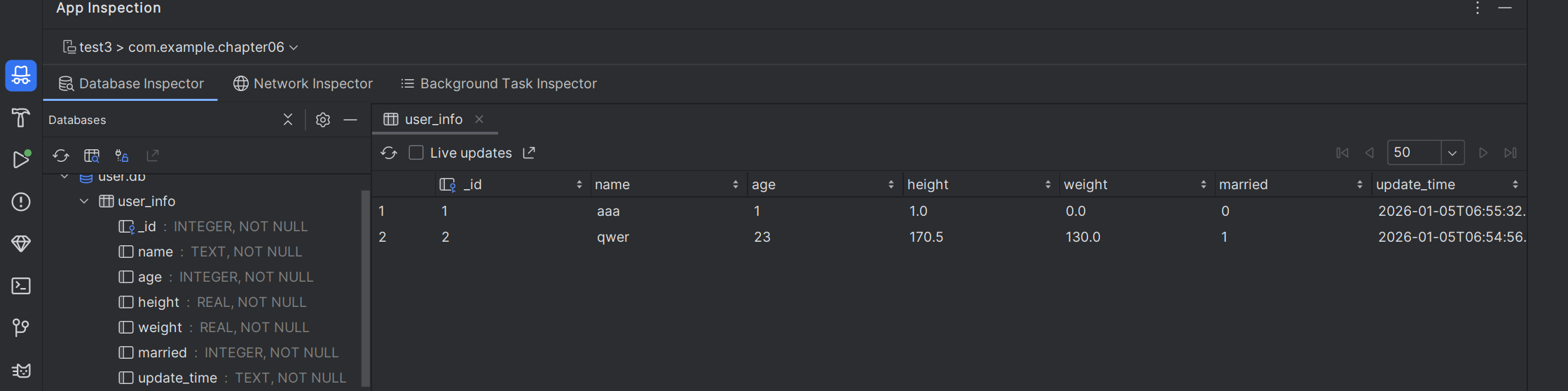
三、事务管理
1、例子
try {
	mWDB.beginTransaction();
	mWDB.insert(TABLE_NAME1, null, values1);
	mWDB.insert(TABLE_NAME2, null, values2);
	mWDB.setTransactionSuccessful();
} catch (Exception e) {
	e.printStackTrace();
} finally {
	mWDB.endTransaction();
}
四、数据库版本升级
1、如果后续程序升级,表结构要加字段,要修改onUpgrade方法,把定义的DB_VERSION加1
这样就会触发执行onUpgrade方法。触发条件就是DB_VERSION变量发生变化了
2、例子
private static final int DB_VERSION = 2;
    @Override
    public void onUpgrade(SQLiteDatabase sqLiteDatabase, int i, int i1) {
        String sql = "alter table " + TABLE_NAME + " add column phone varchar;";
        sqLiteDatabase.execSQL(sql);
        sql = "alter table " + TABLE_NAME + " add column password varchar;";
        sqLiteDatabase.execSQL(sql);
    }





 扫一扫
扫一扫


 605
605

 被折叠的 条评论
为什么被折叠?
被折叠的 条评论
为什么被折叠?
 到【灌水乐园】发言





