



 本文介绍了Java NIO中的通道概念及其实现方式,包括FileChannel、ServerSocketChannel和SocketChannel等核心类的功能与用法。通过四个案例展示了如何利用NIO进行文件读写、复制等操作。
一、基本介绍
1、NIO的通道类似于流,但有些区别
(1)通道可以同时进行读写,而流只能读或者只能写
(2)通道可以实现异步读写数据
(3)通道可以从缓冲读数据,也可以写数据到缓冲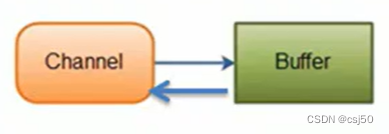
2、BIO中的stream是单向的,例如FileInputStream对象只能进行读取数据的操作,而NIO中的通道(Channel)是双向的,可以读操作,也可以写操作。
3、Channel在NIO中是一个接口
public interface Channel extends Closeable
4、常用的Channel类有:FileChannel、DatagramChannel、ServerSocketChannel(类似ServerSocket)、SocketChannel(类似Socket)。
真实类型:
5、FileChannel用于文件的数据读写,DatagramChannel用于UDP的数据读写,ServerSocketChannel和SocketChannel用于TCP的数据读写。
二、FileChannel类
1、FileChannel类主要用来对本地文件进行IO操作,常见方法有
读和写是站在channel通道的角度
(1)public abstract int read(ByteBuffer dst):从通道读取数据并放到缓冲区中
(2)public abstract int write(ByteBuffer src):把缓冲区的数据写到通道中
(3)public abstract long transferFrom(ReadableByteChannel src, long position, long count):从目标通道中复制数据到当前通道
(4)public abstract long transferTo(long position, long count, WritableByteChannel target):把数据从当前通道复制给目标通道
三、案例1:本地文件写数据
1、使用ByteBuffer(缓冲)和FileChannel(通道),将“hello,你好”写入到file01.txt中
2、文件不存在就创建
3、代码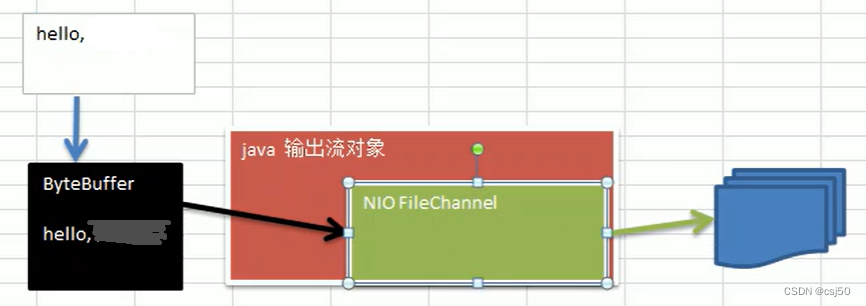
NIOFileChannel01.java
package netty.channel;

import java.io.FileOutputStream;
import java.nio.ByteBuffer;
import java.nio.channels.FileChannel;

public class NIOFileChannel01 {
	public static void main(String[] args) throws Exception {
		String str = "hello,你好";
		//创建一个输出流->包装到channel中
		FileOutputStream fileOutputStream = new FileOutputStream("d:\\file01.txt");

		//通过fileOutputStream输出流获取对应的FileChannel
		//这个fileChannel真实类型是FileChannelImpl
		FileChannel fileChannel = fileOutputStream.getChannel();

		//创建一个缓冲区ByteBuffer
		ByteBuffer byteBuffer = ByteBuffer.allocate(1024);

		//将str放入到byteBuffer中
		byteBuffer.put(str.getBytes());

		//对byteBuffer进行flip
		byteBuffer.flip();

		//将byteBuffer里的数据,写入到fileChannel
		fileChannel.write(byteBuffer);

		//关闭流
		fileOutputStream.close();
	}
}
读写翻转前: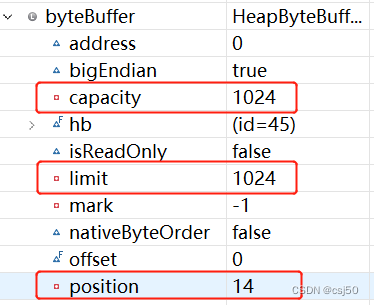
翻转后: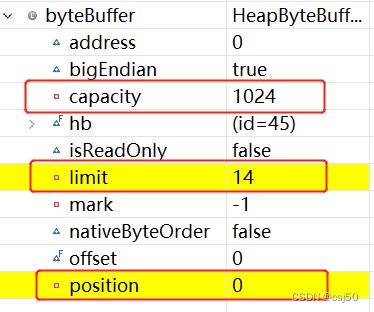
四、案例2:本地文件读数据
1、使用ByteBuffer(缓冲)和FileChannel(通道),将file01.txt中的数据读入到程序,并显示在控制台屏幕
2、假定文件已经存在
3、代码
NIOFileChannel02.java
package netty.channel;

import java.io.File;
import java.io.FileInputStream;
import java.nio.ByteBuffer;
import java.nio.channels.FileChannel;

public class NIOFileChannel02 {
	public static void main(String[] args) throws Exception {
		//创建文件的输入流
		File file = new File("d:\\file01.txt");
		FileInputStream fileInputStream = new FileInputStream(file);

		//通过fileInputStream获取对应的FileChannel -> 实际类型FileChannelImpl
		FileChannel fileChannel = fileInputStream.getChannel();

		//创建缓冲区
		ByteBuffer byteBuffer = ByteBuffer.allocate(1024);

		//将通道的数据读入到byteBuffer中
		fileChannel.read(byteBuffer);

		//将byteBuffer的字节数据转成String
		System.out.println(new String(byteBuffer.array())); //返回buffer中的字节数组hb

		//关闭流
		fileInputStream.close();
	}
}
五、案例3:使用一个Buffer完成文件读取
1、使用FileChannel(通道)和方法read、write,完成文件的拷贝
2、拷贝一个文本文件1.txt到2.txt,放在项目下即可
3、代码
NIOFileChannel03.java
package netty.channel;

import java.io.FileInputStream;
import java.io.FileOutputStream;
import java.nio.ByteBuffer;
import java.nio.channels.FileChannel;

public class NIOFileChannel03 {
	public static void main(String[] args) throws Exception {
		//创建文件的输入流
		FileInputStream fileInputStream = new FileInputStream("d:\\file01.txt");
		//获取输入流对象的channel
		FileChannel fileChannel01 = fileInputStream.getChannel();

		//文件输出流对象
		FileOutputStream fileOutputStream = new FileOutputStream("d:\\file02.txt");
		//获取输入流对象的channel
		FileChannel fileChannel02 = fileOutputStream.getChannel();

		ByteBuffer byteBuffer = ByteBuffer.allocate(1024);

		while(true) {
			//读之前有个重要操作,一定不要忘了
			byteBuffer.clear(); //复位:The position is set to zero, the limit is set to the capacity, and the mark is discarded

			//循环读取
			int read = fileChannel01.read(byteBuffer);
			System.out.println("read = " + read);
			if (read == -1) {
				//表示读完
				break;
			}

			//读写切换
			byteBuffer.flip();

			//将buffer中的数据写入到fileChannel02
			fileChannel02.write(byteBuffer);
		}

		//关闭相关的流
		fileInputStream.close();
		fileOutputStream.close();
	}
}
六、案例4:拷贝文件transferFrom方法
1、使用FileChannel(通道)和方法transferFrom,完成文件的拷贝
2、拷贝一张图片
3、代码
NIOFileChannel04.java
package netty.channel;

import java.io.FileInputStream;
import java.io.FileOutputStream;
import java.nio.channels.FileChannel;

public class NIOFileChannel04 {
	public static void main(String[] args) throws Exception {
		//创建输入流
		FileInputStream fileInputStream = new FileInputStream("d:\\a.jpg");
		//创建输出流
		FileOutputStream fileOutputStream = new FileOutputStream("d:\\a2.jpg");

		//获取各个流对应的fileChannel
		FileChannel source = fileInputStream.getChannel();
		FileChannel dest = fileOutputStream.getChannel();

		//使用transferFrom完成拷贝
		dest.transferFrom(source, 0, source.size());

		//关闭通道和流
		source.close();
		dest.close();
		fileInputStream.close();
		fileOutputStream.close();
	}
}
七、ServerSocketChannel类
1、ServerSocketChannel在服务端监听新的客户端Socket连接
2、相关方法
public static ServerSocketChannel open() throws IOException:得到一个ServerSocketChannel通道
public final ServerSocketChannel bind(SocketAddress local) throws IOException:设置服务器端端口号
public final SelectableChannel configureBlocking(boolean block) throws IOException:设置阻塞或非阻塞模式,取值false表示采用非阻塞模式
public SocketChannel accept() throws IOException:接受一个连接,返回代表这个连接的通道对象
public final SelectionKey register(Selector sel, int ops) throws ClosedChannelException:注册一个选择器并设置监听事件
3、ServerSocketChannel和SocketChannel
ServerSocketChannel继承自AbstractSelectableChannel
SocketChannel也继承自AbstractSelectableChannel
但是SocketChannel实现的接口更多,它更重要的功能是对数据的读和写
八、SocketChannel类
1、SocketChannel,网络IO通道,具体负责进行读写操作,NIO把缓冲区的数据写入通道,或者把通道里的数据读到缓冲区
2、相关方法
public static SocketChannel open() throws IOException:得到一个SocketChannel通道
public final SelectableChannel configureBlocking(boolean block) throws IOException:设置阻塞或非阻塞模式,取值false表示采用非阻塞模式
public abstract boolean connect(SocketAddress remote) throws IOException:连接服务器
public abstract boolean finishConnect() throws IOException:如果上面的方法连接失败,接下来就要通过该方法完成连接操作
public abstract int write(ByteBuffer src) throws IOException:往通道里写数据
public abstract int read(ByteBuffer dst) throws IOException:从通道里读数据
public final SelectionKey register(Selector sel, int ops, Object att) throws ClosedChannelException:注册一个选择器并设置监听事件,最后一个参数可以设置共享数据
public final void close() throws IOException:关闭通道





 扫一扫
扫一扫


 335
335

 被折叠的 条评论
为什么被折叠?
被折叠的 条评论
为什么被折叠?
 到【灌水乐园】发言





