



 本文介绍如何在SpringBoot项目中配置并使用Thymeleaf模板引擎及jQuery库,包括Maven依赖配置、默认访问页面设置及Thymeleaf高级特性介绍。
首先介绍个maven jar包引用的配置的网站,很方便:https://www.webjars.org/
一,还是使用spring initializr 创建一个web工程
然后在pom文件中引入jquery配置(用这个网址(https://www.webjars.org/)):

pom:
<dependency>
    <groupId>org.webjars</groupId>
    <artifactId>jquery</artifactId>
    <version>3.3.1-2</version>
</dependency>
二,设置web默认访问的html页面
在资源文件夹下创建一个index.html页面:
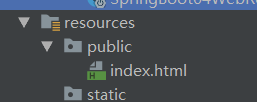
index.html 内容:
<!DOCTYPE html>
<html lang="en">
<head>
    <meta charset="UTF-8">
    <title>Title</title>
</head>
<body>
    <h1>首页</h1>
</body>
</html>
然后重启,localhost:8080/ 页面上就会出现首页两个字。
三。模板引擎
如 jsp,freemarker,Thymeleaf都是模板引擎
springboot推荐使用Thymeleaf,优点:高级语烟的模板引擎,语法简单,功能强大
1,引入Thymeleaf
 <!-- 引入jquery模块l-->
        <dependency>
            <groupId>org.springframework.boot</groupId>
            <artifactId>spring-boot-starter-thymeleaf</artifactId>
        </dependency>
修改版本:
<properties>
        <java.version>1.8</java.version>
        <thymeleaf.version>3.0.9.RELEASE</thymeleaf.version>
        <!--覆盖默认的thymeleaf版本,,布局功能的支持程序-->
        <thymeleaf-layout-dialect.version>2.2.2</thymeleaf-layout-dialect.version>
    </properties>

    <dependencies>
        <!-- 引入web模块l-->
        <dependency>
            <groupId>org.springframework.boot</groupId>
            <artifactId>spring-boot-starter-web</artifactId>
        </dependency>
        <!-- 引入jquery模块l-->
        <dependency>
            <groupId>org.springframework.boot</groupId>
            <artifactId>spring-boot-starter-thymeleaf</artifactId>
        </dependency>





 扫一扫
扫一扫


 901
901

 被折叠的 条评论
为什么被折叠?
被折叠的 条评论
为什么被折叠?
 到【灌水乐园】发言





