



 本文详细介绍了如何构建SpringCloud微服务,包括创建父工程、理解DependencyManagement和Dependencies的区别、创建微服务模块、支付模块和订单模块的构建、热部署Devtools的设置、消费者模块的创建、RestTemplate的使用、Run Dashboard的展示以及工程重构的过程,旨在帮助初学者快速掌握SpringCloud的基础操作。
SpringCloud02
SpringCloud02–构建万物之初
由于SpringCloud是基于SpringBoot开发的,所以,还是那句话:约定>配置>编码
学到这里代码量其实是很少的哦~
一、构建父工程
1.New Project 勾选create from archetype,–>找到 create from archetype: maven-archetype-site 勾选
2.起名~
3.起名的时候,有个Artifact Coordinates 填写相应信息
4.字符编码 - Settings - File encoding
5.注解生效激活 - Settings - Annotation Processors
6.Java编译版本选8
7.File Type过滤 - Settings - File Type
父工程pom
<?xml version="1.0" encoding="UTF-8"?>

<project xmlns="http://maven.apache.org/POM/4.0.0" xmlns:xsi="http://www.w3.org/2001/XMLSchema-instance"
         xsi:schemaLocation="http://maven.apache.org/POM/4.0.0 http://maven.apache.org/xsd/maven-4.0.0.xsd">
    <modelVersion>4.0.0</modelVersion>

    <groupId>org.shy</groupId>
    <artifactId>springcloud</artifactId>
    <version>1.0-SNAPSHOT</version>
    <packaging>pom</packaging>

    <name>Maven</name>
    <!-- FIXME change it to the project's website -->
    <url>http://maven.apache.org/</url>
    <inceptionYear>2001</inceptionYear>

    <!--统一管理jar包版本-->
    <properties>
        <project.build.sourceEncoding>UTF-8</project.build.sourceEncoding>
        <maven.compiler.source>8</maven.compiler.source>
        <maven.compiler.target>8</maven.compiler.target>
        <junit.version>4.12</junit.version>
        <lombok.version>1.18.10</lombok.version>
        <log4j.version>1.2.17</log4j.version>
        <mysql.version>5.1.47</mysql.version>
        <druid.version>1.1.16</druid.version>
        <mybatis.spring.boot.version>2.1.1</mybatis.spring.boot.version>
    </properties>

    <dependencyManagement>
        <dependencies>
            <!--spring boot 2.2.2-->
            <dependency>
                <groupId>org.springframework.boot</groupId>
                <artifactId>spring-boot-dependencies</artifactId>
                <version>2.2.2.RELEASE</version>
                <type>pom</type>
                <scope>import</scope>
            </dependency>
            <!--spring cloud Hoxton.SR1-->
            <dependency>
                <groupId>org.springframework.cloud</groupId>
                <artifactId>spring-cloud-dependencies</artifactId>
                <version>Hoxton.SR1</version>
                <type>pom</type>
                <scope>import</scope>
            </dependency>
            <!--spring cloud 阿里巴巴-->
            <dependency>
                <groupId>com.alibaba.cloud</groupId>
                <artifactId>spring-cloud-alibaba-dependencies</artifactId>
                <version>2.1.0.RELEASE</version>
                <type>pom</type>
                <scope>import</scope>
            </dependency>
            <!--mysql-->
            <dependency>
                <groupId>mysql</groupId>
                <artifactId>mysql-connector-java</artifactId>
                <version>${mysql.version}</version>
                <scope>runtime</scope>
            </dependency>
            <!-- druid-->
            <dependency>
                <groupId>com.alibaba</groupId>
                <artifactId>druid</artifactId>
                <version>${druid.version}</version>
            </dependency>
            <!--mybatis-->
            <dependency>
                <groupId>org.mybatis.spring.boot</groupId>
                <artifactId>mybatis-spring-boot-starter</artifactId>
                <version>${mybatis.spring.boot.version}</version>
            </dependency>
            <!--junit-->
            <dependency>
                <groupId>junit</groupId>
                <artifactId>junit</artifactId>
                <version>${junit.version}</version>
            </dependency>
            <!--log4j-->
            <dependency>
                <groupId>log4j</groupId>
                <artifactId>log4j</artifactId>
                <version>${log4j.version}</version>
            </dependency>
            <dependency>
                <groupId>lombok</groupId>
                <artifactId>${lombok.version}</artifactId>
            </dependency>
        </dependencies>
    </dependencyManagement>

    <build>
        <!--
        <finalName>你的工程名</finalName>(单一工程时添加)
        -->
        <plugins>
            <plugin>
                <groupId>org.springframework.boot</groupId>
                <artifactId>spring-boot-maven-plugin</artifactId>
                <configuration>
                    <fork>true</fork>
                    <addResources>true</addResources>
                </configuration>
            </plugin>
        </plugins>
    </build>
</project>
二、DependencyManagement和Dependencies
Maven使用dependencyManagement元素来提供了一种管理依赖版本号的方式。
通常会在一个组织或者项目的最顶层的父POM中看到dependencyManagement元素。
使用pom.xml中的dependencyManagement元素能让所有在子项目中引用个依赖而不用显式的列出版本量。
Maven会沿着父子层次向上走,直到找到一个拥有dependencyManagement元素的项目,然后它就会使用这个
dependencyManagement元素中指定的版本号。
这样做的好处就是:如果有多个子项目都引用同一样依赖,则可以避免在每个使用的子项目里都声明一个版本号,这样当想升级或切换到另一个版本时,只需要在顶层父容器里更新,而不需要一个一个子项目的修改;另外如果某个子项目需要另外的一个版本,只需要声明version就可。
1.区别:
-
dependencyManagement里只是声明依赖,并不实现引入,因此子项目需要显示的声明需要用的依赖。
-
如果不在子项目中声明依赖,是不会从父项目中继承下来的;只有在子项目中写了该依赖项,并且没有指定具体版本,才会从父项目中继承该项,并且version和scope都读取自父pom。
-
如果子项目中指定了版本号,那么会使用子项目中指定的jar版本。
2.跳过单元测试
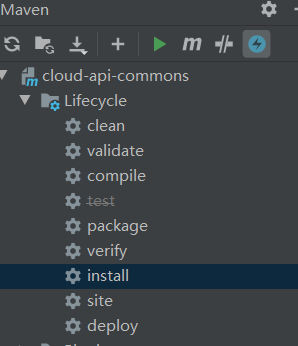
看到那个小闪电没点上之后test就被划了一条
三、创建微服务模块套路
- 建Module
- 改POM
- 写YML
- 主启动
- 业务类
四、支付模块构建
创建cloud-provider-payment8001微服务提供者支付Module模块
1.右键父工程–>new一个module
2.改pom
<?xml version="1.0" encoding="UTF-8"?>
<project xmlns="http://maven.apache.org/POM/4.0.0"
         xmlns:xsi="http://www.w3.org/2001/XMLSchema-instance"
         xsi:schemaLocation="http://maven.apache.org/POM/4.0.0 http://maven.apache.org/xsd/maven-4.0.0.xsd">
    <parent>
        <artifactId>springcloud</artifactId>
        <groupId>org.shy</groupId>
        <version>1.0-SNAPSHOT</version>
    </parent>
    <modelVersion>4.0.0</modelVersion>

    <artifactId>cloud-provider-payment8001</artifactId>

    <dependencies>
        <dependency>
            <groupId>org.springframework.boot</groupId>
            <artifactId>spring-boot-starter-web</artifactId>
        </dependency>
        <dependency>
            <groupId>org.springframework.boot</groupId>
            <artifactId>spring-boot-starter-actuator</artifactId>
        </dependency>
        <dependency>
            <groupId>org.mybatis.spring.boot</groupId>
            <artifactId>mybatis-spring-boot-starter</artifactId>
        </dependency>
        <dependency>
            <groupId>com.alibaba</groupId>
            <artifactId>druid-spring-boot-starter</artifactId>
            <version>1.1.9</version>
        </dependency>
        <dependency>
            <groupId>mysql</groupId>
            <artifactId>mysql-connector-java</artifactId>
        </dependency>
        <dependency>
            <groupId>org.springframework.boot</groupId>
            <artifactId>spring-boot-starter-jdbc</artifactId>
        </dependency>
        <dependency>
            <groupId>org.springframework.boot</groupId>
            <artifactId>spring-boot-devtools</artifactId>
            <scope>runtime</scope>
            <optional>true</optional>
        </dependency>
        <dependency>
            <groupId>org.projectlombok</groupId>
            <artifactId>lombok</artifactId>
            <optional>true</optional>
        </dependency>
        <dependency>
            <groupId>org.springframework.boot</groupId>
            <artifactId>spring-boot-starter-test</artifactId>
            <scope>test</scope>
        </dependency>
    </dependencies>

</project>
3.写yml (application.yml)
server:
  port: 8001

spring:
  application:
    name: cloud-payment-service
  datasource:
    type: com.alibaba.druid.pool.DruidDataSource
    driver-class-name: org.gjt.mm.mysql.Driver
    url: jdbc:mysql://localhost:3306/shy?serverTimezone=UTC&useUnicode=true&characterEncoding=utf-8&useSSL=false
    username: root
    password: root

mybatis:
  mapper-locations: classpath:mapper/*.xml
  type-aliases-package: com.shy.springcloud.entities
4.主启动类(PaymentMain8001)
package com.shy.springcloud;
import org.springframework.boot.SpringApplication;
import org.springframework.boot.autoconfigure.SpringBootApplication;

/**
 * @author shy
 */
@SpringBootApplication//注意注解别丢
public class PaymentMain8001 {
    public static void main(String[] args) {
        SpringApplication.run(PaymentMain8001.class,args);
    }
}
5.业务类
- sql
CREATE TABLE `payment`(
	`id` bigint(20) NOT NULL AUTO_INCREMENT COMMENT 'ID',
    `serial` varchar(200) DEFAULT '',
	PRIMARY KEY (id)
)ENGINE=InnoDB AUTO_INCREMENT=1 DEFAULT CHARSET=utf8mb4
- entities
- 实体类Payment
package com.shy.springcloud.entities;
import lombok.AllArgsConstructor;
import lombok.Data;
import lombok.NoArgsConstructor;
import java.io.Serializable;
@Data
@AllArgsConstructor
@NoArgsConstructor
public class Payment implements Serializable {
    private long id;
    private String serial;
}
- JSON封装体CommonResult(前后端交互给前端的东西)
package com.shy.springcloud.entities;
import lombok.AllArgsConstructor;
import lombok.Data;
import lombok.NoArgsConstructor;
@Data
@AllArgsConstructor
@NoArgsConstructor
public class CommonResult<T>
{
    private Integer code;
    private String  message;
    private T       data;

    public CommonResult(Integer code,String message)
    {
        this(code,message,null);
    }
}
-
dao
dao层接口PaymentDao
package com.shy.springcloud.dao;
import com.shy.springcloud.entities.Payment;
import org.apache.ibatis.annotations.Mapper;
import org.apache.ibatis.annotations.Param;
@Mapper//只要写了dao接口必加@Mapper
public interface PaymentDao
{
    public int create(Payment payment);

    public Payment getPaymentById(@Param("id")long id);
}
映射文件resources/mapper/PaymentMapper.xml
<?xml version="1.0" encoding="UTF-8" ?>
<!DOCTYPE mapper PUBLIC "-//mybatis.org//DTD Mapper 3.0//EN" "http://mybatis.org/dtd/mybatis-3-mapper.dtd" >

<mapper namespace="com.shy.springcloud.dao.PaymentDao">

    <insert id="create" parameterType="Payment" useGeneratedKeys="true" keyProperty="id">
        insert payment(serial) values(#{serial});
    </insert>

    <resultMap id="BaseResultMap" type="com.shy.springcloud.entities.Payment">
        <id column="id" property="id" jdbcType="BIGINT"/>
        <id column="serial" property="serial" jdbcType="VARCHAR"/>
    </resultMap>
    <select id="getPaymentById" parameterType="Long" resultMap="BaseResultMap">
        select * from payment where id = ${id};
    </select>

</mapper>
-
Service
PaymentService接口
package com.shy.springcloud.service;
import com.shy.springcloud.entities.Payment;
import org.apache.ibatis.annotations.Param;
//这里为了省事和dao层一样
public interface PaymentService
{
    public int create(Payment payment);

    public Payment getPaymentById(@Param("id")long id);
}
对应的实现类
package com.shy.springcloud.service;
import com.shy.springcloud.dao.PaymentDao;
import com.shy.springcloud.entities.Payment;
import org.apache.ibatis.annotations.Param;
import org.springframework.stereotype.Service;
import javax.annotation.Resource;
@Service
public class PaymentServiceImpl implements PaymentService
{
    @Resource
    private PaymentDao paymentDao;
    @Override
    public int create(Payment payment){
        return paymentDao.create(payment);
    }
    @Override
    public Payment getPaymentById(long id){
        return paymentDao.getPaymentById(id);
    }
}
controller
package com.shy.springcloud.Controller;

import com.shy.springcloud.entities.CommonResult;
import com.shy.springcloud.entities.Payment;
import com.shy.springcloud.service.PaymentService;
import lombok.extern.slf4j.Slf4j;
import org.springframework.web.bind.annotation.*;

import javax.annotation.Resource;

/**
 * @author shy
 */
@RestController
@Slf4j
public class PaymentController {
    @Resource
    private PaymentService paymentService;

    @PostMapping(value = "/payment/create")//@RequestBody别忘了加~
    public CommonResult create(@RequestBody Payment payment){
        int result = paymentService.create(payment);
        log.info("*******插入结果:"+result);
        if (result > 0){
            return new CommonResult(200,"插入成功",result);
        }else {
            return new CommonResult(444,"插入失败",null);
        }
    }

    @GetMapping(value = "/payment/get/{id}")
    public CommonResult<Payment> getPaymentById(@PathVariable("id")long id){
        Payment payment = paymentService.getPaymentById(id);
        log.info("*******插入结果:"+payment+"OVO");
        if (payment != null){
            return new CommonResult(200,"查询成功",payment);
        }else {
            return new CommonResult(444,"没有对应记录,查询id"+id,null);
        }
    }
}
6.测试
注意创建是post的方式,浏览器不接受,这里用postman测试
五、热部署Devtools
开发的时候用,省去了每次重启服务的操作,提升编码效率,省的费事儿,但是在生产环境,也就是上线了,或者到了维护阶段,就别开了,坑人~
1.常规操作,导入依赖
在生产者pom中已经导入:
		<dependency>
            <groupId>org.springframework.boot</groupId>
            <artifactId>spring-boot-devtools</artifactId>
            <scope>runtime</scope>
            <optional>true</optional>
        </dependency>
2.以下内容复制到父工程的pom.xml(已经复制过了瞅一眼就行)
	<build>
        <!--
        <finalName>你的工程名</finalName>(单一工程时添加)
        -->
        <plugins>
            <plugin>
                <groupId>org.springframework.boot</groupId>
                <artifactId>spring-boot-maven-plugin</artifactId>
                <configuration>
                    <fork>true</fork>
                    <addResources>true</addResources>
                </configuration>
            </plugin>
        </plugins>
    </build>
3.File --> Settings–>build,execution,deployment ->Complier
能打的勾全打上
4.Ctrl + Shift + Alt + /
搜Registry
打勾:
- compiler.automake.allow.when.app.running
- actionSystem.assertFocusAccessFromEdt
六、消费者订单模块
还是5部:
- 建Module
- 改POM
- 写YML
- 主启动
- 业务类
1.建Module
创建名为cloud-consumer-order80的maven工程(springboot项目也可以~自选)。
2.改POM
<?xml version="1.0" encoding="UTF-8"?>
<project xmlns="http://maven.apache.org/POM/4.0.0"
         xmlns:xsi="http://www.w3.org/2001/XMLSchema-instance"
         xsi:schemaLocation="http://maven.apache.org/POM/4.0.0 http://maven.apache.org/xsd/maven-4.0.0.xsd">
    <parent>
        <artifactId>springcloud</artifactId>
        <groupId>org.shy</groupId>
        <version>1.0-SNAPSHOT</version>
    </parent>
    <modelVersion>4.0.0</modelVersion>

    <artifactId>cloud-consumer-order80</artifactId>

    <dependencies>
        </dependency>
        <dependency>
            <groupId>org.springframework.boot</groupId>
            <artifactId>spring-boot-starter-web</artifactId>
        </dependency>
        <dependency>
            <groupId>org.springframework.boot</groupId>
            <artifactId>spring-boot-starter-actuator</artifactId>
        </dependency>

        <dependency>
            <groupId>org.springframework.boot</groupId>
            <artifactId>spring-boot-devtools</artifactId>
            <scope>runtime</scope>
            <optional>true</optional>
        </dependency>
        <dependency>
            <groupId>org.projectlombok</groupId>
            <artifactId>lombok</artifactId>
            <optional>true</optional>
        </dependency>
        <dependency>
            <groupId>org.springframework.boot</groupId>
            <artifactId>spring-boot-starter-test</artifactId>
            <scope>test</scope>
        </dependency>
    </dependencies>
</project>
3.application.yml
server:
  port: 80
80端口被占用的话去控制台看一眼,我的是nginx占用了我的80端口
这里附查看端口步骤:https://jingyan.baidu.com/article/fdffd1f89a0c8af3e98ca10e.html
4.主启动OrderMain80
package com.shy.springcloud;
import org.springframework.boot.SpringApplication;
import org.springframework.boot.autoconfigure.SpringBootApplication;
@SpringBootApplication
public class OrderMain80
{
    public static void main(String[] args) {
        SpringApplication.run(OrderMain80.class,args);
    }
}
5.业务类
-
实体类和提供服务者相同,直接copy
-
controller层,由于这是用户操作的模块,不需要提供操作数据库的层,只需要让他进行相应的操作即可~OrderController
package com.shy.springcloud.controller;
import com.shy.springcloud.entities.CommonResult;
import com.shy.springcloud.entities.Payment;
import lombok.extern.slf4j.Slf4j;
import org.springframework.web.bind.annotation.GetMapping;
import org.springframework.web.bind.annotation.PathVariable;
import org.springframework.web.bind.annotation.RestController;
import org.springframework.web.client.RestTemplate;
import javax.annotation.Resource;
@RestController
@Slf4j
public class OrderController
{
    //访问provider的端口
    public static final String PAYMENT_URL = "http://localhost:8001";
    @Resource
    private RestTemplate restTemplate;

    @GetMapping("/consumer/payment/create")//建议后面的路径复制provider中的
    public CommonResult<Payment> create(Payment payment){
        //这里注意选对方法~
        return restTemplate.postForObject(PAYMENT_URL + "/payment/create",payment,CommonResult.class);
    }

    @GetMapping("/consumer/payment/get/{id}")
    public CommonResult<Payment> getPayment(@PathVariable("id")long id){
        return restTemplate.getForObject(PAYMENT_URL+"/payment/get/" + id,CommonResult.class);
    }
}
- config配置类config.ApplicationContextConfig
package com.shy.springcloud.config;
import org.springframework.context.annotation.Bean;
import org.springframework.context.annotation.Configuration;
import org.springframework.web.client.RestTemplate;
@Configuration
public class ApplicationContextConfig {
    @Bean
    public RestTemplate getRestTemplate(){
        return new RestTemplate();
    }
}
6.测试
启动两个服务
七、RestTemplate
RestTemplate提供了多种便捷访问远程Http服务的方法,是一种简单便捷的访问restful服务模板类,是Spring提供的用于访问Rest服务的客户端模板工具集,简单粗暴~
使用:
- 使用restTemplate访问restful接口非常的简单粗暴无脑。
(url, requestMap, ResponseBean.class)这三个参数分别代表:REST请求地址、请求参数、HTTP响应转换被转换成的对象类型。
八、Run DashBoard
我的2020.1版本启动两个服务时右下角会有提示~点一下有两个选项
Run DashBoard在2020.1版本以被替换为Services~,选择Services即可
九、工程重构
cloud-consumer-order80与cloud-provider-payment8001两工程实体类完全一样,存在代码冗余去冗余就是我们要做的工作
1.新建module
cloud-api-commons
2.pom文件
<?xml version="1.0" encoding="UTF-8"?>
<project xmlns="http://maven.apache.org/POM/4.0.0"
         xmlns:xsi="http://www.w3.org/2001/XMLSchema-instance"
         xsi:schemaLocation="http://maven.apache.org/POM/4.0.0 http://maven.apache.org/xsd/maven-4.0.0.xsd">
    <parent>
        <artifactId>springcloud</artifactId>
        <groupId>org.shy</groupId>
        <version>1.0-SNAPSHOT</version>
    </parent>
    <modelVersion>4.0.0</modelVersion>

    <artifactId>cloud-api-commons</artifactId>

    <dependencies>
        <dependency>
            <groupId>org.springframework.boot</groupId>
            <artifactId>spring-boot-devtools</artifactId>
            <scope>runtime</scope>
            <optional>true</optional>
        </dependency>
        <dependency>
            <groupId>org.projectlombok</groupId>
            <artifactId>lombok</artifactId>
            <optional>true</optional>
        </dependency>
        <!--糊涂工具包-->
        <dependency>
            <groupId>cn.hutool</groupId>
            <artifactId>hutool-all</artifactId>
            <version>5.1.0</version>
        </dependency>
    </dependencies>
</project>
3.entities
将这两个服务的entities复制到我们创建的api下,注意路径要相同
clean,install一下
4.开始改造
删除provider和consumer中的entities实体类
然后分别在两者的pom文件下添加:
	<!--引入自己定义的api通用包-->
        <dependency>
            <!--注意这个路径,看你打的jar包在本地仓库的什么位置,这里需要对应上-->
            <groupId>org.shy</groupId>
            <artifactId>cloud-api-commons</artifactId>
            <version>1.0-SNAPSHOT</version>
        </dependency>





 扫一扫
扫一扫


 900
900

 被折叠的 条评论
为什么被折叠?
被折叠的 条评论
为什么被折叠?
 到【灌水乐园】发言





