
深入理解Tagged Pointer

本文详细解析了TaggedPointer概念如何在64位程序中减少内存占用,提高访问速度及创建、销毁速度,通过实验代码验证了其效果,并指出了使用时的注意事项。

前言

\

在2013年9月,苹果推出了iPhone5s,与此同时,iPhone5s配备了首个采用64位架构的A7双核处理器,为了节省内存和提高执行效率,苹果提出了Tagged Pointer的概念。对于64位程序,引入Tagged Pointer后,相关逻辑能减少一半的内存占用,以及3倍的访问速度提升,100倍的创建、销毁速度提升。本文从Tagged Pointer试图解决的问题入手,带领读者理解Tagged Pointer的实现细节和优势,最后指出了使用时的注意事项。

\

问题

\

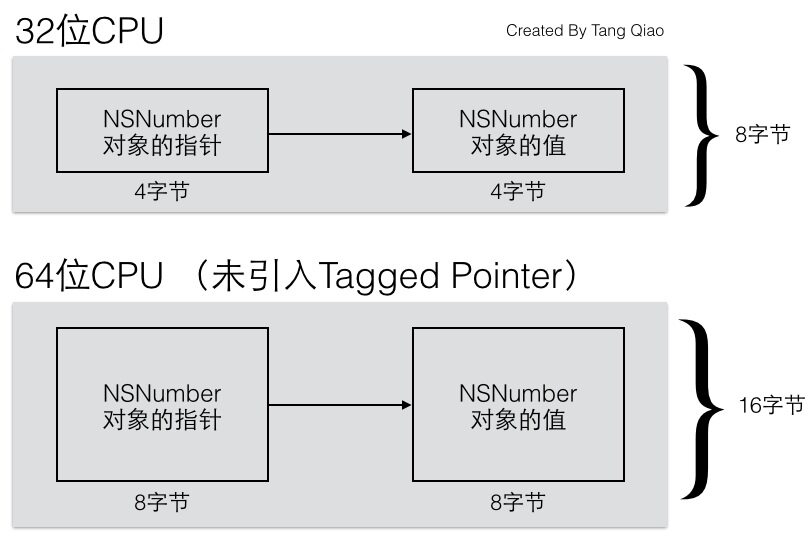
我们先看看原有的对象为什么会浪费内存。假设我们要存储一个NSNumber对象,其值是一个整数。正常情况下,如果这个整数只是一个NSInteger的普通变量,那么它所占用的内存是与CPU的位数有关,在32位CPU下占4个字节,在64位CPU下是占8个字节的。而指针类型的大小通常也是与CPU位数相关,一个指针所占用的内存在32位CPU下为4个字节,在64位CPU下也是8个字节。

\

所以一个普通的iOS程序,如果没有Tagged Pointer对象,从32位机器迁移到64位机器中后,虽然逻辑没有任何变化,但这种NSNumber、NSDate一类的对象所占用的内存会翻倍。如下图所示:
\

54d6d5cb7259ba1b768a3699f726c3b9.jpg

\

我们再来看看效率上的问题,为了存储和访问一个NSNumber对象,我们需要在堆上为其分配内存,另外还要维护它的引用计数,管理它的生命期。这些都给程序增加了额外的逻辑,造成运行效率上的损失。

\

Tagged Pointer

\

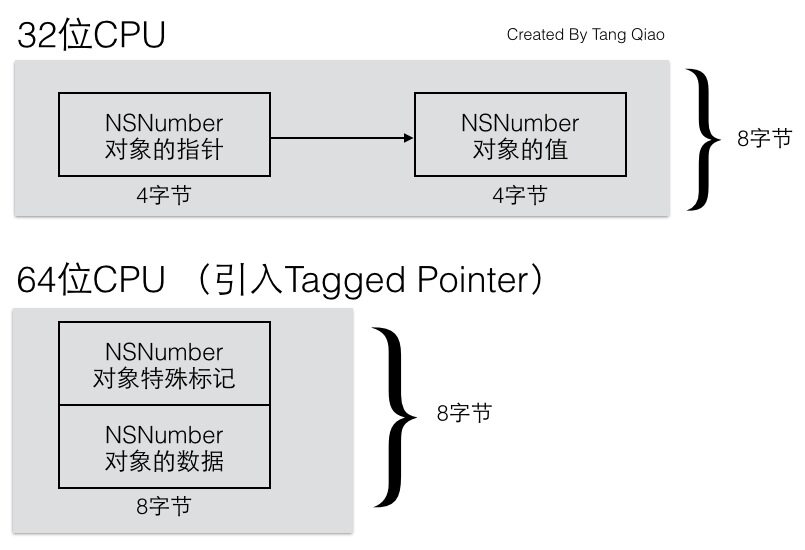
为了改进上面提到的内存占用和效率问题,苹果提出了Tagged Pointer对象。由于NSNumber、NSDate一类的变量本身的值需要占用的内存大小常常不需要8个字节,拿整数来说,4个字节所能表示的有符号整数就可以达到20多亿(注:2^31=2147483648,另外1位作为符号位),对于绝大多数情况都是可以处理的。

\

所以我们可以将一个对象的指针拆成两部分,一部分直接保存数据,另一部分作为特殊标记,表示这是一个特别的指针,不指向任何一个地址。所以,引入了Tagged Pointer对象之后,64位CPU下NSNumber的内存图变成了以下这样:
\

bd3486d06df4286f5eeef72d7ea58e1e.jpg

\

对此,我们也可以用 Xcode做实验来验证。我们的实验代码如下:

\
\int main(int argc, char * argv[])\{\    @autoreleasepool {\        NSNumber *number1 = @1;\        NSNumber *number2 = @2;\        NSNumber *number3 = @3;\        NSNumber *numberFFFF = @(0xFFFF);\\        NSLog(@\"number1 pointer is %p\
Egress Mirroring with ERSPAN Using a Loopback Port The configuration of the device depends on whether the loopback port is a DSA-tagged port. 32.1.5.1.1 Egress Mirroring When Loopback Port is not DSA Tag Port An associated ePort is allocated per each analyzer ePort. The associated ePort is configured as the analyzer ePort in the Egress Mirroring Triggers. The associated ePort is mapped to a physical port that is the loopback port. It is also configured to push a VLAN tag at egress (refer to Section 27.4, Target ePort Based Push Tag). The VLAN-ID of the pushed VLAN identifies the mirroring session. TTI rules (one per analyzer ePort) are assigned to a loopback port and redirect the loopbacked packets to the analyzer ePorts, based on the value of the most external VLAN-ID. The analyzer ePorts are configured to remove the VLAN tag (set the analyzer ePort tag state to untagged as described in Section 27.2.1, Egress VLAN Tag State), and to add the ERSPAN tunnel header (refer to Section 13.3, Assigning the Tunnel-Start/ARP/NAT Pointer). Figure 274 summarizes the packet walkthrough:  Packet marked for egress mirroring is duplicated by the Egress Replication engine (EREP) and sent to the Pre-Egress engine (EQ) for processing by the egress pipeline engines.  The duplicated packet is forwarded to the loopback port, and a VLAN tag is pushed as the most external tag.  Packet is loopbacked  Packet is redirected to the analyzer ePort that removes the external VLAN and adds the ERSPAN tunnel. 翻译并解释
09-27
评论
成就一亿技术人!
拼手气红包6.0元
还能输入1000个字符
 
红包 添加红包
表情包 插入表情
 条评论被折叠 查看
添加红包

请填写红包祝福语或标题

红包个数最小为10个

红包金额最低5元

当前余额3.43前往充值 >
需支付:10.00
成就一亿技术人!
领取后你会自动成为博主和红包主的粉丝 规则
hope_wisdom
发出的红包
实付
使用余额支付
点击重新获取
扫码支付
钱包余额 0

抵扣说明:

1.余额是钱包充值的虚拟货币,按照1:1的比例进行支付金额的抵扣。
2.余额无法直接购买下载,可以购买VIP、付费专栏及课程。

余额充值


