


1.显示消息提示框——uni.showToast(OBJECT)
(1).icon值:success(成功)、error(错误)、loading(加载)、none(不显示图标)
uni.showToast({
	title: '获取失败',
    icon:'error',
	duration: 2000, //提示的延迟时间,单位毫秒,默认:1500
    mask:false,是否显示透明蒙层,防止触摸穿透,默认:false
   // image:'./image.png',//自定义图标的本地路径
});
2.显示加载 loading 提示框——uni.showLoading(OBJECT)
需要搭配uni.hideLoading() 才能关闭提示框。
uni.showLoading({
	title: '加载中'
});

setTimeout(function () {
	uni.hideLoading();
}, 2000);
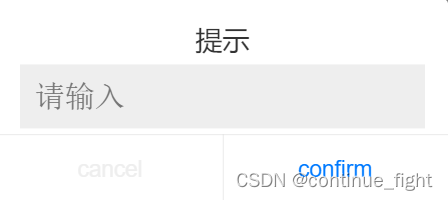
3.显示模态弹窗——uni.showModal(OBJECT)
显示模态弹窗,可以只有一个确定按钮,也可以同时有确定和取消按钮
uni.showModal({
    title: '提示',
    confirmText:'confirm', //确定按钮的文字,默认为"确定"
    cancelText:'cancel',//取消按钮的文字,默认为"取消"
    content: '这是一个模态弹窗',
    showCancel:true,//是否显示取消按钮,默认为 true
    cancelColor:'#eeeeee',//取消按钮的文字颜色,默认为"#000000"
    confirmColor:'#007aff',//确定按钮的文字颜色
    editable:'true',//是否显示输入框
    placeholderText:'请输入',//输入框提示内容
	success: function (res) {
	    if (res.confirm) {
		    console.log('用户点击确定,用户输入文本:'+res.content);
		} else if (res.cancel) {
			console.log('用户点击取消');
		}
	}
});
4.从底部向上弹出操作菜单——uni.showActionSheet(OBJECT)
uni.showActionSheet({
	title:'菜单标题',
	itemList: ['A', 'B', 'C'],//按钮的文字数组
	success: function (res) {
		console.log('选中了第' + (res.tapIndex + 1) + '个按钮');
	},
	fail: function (res) {
		console.log(res.errMsg);
	}
});





 扫一扫
扫一扫


 1万+
1万+

 被折叠的 条评论
为什么被折叠?
被折叠的 条评论
为什么被折叠?
 到【灌水乐园】发言





