



 本文详细介绍JDBC和Mybatis的快速入门指南,包括数据库操作、动态代理、分页插件使用等内容,适合初学者快速上手。
JDBC快速入门
JDBC(Java DataBase Connectivity)是Java和数据库之间的一个桥梁,是一个规范而不是一个实现,能够执行SQL语句。它由一组用Java语言编写的类和接口组成。各种不同类型的数据库都有相应的实现。
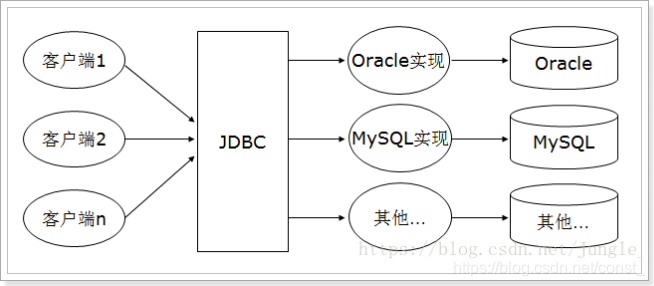
1、创建数据库
2、创建表并插入数据
CREATE TABLE `tb_user` (
  `id` bigint(20) NOT NULL AUTO_INCREMENT,
  `user_name` varchar(100) DEFAULT NULL COMMENT '用户名',
  `password` varchar(100) DEFAULT NULL COMMENT '密码',
  `name` varchar(100) DEFAULT NULL COMMENT '姓名',
  `age` int(10) DEFAULT NULL COMMENT '年龄',
  `sex` tinyint(1) DEFAULT NULL COMMENT '性别,1男性,2女性',
  `birthday` date DEFAULT NULL COMMENT '出生日期',
  `created` datetime DEFAULT NULL COMMENT '创建时间',
  `updated` datetime DEFAULT NULL COMMENT '更新时间',
  PRIMARY KEY (`id`),
  UNIQUE KEY `username` (`user_name`)
) ENGINE=InnoDB AUTO_INCREMENT=7 DEFAULT CHARSET=utf8;

INSERT INTO `tb_user` VALUES ('1', 'zhangsan', '123456', '张三', '30', '1', '1984-08-08', '2014-09-19 16:56:04', '2014-09-21 11:24:59');
INSERT INTO `tb_user` VALUES ('2', 'lisi', '123456', '李四', '21', '2', '1991-01-01', '2014-09-19 16:56:04', '2014-09-19 16:56:04');
INSERT INTO `tb_user` VALUES ('3', 'wangwu', '123456', '王五', '22', '2', '1989-01-01', '2014-09-19 16:56:04', '2014-09-19 16:56:04');
INSERT INTO `tb_user` VALUES ('4', 'zhangwei', '123456', '张伟', '20', '1', '1988-09-01', '2014-09-19 16:56:04', '2014-09-19 16:56:04');
INSERT INTO `tb_user` VALUES ('5', 'lina', '123456', '李娜', '28', '1', '1985-01-01', '2014-09-19 16:56:04', '2014-09-19 16:56:04');
INSERT INTO `tb_user` VALUES ('6', 'lilei', '123456', '李磊', '23', '1', '1988-08-08', '2014-09-20 11:41:15', '2014-09-20 11:41:15');
3、创建Maven项目
4、导入依赖
<dependency>
	<groupId>mysql</groupId>
	<artifactId>mysql-connector-java</artifactId>
	<version>5.1.32</version>
</dependency>
5、编写JDBC程序
public static void main(String[] args) throws Exception{
        Connection connection = null;
        PreparedStatement preparedStatement = null;
        ResultSet resultSet = null;
        try {
            // 加载驱动
            Class.forName("com.mysql.jdbc.Driver");

            // 创建数据库连接
            String url = "jdbc:mysql://127.0.0.1:3306/test";
            String user = "root";
            String password = "123456";
            connection = DriverManager.getConnection(url, user, password);

            // 获取statement对象
            String sql = "SELECT * FROM tb_user WHERE id = ?";
            preparedStatement = connection.prepareStatement(sql);

            // 设置参数,有2个参数,第一个是下标,从1开始,第二个是参数值
            preparedStatement.setLong(1, 1L);

            // 执行查询
            resultSet = preparedStatement.executeQuery();

            // 遍历结果集
            while (resultSet.next()) {
                System.out.println("id = " + resultSet.getLong("id"));
                System.out.println("name = " + resultSet.getString("name"));
                System.out.println("password = " + resultSet.getString("password"));
            }
        } finally {
            // 关闭连接释放资源
            if (null != resultSet) {
                resultSet.close();
            }
            if (null != preparedStatement) {
                preparedStatement.close();
            }
            if (null != connection) {
                connection.close();
            }
        }
    }
Mybatis快速入门
整体架构:
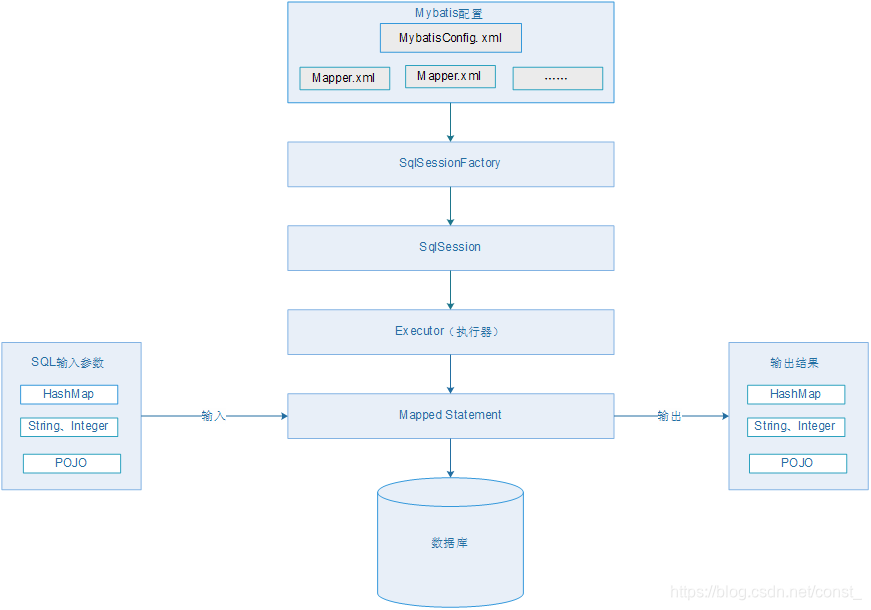
- mybatis配置文件,有2类配置文件
a)全局配置文件,只能有一个,文件名不是固定的,约定文件名:mybatis-config.xml,配置了运行参数、插件、连接池等信息。
b)Mapper.xml,映射文件,在整个mybatis中可以有多个配置文件,配置多个Statement(SQL) - 通过配置文件构造出SqlSessionFactory
- 通过SqlSessionFactory获取到Sqlsession,通过SqlSession就可以操作数据库。
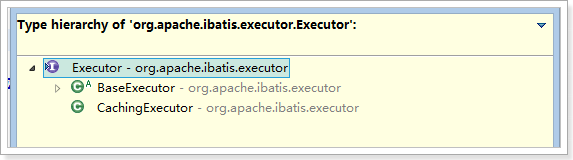
- SqlSession同底层的执行器来执行Statement(SQL),mybatis提供了2种执行器的实现
a)基本实现
b)带有缓存功能的实现
- 执行器通过定义的Mapped Statement对象来执行SQL
- 参数传入:参数类型有三种,HashMap、基本数据类型、POJO对象
结果输出:输出结果集类型有三种,HashMap、基本数据类型、POJO对象
1、创建Maven项目,导入依赖
<dependency>
	<groupId>org.mybatis</groupId>
	<artifactId>mybatis</artifactId>
	<version>3.2.8</version>
</dependency>
2、编写JDBC配置文件
jdbc.properties
jdbc.driver=com.mysql.jdbc.Driver
jdbc.url=jdbc:mysql://127.0.0.1:3306/test?useUnicode=true&characterEncoding=utf8&autoReconnect=true&allowMultiQueries=true
jdbc.username=root
jdbc.password=123456
3、编写Mybatis全局配置文件
<?xml version="1.0" encoding="UTF-8" ?>
<!DOCTYPE configuration
  PUBLIC "-//mybatis.org//DTD Config 3.0//EN"
  "http://mybatis.org/dtd/mybatis-3-config.dtd">
<configuration>
	<!-- 引入外部资源配置文件 -->
	<properties resource="jdbc.properties"/>

	<settings>
		<!-- 开启驼峰匹配 -->
		<setting name="mapUnderscoreToCamelCase" value="true"/>
	</settings>
	<typeAliases>
		<!-- 设置别名 -->
		<!-- <typeAlias type="com.example.demo.User" alias="User"/> -->
		<package name="com.example.demo"/>
	</typeAliases>

	<!-- 配置数据库连接的环境-->
	<environments default="development">
		<environment id="development">
			<transactionManager type="JDBC" />
			<dataSource type="POOLED">
				<property name="driver" value="${jdbc.driver}" />
				<property name="url" value="${jdbc.url}" />
				<property name="username" value="${jdbc.username}" />
				<property name="password" value="${jdbc.password}" />
			</dataSource>
		</environment>
	</environments>
	<mappers>
		<!-- 引入Mapper.xml -->
		<mapper resource="UserMapper.xml" />
	</mappers>
</configuration>
4、编写实体类
public class User {
    private Long id;
    // 用户名
    private String userName;
    // 密码
    private String password;
    // 姓名
    private String name;
    // 年龄
    private Integer age;
    // 性别,1男性,2女性
    private Integer sex;
    // 出生日期
    private Date birthday;
    // 创建时间
    private Date created;
    // 更新时间
    private Date updated;
    // TODO setter、getter
}
5、编写UserMapper.xml
<?xml version="1.0" encoding="UTF-8" ?>
<!DOCTYPE mapper
  PUBLIC "-//mybatis.org//DTD Mapper 3.0//EN"
  "http://mybatis.org/dtd/mybatis-3-mapper.dtd">
<mapper namespace="user">

	<!--
		type: 结果集映射的java对象或者是别名
		id:是resultMap的唯一标识
		autoMapping:自动映射没有定义的映射关系的属性和字段,默认开启
 	-->
	<resultMap type="User" id="userResultMap" autoMapping="true">
		<!--
			column: 表中字段名
			property:对象中的属性名
		 -->
		<id column="id" property="id"/>
		<result column="user_name" property="userName"/>
	</resultMap>

	<select id="queryUserById"  parameterType="Long" resultMap="userResultMap">
		SELECT * FROM tb_user WHERE id = #{id}
	</select>

</mapper>
6、编写程序获取SqlSessionFactory和SqlSession
public static void main(String[] args) throws Exception{
    //定义全局配置文件名
    String resource = "mybatis-config.xml";
    //读取配置文件
    InputStream inputStream = Resources.getResourceAsStream(resource);
    //通过SqlSessionFactoryBuilder构建SqlSessionFactory
    SqlSessionFactory sqlSessionFactory = new SqlSessionFactoryBuilder().build(inputStream);
    System.out.println(sqlSessionFactory);
    SqlSession sqlSession = sqlSessionFactory.openSession();
    System.out.println(sqlSession);

    //Statement引用:命名空间.statememtId
    User user = sqlSession.selectOne("user.queryUserById", 1L);
    System.out.println(user);

    //关闭session
    sqlSession.close();
}
Mybatis使用小结:
- 创建SqlSessionFactory
- 通过SqlSessionFactory创建SqlSession对象
- 通过SqlSession操作数据库
- 调用session.commit()提交事务
- 调用session.close()关闭会话
动态代理的Mapper实现类
Mapper.xml中的命名空间namespace:
要想使用Mybatis提供的DAO动态代理,namespace必须为DAO接口的全路径。
1、定义UserMapper
import org.apache.ibatis.annotations.Param;
public interface UserMapper {
    /**
     * 根据id查询用户信息
     *
     * @param id
     * @return
     */
     User queryUserById(@Param("id") Long id);
}
2、修改UserMapper.xml中的namespace为UserMapper的全路径名
3、通过UserMapper接口来执行定义的sql
public static void main(String[] args) throws Exception{
    //定义全局配置文件名
    String resource = "mybatis-config.xml";
    //读取配置文件
    InputStream inputStream = Resources.getResourceAsStream(resource);
    //通过SqlSessionFactoryBuilder构建SqlSessionFactory
    SqlSessionFactory sqlSessionFactory = new SqlSessionFactoryBuilder().build(inputStream);
    System.out.println(sqlSessionFactory);
    SqlSession sqlSession = sqlSessionFactory.openSession();
    System.out.println(sqlSession);
    UserMapper userMapper = sqlSession.getMapper(UserMapper.class);
    User user = userMapper.queryUserById(2L);
    System.out.println(user);
    //关闭session
    sqlSession.close();
}
使用动态代理总结:
使用Mapper接口不用写接口实现类即可完成数据库操作,官方推荐的使用方法。
- Mapper.xml的namespace必须和Mapper接口的全路径一致。
- Mapper接口的方法名必须和sql定义的id一致。
- Mapper接口中方法的输入参数类型必须和sql定义的paramterType一致。
- Mapper接口中方法的输出参数类型必须和sql定义的resultType一致。
分页插件
1、导入依赖
<dependency>
	<groupId>com.github.pagehelper</groupId>
	<artifactId>pagehelper</artifactId>
	<version>3.7.5</version>
</dependency>
<dependency>
	<groupId>com.github.jsqlparser</groupId>
	<artifactId>jsqlparser</artifactId>
	<version>0.9.1</version>
</dependency>
2、配置分页插件
<plugins>
	<plugin interceptor="com.github.pagehelper.PageHelper">
		<property name="dialect" value="mysql"/>
		<!-- 该参数默认为false -->
		<!-- 设置为true时,使用RowBounds分页会进行count查询 -->
		<property name="rowBoundsWithCount" value="true"/>
	</plugin>
</plugins>
3、在执行查询时设置分页参数
PageHelper.startPage(2, 3);
List<User> users = userMapper.queryAll();
PageInfo<User> pageInfo = new PageInfo<>(users);
System.out.println("数据总数: " + pageInfo.getTotal());
System.out.println("总页数: " + pageInfo.getPages());
System.out.println("最后一页: " + pageInfo.getLastPage());
for (User user : pageInfo.getList()) {
    System.out.println(user);
}





 扫一扫
扫一扫


 323
323

 被折叠的 条评论
为什么被折叠?
被折叠的 条评论
为什么被折叠?
 到【灌水乐园】发言





