



本篇文章介绍了多线程的基本概念、Python多线程的使用方法、线程同步机制以及线程池的使用。
本章的思维导图如下:
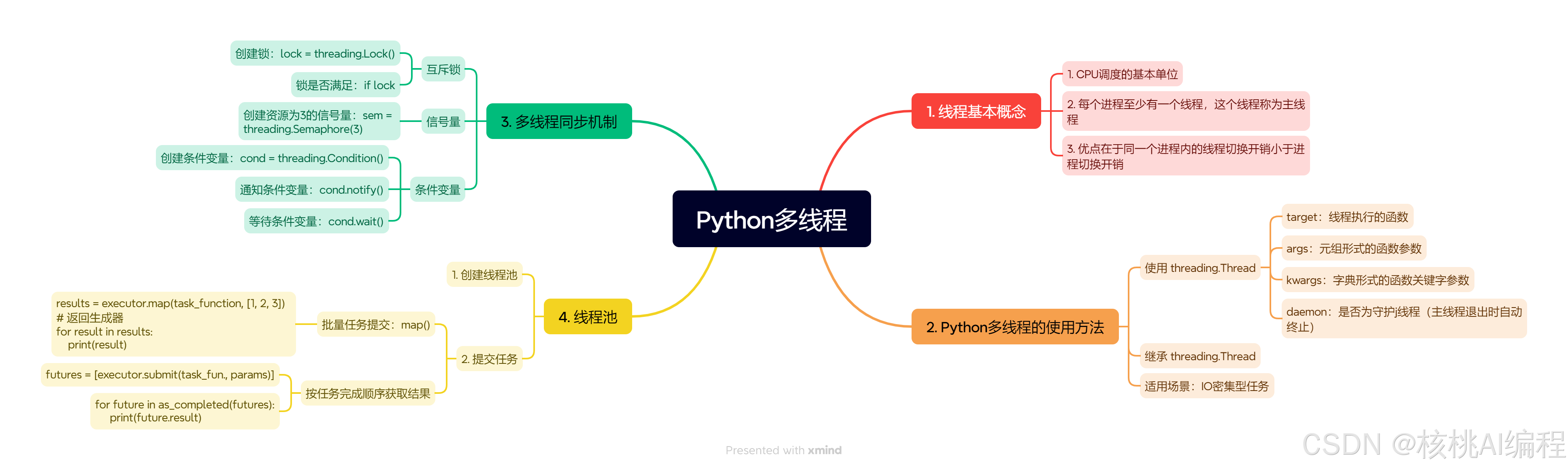
文章目录
1. 线程基本概念
线程是进程内的执行单元,共享进程的内存空间和资源,而进程是独立的资源分配单位。多线程的优势在于轻量级和高效的资源共享,适用于需要并发处理但资源隔离要求不高的场景。
Python多线程主要实现并发(交替执行任务),而非真正的并行(同时执行)。受限于全局解释器锁(GIL),CPU 密集型任务难以通过多线程加速,但 I/O 密集型任务(如网络请求、文件读写)能显著提升效率。
GIL 确保同一时刻仅有一个线程执行 Python 字节码,但线程在等待 I/O 操作时会释放 GIL,因此多线程在 I/O 密集型场景中仍能提升性能。
2. Python 多线程的使用方法
Python通过threading模块实现多线程编程,其核心类是threading.Thread,主要参数如下:
threading.Thread(
    target=None,   # 线程执行的函数
    args=(),       # 函数参数(元组形式)
    kwargs={},     # 函数关键字参数(字典形式)
    daemon=None    # 是否为守护线程(主线程退出时自动终止)
)
2.1 threading.Thread 创建线程
使用 threading.Thread 创建线程有两种方式,一种是直接使用 Thread 进行创建,另一种是通过继承 Thread 类自定义线程的创建。
2.1.1 直接使用 Thread 进行创建
import threading


def worker(name, num):
    print(f"Worker {num} is starting")
    ret = 0
    for i in range(num):
        ret += i
    print(f"worker {name} 完成从0到{num}的求和,结果为{ret}")

def main():
    threads = []
    for i in range(1, 5):
        t = threading.Thread(target=worker, args=(i, i*1000))
        t.start()
        threads.append(t)

    for t in threads:
        t.join()

if __name__ == "__main__":
    main()
输出结果:
worker 1000 is starting
worker 1 完成从0到1000的求和,结果为499500
Worker 2000 is starting
Worker 3000 is starting
worker 2 完成从0到2000的求和,结果为1999000
worker 3 完成从0到3000的求和,结果为4498500
Worker 4000 is starting
worker 4 完成从0到4000的求和,结果为7998000
2.1.2 通过继承 Thread 类自定义线程创建过程
有时候,我们需要自定义线程的创建过程。例如,让线程保存一下额外的信息,定制化线程类执行的代码。
下面写了一个多线程程序,用来计算从 1 到 100000 整数的和。当然,这个场景并不适合使用多线程计算。这里只是作为一个例子。
import threading
import time
import matplotlib.pyplot as plt

# 设置中文字体
plt.rcParams['font.sans-serif'] = ['SimHei']  # 用来正常显示中文标签
plt.rcParams['axes.unicode_minus'] = False  # 用来正常显示负号

# 定义线程类
class SumThread(threading.Thread):
    def __init__(self, start, end):
        super().__init__()
        self.start_num = start
        self.end_num = end
        self.result = 0

    def run(self):
        # 使用等差数列求和公式优化计算
        n = self.end_num - self.start_num + 1
        self.result = n * (self.start_num + self.end_num) // 2

def calculate_sum(num_threads, total_numbers=1000000):
    total_sum = 0
    threads = []

    # 优化线程分配,确保每个线程处理大致相等的工作量
    chunk_size = (total_numbers + num_threads - 1) // num_threads  # 向上取整

    # 创建并启动线程
    for i in range(num_threads):
        start = i * chunk_size + 1
        end = min((i + 1) * chunk_size, total_numbers)
        if start > total_numbers:
            break
        thread = SumThread(start, end)
        threads.append(thread)
        thread.start()

    # 等待所有线程完成并汇总结果
    for thread in threads:
        thread.join()
        total_sum += thread.result

    return total_sum

def main():
    # 测试不同线程数的性能
    thread_counts = [1, 2, 4, 8, 16]
    execution_times = []
    results = []

    print("开始性能测试...")
    for num_threads in thread_counts:
        print(f"\n测试 {num_threads} 个线程...")
        start_time = time.perf_counter()  # 使用更高精度的时间计数器
        result = calculate_sum(num_threads)
        end_time = time.perf_counter()
        execution_time = end_time - start_time
        execution_times.append(execution_time)
        results.append(result)
        print(f"计算结果: {result}")
        print(f"计算耗时: {execution_time:.6f}秒")

    # 验证所有结果是否一致
    if len(set(results)) != 1:
        print("\n警告:不同线程数的计算结果不一致!")
    else:
        print("\n所有线程数的计算结果一致,验证通过!")

    # 绘制性能对比图
    plt.figure(figsize=(12, 8))
    plt.plot(thread_counts, execution_times, 'bo-', linewidth=2, markersize=8)
    plt.xlabel('线程数量', fontsize=14)
    plt.ylabel('执行时间(秒)', fontsize=14)
    plt.title('不同线程数下的计算性能对比\n(计算1到1000000的和)', fontsize=16)
    plt.grid(True, linestyle='--', alpha=0.7)
    plt.xticks(thread_counts)

    # 添加数据标签
    for i, (x, y) in enumerate(zip(thread_counts, execution_times)):
        plt.annotate(f'{y:.6f}s', (x, y), textcoords="offset points",
                    xytext=(0, 10), ha='center')

    # 保存图像
    plt.savefig('thread_performance.png', dpi=300, bbox_inches='tight')
    plt.close()

    # 计算加速比
    base_time = execution_times[0]
    speedups = [base_time / max(t, 1e-6) for t in execution_times]  # 避免除零
    print("\n加速比(相对于单线程):")
    for threads, speedup in zip(thread_counts, speedups):
        print(f"{threads}线程: {speedup:.2f}x")

if __name__ == "__main__":
    main()
绘制的结果:
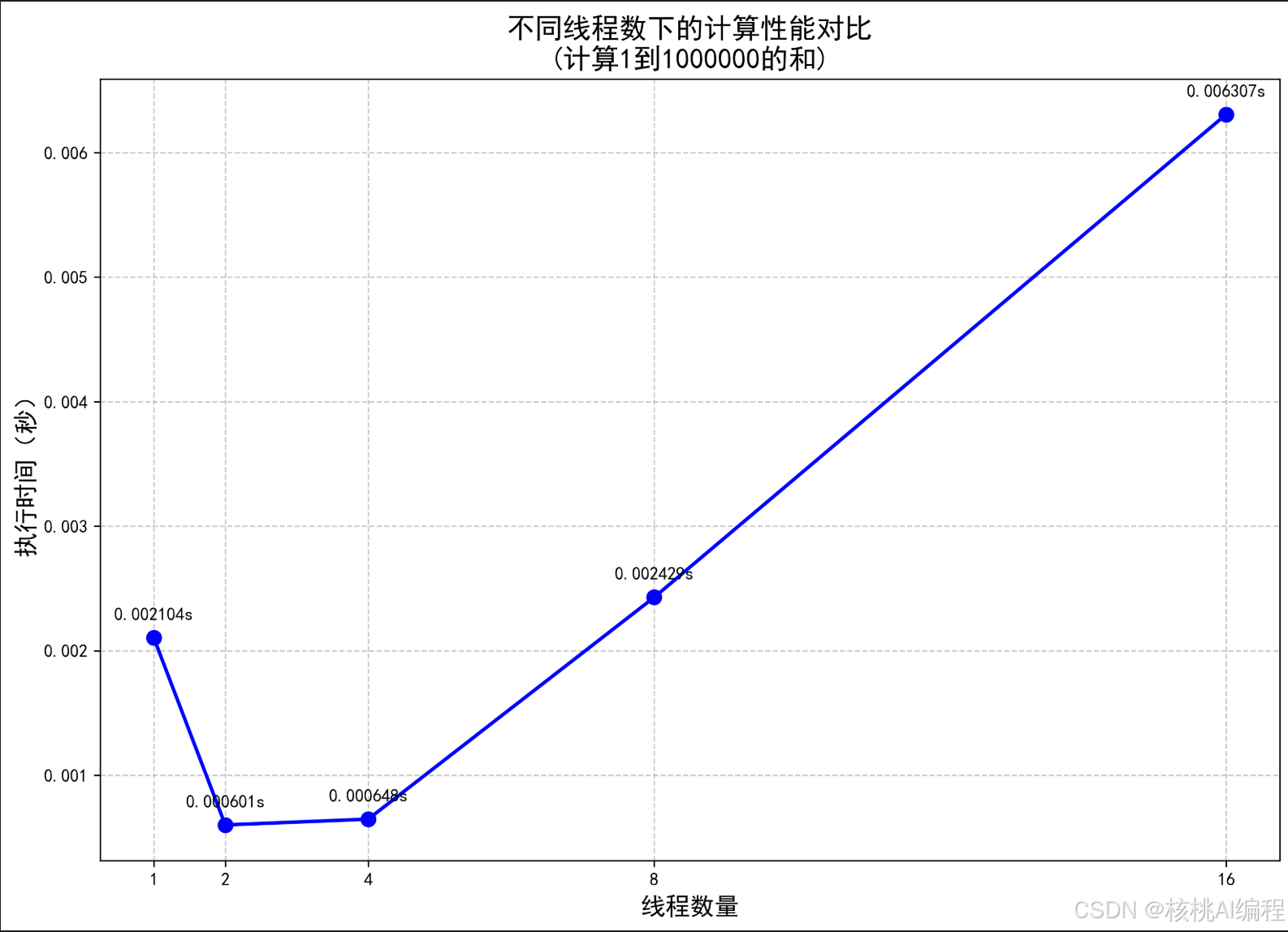
可以看到,由于 GIL 的限制,多线程并不适合 CPU 密集型任务场景。
3. Python线程同步机制
这里介绍三种线程间同步机制:
- 互斥锁
- 信号量
- 条件变量
3.1 互斥锁:threading.Lock()
当多个线程同时操作共享资源时,可能会造成数据不一致。例如,多个用户同时操作同一个银行账户的场景。如果一个用户在访问账户时,没有锁定账户,另一个用户访问账户时看到的数据可能会出现不一致。
- 创建锁:
lock = threading.Lock() - 检查锁是否满足
if lock:
看一个例子:
# bank_account_thread.py
import threading
import time
import random

class BankAccount:
    def __init__(self, initial_balance=0):
        self.balance = initial_balance
        self.lock = threading.Lock()

    def deposit(self, amount):
        with self.lock:
            print(f"存款前余额: {self.balance}")
            self.balance += amount
            print(f"存款 {amount} 后余额: {self.balance}")

    def withdraw(self, amount):
        with self.lock:
            if self.balance >= amount:
                print(f"取款前余额: {self.balance}")
                self.balance -= amount
                print(f"取款 {amount} 后余额: {self.balance}")
            else:
                print(f"余额不足,无法取款 {amount}")

def customer_operations(account, operations):
    for operation in operations:
        if operation[0] == 'deposit':
            account.deposit(operation[1])
        else:
            account.withdraw(operation[1])
        time.sleep(random.uniform(0.1, 0.5))

def main():
    # 创建一个初始余额为1000的账户
    account = BankAccount(1000)

    # 定义两个客户的操作序列
    customer1_operations = [
        ('deposit', 200),
        ('withdraw', 300),
        ('deposit', 500)
    ]

    customer2_operations = [
        ('withdraw', 400),
        ('deposit', 100),
        ('withdraw', 200)
    ]

    # 创建两个线程
    thread1 = threading.Thread(target=customer_operations, args=(account, customer1_operations))
    thread2 = threading.Thread(target=customer_operations, args=(account, customer2_operations))

    # 启动线程
    thread1.start()
    thread2.start()

    # 等待所有线程完成
    thread1.join()
    thread2.join()

    print(f"\n最终账户余额: {account.balance}")

if __name__ == "__main__":
    main()
对于 BankAccount 类内部维护了一个互斥锁,对账户进行存取之前必须先获得锁。
执行结果:
存款前余额: 1000
存款 200 后余额: 1200
取款前余额: 1200
取款 400 后余额: 800
存款前余额: 800
存款 100 后余额: 900
取款前余额: 900
取款 300 后余额: 600
取款前余额: 600
取款 200 后余额: 400
存款前余额: 400
存款 500 后余额: 900

最终账户余额: 900
3.2 信号量:threading.Semaphore()
信号量(Semaphore) 是一种同步原语,用于控制对共享资源的并发访问数量。它维护一个内部计数器,线程通过调用 acquire() 和 release() 来增减计数器,从而限制同时访问资源的线程数。
-
计数器规则:
- 当线程调用 acquire() 时,计数器减 1;如果计数器为 0,线程阻塞,直到其他线程释放资源。
- 当线程调用 release() 时,计数器加 1,唤醒等待的线程。
-
与互斥锁的区别:
- 互斥锁:同一时间只允许一个线程访问资源(计数器最大为 1)。
- 信号量:允许指定数量的线程同时访问资源(计数器可设为 N)。
信号量的常用API:
- 创建
n个资源的信号量:sem = threading.Semaphore(n) - 获取信号量:
sem.acquire() - 增加信号量:
sem.release()
常见使用场景:
- 资源池管理
- 生产者-消费者模型
- 资源池管理(如数据库连接池)
import sqlite3
import threading
import time
import random
from contextlib import contextmanager

class SQLiteConnectionPool:
    def __init__(self, db_path, pool_size=3):
        self.db_path = db_path
        self.pool_size = pool_size
        self.semaphore = threading.Semaphore(pool_size)
        self.lock = threading.Lock()
        self.id_counter = 0  # 添加ID计数器

    @contextmanager
    def get_connection(self):
        # 获取信号量
        self.semaphore.acquire()
        try:
            # 每个线程创建自己的连接
            conn = sqlite3.connect(self.db_path)
            yield conn
        except sqlite3.Error as e:
            print(f"数据库连接错误: {e}")
        finally:
            # 确保连接存在时关闭连接并释放信号量
            if 'conn' in locals() and conn:
                conn.close()
            self.semaphore.release()

    def get_next_id(self):
        with self.lock:
            self.id_counter += 1
            return self.id_counter

def create_table(conn):
    cursor = conn.cursor()
    cursor.execute('''
        CREATE TABLE IF NOT EXISTS users (
            id INTEGER PRIMARY KEY,
            name TEXT,
            age INTEGER
        )
    ''')
    conn.commit()

def insert_user(conn, user_id, name, age):
    cursor = conn.cursor()
    cursor.execute('INSERT INTO users (id, name, age) VALUES (?, ?, ?)',
                  (user_id, name, age))
    conn.commit()

def worker(pool, worker_id):
    print(f"线程 {worker_id} 正在等待获取数据库连接...")

    with pool.get_connection() as conn:
        print(f"线程 {worker_id} 获得了数据库连接,开始工作...")

        # 模拟数据库操作
        work_time = random.randint(1, 3)
        time.sleep(work_time)

        # 获取唯一ID并插入数据
        user_id = pool.get_next_id()
        name = f"User_{worker_id}"
        age = random.randint(20, 50)

        insert_user(conn, user_id, name, age)
        print(f"线程 {worker_id} 插入了一条数据: ID={user_id}, Name={name}, Age={age}")

        print(f"线程 {worker_id} 完成了工作,耗时 {work_time} 秒")

def main():
    # 创建数据库连接池
    pool = SQLiteConnectionPool('test.db')

    # 初始化数据库表
    with pool.get_connection() as conn:
        create_table(conn)

    # 创建多个工作线程
    threads = []
    for i in range(10):
        t = threading.Thread(target=worker, args=(pool, i))
        threads.append(t)
        t.start()

    # 等待所有线程完成
    for t in threads:
        t.join()

    print("所有数据库操作都已完成!")

if __name__ == "__main__":
    main()
- 生产者-消费者模型(控制消费速度)
import queue
import threading

# 任务队列和信号量
task_queue = queue.Queue()
semaphore = threading.Semaphore(2)  # 最多2个消费者同时工作

def producer():
    for i in range(5):
        task_queue.put(f"任务-{i}")
        print(f"生产任务: 任务-{i}")

def consumer():
    while True:
        semaphore.acquire()  # 获取信号量
        task = task_queue.get()
        print(f"消费任务: {task} (剩余信号量: {semaphore._value})")
        task_queue.task_done()
        semaphore.release()  # 释放信号量

# 启动1个生产者,3个消费者
threading.Thread(target=producer, daemon=True).start()
for _ in range(3):
    threading.Thread(target=consumer, daemon=True).start()
task_queue.join()  # 等待所有任务完成
3.3 条件变量:threading.Condition()
条件变量是一种线程同步机制,用于实现线程间的等待-通知机制。它允许线程在某个条件不满足时挂起(等待),并在条件满足时被其他线程唤醒。条件变量通常与互斥锁(Mutex)结合使用,以确保共享数据的安全访问。
核心要素:
- 等待(Wait):线程检查条件是否满足,若不满足则释放互斥锁并进入等待状态。
- 通知(Signal/Broadcast):其他线程修改条件后,通过signal(唤醒一个线程)或broadcast(唤醒所有线程)通知等待的线程。
- 条件谓词:描述条件的布尔表达式(如“队列不为空”),线程被唤醒后需重新检查该条件以避免虚假唤醒。
- 互斥锁(Mutex):保护共享数据,确保条件检查和修改的原子性。
常用API:
- 创建条件变量:
cond = threading.Condition() - 通知等待条件变量的线程:
cond.notify() - 等待条件变量:
cond.wait()
使用条件变量实现生产者-消费者模式。
import threading
import time
import random

class ProducerConsumer:
    def __init__(self, max_size=5):
        self.buffer = []
        self.max_size = max_size
        self.condition = threading.Condition()

    def producer(self):
        while True:
            with self.condition:
                # 如果缓冲区已满,等待
                while len(self.buffer) >= self.max_size:
                    print("缓冲区已满,生产者等待...")
                    self.condition.wait()

                # 生产一个随机数
                item = random.randint(1, 100)
                self.buffer.append(item)
                print(f"生产者生产了: {item}, 当前缓冲区: {self.buffer}")

                # 通知消费者
                self.condition.notify()

            # 模拟生产时间
            time.sleep(random.uniform(0.1, 0.5))

    def consumer(self):
        while True:
            with self.condition:
                # 如果缓冲区为空,等待
                while len(self.buffer) == 0:
                    print("缓冲区为空,消费者等待...")
                    self.condition.wait()

                # 消费一个项目
                item = self.buffer.pop(0)
                print(f"消费者消费了: {item}, 当前缓冲区: {self.buffer}")

                # 通知生产者
                self.condition.notify()

            # 模拟消费时间
            time.sleep(random.uniform(0.1, 0.5))

def main():
    pc = ProducerConsumer()

    # 创建生产者和消费者线程
    producer_thread = threading.Thread(target=pc.producer)
    consumer_thread = threading.Thread(target=pc.consumer)

    # 启动线程
    producer_thread.start()
    consumer_thread.start()

    # 等待线程结束(实际上会一直运行)
    producer_thread.join()
    consumer_thread.join()

if __name__ == "__main__":
    main()
4. Python线程池的使用方法
Python的线程池(ThreadPoolExecutor)是一种高效管理线程的机制,通过预先创建并复用线程来减少频繁创建/销毁线程的开销,适用于I/O密集型任务(如网络请求、文件读写)。
4.1 创建线程池
(1)创建线程池
from concurrent.futures import ThreadPoolExecutor

# 创建最大并发数为3的线程池
with ThreadPoolExecutor(max_workers=3) as executor:
    # 提交任务(submit返回Future对象)
    future = executor.submit(task_function, arg1, arg2)
    print(future.result())  # 阻塞获取结果
(2)批量提交任务
map()方法:简化批量任务提交,按参数顺序返回结果。
results = executor.map(task_function, [1, 2, 3])  # 返回生成器
for result in results:
    print(result)
as_completed():按任务完成顺序获取结果。
futures = [executor.submit(task_function, i) for i in range(5)]
for future in as_completed(futures):
    print(future.result())
4.2 使用线程池实现一个简单的爬虫程序
import concurrent.futures
import requests
from bs4 import BeautifulSoup
import time
import random
from urllib.parse import urlparse

class WebCrawler:
    def __init__(self, max_workers=5):
        self.max_workers = max_workers
        self.headers = {
            'User-Agent': 'Mozilla/5.0 (Windows NT 10.0; Win64; x64) AppleWebKit/537.36 (KHTML, like Gecko) Chrome/91.0.4472.124 Safari/537.36'
        }

    def fetch_url(self, url):
        try:
            # 添加随机延迟,避免请求过于频繁
            time.sleep(random.uniform(0.5, 2.0))

            response = requests.get(url, headers=self.headers, timeout=10)
            response.raise_for_status()

            # 解析网页内容
            soup = BeautifulSoup(response.text, 'html.parser')

            # 获取网页标题
            title = soup.title.string if soup.title else "无标题"

            # 获取所有链接
            links = [a.get('href') for a in soup.find_all('a', href=True)]

            # 获取网页文本内容(示例:获取前100个字符)
            text_content = soup.get_text()[:100] + "..."

            return {
                'url': url,
                'title': title,
                'links': links,
                'content': text_content
            }
        except Exception as e:
            print(f"爬取 {url} 时出错: {str(e)}")
            return None

    def crawl_urls(self, urls):
        results = []
        with concurrent.futures.ThreadPoolExecutor(max_workers=self.max_workers) as executor:
            # 提交所有URL到线程池
            # 通过字典推导式将所有URL提交到线程池,生成future_to_url 字典:
            # - key:Future对象(代表异步任务)
            # - value:对应的URL
            future_to_url = {executor.submit(self.fetch_url, url): url for url in urls}

            # 获取结果。使用 as_completed 迭代已完成的任务(按完成顺序,而非提交顺序)
            for future in concurrent.futures.as_completed(future_to_url):
                url = future_to_url[future]
                try:
                    result = future.result()
                    if result:
                        results.append(result)
                        print(f"成功爬取: {url}")
                except Exception as e:
                    print(f"处理 {url} 时出错: {str(e)}")

        return results

def main():
    # 示例URL列表
    urls = [
        'https://www.python.org',
        'https://www.github.com',
        'https://www.baidu.com',
        'https://www.zhihu.com'
    ]

    # 创建爬虫实例
    crawler = WebCrawler(max_workers=3)

    # 开始爬取
    print("开始爬取...")
    start_time = time.time()

    results = crawler.crawl_urls(urls)

    end_time = time.time()
    print(f"\n爬取完成!耗时: {end_time - start_time:.2f} 秒")

    # 打印结果
    print("\n爬取结果:")
    for result in results:
        print(f"\nURL: {result['url']}")
        print(f"标题: {result['title']}")
        print(f"内容预览: {result['content']}")
        print(f"找到 {len(result['links'])} 个链接")

def test():
    with concurrent.futures.ThreadPoolExecutor(max_workers=3) as executor:
        future = executor.submit(pow, 2, 4)
        print(future.result())

if __name__ == "__main__":
    # main()
    test()
执行结果:
开始爬取...
成功爬取: https://www.baidu.com
成功爬取: https://www.zhihu.com
爬取 https://www.github.com 时出错: HTTPSConnectionPool(host='github.com',
port=443): Max retries exceeded with url: / (Caused by
ConnectTimeoutError(<urllib3.connection.HTTPSConnection object
at 0x000001B769F86710>, 'Connection to github.com timed out.
(connect timeout=10)'))

爬取完成!耗时: 13.04 秒

爬取结果:

URL: https://www.baidu.com
标题: 百度一下,你就知道
内容预览: 百度一下,你就知道
<style data-for="result" type="text/css" >
html{font-size:100px}html body{font-size:.14rem;...
找到 59 个链接

URL: https://www.zhihu.com
标题: 知乎 - 有问题,就会有答案
内容预览:
知乎 - 有问题,就会有答案打开知乎App在「我的页」
右上角打开扫一扫其他扫码方式:微信下载 知乎App
开通机构号无障碍模式验证码登录密码登录获取短信
验证码获取语音验证码登录/注册其他 方式登录未注册手...
找到 24 个链接
今天的文章就到这里了,你已经掌握了 Python 多线程和线程池的基本使用,相信你可以拿到月薪 20 K的 Python 开发工作了。
关注我,通过大量可执行代码持续分享关于后端开发、人工智能等领域的硬核知识。







 扫一扫
扫一扫


 10万+
10万+

 被折叠的 条评论
为什么被折叠?
被折叠的 条评论
为什么被折叠?
 到【灌水乐园】发言





