


文章目录
Helm 包管理器
什么是 Helm
Helm 是 Kubernetes 的包管理工具,用于简化应用的部署、升级、回滚和管理。它使用 Chart(一种打包格式)来定义、安装和升级 Kubernetes 应用。
| 概念 | 说明 |
|---|---|
| Chart | 一个 Helm 包,包含运行 Kubernetes 应用所需的所有资源模板(如 Deployment、Service 等)。类似于 Debian 的 .deb 或 RPM 包。 |
| Repository(仓库) | 存放多个 Chart 的地方,如 Bitnami、Prometheus 官方仓库等。 |
| Release | 在 Kubernetes 集群中安装的一个 Chart 实例。同一个 Chart 可以多次安装,每次生成一个独立的 Release(如 my-app-1, my-app-2)。 |
安装 Helm
参考文档:https://helm.sh/docs/intro/install
- Download your desired version
- Unpack it (tar -zxvf helm-v4.0.0-linux-amd64.tar.gz)
- Find the helm binary in the unpacked directory, and move it to its desired destination (mv linux-amd64/helm /usr/local/bin/helm)
Helm 的常用命令
- 查看版本
helm version
- 添加仓库
helm repo add bitnami https://charts.bitnami.com/bitnami
helm repo add prometheus-community https://prometheus-community.github.io/helm-charts
- 更新仓库索引
helm repo update
- 搜索 Chart
# 在已添加的仓库中搜索
helm search repo nginx

# 在 Artifact Hub 上全局搜索
helm search hub wordpress
- 安装应用(创建 Release)
# 从仓库安装
helm install my-nginx bitnami/nginx

# 指定命名空间
helm install my-db bitnami/postgresql -n dev --create-namespace

# 使用自定义配置文件
helm install my-app ./my-chart -f values.yaml

# 覆盖默认参数
helm install my-redis bitnami/redis --set password=123456,cluster.enabled=true
- 查看已安装的 Release
helm list
helm list -n dev          # 查看指定命名空间
helm list --all-namespaces
- 查看 Release 详情
helm status my-nginx
- 升级 Release
helm upgrade my-nginx bitnami/nginx --set service.type=NodePort
- 回滚到历史版本
helm history my-nginx # 查看历史
helm rollback my-nginx 1   # 回滚到 revision 1
- 卸载(删除)Release
helm uninstall my-nginx
helm uninstall my-nginx -n dev  # 指定命名空间
- 获取 Release 对应的 Kubernetes 清单(调试用)
helm get manifest my-nginx
helm get values my-nginx        # 查看生效的 values
- 测试安装(不真正部署)
helm install my-test bitnami/nginx --dry-run --debug
chart 详解
chart 结构
一个典型的本地 Chart 结构如下:
my-chart/
├── Chart.yaml          # Chart 元信息(名称、版本等)
├── values.yaml         # 默认配置值
├── charts/             # 依赖的子 Chart
└── templates/          # Kubernetes 资源模板(YAML 文件)
    ├── deployment.yaml
    ├── service.yaml
    └── ...
实践案例
创建Nginx Helm Chart
下面是一个创建最简 Nginx Helm Chart,将其打包并推送到 GitHub Pages 仓库
第一步:创建最简 Nginx Helm Chart
- 创建 Chart
helm create my-nginx-chart
- 精简内容(只保留必要文件)
删除不需要的模板(可选,为了“最简”)
rm -f templates/ingress.yaml
rm -f templates/hpa.yaml
rm -f templates/serviceaccount.yaml
rm -f templates/tests/
修改 Chart.yaml
# Chart.yaml
apiVersion: v2
name: my-nginx-chart
description: A minimal Nginx Helm chart
type: application
version: 0.1.0
appVersion: "1.25"
修改 values.yaml(精简版)
# values.yaml
replicaCount: 1

image:
  repository: nginx
  tag: "1.25-alpine"
  pullPolicy: IfNotPresent

service:
  type: ClusterIP
  port: 80

resources: {}
第二步:验证 Chart
# 检查语法
helm lint .

# 预览生成的 YAML(不部署)
helm template my-nginx-release . --debug
第三步:打包 Chart
helm package my-nginx-chart

Successfully packaged chart and saved it to: my-nginx-chart-0.1.0.tgz
第四步:推送到 GitHub Pages 仓库
- 在 GitHub 上创建新仓库
名称:my-helm-charts
不要初始化 README - 克隆该仓库到本地
git clone https://github.com/你的用户名/my-helm-charts.git
cd my-helm-charts
- 复制 Chart 包进来
cp ../my-nginx-chart-0.1.0.tgz .
- 生成 index.yaml
helm repo index . --url https://你的用户名.github.io/my-helm-charts
- 提交并推送
helm repo index . --url https://你的用户名.github.io/my-helm-charts
- 启用 GitHub Pages
进入 GitHub 仓库 → Settings → Pages
Source 选择:Branch: main, Folder: / (root)
保存,等待几分钟生效,最终访问地址应为:https://你的用户名.github.io/my-helm-charts
第五步:使用 Helm 仓库
- 添加仓库
helm repo add my-charts https://你的用户名.github.io/my-helm-charts
helm repo update
- 搜索并安装
helm search repo my-nginx
# 输出:my-charts/my-nginx-chart    0.1.0    1.25    A minimal Nginx Helm chart

helm install demo my-charts/my-nginx-chart
- 验证
kubectl get pods
kubectl port-forward svc/demo-my-nginx-chart 8080:80
安装 Redis chart
- 修改 helm 源
# 查看默认仓库
helm repo list

# 添加仓库
helm repo add bitnami https://charts.bitnami.com/bitnami
helm repo add aliyun https://apphub.aliyuncs.com/stable
helm repo add azure http://mirror.azure.cn/kubernetes/charts
- 搜索 redis chart
# 搜索 redis chart
helm search repo redis

# 查看安装说明
helm show readme bitnami/redis
- 修改配置安装
# 先将 chart 拉到本地
helm pull bitnami/redis

# 解压后,修改 values.yaml 中的参数
tar -xvf redis-17.4.3.tgz

# 修改 storageClass 为 managed-nfs-storage
# 设置 redis 密码 password
# 修改集群架构 architecture,默认是主从(replication,3个节点),可以修改为 standalone 单机模式
# 修改实例存储大小 persistence.size 为需要的大小
# 修改 service.nodePorts.redis 向外暴露端口,范围 <30000-32767>

# 安装操作
# 创建命名空间
kubectl create namespace redis

# 安装
cd ../
helm install redis ./redis -n redis
- 查看安装情况
# 查看 helm 安装列表
helm list

# 查看 redis 命名空间下所有对象信息
kubectl get all -n redis
- 升级与回滚
# 要想升级 chart 可以修改本地的 chart 配置并执行:
helm upgrade [RELEASE] [CHART] [flags]
helm upgrade redis ./redis

# 使用 helm ls 的命令查看当前运行的 chart 的 release 版本,并使用下面的命令回滚到历史版本:
helm rollback <RELEASE> [REVISION] [flags]

# 查看历史
helm history redis
# 回退到上一版本
helm rollback redis
# 回退到指定版本
helm rollback redis 3
- helm 卸载 redis
helm delete redis -n redis
k8s 集群监控
监控方案
Heapster
Heapster 是容器集群监控和性能分析工具,天然的支持Kubernetes 和 CoreOS。
Kubernetes 有个出名的监控 agent—cAdvisor。在每个kubernetes Node 上都会运行 cAdvisor,它会收集本机以及容器的监控数据(cpu,memory,filesystem,network,uptime)。
在较新的版本中,K8S 已经将 cAdvisor 功能集成到 kubelet 组件中。每个 Node 节点可以直接进行 web 访问。
Weave Scope
Weave Scope 可以监控 kubernetes 集群中的一系列资源的状态、资源使用情况、应用拓扑、scale、还可以直接通过浏览器进入容器内部调试等,其提供的功能包括:交互式拓扑界面、图形模式和表格、模式、过滤功能、搜索功能、实时度量、容器排错、插件扩展、
Prometheus
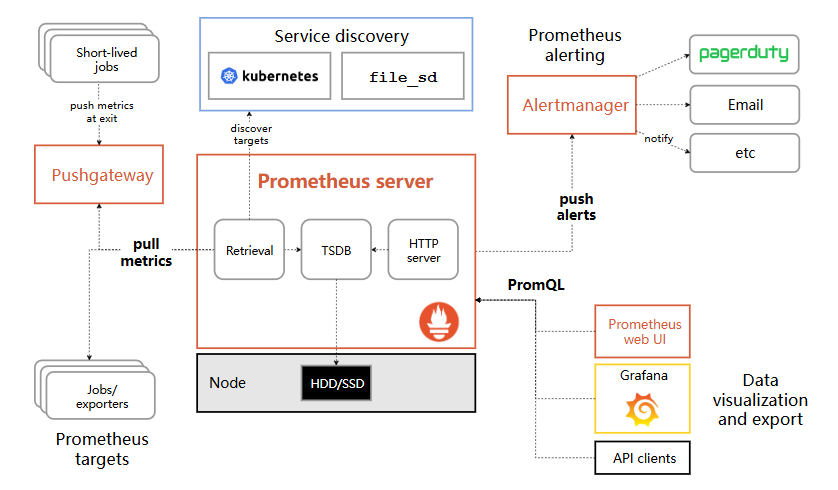
Prometheus 是一套开源的监控系统、报警、时间序列的集合,最初由 SoundCloud 开发,后来随着越来越多公司的使用,于是便独立成开源项目。自此以后,许多公司和组织都采用了 Prometheus 作为监控告警工具。
参考文档:https://prometheus.ac.cn/docs/introduction/overview/
kube-prometheus
下载源代码:https://github.com/prometheus-operator/kube-prometheus
配置文件在manifests
- 替换国内镜像
sed -i 's/quay.io/quay.mirrors.ustc.edu.cn/g' prometheusOperator-deployment.yaml
sed -i 's/quay.io/quay.mirrors.ustc.edu.cn/g' prometheus-prometheus.yaml
sed -i 's/quay.io/quay.mirrors.ustc.edu.cn/g' alertmanager-alertmanager.yaml
sed -i 's/quay.io/quay.mirrors.ustc.edu.cn/g' kubeStateMetrics-deployment.yaml
sed -i 's/k8s.gcr.io/lank8s.cn/g' kubeStateMetrics-deployment.yaml
sed -i 's/quay.io/quay.mirrors.ustc.edu.cn/g' nodeExporter-daemonset.yaml
sed -i 's/quay.io/quay.mirrors.ustc.edu.cn/g' prometheusAdapter-deployment.yaml
sed -i 's/k8s.gcr.io/lank8s.cn/g' prometheusAdapter-deployment.yaml

# 查看是否还有国外镜像
grep "image: " * -r
- 修改访问入口
分别修改 prometheus、alertmanager、grafana 中的 spec.type 为 NodePort 方便测试访问
- 安装
kubectl apply --server-side -f manifests/setup
kubectl wait \
	--for condition=Established \
	--all CustomResourceDefinition \
	--namespace=monitoring
kubectl apply -f manifests/
- 配置 Ingress
# 通过域名访问(没有域名可以在主机配置 hosts)
192.168.113.121 grafana.xxx.cn
192.168.113.121 prometheus.xxx.cn
192.168.113.121 alertmanager.xxx.cn

# 创建 prometheus-ingress.yaml
apiVersion: networking.k8s.io/v1
kind: Ingress
metadata:
  namespace: monitoring
  name: prometheus-ingress
spec:
  ingressClassName: nginx
  rules:
  - host: grafana.xxx.cn  # 访问 Grafana 域名
    http:
      paths:
      - path: /
        pathType: Prefix
        backend:
          service:
            name: grafana
            port:
              number: 3000
  - host: prometheus.xxx.cn  # 访问 Prometheus 域名
    http:
      paths:
      - path: /
        pathType: Prefix
        backend:
          service:
            name: prometheus-k8s
            port:
              number: 9090
  - host: alertmanager.xxx.cn  # 访问 alertmanager 域名
    http:
      paths:
      - path: /
        pathType: Prefix
        backend:
          service:
            name: alertmanager-main
            port:
              number: 9093

# 创建 ingress
kubectl apply -f prometheus-ingress.yaml
- 卸载
kubectl delete --ignore-not-found=true -f manifests/ -f manifests/setup
ELK 日志管理
什么是 ELK
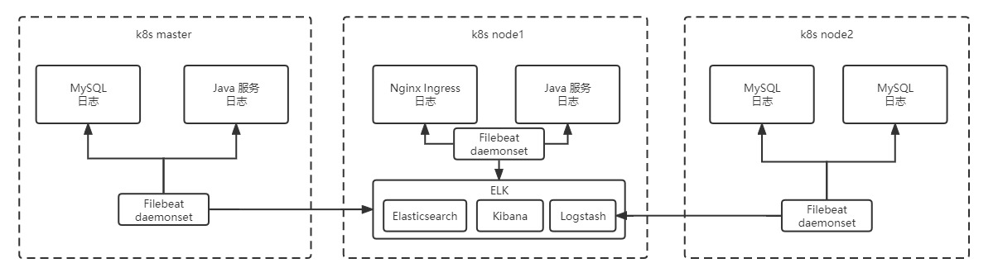
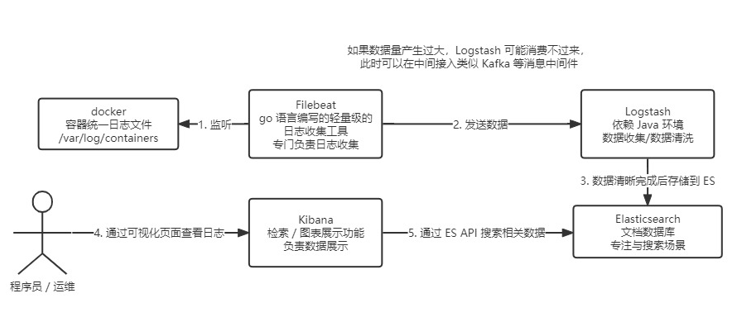
ELK 是一个流行的日志收集、存储、分析和可视化技术栈的简称,由三个开源项目组成:
- E = Elasticsearch
- L = Logstash(或有时用 Filebeat / Fluentd 替代)
- K = Kibana
这个组合 被广泛用于集中式日志管理,尤其在微服务、容器化(如 Kubernetes)和分布式系统中。
集成 ELK
部署 es 搜索服务
# 需要提前给 es 落盘节点打上标签
kubectl label node <node name> es=data

# 创建 es.yaml
---
apiVersion: v1
kind: Service
metadata:
  name: elasticsearch-logging
  namespace: kube-logging
  labels:
    k8s-app: elasticsearch-logging
    kubernetes.io/cluster-service: "true"
    addonmanager.kubernetes.io/mode: Reconcile
    kubernetes.io/name: "Elasticsearch"
spec:
  ports:
  - port: 9200
    protocol: TCP
    targetPort: db
  selector:
    k8s-app: elasticsearch-logging
---
# RBAC authn and authz
apiVersion: v1
kind: ServiceAccount
metadata:
  name: elasticsearch-logging
  namespace: kube-logging
  labels:
    k8s-app: elasticsearch-logging
    kubernetes.io/cluster-service: "true"
    addonmanager.kubernetes.io/mode: Reconcile
---
kind: ClusterRole
apiVersion: rbac.authorization.k8s.io/v1
metadata:
  name: elasticsearch-logging
  labels:
    k8s-app: elasticsearch-logging
    kubernetes.io/cluster-service: "true"
    addonmanager.kubernetes.io/mode: Reconcile
rules:
- apiGroups:
  - ""
  resources:
  - "services"
  - "namespaces"
  - "endpoints"
  verbs:
  - "get"
---
kind: ClusterRoleBinding
apiVersion: rbac.authorization.k8s.io/v1
metadata:
  namespace: kube-logging
  name: elasticsearch-logging
  labels:
    k8s-app: elasticsearch-logging
    kubernetes.io/cluster-service: "true"
    addonmanager.kubernetes.io/mode: Reconcile
subjects:
- kind: ServiceAccount
  name: elasticsearch-logging
  namespace: kube-logging
  apiGroup: ""
roleRef:
  kind: ClusterRole
  name: elasticsearch-logging
  apiGroup: ""
---
# Elasticsearch deployment itself
apiVersion: apps/v1
kind: StatefulSet #使用statefulset创建Pod
metadata:
  name: elasticsearch-logging #pod名称,使用statefulSet创建的Pod是有序号有顺序的
  namespace: kube-logging  #命名空间
  labels:
    k8s-app: elasticsearch-logging
    kubernetes.io/cluster-service: "true"
    addonmanager.kubernetes.io/mode: Reconcile
    srv: srv-elasticsearch
spec:
  serviceName: elasticsearch-logging #与svc相关联,这可以确保使用以下DNS地址访问Statefulset中的每个pod (es-cluster-[0,1,2].elasticsearch.elk.svc.cluster.local)
  replicas: 1 #副本数量,单节点
  selector:
    matchLabels:
      k8s-app: elasticsearch-logging #和pod template配置的labels相匹配
  template:
    metadata:
      labels:
        k8s-app: elasticsearch-logging
        kubernetes.io/cluster-service: "true"
    spec:
      serviceAccountName: elasticsearch-logging
      containers:
      - image: docker.io/library/elasticsearch:7.9.3
        name: elasticsearch-logging
        resources:
          # need more cpu upon initialization, therefore burstable class
          limits:
            cpu: 1000m
            memory: 2Gi
          requests:
            cpu: 100m
            memory: 500Mi
        ports:
        - containerPort: 9200
          name: db
          protocol: TCP
        - containerPort: 9300
          name: transport
          protocol: TCP
        volumeMounts:
        - name: elasticsearch-logging
          mountPath: /usr/share/elasticsearch/data/   #挂载点
        env:
        - name: "NAMESPACE"
          valueFrom:
            fieldRef:
              fieldPath: metadata.namespace
        - name: "discovery.type"  #定义单节点类型
          value: "single-node"
        - name: ES_JAVA_OPTS #设置Java的内存参数,可以适当进行加大调整
          value: "-Xms512m -Xmx2g"
      volumes:
      - name: elasticsearch-logging
        hostPath:
          path: /data/es/
      nodeSelector: #如果需要匹配落盘节点可以添加 nodeSelect
        es: data
      tolerations:
      - effect: NoSchedule
        operator: Exists
      # Elasticsearch requires vm.max_map_count to be at least 262144.
      # If your OS already sets up this number to a higher value, feel free
      # to remove this init container.
      initContainers: #容器初始化前的操作
      - name: elasticsearch-logging-init
        image: alpine:3.6
        command: ["/sbin/sysctl", "-w", "vm.max_map_count=262144"] #添加mmap计数限制,太低可能造成内存不足的错误
        securityContext:  #仅应用到指定的容器上,并且不会影响Volume
          privileged: true #运行特权容器
      - name: increase-fd-ulimit
        image: busybox
        imagePullPolicy: IfNotPresent
        command: ["sh", "-c", "ulimit -n 65536"] #修改文件描述符最大数量
        securityContext:
          privileged: true
      - name: elasticsearch-volume-init #es数据落盘初始化,加上777权限
        image: alpine:3.6
        command:
          - chmod
          - -R
          - "777"
          - /usr/share/elasticsearch/data/
        volumeMounts:
        - name: elasticsearch-logging
          mountPath: /usr/share/elasticsearch/data/

# 创建命名空间
kubectl create ns kube-logging

# 创建服务
kubectl create -f es.yaml

# 查看 pod 启用情况
kubectl get pod -n kube-logging
部署 logstash 数据清洗
# 创建 logstash.yaml 并部署服务
---
apiVersion: v1
kind: Service
metadata:
  name: logstash
  namespace: kube-logging
spec:
  ports:
  - port: 5044
    targetPort: beats
  selector:
    type: logstash
  clusterIP: None
---
apiVersion: apps/v1
kind: Deployment
metadata:
  name: logstash
  namespace: kube-logging
spec:
  selector:
    matchLabels:
      type: logstash
  template:
    metadata:
      labels:
        type: logstash
        srv: srv-logstash
    spec:
      containers:
      - image: docker.io/kubeimages/logstash:7.9.3 #该镜像支持arm64和amd64两种架构
        name: logstash
        ports:
        - containerPort: 5044
          name: beats
        command:
        - logstash
        - '-f'
        - '/etc/logstash_c/logstash.conf'
        env:
        - name: "XPACK_MONITORING_ELASTICSEARCH_HOSTS"
          value: "http://elasticsearch-logging:9200"
        volumeMounts:
        - name: config-volume
          mountPath: /etc/logstash_c/
        - name: config-yml-volume
          mountPath: /usr/share/logstash/config/
        - name: timezone
          mountPath: /etc/localtime
        resources: #logstash一定要加上资源限制,避免对其他业务造成资源抢占影响
          limits:
            cpu: 1000m
            memory: 2048Mi
          requests:
            cpu: 512m
            memory: 512Mi
      volumes:
      - name: config-volume
        configMap:
          name: logstash-conf
          items:
          - key: logstash.conf
            path: logstash.conf
      - name: timezone
        hostPath:
          path: /etc/localtime
      - name: config-yml-volume
        configMap:
          name: logstash-yml
          items:
          - key: logstash.yml
            path: logstash.yml

---
apiVersion: v1
kind: ConfigMap
metadata:
  name: logstash-conf
  namespace: kube-logging
  labels:
    type: logstash
data:
  logstash.conf: |-
    input {
      beats {
        port => 5044
      }
    }
    filter {
      # 处理 ingress 日志
      if [kubernetes][container][name] == "nginx-ingress-controller" {
        json {
          source => "message"
          target => "ingress_log"
        }
        if [ingress_log][requesttime] {
          mutate {
            convert => ["[ingress_log][requesttime]", "float"]
          }
        }
        if [ingress_log][upstremtime] {
          mutate {
            convert => ["[ingress_log][upstremtime]", "float"]
          }
        }
        if [ingress_log][status] {
          mutate {
            convert => ["[ingress_log][status]", "float"]
          }
        }
        if  [ingress_log][httphost] and [ingress_log][uri] {
          mutate {
            add_field => {"[ingress_log][entry]" => "%{[ingress_log][httphost]}%{[ingress_log][uri]}"}
          }
          mutate {
            split => ["[ingress_log][entry]","/"]
          }
          if [ingress_log][entry][1] {
            mutate {
              add_field => {"[ingress_log][entrypoint]" => "%{[ingress_log][entry][0]}/%{[ingress_log][entry][1]}"}
              remove_field => "[ingress_log][entry]"
            }
          } else {
            mutate {
              add_field => {"[ingress_log][entrypoint]" => "%{[ingress_log][entry][0]}/"}
              remove_field => "[ingress_log][entry]"
            }
          }
        }
      }
      # 处理以srv进行开头的业务服务日志
      if [kubernetes][container][name] =~ /^srv*/ {
        json {
          source => "message"
          target => "tmp"
        }
        if [kubernetes][namespace] == "kube-logging" {
          drop{}
        }
        if [tmp][level] {
          mutate{
            add_field => {"[applog][level]" => "%{[tmp][level]}"}
          }
          if [applog][level] == "debug"{
            drop{}
          }
        }
        if [tmp][msg] {
          mutate {
            add_field => {"[applog][msg]" => "%{[tmp][msg]}"}
          }
        }
        if [tmp][func] {
          mutate {
            add_field => {"[applog][func]" => "%{[tmp][func]}"}
          }
        }
        if [tmp][cost]{
          if "ms" in [tmp][cost] {
            mutate {
              split => ["[tmp][cost]","m"]
              add_field => {"[applog][cost]" => "%{[tmp][cost][0]}"}
              convert => ["[applog][cost]", "float"]
            }
          } else {
            mutate {
              add_field => {"[applog][cost]" => "%{[tmp][cost]}"}
            }
          }
        }
        if [tmp][method] {
          mutate {
            add_field => {"[applog][method]" => "%{[tmp][method]}"}
          }
        }
        if [tmp][request_url] {
          mutate {
            add_field => {"[applog][request_url]" => "%{[tmp][request_url]}"}
          }
        }
        if [tmp][meta._id] {
          mutate {
            add_field => {"[applog][traceId]" => "%{[tmp][meta._id]}"}
          }
        }
        if [tmp][project] {
          mutate {
            add_field => {"[applog][project]" => "%{[tmp][project]}"}
          }
        }
        if [tmp][time] {
          mutate {
            add_field => {"[applog][time]" => "%{[tmp][time]}"}
          }
        }
        if [tmp][status] {
          mutate {
            add_field => {"[applog][status]" => "%{[tmp][status]}"}
            convert => ["[applog][status]", "float"]
          }
        }
      }
      mutate {
        rename => ["kubernetes", "k8s"]
        remove_field => "beat"
        remove_field => "tmp"
        remove_field => "[k8s][labels][app]"
      }
    }
    output {
      elasticsearch {
        hosts => ["http://elasticsearch-logging:9200"]
        codec => json
        index => "logstash-%{+YYYY.MM.dd}" #索引名称以logstash+日志进行每日新建
      }
    }
---

apiVersion: v1
kind: ConfigMap
metadata:
  name: logstash-yml
  namespace: kube-logging
  labels:
    type: logstash
data:
  logstash.yml: |-
    http.host: "0.0.0.0"
    xpack.monitoring.elasticsearch.hosts: http://elasticsearch-logging:9200
部署 filebeat 数据采集
# 创建 filebeat.yaml 并部署
---
apiVersion: v1
kind: ConfigMap
metadata:
  name: filebeat-config
  namespace: kube-logging
  labels:
    k8s-app: filebeat
data:
  filebeat.yml: |-
    filebeat.inputs:
    - type: container
      enable: true
      paths:
        - /var/log/containers/*.log #这里是filebeat采集挂载到pod中的日志目录
      processors:
        - add_kubernetes_metadata: #添加k8s的字段用于后续的数据清洗
            host: ${NODE_NAME}
            matchers:
            - logs_path:
                logs_path: "/var/log/containers/"
    #output.kafka:  #如果日志量较大,es中的日志有延迟,可以选择在filebeat和logstash中间加入kafka
    #  hosts: ["kafka-log-01:9092", "kafka-log-02:9092", "kafka-log-03:9092"]
    # topic: 'topic-test-log'
    #  version: 2.0.0
    output.logstash: #因为还需要部署logstash进行数据的清洗,因此filebeat是把数据推到logstash中
       hosts: ["logstash:5044"]
       enabled: true
---
apiVersion: v1
kind: ServiceAccount
metadata:
  name: filebeat
  namespace: kube-logging
  labels:
    k8s-app: filebeat
---
apiVersion: rbac.authorization.k8s.io/v1
kind: ClusterRole
metadata:
  name: filebeat
  labels:
    k8s-app: filebeat
rules:
- apiGroups: [""] # "" indicates the core API group
  resources:
  - namespaces
  - pods
  verbs: ["get", "watch", "list"]
---
apiVersion: rbac.authorization.k8s.io/v1
kind: ClusterRoleBinding
metadata:
  name: filebeat
subjects:
- kind: ServiceAccount
  name: filebeat
  namespace: kube-logging
roleRef:
  kind: ClusterRole
  name: filebeat
  apiGroup: rbac.authorization.k8s.io
---
apiVersion: apps/v1
kind: DaemonSet
metadata:
  name: filebeat
  namespace: kube-logging
  labels:
    k8s-app: filebeat
spec:
  selector:
    matchLabels:
      k8s-app: filebeat
  template:
    metadata:
      labels:
        k8s-app: filebeat
    spec:
      serviceAccountName: filebeat
      terminationGracePeriodSeconds: 30
      containers:
      - name: filebeat
        image: docker.io/kubeimages/filebeat:7.9.3 #该镜像支持arm64和amd64两种架构
        args: [
          "-c", "/etc/filebeat.yml",
          "-e","-httpprof","0.0.0.0:6060"
        ]
        #ports:
        #  - containerPort: 6060
        #    hostPort: 6068
        env:
        - name: NODE_NAME
          valueFrom:
            fieldRef:
              fieldPath: spec.nodeName
        - name: ELASTICSEARCH_HOST
          value: elasticsearch-logging
        - name: ELASTICSEARCH_PORT
          value: "9200"
        securityContext:
          runAsUser: 0
          # If using Red Hat OpenShift uncomment this:
          #privileged: true
        resources:
          limits:
            memory: 1000Mi
            cpu: 1000m
          requests:
            memory: 100Mi
            cpu: 100m
        volumeMounts:
        - name: config #挂载的是filebeat的配置文件
          mountPath: /etc/filebeat.yml
          readOnly: true
          subPath: filebeat.yml
        - name: data #持久化filebeat数据到宿主机上
          mountPath: /usr/share/filebeat/data
        - name: varlibdockercontainers #这里主要是把宿主机上的源日志目录挂载到filebeat容器中,如果没有修改docker或者containerd的runtime进行了标准的日志落盘路径,可以把mountPath改为/var/lib
          mountPath: /var/lib
          readOnly: true
        - name: varlog #这里主要是把宿主机上/var/log/pods和/var/log/containers的软链接挂载到filebeat容器中
          mountPath: /var/log/
          readOnly: true
        - name: timezone
          mountPath: /etc/localtime
      volumes:
      - name: config
        configMap:
          defaultMode: 0600
          name: filebeat-config
      - name: varlibdockercontainers
        hostPath: #如果没有修改docker或者containerd的runtime进行了标准的日志落盘路径,可以把path改为/var/lib
          path: /var/lib
      - name: varlog
        hostPath:
          path: /var/log/
      # data folder stores a registry of read status for all files, so we don't send everything again on a Filebeat pod restart
      - name: inputs
        configMap:
          defaultMode: 0600
          name: filebeat-inputs
      - name: data
        hostPath:
          path: /data/filebeat-data
          type: DirectoryOrCreate
      - name: timezone
        hostPath:
          path: /etc/localtime
      tolerations: #加入容忍能够调度到每一个节点
      - effect: NoExecute
        key: dedicated
        operator: Equal
        value: gpu
      - effect: NoSchedule
        operator: Exists
部署 kibana 可视化界面
# 此处有配置 kibana 访问域名,如果没有域名则需要在本机配置 hosts
192.168.113.121 kibana.xxx.cn

# 创建 kibana.yaml 并创建服务
---
apiVersion: v1
kind: ConfigMap
metadata:
  namespace: kube-logging
  name: kibana-config
  labels:
    k8s-app: kibana
data:
  kibana.yml: |-
    server.name: kibana
    server.host: "0"
    i18n.locale: zh-CN                      #设置默认语言为中文
    elasticsearch:
      hosts: ${ELASTICSEARCH_HOSTS}         #es集群连接地址,由于我这都都是k8s部署且在一个ns下,可以直接使用service name连接
---
apiVersion: v1
kind: Service
metadata:
  name: kibana
  namespace: kube-logging
  labels:
    k8s-app: kibana
    kubernetes.io/cluster-service: "true"
    addonmanager.kubernetes.io/mode: Reconcile
    kubernetes.io/name: "Kibana"
    srv: srv-kibana
spec:
  type: NodePort
  ports:
  - port: 5601
    protocol: TCP
    targetPort: ui
  selector:
    k8s-app: kibana
---
apiVersion: apps/v1
kind: Deployment
metadata:
  name: kibana
  namespace: kube-logging
  labels:
    k8s-app: kibana
    kubernetes.io/cluster-service: "true"
    addonmanager.kubernetes.io/mode: Reconcile
    srv: srv-kibana
spec:
  replicas: 1
  selector:
    matchLabels:
      k8s-app: kibana
  template:
    metadata:
      labels:
        k8s-app: kibana
    spec:
      containers:
      - name: kibana
        image: docker.io/kubeimages/kibana:7.9.3 #该镜像支持arm64和amd64两种架构
        resources:
          # need more cpu upon initialization, therefore burstable class
          limits:
            cpu: 1000m
          requests:
            cpu: 100m
        env:
          - name: ELASTICSEARCH_HOSTS
            value: http://elasticsearch-logging:9200
        ports:
        - containerPort: 5601
          name: ui
          protocol: TCP
        volumeMounts:
        - name: config
          mountPath: /usr/share/kibana/config/kibana.yml
          readOnly: true
          subPath: kibana.yml
      volumes:
      - name: config
        configMap:
          name: kibana-config
---
apiVersion: networking.k8s.io/v1
kind: Ingress
metadata:
  name: kibana
  namespace: kube-logging
spec:
  ingressClassName: nginx
  rules:
  - host: kibana.wolfcode.cn
    http:
      paths:
      - path: /
        pathType: Prefix
        backend:
          service:
            name: kibana
            port:
              number: 5601
k8s可视化界面
| 工具名称 | 类型 | 多集群支持 | 核心功能特点 | 适用场景 | 是否活跃维护 | 官网 / 项目地址 |
|---|---|---|---|---|---|---|
| Kubernetes Dashboard | Web UI | ❌ 否 | 查看/管理资源、日志查看、基础 RBAC | 快速调试、简单运维 | ✅ 是 | https://github.com/kubernetes/dashboard |
| Lens | 桌面应用 | ✅ 是 | 实时监控、内置终端、YAML 编辑、Helm/Prometheus 集成、插件系统 | 开发者、SRE 日常管理 | ✅ 是 | https://k8slens.dev/ |
| Rancher | Web 平台 | ✅ 是 | 多集群统一管理、用户/项目权限、应用市场、监控告警集成 | 企业级生产环境 | ✅ 是 | https://rancher.com/ |
| Octant | 桌面/Web(本地) | ❌ 否 | 资源依赖可视化、交互式调试、插件扩展 | 开发者本地调试 | ❌ 否(已归档) | https://github.com/vmware-tanzu/octant |
| KubeSphere | Web 平台 | ✅ 是 | 多租户、DevOps、服务网格、内置监控/日志/告警、应用商店 | 全栈云原生平台、中大型团队 | ✅ 是 | https://kubesphere.io/ |
| Portainer | Web UI | ⚠️ 有限 | 简易 Pod/Deployment 管理、用户权限、轻量部署 | 小型团队、边缘计算、入门用户 | ✅ 是 | https://www.portainer.io/ |





 扫一扫
扫一扫


 1102
1102

 被折叠的 条评论
为什么被折叠?
被折叠的 条评论
为什么被折叠?
 到【灌水乐园】发言





