



 本文介绍SpringBoot中的异步任务处理、定时任务配置及邮件发送功能。通过实例演示如何使用@Async注解实现异步方法,利用@EnableScheduling与@Scheduled进行定时任务调度,并展示邮件发送的具体步骤。
一、异步任务
应用场景:比如我们在网站上发送邮件,后台会去发送邮件,此时前台会造成响应不动,直到邮件发送完毕,响应才会成功,所以我们一般会采用多线程的方式去处理这些任务。
编写方法,假装正在处理数据,使用线程设置一些延时,模拟同步等待的情况;
-
Service
@Service public class AsyncService { public void hello(){ try { Thread.sleep(3000); } catch (InterruptedException e) { e.printStackTrace(); } System.out.println("数据处理中...."); } } -
Controller
@RestController public class AsyncController { @Autowired AsyncService asyncService; @GetMapping("/hello") public String hello(){ asyncService.hello(); return "success"; } } -
访问http://localhost:8080/hello进行测试,3秒后出现success,这是同步等待的情况。
-
我们如果想让用户直接得到消息,就在后台使用多线程的方式进行处理即可,但是每次都需要自己手动去编写多线程的实现的话,太麻烦了,我们只需要用一个简单的办法,在我们的方法上加一个简单的注解即可,如下:
@Async // 告诉Spring这是一个异步方法 @Service public class AsyncService { public void hello(){ try { Thread.sleep(3000); } catch (InterruptedException e) { e.printStackTrace(); } System.out.println("数据处理中...."); } } -
SpringBoot会自己开一个线程池进行调用!但是要让这个注解生效,我们还需要在主程序上添加一个注解@EnableAsync ,开启异步注解功能
@EnableAsync //开启异步注解功能 @SpringBootApplication public class SpringbootTaskApplication { public static void main(String[] args) { SpringApplication.run(SpringbootTaskApplication.class, args); } } -
重新测试,网页瞬间响应,后台代码依旧执行
二、定时任务
项目开发中经常需要执行一些定时任务,比如需要在每天凌晨的时候,分析一次前一天的日志信息,Spring为我们提供了异步执行任务调度的方式,提供了两个接口:
- TaskExecutor接口
- TaskScheduler接口
两个注解: - @EnableScheduling
- @Scheduled
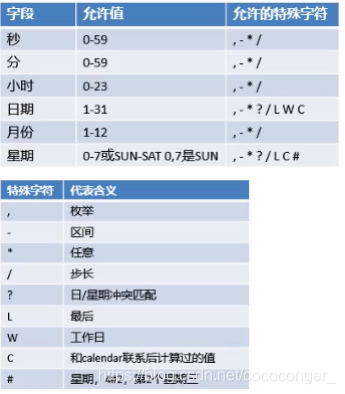
corn表达式:
-
Service
@Service public class ScheduledService { //秒 分 时 日 月 周几 //0 * * * * MON-FRI //注意cron表达式的用法; @Scheduled(cron = "0 * * * * 0-7") public void hello(){ System.out.println("hello....."); } } -
在主程序上增加@EnableScheduling 开启定时任务功能
@EnableAsync //开启异步注解功能
@EnableScheduling //开启基于注解的定时任务
@SpringBootApplication
public class SpringbootTaskApplication {
	public static void main(String[] args) {
		SpringApplication.run(SpringbootTaskApplication.class, args);
	}
}
三、邮件任务
Springboot也帮做了邮件发送的支持
- 邮件发送需要引入spring-boot-start-mail
- SpringBoot 自动配置MailSenderAutoConfiguration
- 定义MailProperties内容,配置在application.yml中
- 自动装配JavaMailSender
- 测试邮件发送
-
导入依赖
<dependency>
	<groupId>org.springframework.boot</groupId>
	<artifactId>spring-boot-starter-mail</artifactId>
</dependency>
看它引入的依赖,可以看到 jakarta.mail
<dependency> <groupId>com.sun.mail</groupId> <artifactId>jakarta.mail</artifactId> <version>1.6.4</version> <scope>compile</scope> </dependency> -
配置文件
spring.mail.username=24736743@qq.com spring.mail.password=yhkrgtqwbnrcbhcj spring.mail.host=smtp.qq.com # qq需要配置ssl spring.mail.properties.mail.smtp.ssl.enable=true -
测试
@Autowired
JavaMailSenderImpl mailSender;
@Test
public void contextLoads() {
	//邮件设置1:一个简单的邮件
	SimpleMailMessage message = new SimpleMailMessage();
	message.setSubject("通知-明天来狂神这听课");
	message.setText("今晚7:30开会");
	message.setTo("24736743@qq.com");
	message.setFrom("24736743@qq.com");
	mailSender.send(message);
}
	@Test
public void contextLoads2() throws MessagingException {
	//邮件设置2:一个复杂的邮件
	MimeMessage mimeMessage = mailSender.createMimeMessage();
	MimeMessageHelper helper = new MimeMessageHelper(mimeMessage, true);
	helper.setSubject("通知-明天来狂神这听课");
	helper.setText("<b style='color:red'>今天 7:30来开会</b>",true);
	//发送附件
	helper.addAttachment("1.jpg",new File(""));
	helper.addAttachment("2.jpg",new File(""));
	helper.setTo("24736743@qq.com");
	helper.setFrom("24736743@qq.com");
	mailSender.send(mimeMessage);
}





 扫一扫
扫一扫


 804
804

 被折叠的 条评论
为什么被折叠?
被折叠的 条评论
为什么被折叠?
 到【灌水乐园】发言





