一、pom.xml配置
<dependencies>
	<dependency>
		<groupId>org.springframework.boot</groupId>
		<artifactId>spring-boot-starter-web</artifactId>
	</dependency>
	<dependency>
		<groupId>org.springframework.boot</groupId>
		<artifactId>spring-boot-starter-security</artifactId>
	</dependency>
	<dependency>
		<groupId>org.springframework.boot</groupId>
		<artifactId>spring-boot-starter-actuator</artifactId>
	</dependency>
	<dependency>
		<groupId>org.springframework.boot</groupId>
		<artifactId>spring-boot-devtools</artifactId>
		<scope>runtime</scope>
		<optional>true</optional>
	</dependency>
	<dependency>
		<groupId>org.springframework.boot</groupId>
		<artifactId>spring-boot-configuration-processor</artifactId>
		<optional>true</optional>
	</dependency>
	<dependency>
		<groupId>org.projectlombok</groupId>
		<artifactId>lombok</artifactId>
		<optional>true</optional>
	</dependency>
	<dependency>
        <groupId>com.google.guava</groupId>
        <artifactId>guava</artifactId>
        <version>28.1-jre</version>
    </dependency>
	<dependency>
		<groupId>org.springframework.boot</groupId>
		<artifactId>spring-boot-starter-test</artifactId>
		<scope>test</scope>
	</dependency>
	<dependency>
		<groupId>org.springframework.security</groupId>
		<artifactId>spring-security-test</artifactId>
		<scope>test</scope>
	</dependency>
</dependencies>
二、WebSecurityConfig代码
import com.fasterxml.jackson.databind.ObjectMapper;
import com.google.common.collect.Maps;
import org.springframework.beans.factory.annotation.Autowired;
import org.springframework.context.annotation.Bean;
import org.springframework.http.MediaType;
import org.springframework.security.authentication.UsernamePasswordAuthenticationToken;
import org.springframework.security.config.annotation.web.builders.HttpSecurity;
import org.springframework.security.config.annotation.web.configuration.EnableWebSecurity;
import org.springframework.security.config.annotation.web.configuration.WebSecurityConfigurerAdapter;
import org.springframework.security.core.Authentication;
import org.springframework.security.core.AuthenticationException;
import org.springframework.security.web.authentication.UsernamePasswordAuthenticationFilter;
import javax.servlet.http.HttpServletRequest;
import javax.servlet.http.HttpServletResponse;
import java.io.IOException;
import java.io.InputStream;
import java.io.PrintWriter;
import java.util.Map;
@EnableWebSecurity
public class WebSecurityConfig extends WebSecurityConfigurerAdapter {
@Autowired
private ObjectMapper objectMapper;
@Override
protected void configure(HttpSecurity http) throws Exception {
http
.authorizeRequests().anyRequest().authenticated()
.and()
.formLogin()
.and()
.logout().logoutUrl("/logout")
.logoutSuccessHandler((request, response, authentication) -> {
response.setContentType("application/json;charset=utf-8");
PrintWriter out = response.getWriter();
out.write(objectMapper.writeValueAsString(logoutObj()));
out.flush();
out.close();
})
.and()
.csrf().disable();
http.addFilterAt(usernamePasswordAuthenticationFilter(), UsernamePasswordAuthenticationFilter.class);
}
@Bean
public UsernamePasswordAuthenticationFilter usernamePasswordAuthenticationFilter() throws Exception {
UsernamePasswordAuthenticationFilter filter = new UsernamePasswordAuthenticationFilter(){
@Override
public Authentication attemptAuthentication(HttpServletRequest request, HttpServletResponse response) throws AuthenticationException {
if (request.getContentType().equals(MediaType.APPLICATION_JSON_UTF8_VALUE) || request.getContentType().equals(MediaType.APPLICATION_JSON_VALUE)) {
UsernamePasswordAuthenticationToken authRequest;
try (InputStream is = request.getInputStream();) {
Map<String, String> authenticationBean = objectMapper.readValue(is, Map.class);
authRequest = new UsernamePasswordAuthenticationToken(authenticationBean.get("username"), authenticationBean.get("password"));
} catch (IOException e) {
logger.error("", e);
authRequest = new UsernamePasswordAuthenticationToken("", "");
}
setDetails(request, authRequest);
return getAuthenticationManager().authenticate(authRequest);
} else {
return super.attemptAuthentication(request, response);
}
}
};
filter.setAuthenticationSuccessHandler((request, response, authentication) -> {
response.setContentType("application/json;charset=utf-8");
PrintWriter out = response.getWriter();
out.write(objectMapper.writeValueAsString(successObj()));
out.flush();
out.close();
});
filter.setAuthenticationFailureHandler((request, response, exception) -> {
response.setContentType("application/json;charset=utf-8");
PrintWriter out = response.getWriter();
out.write(objectMapper.writeValueAsString(failureObj()));
out.flush();
out.close();
});
filter.setAuthenticationManager(authenticationManager());
return filter;
}
@Bean
public ObjectMapper objectMapper() {
return new ObjectMapper();
}
private Map<String, Object> successObj() {
Map<String, Object> map = Maps.newHashMap();
map.put("code", 200);
map.put("message", "登录成功");
return map;
}
private Map<String, Object> failureObj() {
Map<String, Object> map = Maps.newHashMap();
map.put("code", 401);
map.put("message", "登录失败");
return map;
}
private Map<String, Object> logoutObj() {
Map<String, Object> map = Maps.newHashMap();
map.put("code", 200);
map.put("message", "注销成功");
return map;
}
}
三、Postman测试
- 输入正确的账号和密码
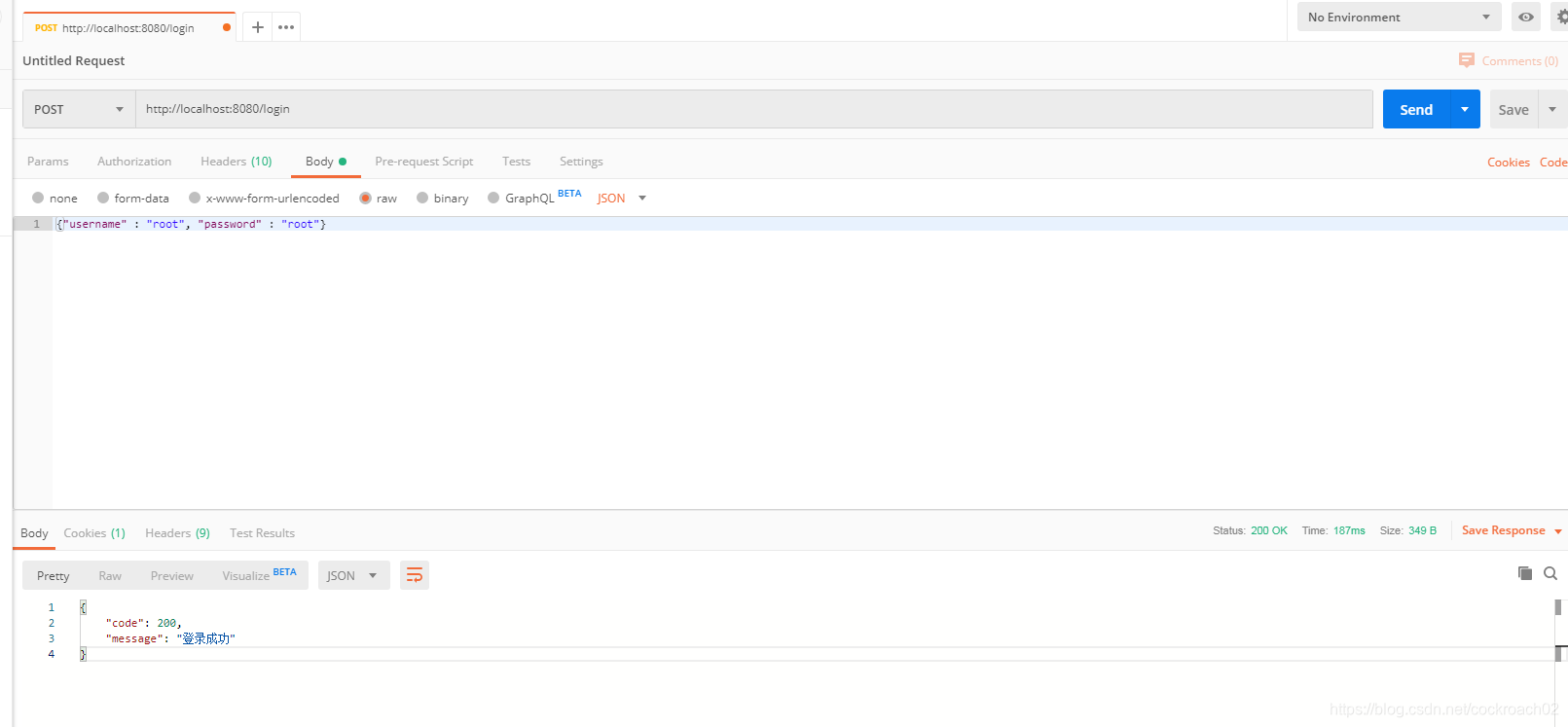
- 输入错误账号和密码
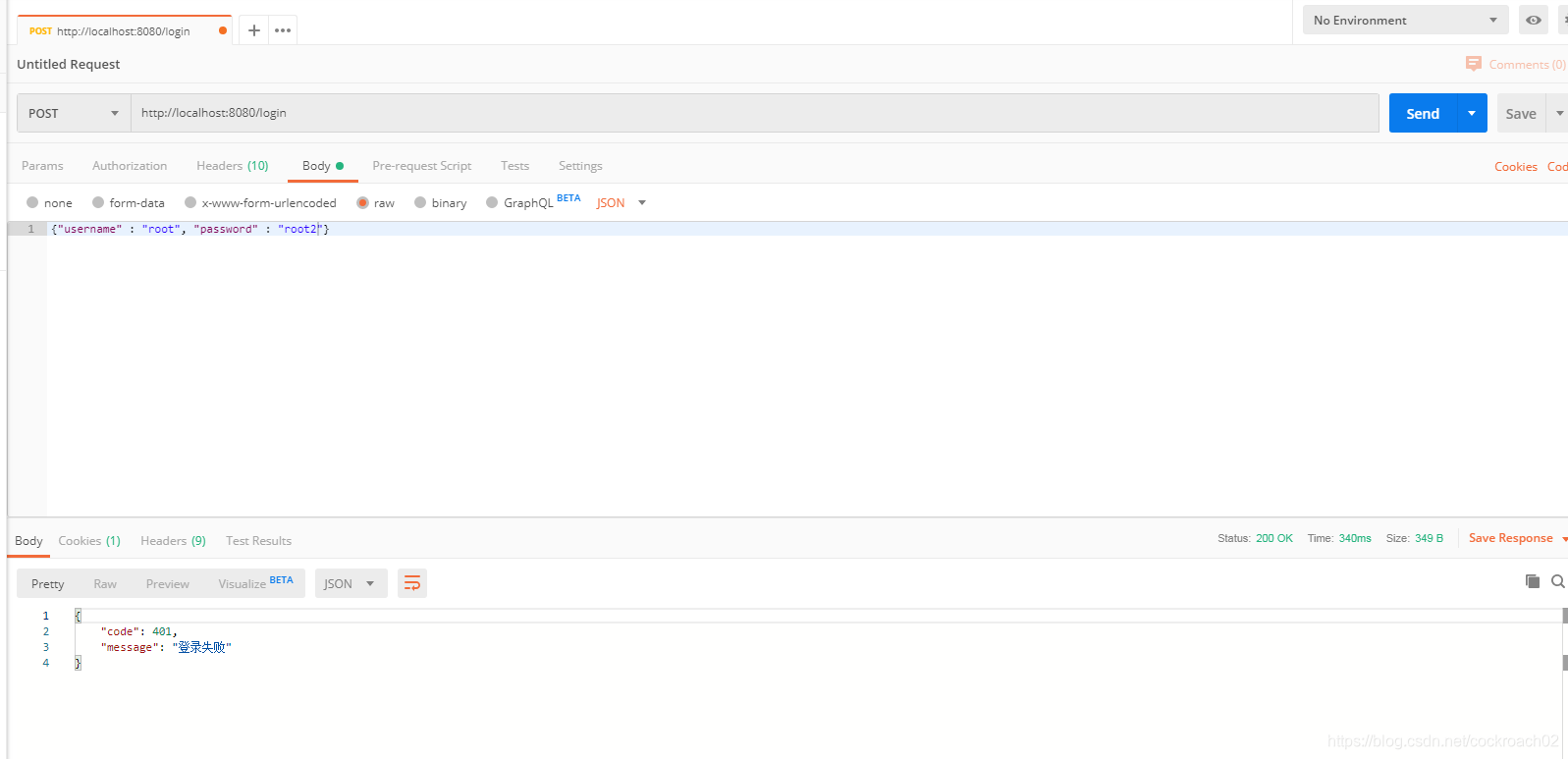
四、参考链接
- SpringSecurity登录使用JSON格式数据
- Spring Security and JSON Authentication



 本文详细介绍了如何在Spring Boot项目中配置Spring Security以支持JSON格式的登录请求,包括pom.xml依赖配置、WebSecurityConfig类实现及Postman测试过程。





 扫一扫
扫一扫


 2803
2803

 被折叠的 条评论
为什么被折叠?
被折叠的 条评论
为什么被折叠?
 到【灌水乐园】发言





