


Metersphere的安装部署,主要参考官网的在线文档:https://metersphere.io/docs/v3.x/installation/offline_installation_windows/
主要安装步骤回顾:
- VirtualBox 下载链接:https://download.virtualbox.org/virtualbox/7.0.14/VirtualBox-7.0.14-161095-Win.exe
- 通过网盘链接下载 Ubuntu OVA 文件: https://pan.baidu.com/s/1SDy2HZNlDQYCy6J7wPsmtw?pwd=423w 提取码:423w
- Virtualbox导入Ubuntu并启动(用户名:root,密码:passwd)
- 查看虚拟机的 IP,输入命令 ip a
- 使用远程连接工具 XShell连接到虚拟机:https://www.xshell.com/zh/free-for-home-school/
- 当前最新版本是3.6.1,官方下载地址(https://community.fit2cloud.com/#/products/metersphere/downloads)
虚机中下载 MeterSphere 安装包:wget https://cdn0-download-offline-installer.fit2cloud.com/metersphere/release/metersphere-ce-offline-installer-v3.6.1-lts.tar.gz - 解压并执行安装命令
tar -zxvf metersphere-ce-online-installer-v3.x.y.tar.gz
cd metersphere-ce-online-installer-v3.x.y
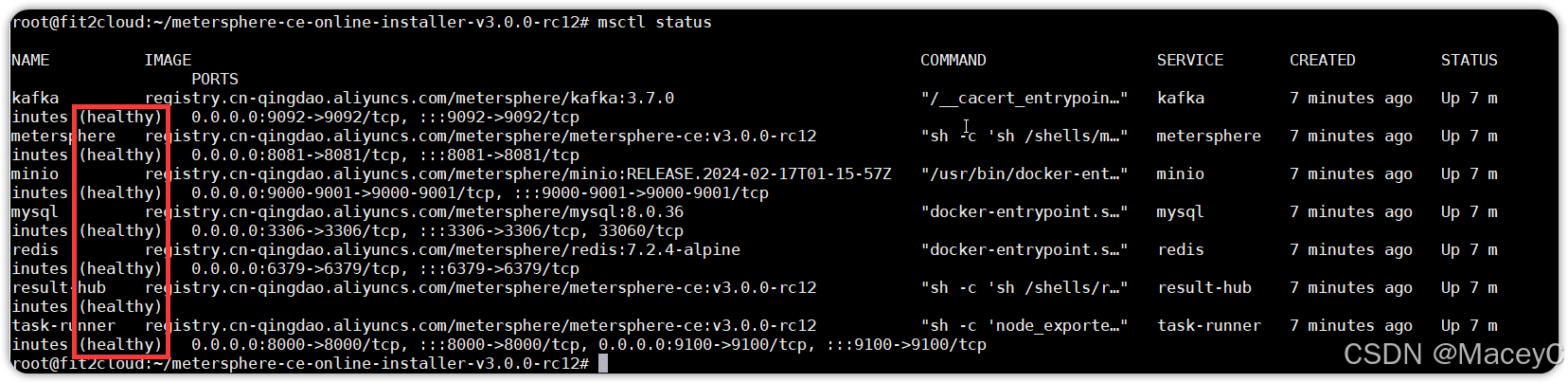
/bin/bash install.sh - 安装完成后,执行【msctl status】命令查看服务都是 healthy 状态即可访问并登录。
- 如果显示有unhealthy,重新启动容器即可
如metersphere显示unhealthy,用docker start metersphere 启动该容器即可看到metersphere处于healthy状态。
本机访问http://ip:8081,用户名admin,密码metersphere,即可开始使用。





 扫一扫
扫一扫


 2551
2551

 被折叠的 条评论
为什么被折叠?
被折叠的 条评论
为什么被折叠?
 到【灌水乐园】发言





