



 本文聚焦Android图片重复问题,分为APP运行时加载相同图片对象致内存浪费、APK包中存在相同图片文件影响包大小两类。分别介绍内存图片查重和APK文件查重思路,前者用HAHA库分析hprof文件,后者遍历项目目录以图片MD5为Key值,还推荐了冗余代码查重工具。
本文将图片重复分为两种类型:
1.APP运行时加载了多个相同的图片对象,造成了内存浪费
2.APK包中存在多个相同的图片文件,影响了APK包大小
下面分别进行讨论:
---------------------------------------------------------------------------------------------------
一.内存图片查重:
目的:降低运行时内存,防止程序发生OOM异常,以及降低程序由于内存过大被LMK机制杀死的概率。另一方面,不合理的内存使用会使GC大大增多,从而导致程序变卡。
思路:通过分析内存文件hprof快速判断内存中是否存在重复的图片,并且将这些重复图片的PNG、堆栈等信息输出
内存文件hprof快速判断内存中是否存在重复的图片,并且将这些重复图片的PNG、堆栈等信息输出
1.首先是获取我们需要分析的 hprof 文件,我们加载两张相同图片:
Bitmap bitmap1 = BitmapFactory.decodeResource(getResources(), R.mipmap.test);
Bitmap bitmap2 = BitmapFactory.decodeResource(getResources(), R.mipmap.test);

imageView1.setImageBitmap(bitmap1);
imageView2.setImageBitmap(bitmap2);
2.生成 hprof 文件
// 手动触发 GC
Runtime.getRuntime().gc();
System.runFinalization();
Debug.dumpHprofData(file.getAbsolutePath());
3.利用HAHA 库进行文件分析的核心代码:
主要思路是遍历所有的bitmap对象,用HashCode-List<AnalyserResults>,作为key-value,最后如果判断value的list的size大于1,则说明内存中存在重复图片
File heapDumpFile = new File(args[0]);
            //打开hprof文件
            HprofBuffer buffer = new MemoryMappedFileBuffer(heapDumpFile);
            HprofParser parser = new HprofParser(buffer);
            //解析获得快照
            com.squareup.haha.perflib.Snapshot snapshot = parser.parse();
            snapshot.computeDominators();

            //获得Bitmap Class
            Collection<ClassObj> bitmapClasses = snapshot.findClasses("android.graphics.Bitmap");
            //获取堆数据,这里包括项目app、系统、default heap的信息,需要进行过滤
            Collection<Heap> heaps = snapshot.getHeaps();
//            Tools.print("bitmapClasses size = " + bitmapClasses.size());
//            Tools.print("all heaps size in snapshot = " + heaps.size());

            //这里有一个坑,其实snapshot也是从每个heap上获取他的ClassObj列表的,但是可能出现这个heap上的
            //ClassObj对象出现在了另一个heap中的情况,因此我们不能直接获取heap的ClassObj列表,
            //需要直接从snapshot总获取ClassObj列表.
            long startTime = System.currentTimeMillis();
            Tools.print("---------------------- START ----------------------- ");
            for (Heap heap : heaps) {
                // 只需要分析app和default heap即可
                Tools.print("HeapName:" + heap.getName());
                if (!heap.getName().equals("app") && !heap.getName().equals("default")) {
                    continue;
                }
                //  Tools.print("HeapName:" + heap.getName());

                Map<Integer, List<AnalyzerResult>> map = new HashMap<>();

                for (ClassObj clazz : bitmapClasses) {
                    //从heap中获得所有的Bitmap实例
                    List<Instance> instances = clazz.getHeapInstances(heap.getId());

                    for (int i = 0; i < instances.size(); i++) {
                        //从GcRoot开始遍历搜索,Integer.MAX_VALUE代表无法被搜索到,说明对象没被引用可以被回收
                        if (instances.get(i).getDistanceToGcRoot() == Integer.MAX_VALUE) {
                            continue;
                        }
                        List<AnalyzerResult> analyzerResults;
                        int curHashCode = Tools.getHashCodeByInstance(instances.get(i));
                        AnalyzerResult result = Tools.getAnalyzerResult(instances.get(i));
                        result.setInstance(instances.get(i));
                        if (map.get(curHashCode) == null){
                            analyzerResults = new ArrayList<>();
                        }else {
                            analyzerResults = map.get(curHashCode);
                        }
                        analyzerResults.add(result);
                        map.put(curHashCode, analyzerResults);
                    }
                }

                if (map.isEmpty()){
                    Tools.print("current head has no bitmap object");
                }

                for (Map.Entry<Integer, List<AnalyzerResult>> entry : map.entrySet()){
                    List<AnalyzerResult> analyzerResults = entry.getValue();
                    //去除size小于2的,剩余的为重复图片。
                    if (analyzerResults.size() < 2){
                        continue;
                    }
                    Tools.print("============================================================");
                    Tools.print("duplcateCount:" + analyzerResults.size());
                    Tools.print("stacks:[");
                    for (AnalyzerResult result : analyzerResults){
                        Tools.print("   [");
                        Tools.getStackInfo(result.getInstance());
                        Tools.print("   ]");
                    }
                    Tools.print("]");
                    Tools.print(analyzerResults.get(0).toString());
                    Tools.print("============================================================");
                }

            }
            long endTime = System.currentTimeMillis();
            Tools.print("---------------------- END ----------------------- ");
            Tools.print("Total cost time:" + (endTime - startTime) + "ms");
最终的输出结果:
$ java -jar DuplicatedBitmapAnalyzer-1.0.jar dump.hprof
---------------------- START -----------------------
HeapName:default
current head has no bitmap object
HeapName:app
============================================================
duplcateCount:2
stacks:[
   [
      android.graphics.drawable.BitmapDrawable$BitmapState@315598040 (0x12cfa4d8)
      android.graphics.drawable.BitmapDrawable@315232112 (0x12ca0f70)
      android.support.v7.widget.AppCompatImageView@315614208 (0x12cfe400)
      android.view.View[12]@315579008 (0x12cf5a80)
      android.widget.LinearLayout@315612160 (0x12cfdc00)
      android.support.v7.widget.AppCompatButton@315615232 (0x12cfe800)
   ]
   [
      android.graphics.drawable.BitmapDrawable$BitmapState@315597984 (0x12cfa4a0)
      android.graphics.drawable.BitmapDrawable@315232040 (0x12ca0f28)
      android.support.v7.widget.AppCompatImageView@315613184 (0x12cfe000)
      android.view.View[12]@315579008 (0x12cf5a80)
      android.widget.LinearLayout@315612160 (0x12cfdc00)
      android.support.v7.widget.AppCompatButton@315615232 (0x12cfe800)
   ]
]
bufferHash:fac3180b7dd77454bb6c81bc02827945
width:90
height:90
bufferSize:32400
============================================================
---------------------- END -----------------------
Total cost time:49ms
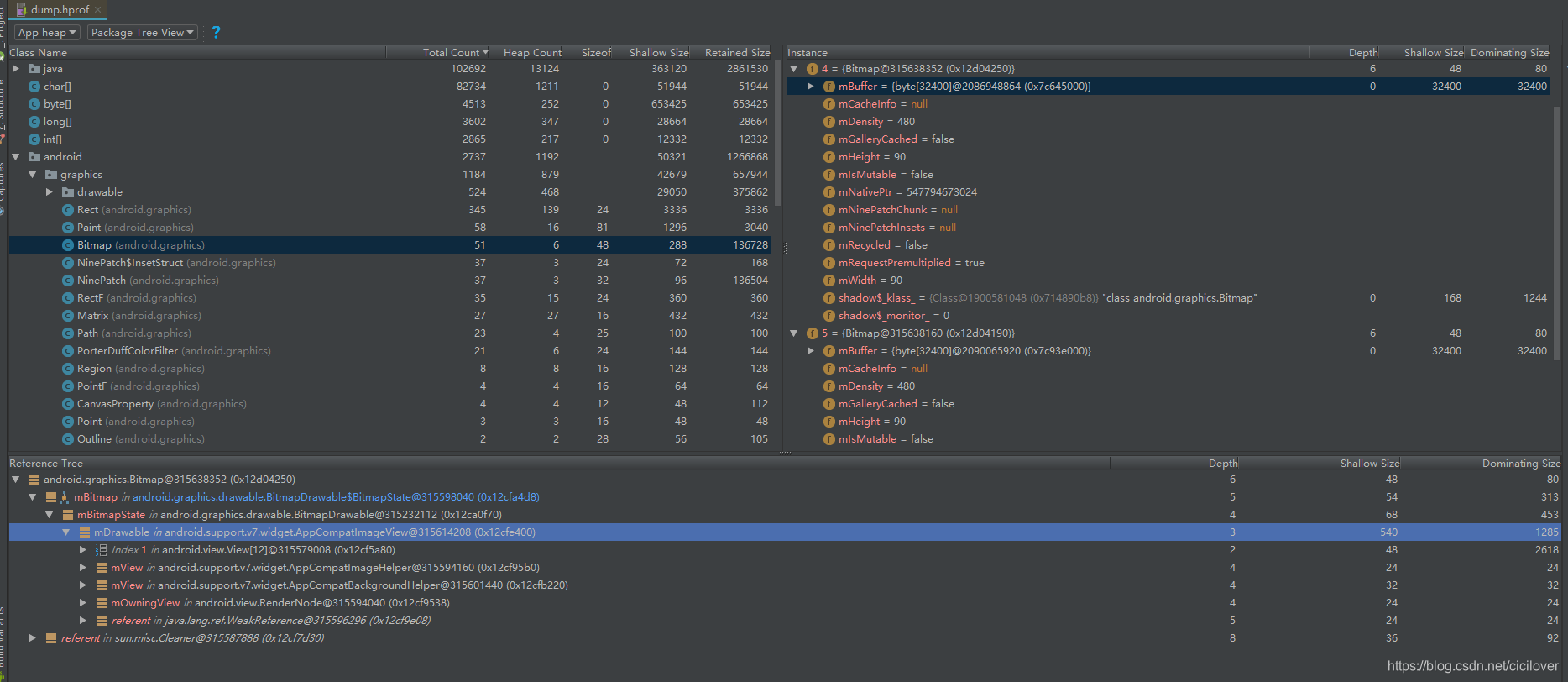
用AS打开Hprof文件,发现drawable对象一样:
-----------------------------------------------------------------------------------------------------
二.APK文件查重(可以包括图片,布局,资源等等)
目的:降低程序占用的空间,防止由于ROM空间不足导致程序无法安装;另外在用到插件化技术时,不注意控制插件包大小,尤其会影响插件加载速度
思路:和上面类似,遍历项目目录下的图片资源,将图片MD5作为Key值,如果存在多个相同文件,则对应的value存储多个,最后输出重复结果。
可以考虑用脚本实现,在代码入库前做强制检查,具体代码就不贴了。
说到文件查重,顺便推荐一下冗余代码查重工具:Simian,重构的时候可以使用,实测效果不错。
最后:
好的架构,不要相信大家的口头约定,应该考虑将能自动化的工作,全部自动化。
只有保证实验室监控和线上监控的持续有效实施,才能够保证项目的线上质量。





 扫一扫
扫一扫


 4185
4185

 被折叠的 条评论
为什么被折叠?
被折叠的 条评论
为什么被折叠?
 到【灌水乐园】发言





