


 本文详细介绍了如何在iOS应用中使用AppDelegate进行应用启动配置,包括设置窗口、背景颜色及可见性。通过创建TaobaoViewController和TmallViewController实例,并使用UINavigationController进行包装,设置标题、图标及选中图标,实现TabBarController的页面切换。同时,调整了UINavigationBar的透明度和颜色,以统一导航栏样式。
效果
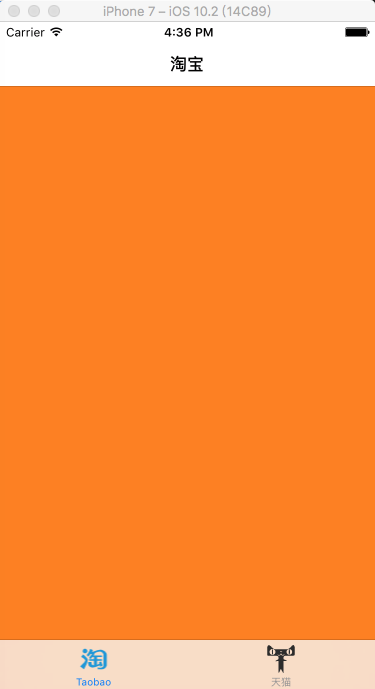
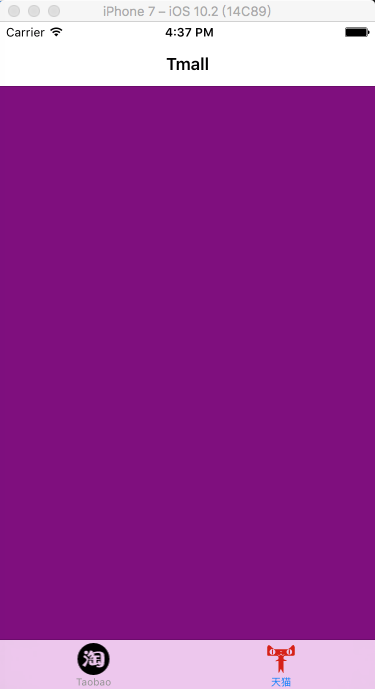
-----------------AppDelegate.m-----------------------------------------
#import "AppDelegate.h"
#import "TmallViewController.h"
#import "TaobaoViewController.h"
@interface AppDelegate ()
@implementation AppDelegate
- (BOOL)application:(UIApplication *)application didFinishLaunchingWithOptions:(NSDictionary *)launchOptions {
self.window = [[UIWindow alloc] initWithFrame:[[UIScreen mainScreen] bounds]];
// Override point for customization after application launch.
self.window.backgroundColor = [UIColor whiteColor];
[self.window makeKeyAndVisible];
//taobao 页面
TaobaoViewController * taobao = [[TaobaoViewController alloc] init];
UINavigationController * taoNav = [[UINavigationController alloc]initWithRootViewController:taobao];
//设置标题
taoNav.tabBarItem.title = @"Taobao";
//未选中时图片
taoNav.tabBarItem.image = [[UIImage imageNamed:@"taobao-1"] imageWithRenderingMode:UIImageRenderingModeAlwaysOriginal];
// 选中图片
taoNav.tabBarItem.selectedImage = [[UIImage imageNamed:@"taobao"] imageWithRenderingMode:UIImageRenderingModeAlwaysOriginal];
//Tmall 页面
TmallViewController * tmall = [[TmallViewController alloc] init];
UINavigationController * tmallNav= [[UINavigationController alloc] initWithRootViewController:tmall];
tmallNav.tabBarItem.title = @"天猫";
tmallNav.tabBarItem.image = [[UIImage imageNamed:@"tmall-1"] imageWithRenderingMode:UIImageRenderingModeAlwaysOriginal];
tmallNav.tabBarItem.selectedImage = [[UIImage imageNamed:@"tmall"] imageWithRenderingMode:UIImageRenderingModeAlwaysOriginal];
// 统一设置导航栏的样式
[[UINavigationBar appearance] setTranslucent:NO];
[[UINavigationBar appearance] setTintColor:[UIColor yellowColor]];
UITabBarController *tabberC = [[UITabBarController alloc] init];
//把页面放到TabBarController中
tabberC.viewControllers = [NSArray arrayWithObjects:taoNav,tmallNav, nil];
//TabBarController作为Window的根视图
self.window.rootViewController = tabberC;
return YES;
}





 扫一扫
扫一扫


 562
562

 被折叠的 条评论
为什么被折叠?
被折叠的 条评论
为什么被折叠?
 到【灌水乐园】发言





