


开发意义
人类的进步带动信息化的发展,使人们生活节奏越来越快,所以人们越来越重视信息的时效性。以往的管理方式已经满足不了人们对获得信息的方式、方便快捷的需求。即地方美食分享网站慢慢的被人们关注。首先,网上获取信息十分的实时、便捷,只要系统在线状态,无论在哪里都能第一时间查找到理想的信息。
计算机技术在管理中成为人们的重要工具。可以有效快捷的解决想要获取的信息,提高工作效率。
#技术栈
后端:SpringBoot、JDK8、MAVEN3.6.0、MySQL5.7等。
前端:Vue.js、Element UI、Axios、Node14.16.0等。
开发工具:IDEA、VS Code。
#软件功能模块设计
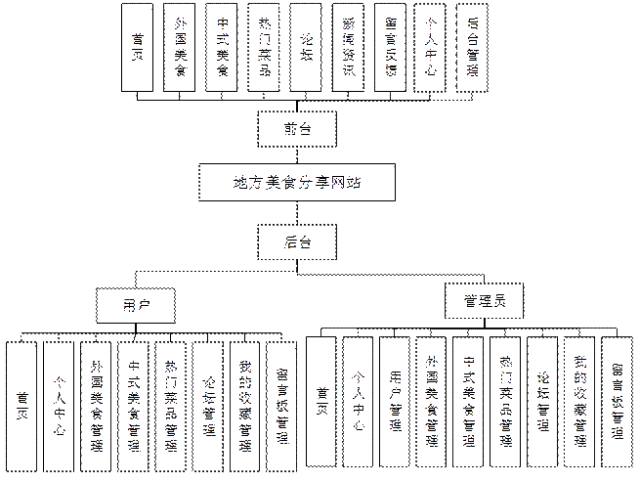
#启动项目
后台路径地址:localhost:8080/项目名称/admin/dist/index.html
前台路径地址:localhost:8080/项目名称/front/index.html
http://localhost:8080/springbooth10zf/front/index.html
http://localhost:8080/springbooth10zf/admin/dist/index.html#/index
#系统展示
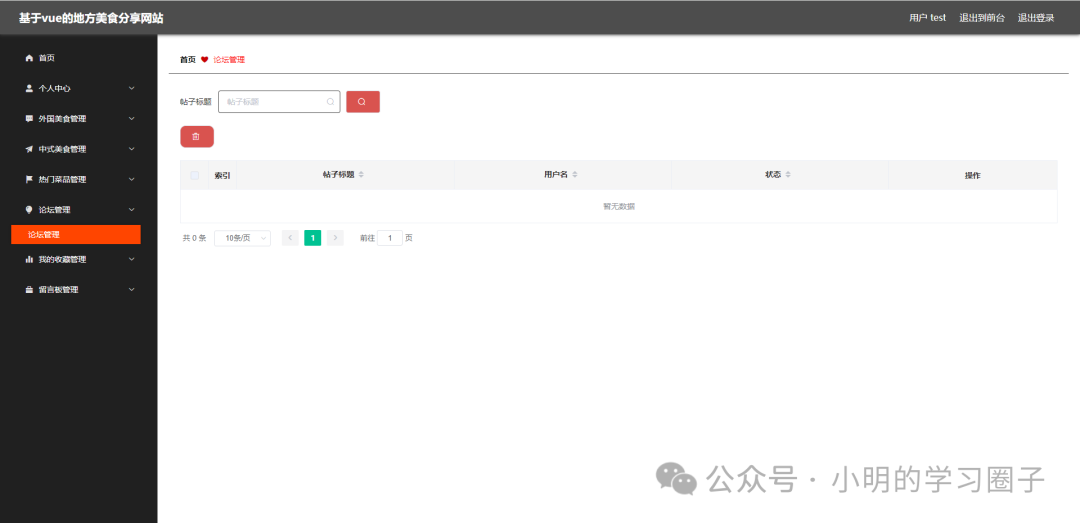
#后台展示


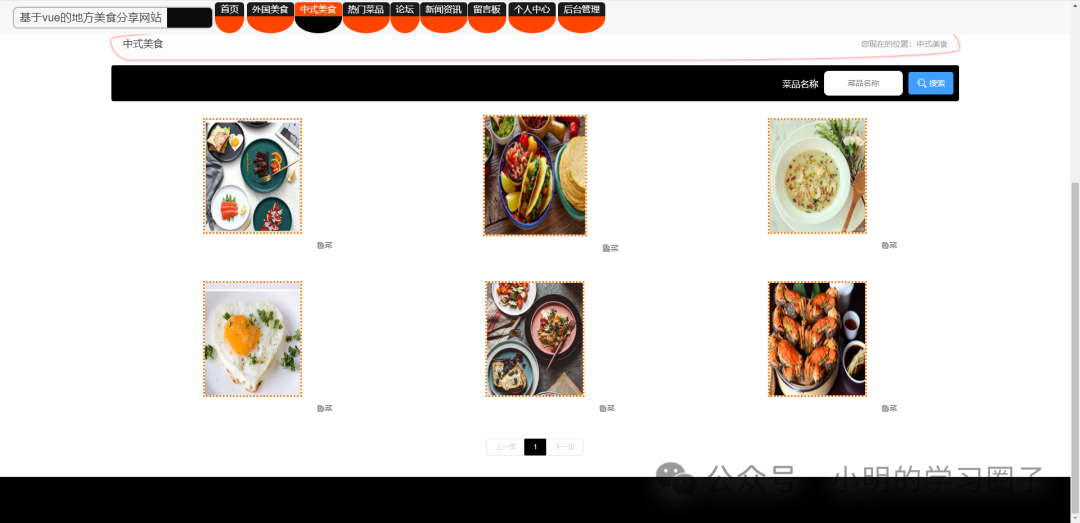
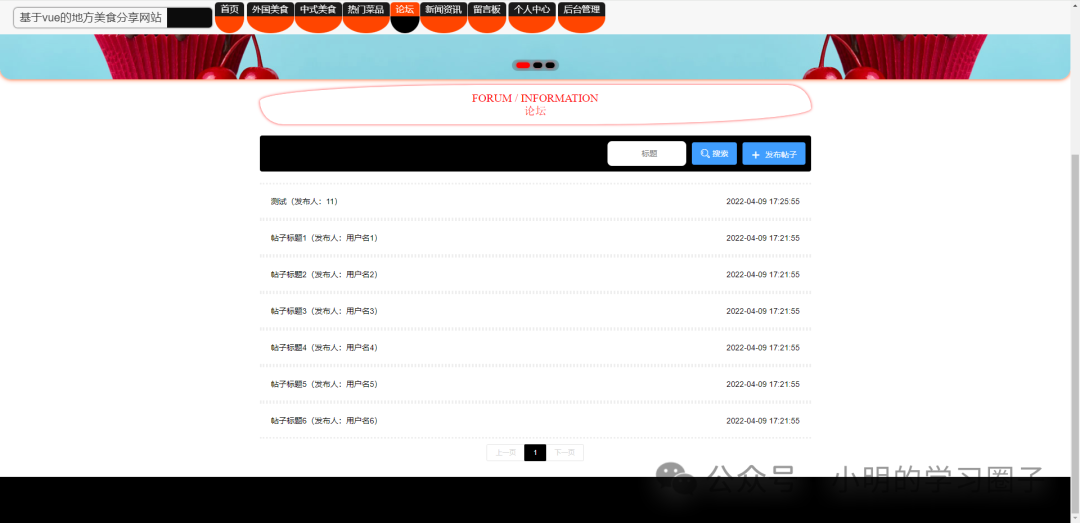
前台

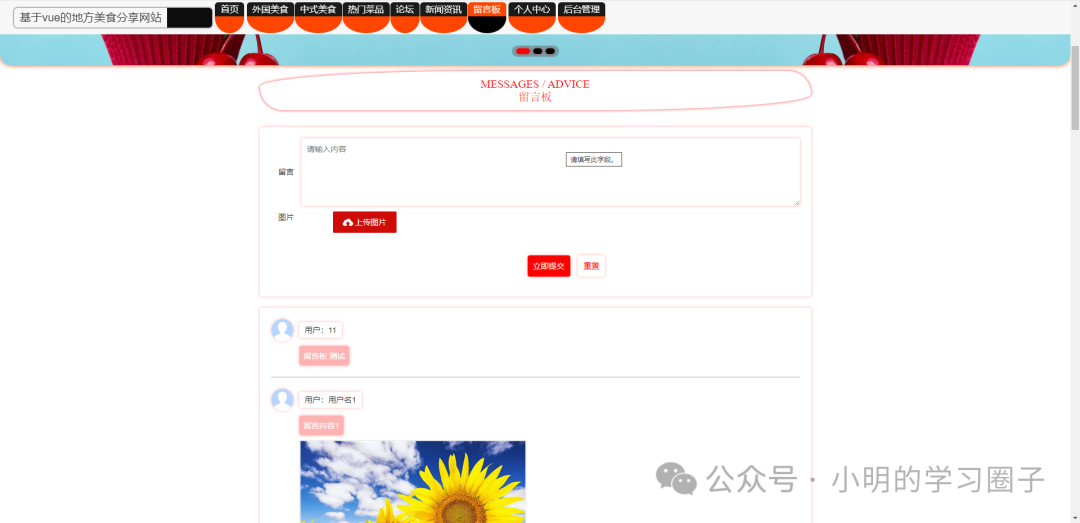
#
部分代码
package com.controller;


import java.util.Arrays;
import java.util.Calendar;
import java.util.Date;
import java.util.Map;


import javax.servlet.http.HttpServletRequest;


import org.springframework.beans.factory.annotation.Autowired;
import org.springframework.stereotype.Controller;
import org.springframework.web.bind.annotation.GetMapping;
import org.springframework.web.bind.annotation.PathVariable;
import org.springframework.web.bind.annotation.PostMapping;
import org.springframework.web.bind.annotation.RequestBody;
import org.springframework.web.bind.annotation.RequestMapping;
import org.springframework.web.bind.annotation.RequestParam;
import org.springframework.web.bind.annotation.ResponseBody;
import org.springframework.web.bind.annotation.RestController;


import com.annotation.IgnoreAuth;
import com.baomidou.mybatisplus.mapper.EntityWrapper;
import com.entity.TokenEntity;
import com.entity.UserEntity;
import com.service.TokenService;
import com.service.UserService;
import com.utils.CommonUtil;
import com.utils.MPUtil;
import com.utils.PageUtils;
import com.utils.R;
import com.utils.ValidatorUtils;


/**
 * 登录相关
 */
@RequestMapping("users")
@RestController
public class UserController{

  @Autowired
  private UserService userService;

  @Autowired
  private TokenService tokenService;


  /**
   * 登录
   */
  @IgnoreAuth
  @PostMapping(value = "/login")
  public R login(String username, String password, String captcha, HttpServletRequest request) {
    UserEntity user = userService.selectOne(new EntityWrapper<UserEntity>().eq("username", username));
    if(user==null || !user.getPassword().equals(password)) {
      return R.error("账号或密码不正确");
    }
    String token = tokenService.generateToken(user.getId(),username, "users", user.getRole());
    return R.ok().put("token", token);
  }

  /**
   * 注册
   */
  @IgnoreAuth
  @PostMapping(value = "/register")
  public R register(@RequestBody UserEntity user){
//      ValidatorUtils.validateEntity(user);
      if(userService.selectOne(new EntityWrapper<UserEntity>().eq("username", user.getUsername())) !=null) {
        return R.error("用户已存在");
      }
        userService.insert(user);
        return R.ok();
    }


  /**
   * 退出
   */
  @GetMapping(value = "logout")
  public R logout(HttpServletRequest request) {
    request.getSession().invalidate();
    return R.ok("退出成功");
  }

  /**
     * 密码重置
     */
    @IgnoreAuth
  @RequestMapping(value = "/resetPass")
    public R resetPass(String username, HttpServletRequest request){
      UserEntity user = userService.selectOne(new EntityWrapper<UserEntity>().eq("username", username));
      if(user==null) {
        return R.error("账号不存在");
      }
      user.setPassword("123456");
        userService.update(user,null);
        return R.ok("密码已重置为:123456");
    }

  /**
     * 列表
     */
    @RequestMapping("/page")
    public R page(@RequestParam Map<String, Object> params,UserEntity user){
        EntityWrapper<UserEntity> ew = new EntityWrapper<UserEntity>();
      PageUtils page = userService.queryPage(params, MPUtil.sort(MPUtil.between(MPUtil.allLike(ew, user), params), params));
        return R.ok().put("data", page);
    }


  /**
     * 列表
     */
    @RequestMapping("/list")
    public R list( UserEntity user){
         EntityWrapper<UserEntity> ew = new EntityWrapper<UserEntity>();
        ew.allEq(MPUtil.allEQMapPre( user, "user"));
        return R.ok().put("data", userService.selectListView(ew));
    }


    /**
     * 信息
     */
    @RequestMapping("/info/{id}")
    public R info(@PathVariable("id") String id){
        UserEntity user = userService.selectById(id);
        return R.ok().put("data", user);
    }

    /**
     * 获取用户的session用户信息
     */
    @RequestMapping("/session")
    public R getCurrUser(HttpServletRequest request){
      Long id = (Long)request.getSession().getAttribute("userId");
        UserEntity user = userService.selectById(id);
        return R.ok().put("data", user);
    }


    /**
     * 保存
     */
    @PostMapping("/save")
    public R save(@RequestBody UserEntity user){
//      ValidatorUtils.validateEntity(user);
      if(userService.selectOne(new EntityWrapper<UserEntity>().eq("username", user.getUsername())) !=null) {
        return R.error("用户已存在");
      }
        userService.insert(user);
        return R.ok();
    }


    /**
     * 修改
     */
    @RequestMapping("/update")
    public R update(@RequestBody UserEntity user){
//        ValidatorUtils.validateEntity(user);
      UserEntity u = userService.selectOne(new EntityWrapper<UserEntity>().eq("username", user.getUsername()));
      if(u!=null && u.getId()!=user.getId() && u.getUsername().equals(user.getUsername())) {
        return R.error("用户名已存在。");
      }
        userService.updateById(user);//全部更新
        return R.ok();
    }


    /**
     * 删除
     */
    @RequestMapping("/delete")
    public R delete(@RequestBody Long[] ids){
        userService.deleteBatchIds(Arrays.asList(ids));
        return R.ok();
    }
}
<template>
<div class="main-content">
<!-- 列表页 -->
<div v-if="showFlag">
<el-form :inline="true" :model="searchForm" class="form-content">
<el-row :gutter="20" class="slt" :style="{justifyContent:contents.searchBoxPosition=='1'?'flex-start':contents.searchBoxPosition=='2'?'center':'flex-end'}">
<el-form-item :label="contents.inputTitle == 1 ? '用户名' : ''">
<el-input v-if="contents.inputIcon == 1 && contents.inputIconPosition == 1" prefix-icon="el-icon-search" v-model="searchForm.username" placeholder="用户名" clearable></el-input>
<el-input v-if="contents.inputIcon == 1 && contents.inputIconPosition == 2" suffix-icon="el-icon-search" v-model="searchForm.username" placeholder="用户名" clearable></el-input>
<el-input v-if="contents.inputIcon == 0" v-model="searchForm.username" placeholder="用户名" clearable></el-input>
</el-form-item>
<el-form-item>
<el-button v-if="contents.searchBtnIcon == 1 && contents.searchBtnIconPosition == 1" icon="el-icon-search" type="success" @click="search()">{{ contents.searchBtnFont == 1?'查询':'' }}</el-button>
<el-button v-if="contents.searchBtnIcon == 1 && contents.searchBtnIconPosition == 2" type="success" @click="search()">{{ contents.searchBtnFont == 1?'查询':'' }}<i class="el-icon-search el-icon--right"/></el-button>
<el-button v-if="contents.searchBtnIcon == 0" type="success" @click="search()">{{ contents.searchBtnFont == 1?'查询':'' }}</el-button>
</el-form-item>
</el-row>
<el-row class="ad" :style="{justifyContent:contents.btnAdAllBoxPosition=='1'?'flex-start':contents.btnAdAllBoxPosition=='2'?'center':'flex-end'}">
<el-form-item>
<el-button
v-if="isAuth('users','新增') && contents.btnAdAllIcon == 1 && contents.btnAdAllIconPosition == 1"
type="success"
icon="el-icon-plus"
@click="addOrUpdateHandler()"
>{{ contents.btnAdAllFont == 1?'新增':'' }}</el-button>
<el-button
v-if="isAuth('users','新增') && contents.btnAdAllIcon == 1 && contents.btnAdAllIconPosition == 2"
type="success"
@click="addOrUpdateHandler()"
>{{ contents.btnAdAllFont == 1?'新增':'' }}<i class="el-icon-plus el-icon--right" /></el-button>
<el-button
v-if="isAuth('users','新增') && contents.btnAdAllIcon == 0"
type="success"
@click="addOrUpdateHandler()"
>{{ contents.btnAdAllFont == 1?'新增':'' }}</el-button>
<el-button
v-if="isAuth('users','删除') && contents.btnAdAllIcon == 1 && contents.btnAdAllIconPosition == 1 && contents.tableSelection"
:disabled="dataListSelections.length <= 0"
type="danger"
icon="el-icon-delete"
@click="deleteHandler()"
>{{ contents.btnAdAllFont == 1?'删除':'' }}</el-button>
<el-button
v-if="isAuth('users','删除') && contents.btnAdAllIcon == 1 && contents.btnAdAllIconPosition == 2 && contents.tableSelection"
:disabled="dataListSelections.length <= 0"
type="danger"
@click="deleteHandler()"
>{{ contents.btnAdAllFont == 1?'删除':'' }}<i class="el-icon-delete el-icon--right" /></el-button>
<el-button
v-if="isAuth('users','删除') && contents.btnAdAllIcon == 0 && contents.tableSelection"
:disabled="dataListSelections.length <= 0"
type="danger"
@click="deleteHandler()"
>{{ contents.btnAdAllFont == 1?'删除':'' }}</el-button>
</el-form-item>
</el-row>
</el-form>
<div class="table-content">
<el-table class="tables" :size="contents.tableSize" :show-header="contents.tableShowHeader"
:header-row-style="headerRowStyle" :header-cell-style="headerCellStyle"
:border="contents.tableBorder"
:fit="contents.tableFit"
:stripe="contents.tableStripe"
:style="{width: '100%',fontSize:contents.tableContentFontSize,color:contents.tableContentFontColor}"
v-if="isAuth('users','查看')"
:data="dataList"
v-loading="dataListLoading"
@selection-change="selectionChangeHandler">
<el-table-column v-if="contents.tableSelection"
type="selection"
:header-align="contents.tableAlign"
align="center"
width="50">
</el-table-column>
<el-table-column label="索引" :align="contents.tableAlign" v-if="contents.tableIndex" type="index" width="50" />
<el-table-column :sortable="contents.tableSortable" :align="contents.tableAlign"
prop="username"
:header-align="contents.tableAlign"
label="用户名">
<template slot-scope="scope">
{{scope.row.username}}
</template>
</el-table-column>
<el-table-column :sortable="contents.tableSortable" :align="contents.tableAlign"
prop="password"
:header-align="contents.tableAlign"
label="密码">
<template slot-scope="scope">
{{scope.row.password}}
</template>
</el-table-column>
<el-table-column :sortable="contents.tableSortable" :align="contents.tableAlign"
prop="role"
:header-align="contents.tableAlign"
label="角色">
<template slot-scope="scope">
{{scope.row.role}}
</template>
</el-table-column>
<el-table-column width="300" :align="contents.tableAlign"
:header-align="contents.tableAlign"
label="操作">
<template slot-scope="scope">
<el-button v-if="isAuth('users','查看') && contents.tableBtnIcon == 1 && contents.tableBtnIconPosition == 1" type="success" icon="el-icon-tickets" size="mini" @click="addOrUpdateHandler(scope.row.id,'info')">{{ contents.tableBtnFont == 1?'详情':'' }}</el-button>
<el-button v-if="isAuth('users','查看') && contents.tableBtnIcon == 1 && contents.tableBtnIconPosition == 2" type="success" size="mini" @click="addOrUpdateHandler(scope.row.id,'info')">{{ contents.tableBtnFont == 1?'详情':'' }}<i class="el-icon-tickets el-icon--right" /></el-button>
<el-button v-if="isAuth('users','查看') && contents.tableBtnIcon == 0" type="success" size="mini" @click="addOrUpdateHandler(scope.row.id,'info')">{{ contents.tableBtnFont == 1?'详情':'' }}</el-button>
<el-button v-if=" isAuth('users','修改') && contents.tableBtnIcon == 1 && contents.tableBtnIconPosition == 1" type="primary" icon="el-icon-edit" size="mini" @click="addOrUpdateHandler(scope.row.id)">{{ contents.tableBtnFont == 1?'修改':'' }}</el-button>
<el-button v-if=" isAuth('users','修改') && contents.tableBtnIcon == 1 && contents.tableBtnIconPosition == 2" type="primary" size="mini" @click="addOrUpdateHandler(scope.row.id)">{{ contents.tableBtnFont == 1?'修改':'' }}<i class="el-icon-edit el-icon--right" /></el-button>
<el-button v-if=" isAuth('users','修改') && contents.tableBtnIcon == 0" type="primary" size="mini" @click="addOrUpdateHandler(scope.row.id)">{{ contents.tableBtnFont == 1?'修改':'' }}</el-button>
<el-button v-if="isAuth('users','删除') && contents.tableBtnIcon == 1 && contents.tableBtnIconPosition == 1" type="danger" icon="el-icon-delete" size="mini" @click="deleteHandler(scope.row.id)">{{ contents.tableBtnFont == 1?'删除':'' }}</el-button>
<el-button v-if="isAuth('users','删除') && contents.tableBtnIcon == 1 && contents.tableBtnIconPosition == 2" type="danger" size="mini" @click="deleteHandler(scope.row.id)">{{ contents.tableBtnFont == 1?'删除':'' }}<i class="el-icon-delete el-icon--right" /></el-button>
<el-button v-if="isAuth('users','删除') && contents.tableBtnIcon == 0" type="danger" size="mini" @click="deleteHandler(scope.row.id)">{{ contents.tableBtnFont == 1?'删除':'' }}</el-button>
</template>
</el-table-column>
</el-table>
<el-pagination
clsss="pages"
:layout="layouts"
@size-change="sizeChangeHandle"
@current-change="currentChangeHandle"
:current-page="pageIndex"
:page-sizes="[10, 20, 50, 100]"
:page-size="Number(contents.pageEachNum)"
:total="totalPage"
:small="contents.pageStyle"
class="pagination-content"
:background="contents.pageBtnBG"
:style="{textAlign:contents.pagePosition==1?'left':contents.pagePosition==2?'center':'right'}"
></el-pagination>
</div>
</div>
<!-- 添加/修改页面 将父组件的search方法传递给子组件-->
<add-or-update v-if="addOrUpdateFlag" :parent="this" ref="addOrUpdate"></add-or-update>
</div>
</template>
<script>
import axios from 'axios'
import AddOrUpdate from "./add-or-update";
export default {
data() {
return {
searchForm: {
key: ""
},
form:{},
dataList: [],
pageIndex: 1,
pageSize: 10,
totalPage: 0,
dataListLoading: false,
dataListSelections: [],
showFlag: true,
sfshVisiable: false,
shForm: {},
chartVisiable: false,
addOrUpdateFlag:false,
contents:{"searchBtnFontColor":"rgba(255, 255, 255, 1)","pagePosition":"1","inputFontSize":"14px","inputBorderRadius":"4px","tableBtnDelFontColor":"rgba(77, 77, 77, 1)","tableBtnIconPosition":"1","searchBtnHeight":"40px","tableBgColor":"#f5f5f5","inputIconColor":"rgba(217, 83, 79, 1)","searchBtnBorderRadius":"4px","tableStripe":true,"btnAdAllWarnFontColor":"rgba(255, 255, 255, 1)","tableBtnDelBgColor":"rgba(255, 255, 255, 1)","searchBtnIcon":"1","tableSize":"small","searchBtnBorderStyle":"solid","tableSelection":true,"text":{"padding":"0","boxShadow":"0 0 6px rgba(0,0,0,.1)","margin":"0 auto","borderColor":"rgba(0,0,0,.3)","backgroundColor":"#f7f7f7","color":"#333","borderRadius":"6px","borderWidth":"0","width":"auto","lineHeight":"64px","fontSize":"24px","borderStyle":"solid"},"searchBtnBorderWidth":"1px","tableContentFontSize":"14px","searchBtnBgColor":"rgba(217, 83, 79, 1)","inputTitleSize":"14px","btnAdAllBorderColor":"#DCDFE6","pageJumper":true,"btnAdAllIconPosition":"1","searchBoxPosition":"1","tableBtnDetailFontColor":"rgba(77, 77, 77, 1)","tableBtnHeight":"40px","pagePager":true,"searchBtnBorderColor":"#DCDFE6","tableHeaderFontColor":"rgba(47, 44, 44, 1)","inputTitle":"1","tableBtnBorderRadius":"0px","btnAdAllFont":"0","btnAdAllDelFontColor":"rgba(255, 255, 255, 1)","tableBtnIcon":"1","btnAdAllHeight":"40px","btnAdAllWarnBgColor":"rgba(66, 139, 202, 1)","btnAdAllBorderWidth":"1px","tableStripeFontColor":"rgba(66, 139, 202, 1)","tableBtnBorderStyle":"none none solid none ","inputHeight":"40px","btnAdAllBorderRadius":"10px","btnAdAllDelBgColor":"rgba(217, 83, 79, 1)","pagePrevNext":true,"btnAdAllAddBgColor":"rgba(201, 0, 0, 1)","searchBtnFont":"0","tableIndex":true,"btnAdAllIcon":"1","tableSortable":true,"pageSizes":true,"tableFit":true,"pageBtnBG":true,"searchBtnFontSize":"14px","tableBtnEditBgColor":"rgba(255, 255, 255, 1)","inputBorderWidth":"1px","box":{"padding":"10px 20px","boxShadow":"0 0 6px rgba(0,0,0,0)","flag":1,"backgroundImage":"","background":"#fff"},"inputFontPosition":"1","inputFontColor":"#333","pageEachNum":10,"tableHeaderBgColor":"rgba(245, 245, 245, 1)","inputTitleColor":"#333","btnAdAllBoxPosition":"1","tableBtnDetailBgColor":"rgba(255, 255, 255, 1)","inputIcon":"1","searchBtnIconPosition":"1","btnAdAllFontSize":"14px","inputBorderStyle":"solid solid solid solid ","tableHoverFontColor":"#333","inputBgColor":"#fff","pageStyle":false,"pageTotal":true,"btnAdAllAddFontColor":"rgba(255, 255, 255, 1)","tableBtnFont":"1","tableContentFontColor":"rgba(252, 125, 125, 1)","inputBorderColor":"rgba(77, 77, 77, 1)","tableShowHeader":true,"tableHoverBgColor":"#f5f5f5","tableBtnFontSize":"10px","tableBtnBorderColor":"rgba(201, 0, 0, 1)","inputIconPosition":"2","tableBorder":true,"btnAdAllBorderStyle":"solid","tableBtnBorderWidth":"1px","tableStripeBgColor":"rgba(245, 245, 245, 1)","tableBtnEditFontColor":"rgba(77, 77, 77, 1)","tableAlign":"center"},
layouts: '',
};
},
created() {
this.init();
this.getDataList();
this.contentStyleChange()
},
mounted() {
},
filters: {
htmlfilter: function (val) {
return val.replace(/<[^>]*>/g).replace(/undefined/g,'');
}
},
components: {
AddOrUpdate,
},
methods: {
contentStyleChange() {
this.contentSearchStyleChange()
this.contentBtnAdAllStyleChange()
this.contentSearchBtnStyleChange()
this.contentTableBtnStyleChange()
this.contentPageStyleChange()
},
contentSearchStyleChange() {
this.$nextTick(()=>{
document.querySelectorAll('.form-content .slt .el-input__inner').forEach(el=>{
let textAlign = 'left'
if(this.contents.inputFontPosition == 2) textAlign = 'center'
if(this.contents.inputFontPosition == 3) textAlign = 'right'
el.style.textAlign = textAlign
el.style.height = this.contents.inputHeight
el.style.lineHeight = this.contents.inputHeight
el.style.color = this.contents.inputFontColor
el.style.fontSize = this.contents.inputFontSize
el.style.borderWidth = this.contents.inputBorderWidth
el.style.borderStyle = this.contents.inputBorderStyle
el.style.borderColor = this.contents.inputBorderColor
el.style.borderRadius = this.contents.inputBorderRadius
el.style.backgroundColor = this.contents.inputBgColor
})
if(this.contents.inputTitle) {
document.querySelectorAll('.form-content .slt .el-form-item__label').forEach(el=>{
el.style.color = this.contents.inputTitleColor
el.style.fontSize = this.contents.inputTitleSize
el.style.lineHeight = this.contents.inputHeight
})
}
setTimeout(()=>{
document.querySelectorAll('.form-content .slt .el-input__prefix').forEach(el=>{
el.style.color = this.contents.inputIconColor
el.style.lineHeight = this.contents.inputHeight
})
document.querySelectorAll('.form-content .slt .el-input__suffix').forEach(el=>{
el.style.color = this.contents.inputIconColor
el.style.lineHeight = this.contents.inputHeight
})
document.querySelectorAll('.form-content .slt .el-input__icon').forEach(el=>{
el.style.lineHeight = this.contents.inputHeight
})
},10)
})
},
// 搜索按钮
contentSearchBtnStyleChange() {
this.$nextTick(()=>{
document.querySelectorAll('.form-content .slt .el-button--success').forEach(el=>{
el.style.height = this.contents.searchBtnHeight
el.style.color = this.contents.searchBtnFontColor
el.style.fontSize = this.contents.searchBtnFontSize
el.style.borderWidth = this.contents.searchBtnBorderWidth
el.style.borderStyle = this.contents.searchBtnBorderStyle
el.style.borderColor = this.contents.searchBtnBorderColor
el.style.borderRadius = this.contents.searchBtnBorderRadius
el.style.backgroundColor = this.contents.searchBtnBgColor
})
})
},
// 新增、批量删除
contentBtnAdAllStyleChange() {
this.$nextTick(()=>{
document.querySelectorAll('.form-content .ad .el-button--success').forEach(el=>{
el.style.height = this.contents.btnAdAllHeight
el.style.color = this.contents.btnAdAllAddFontColor
el.style.fontSize = this.contents.btnAdAllFontSize
el.style.borderWidth = this.contents.btnAdAllBorderWidth
el.style.borderStyle = this.contents.btnAdAllBorderStyle
el.style.borderColor = this.contents.btnAdAllBorderColor
el.style.borderRadius = this.contents.btnAdAllBorderRadius
el.style.backgroundColor = this.contents.btnAdAllAddBgColor
})
document.querySelectorAll('.form-content .ad .el-button--danger').forEach(el=>{
el.style.height = this.contents.btnAdAllHeight
el.style.color = this.contents.btnAdAllDelFontColor
el.style.fontSize = this.contents.btnAdAllFontSize
el.style.borderWidth = this.contents.btnAdAllBorderWidth
el.style.borderStyle = this.contents.btnAdAllBorderStyle
el.style.borderColor = this.contents.btnAdAllBorderColor
el.style.borderRadius = this.contents.btnAdAllBorderRadius
el.style.backgroundColor = this.contents.btnAdAllDelBgColor
})
document.querySelectorAll('.form-content .ad .el-button--warning').forEach(el=>{
el.style.height = this.contents.btnAdAllHeight
el.style.color = this.contents.btnAdAllWarnFontColor
el.style.fontSize = this.contents.btnAdAllFontSize
el.style.borderWidth = this.contents.btnAdAllBorderWidth
el.style.borderStyle = this.contents.btnAdAllBorderStyle
el.style.borderColor = this.contents.btnAdAllBorderColor
el.style.borderRadius = this.contents.btnAdAllBorderRadius
el.style.backgroundColor = this.contents.btnAdAllWarnBgColor
})
})
},
// 表格
// rowStyle({ row, rowIndex}) {
// if (rowIndex % 2 == 1) {
// if(this.contents.tableStripe) {
// return {color:this.contents.tableStripeFontColor}
// }
// } else {
// return ''
// }
// },
// cellStyle({ row, rowIndex}){
// if (rowIndex % 2 == 1) {
// if(this.contents.tableStripe) {
// return {backgroundColor:this.contents.tableStripeBgColor}
// }
// } else {
// return ''
// }
// },
headerRowStyle({ row, rowIndex}){
return {color: this.contents.tableHeaderFontColor}
},
headerCellStyle({ row, rowIndex}){
return {backgroundColor: this.contents.tableHeaderBgColor}
},
// 表格按钮
contentTableBtnStyleChange(){
// this.$nextTick(()=>{
// setTimeout(()=>{
// document.querySelectorAll('.table-content .tables .el-table__body .el-button--success').forEach(el=>{
// el.style.height = this.contents.tableBtnHeight
// el.style.color = this.contents.tableBtnDetailFontColor
// el.style.fontSize = this.contents.tableBtnFontSize
// el.style.borderWidth = this.contents.tableBtnBorderWidth
// el.style.borderStyle = this.contents.tableBtnBorderStyle
// el.style.borderColor = this.contents.tableBtnBorderColor
// el.style.borderRadius = this.contents.tableBtnBorderRadius
// el.style.backgroundColor = this.contents.tableBtnDetailBgColor
// })
// document.querySelectorAll('.table-content .tables .el-table__body .el-button--primary').forEach(el=>{
// el.style.height = this.contents.tableBtnHeight
// el.style.color = this.contents.tableBtnEditFontColor
// el.style.fontSize = this.contents.tableBtnFontSize
// el.style.borderWidth = this.contents.tableBtnBorderWidth
// el.style.borderStyle = this.contents.tableBtnBorderStyle
// el.style.borderColor = this.contents.tableBtnBorderColor
// el.style.borderRadius = this.contents.tableBtnBorderRadius
// el.style.backgroundColor = this.contents.tableBtnEditBgColor
// })
// document.querySelectorAll('.table-content .tables .el-table__body .el-button--danger').forEach(el=>{
// el.style.height = this.contents.tableBtnHeight
// el.style.color = this.contents.tableBtnDelFontColor
// el.style.fontSize = this.contents.tableBtnFontSize
// el.style.borderWidth = this.contents.tableBtnBorderWidth
// el.style.borderStyle = this.contents.tableBtnBorderStyle
// el.style.borderColor = this.contents.tableBtnBorderColor
// el.style.borderRadius = this.contents.tableBtnBorderRadius
// el.style.backgroundColor = this.contents.tableBtnDelBgColor
// })
// }, 50)
// })
},
// 分页
contentPageStyleChange(){
let arr = []
if(this.contents.pageTotal) arr.push('total')
if(this.contents.pageSizes) arr.push('sizes')
if(this.contents.pagePrevNext){
arr.push('prev')
if(this.contents.pagePager) arr.push('pager')
arr.push('next')
}
if(this.contents.pageJumper) arr.push('jumper')
this.layouts = arr.join()
this.contents.pageEachNum = 10
},
init () {
},
search() {
this.pageIndex = 1;
this.getDataList();
},
// 获取数据列表
getDataList() {
this.dataListLoading = true;
let params = {
page: this.pageIndex,
limit: this.pageSize,
sort: 'id',
}
if(this.searchForm.username!='' && this.searchForm.username!=undefined){
params['username'] = '%' + this.searchForm.username + '%'
}
this.$http({
url: "users/page",
method: "get",
params: params
}).then(({ data }) => {
if (data && data.code === 0) {
this.dataList = data.data.list;
this.totalPage = data.data.total;
} else {
this.dataList = [];
this.totalPage = 0;
}
this.dataListLoading = false;
});
},
// 每页数
sizeChangeHandle(val) {
this.pageSize = val;
this.pageIndex = 1;
this.getDataList();
},
// 当前页
currentChangeHandle(val) {
this.pageIndex = val;
this.getDataList();
},
// 多选
selectionChangeHandler(val) {
this.dataListSelections = val;
},
// 添加/修改
addOrUpdateHandler(id,type) {
this.showFlag = false;
this.addOrUpdateFlag = true;
this.crossAddOrUpdateFlag = false;
if(type!='info'){
type = 'else';
}
this.$nextTick(() => {
this.$refs.addOrUpdate.init(id,type);
});
},
// 查看评论
// 下载
download(file){
window.open(`${file}`)
},
// 删除
deleteHandler(id) {
var ids = id
? [Number(id)]
: this.dataListSelections.map(item => {
return Number(item.id);
});
this.$confirm(`确定进行[${id ? "删除" : "批量删除"}]操作?`, "提示", {
confirmButtonText: "确定",
cancelButtonText: "取消",
type: "warning"
}).then(() => {
this.$http({
url: "users/delete",
method: "post",
data: ids
}).then(({ data }) => {
if (data && data.code === 0) {
this.$message({
message: "操作成功",
type: "success",
duration: 1500,
onClose: () => {
this.search();
}
});
} else {
this.$message.error(data.msg);
}
});
});
},
}
};
</script>
<style lang="scss" scoped>
.slt {
margin: 0 !important;
display: flex;
}
.ad {
margin: 0 !important;
display: flex;
}
.pages {
& /deep/ el-pagination__sizes{
& /deep/ el-input__inner {
height: 22px;
line-height: 22px;
}
}
}
.el-button+.el-button {
margin:0;
}
.tables {
& /deep/ .el-button--success {
height: 40px;
color: rgba(77, 77, 77, 1);
font-size: 10px;
border-width: 1px;
border-style: none none solid none ;
border-color: rgba(201, 0, 0, 1);
border-radius: 0px;
background-color: rgba(255, 255, 255, 1);
}
& /deep/ .el-button--primary {
height: 40px;
color: rgba(77, 77, 77, 1);
font-size: 10px;
border-width: 1px;
border-style: none none solid none ;
border-color: rgba(201, 0, 0, 1);
border-radius: 0px;
background-color: rgba(255, 255, 255, 1);
}
& /deep/ .el-button--danger {
height: 40px;
color: rgba(77, 77, 77, 1);
font-size: 10px;
border-width: 1px;
border-style: none none solid none ;
border-color: rgba(201, 0, 0, 1);
border-radius: 0px;
background-color: rgba(255, 255, 255, 1);
}
& /deep/ .el-button {
margin: 4px;
}
}
.form-content {
background: transparent;
}
.table-content {
background: transparent;
}
.tables /deep/ .el-table__body tr {
background-color: #f5f5f5 !important;
color: rgba(252, 125, 125, 1) !important;
}
.tables /deep/ .el-table__body tr.el-table__row--striped td {
background: transparent;
}
.tables /deep/ .el-table__body tr.el-table__row--striped {
background-color: rgba(245, 245, 245, 1) !important;
color: rgba(66, 139, 202, 1) !important;
}
.tables /deep/ .el-table__body tr:hover>td {
background-color: #f5f5f5 !important;
color: #333 !important;
}
</style>论文和PPT
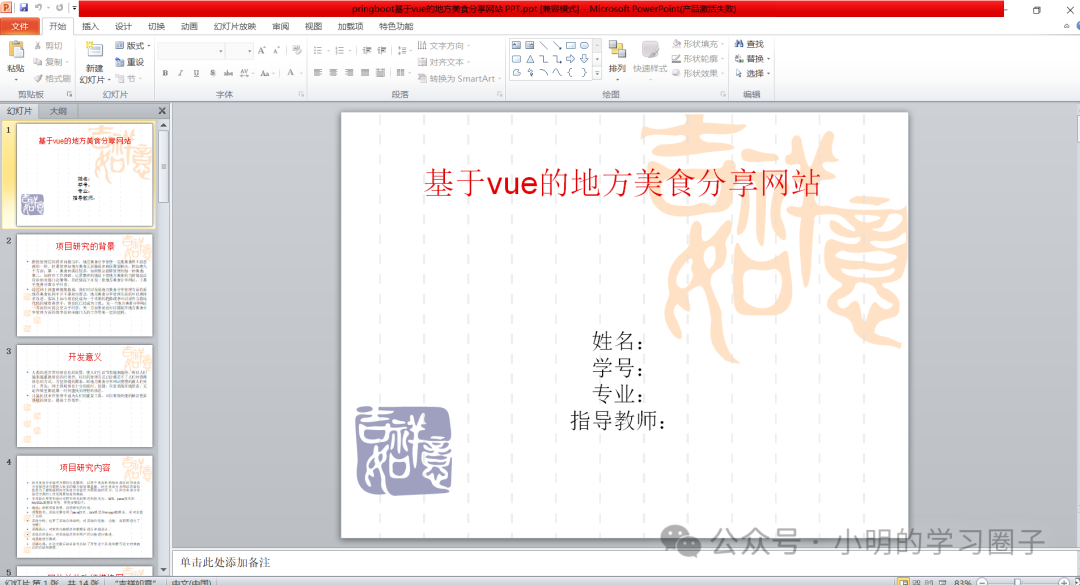
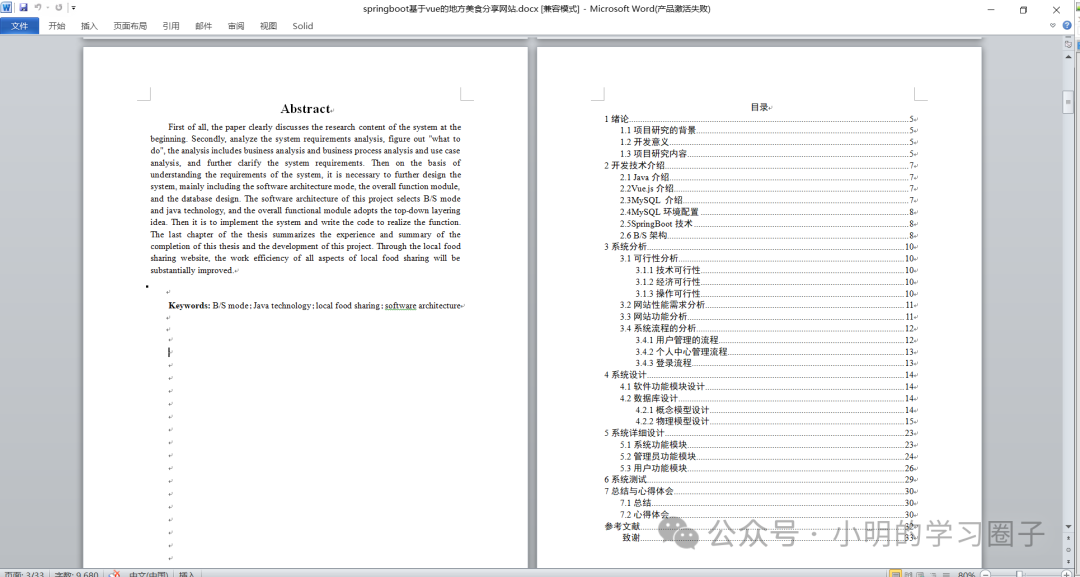
关键字:基于vue的地方美食分享网站--论文-小明的学习圈子www.stucoding.com
 1万+


 扫一扫


 被折叠的 条评论
为什么被折叠?
 到【灌水乐园】发言


