解决Multiple annotations found at this line: - javax.servlet.jsp.JspException cannot be resolve
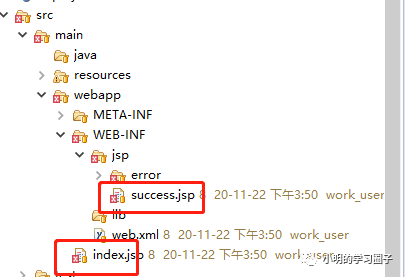
错误原因
javax.servlet.http.HttpServlet没有找到Java Build Path。
解决方法
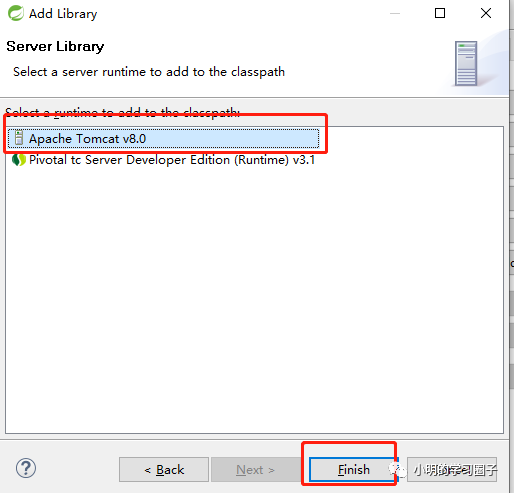
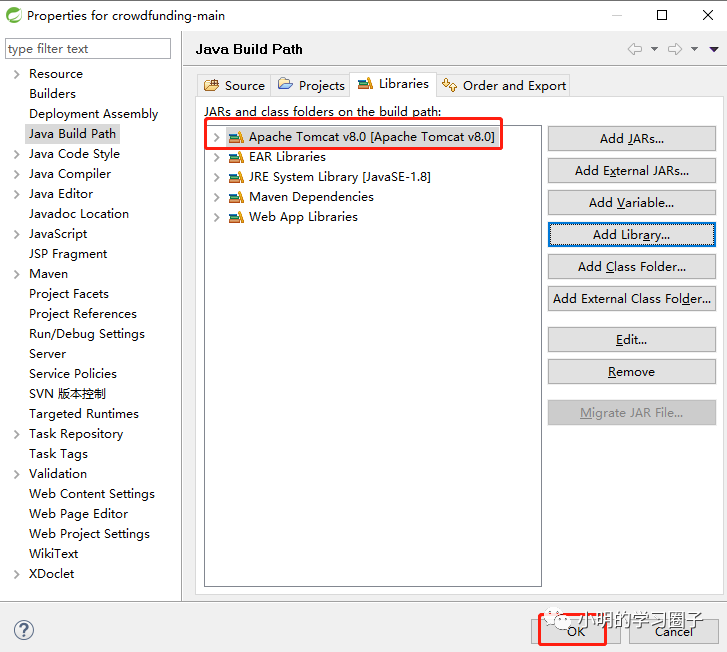
右键你的项目点击BuildPath-->Configure Build Path,点击add library(或者右键你的项目点击BuildPath->点击add library)



 墨衍会员
·
AI 创作全网分发
墨衍智能分发
本文由作者通过墨衍一键同步至各平台
1分发平台
1k累计阅读
1k平均单平台
已同步平台
优快云
微信公众号
微博
知乎
掘金
百家号
博客园
抖音
小红书
你的文章也可以这样分发
墨衍会员 ¥399起/年,写一次发全网
我也要
解决Multiple annotations found at this line: - javax.servlet.jsp.JspException cannot be resolve
错误原因
javax.servlet.http.HttpServlet没有找到Java Build Path。
解决方法
右键你的项目点击BuildPath-->Configure Build Path,点击add library(或者右键你的项目点击BuildPath->点击add library)
全国排污许可证数据
from tkinter import * # 导入窗口控件 import tkinter.filedialog import requests from lxml import etree from tkinter import ttk from bs4 import BeautifulSoup import webbrowser # 调用浏览器打开网页 from tkinter import messagebox # 弹出提示框 from openpyxl import Workbook imp.
JSP报错:解决Multiple annotations found at this line ---https://www.jsonbest.com
[json](https://www.jsonbest.com/zh) Multiple annotations found at this line Unknown tag (jap:forward) 1.项目右键,点击build path,选择configure build path选项进入下一步:如下 JSP报错:解决Multiple annotations found at this line
基于C#的ASP.NET开发的党史学习网站课设
开展党史学习教育,就是要以史为镜、以史明志,把苦难辉煌的过去、日新月异的现在、光明宏大的未来贯通起来,在鉴往知来中砥砺前行,在乱云飞渡中把准航向,在凝心聚力中团结奋斗,共同创造新的历史伟业。登陆按钮与数据库进行连接,逻辑实现是如图3.1.3所示,自己定义一个SQL查询语句,将账号、密码放入SQL查询语句中,用sqlDataReader.HasRows语句进行逐一比较,找出结果,将用户名存入session并调用cookies,如果结果存在就关闭数据库,进行数据跳转,并弹出登陆成功的提示框,并关闭数据库。
Multiple annotations found at this line
本篇 eclipse Multiple annotations found at this line错误,eclipse开发过程中,一些XML配置文件会报错,但是这些其实不是错,飘红的原因是因为eclipse的校验问题。 去掉校验设置步骤: 1.设置全局eclipse校验信息,windows>preferences>Validation,在编辑面板选中“Enable pr
ADK 第一篇 Google Agent Development Kit 简介
是一个灵活且模块化的框架,专为开发和部署AI智能体而设计。虽然ADK针对Gemini和Google生态系统进行了优化,但它与模型无关、与部署环境无关,并兼容其他框架。ADK的核心理念是让智能体开发更接近传统软件开发模式,从而帮助开发者更轻松地构建、部署和编排智能体架构——无论是处理简单任务,还是管理复杂工作流。:利用预置工具、自定义函数、OpenAPI规范或集成现有工具,赋予智能体多样化能力,实现与谷歌生态系统的深度整合。
告别“静态组件”:Adobe XD的堆栈+状态,打造“活”的响应式UI
今天,我想分享一套能彻底告别这种“笨方法”的、Adobe XD中的进阶技巧,通过组合使用“堆栈”、“内边距”和“组件状态”,去构建一个能自动适应内容、真正“活”起来的智能响应式组件。
Multiple annotations found at this line: 解决办法
最近在学习myeclipse的过程中,碰到一个错误:以下为报错内容:在jsp文件中红线句子报错 Multiple annotations found at this line:在csdn上找了很久,也没有找到有用的方法。后来请教了老师,不到五分钟就解决了。软件说明:Myeclipse2017。
DEAP数据集实战指南:从脑电信号到情绪分类的完整流程解析
本文提供了DEAP数据集在脑电信号情绪识别领域的完整实战指南。详细解析了数据下载、结构理解、频带功率特征提取等核心步骤,并演示了如何构建和评估机器学习分类模型,为研究者实现从原始脑电信号到情绪分类的完整流程提供了清晰路径。
关于Multiple annotations found at this line: 解决办法
Multiple annotations found at this line: - schema_reference.4: Failed to read schema document ‘http://www.springframework.org/schema/context/spring-context-4.3.xsd’, because 1) could not find the docu...
open-web UI 实用指南
open-web UI 类似于chatgpt的界面,可以私有化模型本地部署,也可以用商业模型.本文只是用开源模型. 它以实现多模态AI聊天 , AI 翻译 , 语音转文本, 文本转语音, 文生图,代码助手,可谓利器。
【大模型应用开发-FastAPI框架】(八)Sqlalchemy+postgresql简单增删改查
语言,为高效和高性能的数据库访问设计,实现了完整的企业级持久模型”。SQLAlchemy的理念是,的量级和性能重要于对象集合;而对象集合的抽象又重要于表和行。因此,SQLAlchemy采用了类似于。社区中成为广泛使用的ORM工具之一,不亚于Django的ORM框架。和declarative等可选插件可以让用户使用声明语法。SQLAlchemy首次发行于2006年2月,并迅速地在。SQLAlchemy“采用简单的。二、安装postgresql。一、SQLAlchemy简介。的数据映射模型,而不是其他。
Multiple annotations found at this line: 解决办法
Multiple annotations found at this line: - schema_reference.4: Failed to read schema document 'http://www.springframework.org/schema/beans/ spring-beans-3.1.xsd', because 1) could not find the docum
YOLOv8改进 | 细节涨点篇 | DySample一种超级轻量的动态上采样算子(效果完爆CARAFE)
本文给大家带来的改进机制是一种号称超轻量级且有效的动态上采样器——DySample。与传统的基于内核的动态上采样器相比,DySample采用了一种基于点采样的方法,相比于以前的基于内核的动态上采样器,DySample具有更少的参数、浮点运算次数、GPU内存和延迟。此外,DySample在包括语义分割、目标检测、实例分割、全景分割和单目深度估计在内的五个预测任务中,性能均优于其他上采样器(截至目前最有效的上采样算子)。
spring Multiple annotations found at this line: 解决办法
xml Multiple annotations found at this line: - schema_reference.4: Failed to read schema document 'http://www.springframework.org/schema/beans/ spring-beans-3.1.xsd', because 1) could not find the
jre9下载 jdk9
(Java SE Runtime Environment 9.0) 9.0u175 官方最新版 【x86|x64】
文档:亲测可用解决vnc灰屏,黑屏,鼠标大黑叉情况
主要解决vnc-viewer灰屏,黑屏,鼠标大黑叉等现象,详细见文档。
【eclipse】Multiple annotations found at this line:——解决方法
【eclipse】Multiple annotations found at this line:——解决方法
NTscan扫描工具
ntscan是一个扫描器,可以扫描没有密码和弱密码的共享,先到配置文件中填写猜测的用户名和密码,扫描过程中右侧出现的是扫描日志。
JSP:Multiple annotations found at this line 解决
创建JSP的时候出现了Multiple annotations found at this line,不知道怎么解决,本人今天也遇到了这个情况,然后使用下列方式解决了问题。 步骤如下: 1.项目右键,点击build path,选择configure build path选项进入下一步:如下 2:在configure build path界面下找到,java build path项,Lib
老版QQ原生表情gif动态
这是老版的QQ表情,不过全是动态的的,Windows照片查看器是不会动的,可以右击用浏览器打开查看,再说一遍是老版的,只是分享给宁愿用老版也要动态的人。
Multiple annotations found at this line:解决
Multiple annotations found at this line: - schema_reference.4: Failedto read schema document'http://www.springframework.org/schema/context/spring-context-3.0.xsd', because1) could not find the
JSP报错解决:Multiple annotations found at this line 解决
创建JSP的时候出现了Multiple annotations found at this line,不知道怎么解决,本人今天也遇到了这个情况,然后使用下列方式解决了问题。 步骤如下: 1.项目右键,点击build path,选择configure build path选项进入下一步:如下 2:在configure build path界面下找到,java build path项,Lib...
解决Jsp报错:Multiple annotations found at this line
报错页面如下: 解决办法: 1、Jsp页面引入,windows自带的打印功能。onclick没写引号("") 2、加上引号,就不再报错了。
maven pom文件报错:Multiple annotations found at this line 解决方案
研究maven多模块项目时,因为家里和公司不能同时开发,所以把家里搭建好的项目复制到公司继续研究, 当时家里的电脑搭建好项目之后是没问题的,但是复制到公司的eclipse上之后就看到pom文件出现下面的错误: Multiple annotations found at this line: Plugin execution not covered by lifecycle configurati...
MyBatis映射器出错,已解决(Multiple annotations found at this line:)
创建UserMapper.xml文件时提示错误:Multiple annotations found at this line: - The content of element type “mapper” must match “EMPTY”. - Attribute “namespace” must be declared for element type “mapper”. 这是因为配置文...
eclipse新建JSP页面报错:Multiple annotations found at this line解决方法
eclipse新建JSP页面报错:Multiple annotations found at this line解决方法
jsp页面出现:Multiple annotations found at this line:的解决办法
详见:http://jingyan.baidu.com/article/148a1921d53ade4d70c3b17e.html 1、 Multiple annotations found at this line: - The superclass "javax.servlet.http.HttpServlet" was not found on the Ja
JSP报错:解决Multiple annotations found at this line
报错类似如下, 按步骤可以解决这种问题 Multiple annotations found at this line Unknown tag (jap:forward) 步骤如下: 1.项目右键,点击build path,选择configure...

 被折叠的 条评论
为什么被折叠?
 到【灌水乐园】发言


 3385


 扫一扫


