


 本文介绍如何在Shiro中集成验证码功能,包括自定义FormAuthenticationFilter进行验证码校验、配置Shiro拦截器注入自定义过滤器及生成验证码的Servlet实现。
shiro使用FormAuthenticationFilter进行表单认证,验证校验的功能应该加在FormAuthenticationFilter中,在认证之前进行验证码校验。
需要写FormAuthenticationFilter的子类,继承FormAuthenticationFilter,改写它的认证方法,在认证之前进行验证码校验。
1.自定义FormAuthenticationFilter
public class CustomFormAuthenticationFilter extends FormAuthenticationFilter{
    @Override
    protected boolean onAccessDenied(ServletRequest request, ServletResponse response) throws Exception {
        // 在这里进行验证码的校验
        HttpServletRequest httpServletRequest = (HttpServletRequest) request;
        HttpSession session = httpServletRequest.getSession();

        // 取出验证码
        String validateCode = (String) session.getAttribute("validateCode");
        // 取出页面的验证码
        // 输入的验证和session中的验证进行对比
        String randomcode = httpServletRequest.getParameter("randomcode");
        if (randomcode != null && validateCode != null && !randomcode.equals(validateCode)) {
            // 如果校验失败,将验证码错误失败信息,通过shiroLoginFailure设置到request中
            httpServletRequest.setAttribute("shiroLoginFailure", "kaptchaValidateFailed");//自定义登录异常
            // 拒绝访问,不再校验账号和密码
            return true;
        }
        return super.onAccessDenied(request, response);
    }
}
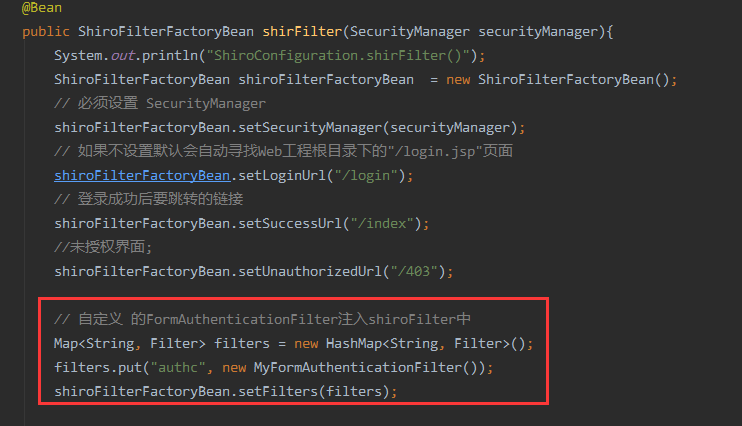
2.在ShiroConfiguration.java中的shiroFilter方法注入自定义FormAuthenticationFilter
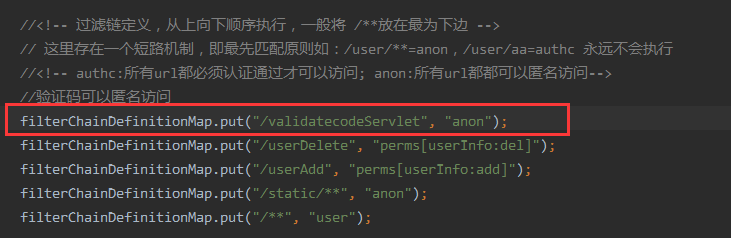
添加定义的过滤器,并且将生成验证码的servlet设定为可匿名访问。
3.登录方法加入自定义的异常kaptchaValidateFailed
 @RequestMapping(value="/login",method=RequestMethod.POST)
    public String login(HttpServletRequest request, Map<String, Object> map){
        System.out.println("HomeController.login()");
        // FormAuthenticationFilter定义了出错异常,自定义的异常,也可以继承此类下添加
        String exception = (String) request.getAttribute(FormAuthenticationFilter.DEFAULT_ERROR_KEY_ATTRIBUTE_NAME);
        System.out.println("exception=" + exception);

        String msg = "";
        if (exception != null) {
            if (UnknownAccountException.class.getName().equals(exception)) {
                System.out.println("UnknownAccountException -- > 账号不存在:");
                msg = "UnknownAccountException -- > 账号不存在:";
            } else if (IncorrectCredentialsException.class.getName().equals(exception)) {
                System.out.println("IncorrectCredentialsException -- > 密码不正确:");
                msg = "IncorrectCredentialsException -- > 密码不正确:";
            } else if ("kaptchaValidateFailed".equals(exception)) {
                System.out.println("kaptchaValidateFailed -- > 验证码错误");
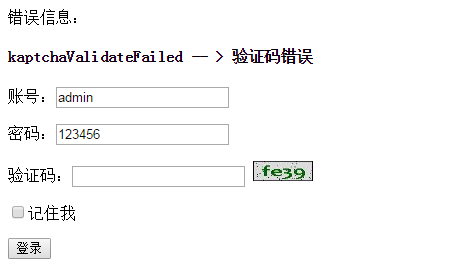
                msg = "kaptchaValidateFailed -- > 验证码错误";
            } else if (ExcessiveAttemptsException.class.getName().equals(exception)) {
                System.out.println("ExcessiveAttemptsException -- > 登录失败次数过多:");
                msg = "ExcessiveAttemptsException -- > 登录失败次数过多:";
            }else if ("kaptchaValidateFailed".equals(exception)) {
                System.out.println("kaptchaValidateFailed -- > 验证码错误");
                msg = "kaptchaValidateFailed -- > 验证码错误";
            }
            else {
                msg = "else >> "+exception;
                System.out.println("else -- >" + exception);
            }
        }
        map.put("msg", msg);
        // 此方法不处理登录成功,由shiro进行处理.
        return "login";
    }
4.修改login.html
<!DOCTYPE html>
<html xmlns="http://www.w3.org/1999/xhtml" xmlns:th="http://www.thymeleaf.org"
      xmlns:sec="http://www.thymeleaf.org/thymeleaf-extras-springsecurity3">
<head>
<meta charset="UTF-8" />
<title>Insert title here</title>
</head>
<body>
            错误信息:<h4 th:text="${msg}"></h4>
       <form action="" method="post">
           <p>账号:<input type="text" name="username" value="admin"/></p>
           <p>密码:<input type="text" name="password" value="123456"/></p>
           <p>验证码:<input type="text" name="randomcode"/>
           <img th:src="@{/validatecodeServlet}" height="20px" width="60px" onclick="random(this)"/></p>
           <P><input type="checkbox" name="rememberMe" />记住我</P>
           <p><input type="submit" value="登录"/></p>
       </form>
       <script th:inline="javascript">
          function random(tmp){
               tmp.src="/validatecodeServlet?rnd="+Math.random();
          }
       </script>
</body>
</html>
5.生成验证码servlet
@WebServlet(urlPatterns="/validatecodeServlet")
public class ValidatecodeServlet extends HttpServlet{
     /**
     *
     */
    private static final long serialVersionUID = 1L;

    @Override
        protected void doGet(HttpServletRequest req, HttpServletResponse resp) throws ServletException, IOException {
            System.out.println(">>>>>>>>>>doGet()<<<<<<<<<<<");
            doPost(req, resp);
        }

        @Override
        protected void doPost(HttpServletRequest req, HttpServletResponse resp) throws ServletException, IOException {
            System.out.println(">>>>>>>>>>doPost()<<<<<<<<<<<");
            int width = 60;
            int height = 32;
            //create the image
            BufferedImage image = new BufferedImage(width, height, BufferedImage.TYPE_INT_RGB);
            Graphics g = image.getGraphics();
            // set the background color
            g.setColor(new Color(0xDCDCDC));
            g.fillRect(0, 0, width, height);
            // draw the border
            g.setColor(Color.black);
            g.drawRect(0, 0, width - 1, height - 1);
            // create a random instance to generate the codes
            Random rdm = new Random();
            String hash1 = Integer.toHexString(rdm.nextInt());
            System.out.print(hash1);
            // make some confusion
            for (int i = 0; i < 50; i++) {
                int x = rdm.nextInt(width);
                int y = rdm.nextInt(height);
                g.drawOval(x, y, 0, 0);
            }
            // generate a random code
            String capstr = hash1.substring(0, 4);
            HttpSession session = req.getSession(true);
            //将生成的验证码存入session
            session.setAttribute("validateCode", capstr);
            g.setColor(new Color(0, 100, 0));
            g.setFont(new Font("Candara", Font.BOLD, 24));
            g.drawString(capstr, 8, 24);
            g.dispose();
            //输出图片
            resp.setContentType("image/jpeg");
            OutputStream strm = resp.getOutputStream();
            ImageIO.write(image, "jpeg", strm);
            strm.close();

        }
}
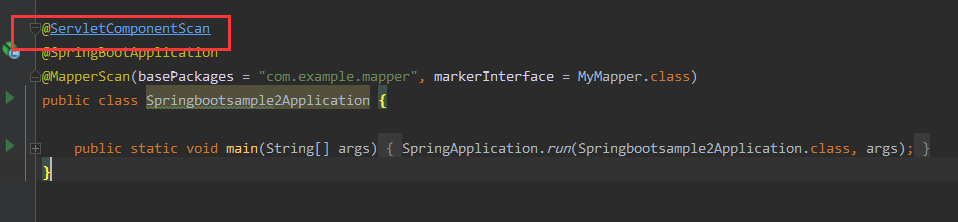
6.Application.java添加注解
@ServletComponentScan
7.效果
8.代码
https://git.oschina.net/zheng875/springboottemplate
持续集成中。。。。。。。。。。。。。。。。。。。





 扫一扫
扫一扫


 968
968

 被折叠的 条评论
为什么被折叠?
被折叠的 条评论
为什么被折叠?
 到【灌水乐园】发言





