



 本文详细探讨了Linux环境下磁盘I/O性能监控与分析的关键概念,包括IOPS定义、计算方法、RAID级别选择、SATA与SAS硬盘对比,以及如何根据工作负载调整文件系统性能。通过案例研究,作者展示了如何使用sysstat等工具收集数据,并利用这些数据进行深入分析,以确定存储子系统的瓶颈和潜在改进措施。
Monitoring and analyzing performance is an important task for any sysadmin. Disk I/O bottlenecks can bring applications to a crawl. What are IOPS? Should I use SATA, SAS, or FC? How many spindles do I need? What RAID level should I use? Is my system read or write heavy? These are common questions for anyone embarking on an disk I/O analysis quest. Obligatory disclaimer: I do not consider myself an expert in storage or anything for that mater. This is just how I have done I/O analysis in the past. I welcome additions and corrections. I believe it’s also important to note that this analysis is geared toward random operations than sequential read/write workloads.
Let’s start at the very beginning … a very good place to start. Hey it worked for Julie Andrews … So what are IOPS? They are input output (I/O) operations measured in seconds. It’s good to note that IOPS are also referred to as transfers per second (tps). IOPs are important for applications that require frequent access to disk. Databases, version control systems, and mail stores all come to mind.
Great so now that I know what IOPS are how do I calculate them? IOPS are a function of rotational speed (aka spindle speed), latency and seek time. The equation is pretty simple, 1/(seek + latency) = IOPS. Scott Lowe has agood example on his techreplublic.com blog.
Sample drive:
- Model: Western Digital VelociRaptor 2.5″ SATA hard drive
- Rotational speed: 10,000 RPM
- Average latency: 3 ms (0.003 seconds)
- Average seek time: 4.2 ®/4.7 (w) = 4.45 ms (0.0045 seconds)
- Calculated IOPS for this disk: 1/(0.003 + 0.0045) = about 133 IOPS“
It’s great to know how to calculate a disks IOPS but for the most part you can get by with commonly accepted averages. Of course sources vary but from what I have seen.
“
Rotational Speed (rpm) IOPS 5400 50–80 7200 75–100 10k 125–150 15k 175–210
Should I use SATA, SAS or FC? That’s a loaded question. As with most things the answer is “depends”. I don’t want to get into the SATA vs SAS debate you can do your own research and make your own decisions based on your needs, but I will point out a few things.
- SATA only gets up to 10k (at the time of this writing)
- SATA is only 1/2 duplex (From Tomak in comments)
- Differences in reliability (MTBF, BER) interesting article on Real Life Raid Reliability
- See differences in Native Command Queuing (NCQ) and Command Tag Queuing (CTQ)
These factors are key considerations when choosing what kind of drives to use.
What RAID level should I use? You know what IOPS are, how to calculate them and determined what kind of drives to use, the next logical question is commonly RAID 5 vs RAID 10. There is difference in reliability, especially as the number of drives in your raid-set increases but that is outside the scope of this post.
| Raid Level | Write Operations | Read Operations | Notes |
| 0 | 1 | 1 | Write/Read: high throughput, low CPU utilization, no redundancy |
| 1 | 2 | 1 | Write: only as fast as single driveRead: Two read schemes available. Read data from both drives, or data from the drive that returns it first. One is higher throughput the other is faster seek times. |
| 5 | 4 | 1 | Write: Read-Modify-Write requires two reads and two writes per write request. Lower throughput higher CPU if the HBAdoesn’t have a dedicated IOprocessor.Read-Modify-Write requires two reads and two writes per write request. Lower throughput higher CPU if the HBAdoesn’t have a dedicated IOprocessor.Read: High throughput low CPU utilization normally, in a failed state performance falls dramatically due to parity calculation and any rebuild operations that are going on. |
| 6 | 5 | 1 | Write: Read-Modify-Write requires three reads and three writes per write request. Do not use a software implementation if it is availableRead: High throughput low CPU utilization normally, in a failed state performance falls dramatically due to parity calculation and any rebuild operations that are going on. |
As you can see in the table above, writes are where you take your performance hit. Now that the penalty or RAID factor is known for different raid levels we can get a good estimate of the theoretical maximum IOPS for aRAID set (excluding caching of course). To do this you take the product of the number of disks and IOPS per disk divided by the sum of the %read workload and the product of the raid factor (see write operations column) and %write workload.
Here is the equation:
d = number of disks
dIOPS = IOPS per disk
%r = % of read workload
%w = % of write workload
F = raid factor (write operations column)
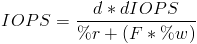
Wait a second, where am I supposed to get %read and %write from?
“
You need to examine your workload. I usually turn to my favorite statistics collector, sysstat. sar –d –p will report activity for each block device and pretty print the device name. I am assuming you already know what block device you are looking to analyze but if your looking for the busiest device just look in the tps column. the rd_sec/s and wr_sec/s columns display number of sectors read/written from/to the device. To get the percentage of read or writes divide rd_sec/s by the sum of rd_sec/s and wr_sec/s.
The equations:
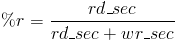
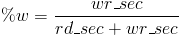
An example from my workstation:
Average for sdb rd_sec/s = 1150.80
Average for sdb wr_sec/s = 1166.53
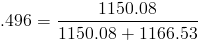
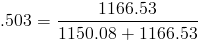
As you can see my workstation read/write workload is pretty balanced at 49.6% read, and 50.3% write. Compare that to a cvs server (don’t get me started on how bad cvs is, its just something I have to deal with).
Average for sdb rd_sec/s = 27.78k
Average for sdb wr_sec/s = 2.07k
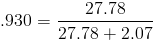
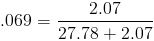
This server workload is extremely high on reads. Ok time to analyze the performance.
In and of itself being a heavy read workload is not a problem. My problem is user complaints of slowness. I note (again from sysstat collected metrics) that the tps or average IOPS on this device is about 574. Again thats not an issue in and of itself, we need to know what we can expect from its subsystem. This device happens to be SAN based storage. The raid set its on is comprised of 4 10kRPM FC drives in a raid 10. Remember from the table above that IOPS for a 10kRPM drive are in the 125-150ish range. We need to calculate the expected IOPS from that raid set using the IOPS equation above, our measured workloads for read/write, the number of disks, and the raid level (10 and 1 are treated the same).
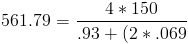
Using the high end of the scale for 10kRPM IOPS per drive results in a maximum theoretical IOPS of 561.79, thats pretty close to what I am observing (remember cache is not taken into account). So based on these numbers it looks like my storage subsystem is saturated. I guess I better add some spindles. Unfortunately there is no historical data for this system so I have no way of knowing how many tps I need to aim for.
Don’t get stuck where I am and have to guess how many spindles need to be added to reduce the pain, start recording your trends now! Even better, once you start collecting your statistical information go ahead and set an alert for 65% or 70% utilization of theoretical max IOPS for an extended period as well as increasingly bothersome alerts going up from there. It’s never good to have to react to performance issues, always better to be proactive. There was absolutely nothing wrong with the sizing of this example raid set 2–4 years ago. Had it been under monitoring the entire time with proper thresholds set a proper plan could have been made, and spindles could have been added before causing users any pain.
If you want to use sysstat like I did, you might find this Nagios plug-in that I wrote helpful check_sar_perf. I use it with Zenoss, but it could be tied into any NMS that records the performance data from a Nagios plug-in.
Go forth, collect, analyze and plan so your users aren’t calling you with issues.
- http://wiki.horde.org/HardwareRequirements
- http://don.blogs.smugmug.com/2007/10/08/hdd-iops-limiting-factor-seek-or-rpm/
- http://blogs.techrepublic.com.com/datacenter/?p=2182
- http://www.sqlservercentral.com/blogs/sqlmanofmystery/archive/2009/12/07/fundamentals-of-storage-systems-raid-an-introduction.aspx
- http://blog.aarondelp.com/2009/10/its-now-all-about-iops.html
- http://adamstechblog.com/2009/02/10/how-to-calculate-iops-ios-per-second/
- http://www.performancewiki.com/diskio-tuning.html
- http://vmtoday.com/2009/12/storage-basics-part-i-intro/
- http://vmtoday.com/2009/12/storage-basics-part-ii-iops/
- http://vmtoday.com/2010/01/storage-basics-part-iii-raid/
- http://vmtoday.com/2010/01/storage-basics-part-iv-interface/
- http://vmtoday.com/2010/03/storage-basics-part-v-controllers-cache-and-coalescing/
- http://vmtoday.com/2010/04/storage-basics-part-vi-storage-workload-characterization/
- http://private.codecogs.com/components/equationeditor/equationeditor.php





 扫一扫
扫一扫


 2049
2049


 到【灌水乐园】发言




The link for the check_sar_perf script seems completely unrelated.
Other than that, this is a very good article!
The link for check_sar_perf points tohttp://vmtoday.com/2010/04/storage-basics-part-vi-storage-workload-characterization/ , which I don’t think was your intention.
Thanks for the comment Jean-Francois, check_sar_perf is just an easy way to transport sar metrics for stuffing into an NMS.
The only thing that makes it related would be the output from check_sar_perf disk sda etc … stuffed into your cacti or zenoss so you could see a trend.
lol oops, fixing it now
Does anybody know if interlaced sectors are used on harddisks? In the day of floppies this could increase the data throughput considerably by choosing the right interlace.
When comparing SATA and SAS it’s important to remember thatSATA is only 1/2 duplex. This is a good introduction to the disks but I’d really like to see you follow it up (for the sake of all noobs) with a discussion about bandwidth over the bus and maybe even controllers and their limitations (including caching issues/options writeback/write through/cache mirroring, etc.).
Additionally, a discussion wrt tuning the VFS for specific workload performance would dovetail nicely. Maybe a future article?
Whoa, that is some high-level hardware analyzing. I hope to get to that level one day.
What about cashe size? You failed to mention it in the article. I figure it doesn’t play that big of a difference. Especially in long, constant transfers, but it has to help some? With new drivers coming with even larger cashes 64MBs!
Another question I’ve always have had but have never heard anyone address. It seems to me that even though a higher RPMdrive might have better performance, a lower RPM drive would have a longer life. Especially if they were both models from the same line from the same company.
In your first table, you have 5200 rpm drives — it should be 5400 rpm.
“It would be good to note” that IOPS are also known as TPS, if it were anywhere close to *true*.
Alas, it’s not. “Transactions per second”, as it’s generally used, refers to a very specific DBMS benchmark, promulgated by the Transaction Processing Performance Council; the TPS-C rating. (They have two others, but the –C is the one most commonly quoted)
Whether you’re that specfic or not, you’re almost certainly still talking about SQL transactions, and each one of those is going to take a *lot* more than 1 IOP. Generally by 2 to 3 orders of magnitude, but 4 isn’t uncommon, and 5 or 6 isn’t unreasonable.
And if your IOPs are taking seconds, my condolences.
@Vonskippy — Thanks I’ll fix it.
@Baylink — Yes, I meant to say Transfers per second. I’ll correct it. From man sar — A transfer is an I/O request to a physical device. Multiple logical requests can be combined into a singleIO request to the device. A transfer is of indeterminate size.
@Tormak — Thanks for the comments! You are right about noting sata is only 1/2 duplex. I thought about mentioning it but didn’t want to get deep into that discussion. Since you bring it up, Ill toss it in.
As for tuning file systems, that does seem like it would be a good read. In fact I noticed my example file system could use some tuning. If I can get some good data from doing that I may write a file-system tuning follow-up.
My apologies for the tone; yesterday was kindof a cranky day.
Nice bits in the rest of the piece.
And I like your captcha.
@Baylink, hey no problem everyone has cranky days. Thanks for the correction. As for the captcha, I agree. It was the least obnoxious one I could find. Props to http://clickcha.com/ the author.
Nice write up. One point to make though, there really is no such thing as an IOP singular. IOPS means IO Operations Per Second. The “OP” part is not short for OPeration. Leaving off the “S” is nonsensical. It’s like PPS in the network space (or hopefully,KPPS). Singular is just IO (for either “I/O Operation” or just I/O sans “/” for the lazy).
The numbers in the equations for %r and %w are the same. The results are different.
@phil — Yeah, your write it can be misleading i suppose. In my head I was just thinking Input Output OPeration Kind of like saying your ATM PIN Number (Personal Identification Number Number). I should probably change it up in the post. Thanks for the input.
@Roger Themocap — Ah your right. I screwed up when putting my equations intohttp://private.codecogs.com/components/equationeditor/equationeditor.phpto generate the images. Ill get that fixed. FYI its the one for %w thats wrong, should be .503 = 1166.53/(1150.08+1166.53). Thanks for the correction