



 本文介绍如何使用ESP32获取GPS北斗模块的经纬度和日期时间,并将其每分钟一条记录保存到TF卡,以日期命名文件。涉及自定义组件、SD卡驱动及文件操作,适合进行物联网设备数据持久化。
陈拓 2022/05/13-2022/05/15
1. 简介
在《ESP32 ESP-IDF 获取GPS北斗模块的经纬度和日期时间》
https://zhuanlan.zhihu.com/p/514006797
https://blog.youkuaiyun.com/chentuo2000/article/details/124757285?spm=1001.2014.3001.5501
一文中我们已经用ESP32获取了GPS北斗模块HT1818Z3G5L的经纬度和日期时间数据。
文本我们将经纬度和日期时间保存到TF卡中。每天保存一个文件,用日期作为文件名。模块大约1秒钟发送一次数据,我们不需要保存那么多数据,如果1分钟保存一次,1天有1440条记录。
记录格式:纬度,经度,年,月,日,时分秒
例子:
2233.87430,11407.13740,2022,05,08,132506.000
2. 开发环境
《用乐鑫国内Gitee镜像搭建ESP32开发环境》
https://zhuanlan.zhihu.com/p/348106034
https://blog.youkuaiyun.com/chentuo2000/article/details/113424934?spm=1001.2014.3001.5501
3. 写代码
为便于以后代码复用,将SD卡相关的功能代码写成组件形式。有关自定义组件可以参考《ESP32 ESP-IDF自定义组件》
https://zhuanlan.zhihu.com/p/441368112
https://blog.youkuaiyun.com/chentuo2000/article/details/121725928?spm=1001.2014.3001.5501
- 项目树
tree
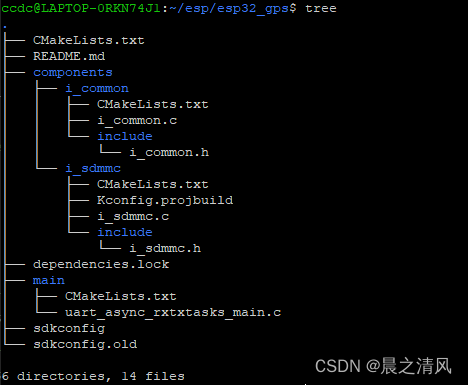
其中SD卡的驱动程序请参考:
《ESP32 ESP-IDF使用TF(SD)卡》
https://zhuanlan.zhihu.com/p/456916894
https://blog.youkuaiyun.com/chentuo2000/article/details/122477340?spm=1001.2014.3001.5501
- 顶层CMakeLists.txt
cmake_minimum_required(VERSION 3.5)

include($ENV{IDF_PATH}/tools/cmake/project.cmake)
project(esp32_gps)
3.1 main目录
- CMakeLists.txt
idf_component_register(SRCS "uart_async_rxtxtasks_main.c"
                    INCLUDE_DIRS ".")
- uart_async_rxtxtasks_main.c
#include "freertos/FreeRTOS.h"
#include "freertos/task.h"
#include "esp_system.h"
#include "esp_log.h"
#include "driver/uart.h"
#include "string.h"
#include "driver/gpio.h"

#include "i_common.h"
#include "i_sdmmc.h"

static const char *TAG = "ESP32_GPS";
static const int RX_BUF_SIZE = 1024;
char *data = NULL;
char *dest = NULL;

int s_count = 0; // 秒计数

typedef struct {
    char lat[16];
    char lon[16];
    char utc[16];
    char day[8];
    char month[8];
    char year[8];
} gps_data_t;

char *test_data ="\
$GNGGA,132506.000,2233.87430,N,11407.13740,E,1,13,1.0,103.3,M,-2.8,M,,*5E\n\
$GNGLL,2233.87430,N,11407.13740,E,132506.000,A,A*4E\n\
$GNGSA,A,3,02,05,15,23,24,29,195,,,,,,1.6,1.0,1.3,1*07\n\
$GNGSA,A,3,07,10,16,21,34,42,,,,,,,1.6,1.0,1.3,4*33\n\
$GPGSV,3,1,09,02,34,134,15,05,40,044,14,15,71,308,25,18,32,326,26,0*68\n\
$GPGSV,3,2,09,20,25,074,,23,13,293,37,24,32,174,31,29,45,251,37,0*6B\n\
$GPGSV,3,3,09,195,50,158,31,0*6A\n\
$BDGSV,3,1,11,03,,,28,07,13,193,27,10,14,207,32,12,,,35,0*71\n\
$BDGSV,3,2,11,16,66,191,29,21,47,308,41,22,41,027,,34,33,309,25,0*74\n\
$BDGSV,3,3,11,40,,,33,42,12,265,36,44,,,28,0*4B\n\
$GNRMC,132506.000,A,2233.87430,N,11407.13740,E,0.00,244.71,080522,,,A,V*0A\n\
$GNVTG,244.71,T,,M,0.00,N,0.00,K,A*27\n\
$GNZDA,132506.000,08,05,2022,00,00*44\n\
$GPTXT,01,01,01,ANTENNA OPEN*25\n\
";

#define TXD_PIN (GPIO_NUM_13)
#define RXD_PIN (GPIO_NUM_16)

void write_sdmmc(gps_data_t gps_data) {
    char file_name[9] = {0};
    char record[80] = {0};
    uint8_t i = 0;
    uint8_t offset = 0;

    if (sdmmc_status == 0) {
        uint8_t init = card_mount(); // 初始化并装载TF卡
        if (init == 0) {
            printf("TF 卡初始化成功! \n");
            sdmmc_status = 1; // sd卡mount成功
        } else {
            printf("TF 卡初始化失败! \n");
            sdmmc_status = 0; // sd卡mount失败
        }
    }

    file_name[8] = '\0';
    if (sdmmc_status == 1 && gps_data.lat[0] != ',') {
        // 用日期作为文件名
        file_name[0] = gps_data.year[0]; file_name[1] = gps_data.year[1]; file_name[2] = gps_data.year[2]; file_name[3] = gps_data.year[3];
        file_name[4] = gps_data.month[0]; file_name[5] = gps_data.month[1];
        file_name[6] = gps_data.day[0]; file_name[7] = gps_data.day[1];
        printf("\nfile_name=%s\n", file_name);

        offset = 0;
        i = 0;
        while(gps_data.lat[i] != 0) {record[offset] = gps_data.lat[i]; offset++; i++;}
        i = 0;
        while(gps_data.lon[i] != 0) {record[offset] = gps_data.lon[i]; offset++; i++;}
        i = 0;
        while(gps_data.year[i] != 0) {record[offset] = gps_data.year[i]; offset++; i++;}
        i = 0;
        while(gps_data.month[i] != 0) {record[offset] = gps_data.month[i]; offset++; i++;}
        i = 0;
        while(gps_data.day[i] != 0) {record[offset] = gps_data.day[i]; offset++; i++;}
        i = 0;
        while(gps_data.utc[i] != 0) {record[offset] = gps_data.utc[i]; offset++; i++;}
        record[offset-1] = '\n';
        printf("record=%s\n", record);

        uint8_t ret = write_file(file_name, record, sizeof(record)); // 写TF卡
        if (ret == 0) {
            printf("数据存储成功。\n");
        } else {
            printf("数据存储失败! \n");
        }
    }

    //card_unmount(); // 卸载TF卡
}

static char *cut_substr(char *dest, char *src, char start, int n)
{
    char *p = dest;
    char *q = src;

    q += start;
    while(n--) *(p++ )= *(q++);
    *(p++) = '\0';
    return dest;
}

void init_uart2(void) {
    const uart_config_t uart_config = {
        .baud_rate = 9600,
        .data_bits = UART_DATA_8_BITS,
        .parity = UART_PARITY_DISABLE,
        .stop_bits = UART_STOP_BITS_1,
        .flow_ctrl = UART_HW_FLOWCTRL_DISABLE,
        .source_clk = UART_SCLK_APB,
    };
    // We won't use a buffer for sending data.
    uart_driver_install(UART_NUM_2, RX_BUF_SIZE * 2, 0, 0, NULL, 0);
    uart_param_config(UART_NUM_2, &uart_config);
    uart_set_pin(UART_NUM_2, TXD_PIN, RXD_PIN, UART_PIN_NO_CHANGE, UART_PIN_NO_CHANGE);
}

static void rx2_task(void *arg)
{
    char *row;
    char *pos1;
    char *pos2;

    static const char *RX_TASK_TAG = "RX2_TASK";
    esp_log_level_set(RX_TASK_TAG, ESP_LOG_INFO);

    gps_data_t gps_data;
    s_count = 59;
    while (1) {
        bzero(&gps_data, sizeof(gps_data));
        const int rxBytes = uart_read_bytes(UART_NUM_2, data, RX_BUF_SIZE, 1000 / portTICK_PERIOD_MS);
        if (rxBytes > 0) {
            data[rxBytes] = 0;
            //ESP_LOGI(RX_TASK_TAG, "Read %d bytes: '%s'", rxBytes, data);
            //ESP_LOG_BUFFER_HEXDUMP(RX_TASK_TAG, data, rxBytes, ESP_LOG_INFO);
            // 取经纬度
            //row = strstr(test_data, "$GNGGA"); // 测试
            row = strstr(data, "$GNGGA");
            //printf("row=%s\n", row); // GGA
            pos1 = strchr(row, ','); // UTC时间...
            pos2 = strchr(pos1+1, ','); // 纬度...
            pos1 = strchr(pos2+1, ','); // 纬度方向...
            cut_substr(gps_data.lat, pos2, 1, pos1-pos2); // 纬度
            pos2 = strchr(pos1+1, ','); // 经度...
            pos1 = strchr(pos2+1, ','); // 经度方向...
            cut_substr(gps_data.lon, pos2, 1, pos1-pos2); // 经度
            //printf("lat=%s lon=%s\n", gps_data.lat, gps_data.lon);
            // 取时间日期
            //row = strstr(test_data, "$GNZDA"); // 测试
            row = strstr(data, "$GNZDA");
            //printf("row=%s\n", row); // ZDA
            pos1 = strchr(row, ','); // UTC时间...
            pos2 = strchr(pos1+1, ','); // 日...
            cut_substr(gps_data.utc, pos1, 1, pos2-pos1); // UTC时间
            //printf("utc=%s\n", gps_data.utc);
            pos1 = strchr(pos2+1, ','); // 月...
            cut_substr(gps_data.day, pos2, 1, pos1-pos2); // 日
            pos2 = strchr(pos1+1, ','); // 年...
            cut_substr(gps_data.month, pos1, 1, pos2-pos1); // 月
            pos1 = strchr(pos2+1, ','); // 本时区小时...
            cut_substr(gps_data.year, pos2, 1, pos1-pos2); // 年
            //printf("utc=%s day=%s month=%s year=%s\n", gps_data.utc, gps_data.day, gps_data.month, gps_data.year);

            if(s_count == 60) { // 1分钟写卡1次
                s_count = 0;
                write_sdmmc(gps_data); // 写tf卡
            } else {
                s_count++; // 秒计数,模块大约1秒钟发送1次数据,时间间隔不精确
            }
        }
    }
}

void app_main(void)
{
    ESP_LOGI(TAG, "[APP] Startup..");
    ESP_LOGI(TAG, "[APP] Free memory: %d bytes", esp_get_free_heap_size());
    ESP_LOGI(TAG, "[APP] IDF version: %s", esp_get_idf_version());
    printf("================== esp32-gps v1.0.0 ==================\n");

    data = (char *)malloc(RX_BUF_SIZE+1);
    dest = (char *)malloc(16);
    init_uart2();
    xTaskCreate(rx2_task, "uart_rx2_task", 1024*4, NULL, configMAX_PRIORITIES, NULL);
    // ***ERROR*** A stack overflow in task uart_rx2_task has been detected. modify 1024*2 to 1024*4
}
3.2 i_common子目录
- CMakeLists.txt
idf_component_register(SRCS "i_common.c"
                    INCLUDE_DIRS "include"
                    REQUIRES)
- i_common.h
#ifndef _COMMON_H_
#define _COMMON_H_

extern uint8_t sdmmc_status; // 0 sd卡未mount,1 sd卡已mount

#endif
- i_common.c
#include <string.h>
#include <stdlib.h>
#include "i_common.h"

uint8_t sdmmc_status = 0; // 0 sd卡未mount,1 sd卡已mount
3.3 i_sdmmc子目录
- CMakeLists.txt
idf_component_register(SRCS "i_sdmmc.c"
                    INCLUDE_DIRS "include"
                    PRIV_REQUIRES i_common
                    REQUIRES fatfs)
- i_sdmmc.h
#ifndef _SDMMC_H_
#define _SDMMC_H_

uint8_t card_mount(void);
uint8_t write_file(char *file_name, char *text, uint8_t data_len);
void read_file(void);
void card_unmount(void);

#endif
- i_sdmmc.c
#include <string.h>
#include <sys/unistd.h>
#include <sys/stat.h>
#include "esp_vfs_fat.h"
#include "sdmmc_cmd.h"
#include "driver/sdmmc_host.h"

#include "i_common.h"

static const char *TAG = "TF SD CARD";

#define MOUNT_POINT "/root"
const char mount_point[] = MOUNT_POINT;

sdmmc_card_t *card;

// create file.
const char *file_data = MOUNT_POINT"/data.txt";

// Use POSIX and C standard library functions to work with files:
uint8_t write_file(char *file_name, char *text, uint8_t data_len)
{
    char *mnt_point = MOUNT_POINT;
    char *file_path = (char *) malloc(strlen(mnt_point) + strlen(file_name) + 1 + 4);
    sprintf(file_path, "%s/%s", mnt_point, file_name);
    ESP_LOGI(TAG, "Write file %s", file_path);
    FILE *f = fopen(file_path, "ab");
    if (f == NULL) {
        ESP_LOGE(TAG, "Failed to open file for writing");
        printf("打开文件错误! \n");
        return 1;
    } else {
        printf("数据开始写入TF卡 ---> data_len = %zu\n", data_len);
        size_t w_len = fwrite(text, sizeof(uint8_t), data_len, f); // 二进制方式
        fclose(f);
        if (w_len == data_len) {
            printf("数据写入TF卡成功。\n");
            return 0;
        } else {
            printf("数据写入TF卡失败! \n");
            return 2;
        }
    }
}

void read_file(void)
{
    // Open file for reading
    ESP_LOGI(TAG, "Reading file %s", file_data);
    FILE *f = fopen(file_data, "r");
    if (f == NULL) {
        ESP_LOGE(TAG, "Failed to open file for reading");
        return;
    }

    // Read a line from file
    char line[64];
    fgets(line, sizeof(line), f);
    fclose(f);

    // Strip newline
    char *pos = strchr(line, '\n');
    if (pos) {
        *pos = '\0';
    }
    ESP_LOGI(TAG, "Read from file: '%s'", line);
}

void card_unmount(void)
{
    // All done, unmount partition and disable SDMMC peripheral
    esp_vfs_fat_sdcard_unmount(mount_point, card);
    // All done, unmount partition and disable SDMMC or SPI peripheral
    //esp_vfs_fat_sdmmc_unmount();
    //ESP_LOGI(TAG, "Card unmounted");
}

uint8_t show_sd_info = 0; // 0 未显示SD卡信息,1 已显示SD卡信息
uint8_t card_mount(void)
{
    ESP_LOGI(TAG, "Initializing SDCARD file system");
    esp_err_t ret;

    // Options for mounting the filesystem.
    // If format_if_mount_failed is set to true, SD card will be partitioned and
    // formatted in case when mounting fails.
    esp_vfs_fat_sdmmc_mount_config_t mount_config = {
#ifdef CONFIG_EXAMPLE_FORMAT_IF_MOUNT_FAILED
        .format_if_mount_failed = true,
#else
        .format_if_mount_failed = false,
#endif // EXAMPLE_FORMAT_IF_MOUNT_FAILED
        .max_files = 5,
        .allocation_unit_size = 16 * 1024
    };
    //ESP_LOGI(TAG, "Initializing SD card");

    // Use settings defined above to initialize SD card and mount FAT filesystem.
    // Note: esp_vfs_fat_sdmmc/sdspi_mount is all-in-one convenience functions.
    // Please check its source code and implement error recovery when developing
    // production applications.

    //ESP_LOGI(TAG, "Using SDMMC peripheral");
    sdmmc_host_t host = SDMMC_HOST_DEFAULT();

    // This initializes the slot without card detect (CD) and write protect (WP) signals.
    // Modify slot_config.gpio_cd and slot_config.gpio_wp if your board has these signals.
    sdmmc_slot_config_t slot_config = SDMMC_SLOT_CONFIG_DEFAULT();

    // To use 1-line SD mode, change this to 1:
    //slot_config.width = 4;
    slot_config.width = 1;

    // On chips where the GPIOs used for SD card can be configured, set them in
    // the slot_config structure:
#ifdef SOC_SDMMC_USE_GPIO_MATRIX
    slot_config.clk = GPIO_NUM_14;
    slot_config.cmd = GPIO_NUM_15;
    slot_config.d0 = GPIO_NUM_2;
    slot_config.d1 = GPIO_NUM_4;
    slot_config.d2 = GPIO_NUM_12;
    slot_config.d3 = GPIO_NUM_13;
#endif

    // Enable internal pullups on enabled pins. The internal pullups
    // are insufficient however, please make sure 10k external pullups are
    // connected on the bus. This is for debug / example purpose only.
    slot_config.flags |= SDMMC_SLOT_FLAG_INTERNAL_PULLUP;

    //ESP_LOGI(TAG, "Mounting filesystem");
    ret = esp_vfs_fat_sdmmc_mount(mount_point, &host, &slot_config, &mount_config, &card);

    if (ret != ESP_OK) {
        if (ret == ESP_FAIL) {
            ESP_LOGE(TAG, "Failed to mount filesystem. "
                     "If you want the card to be formatted, set the EXAMPLE_FORMAT_IF_MOUNT_FAILED menuconfig option.");
        } else {
            ESP_LOGE(TAG, "Failed to initialize the card (%s). "
                     "Make sure SD card lines have pull-up resistors in place.", esp_err_to_name(ret));
        }
        return 1;
    } else {
        if (show_sd_info == 0) {
            ESP_LOGI(TAG, "Filesystem mounted");
            // Card has been initialized, print its properties
            sdmmc_card_print_info(stdout, card);
            ESP_LOGI(TAG, "Mounte SD card on %s", mount_point);
            show_sd_info = 1;
        }
        return 0;
    }
}
说明1:SD卡有2种工作模式:4线(SDIO)模式和1线(SPI)模式。
当slot_config.width = 4;时SD卡工作在SD卡模式,使用4条数据线:DATA0-DATA3,还有CLK和CMD共6条信号线。
当slot_config.width = 1;时SD卡工作在SPI模式,使用2条数据线:MISO(DATAOUT)和、MOSI(DATAIN),因为这2条线是单向传输的,所以叫1线模式,还有CLK和CS共4条信号线。
看相关代码:
    // To use 1-line SD mode, change this to 1:
    //slot_config.width = 4;
    slot_config.width = 1;

    // On chips where the GPIOs used for SD card can be configured, set them in
    // the slot_config structure:
#ifdef SOC_SDMMC_USE_GPIO_MATRIX
    slot_config.clk = GPIO_NUM_14;
    slot_config.cmd = GPIO_NUM_15;
    slot_config.d0 = GPIO_NUM_2;
    slot_config.d1 = GPIO_NUM_4;
    slot_config.d2 = GPIO_NUM_12;
    slot_config.d3 = GPIO_NUM_13;
#endif
在1线模式时:
    CLK  = GPIO_NUM_14;
    MOSI = GPIO_NUM_15;
    MISO = GPIO_NUM_2;
    CS = GPIO_NUM_13;
GPIO_NUM_4和GPIO_NUM_12不使用。
说明2:如果程序运行时出现错误:
***ERROR*** A stack overflow in task uart_rx2_task has been detected.
可以将任务uart_rx2_task堆栈的大小从1024*2改为1024*4,或者将数组变量移出函数,作为全局变量。
- Kconfig.projbuild
添加一个配置目录。
menu "SD Card menu"

    config EXAMPLE_FORMAT_IF_MOUNT_FAILED
        bool "Format the card if mount failed"
        default n
        help
            If this config item is set, format_if_mount_failed will be set to true and the card will be formatted if
            the mount has failed.
endmenu
4. 构建项目
- 刷新esp-idf环境
get_idf
注意:每次打开终端进入sdk都要执行一次此命令
idf.py set-target esp32
注意:在项目创建第一次使用,以后就不用运行这个命令了。
- 清除以前的构建
或者直接删除build文件夹。
- 配置项目
idf.py menuconfig
1) 将闪存设置为4MB

2) 设置SD卡
前面添加的Kconfig.projbuild会出现中顶层目录中:
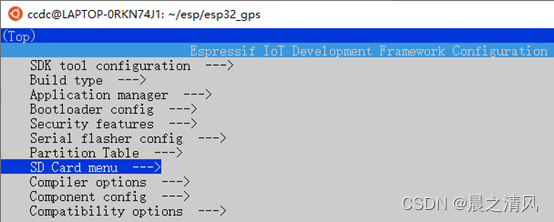
设置即使安装失败也不格式化SD卡:

保存,退出
- 编译
idf.py build
- 烧写
上电后按一下RST键。
idf.py -p /dev/ttyS4 -b 115200 flash
- 串口监视器
idf.py monitor -p /dev/ttyS4
SD卡初始化:

识别出这是一张32G的TF卡。
保存数据:
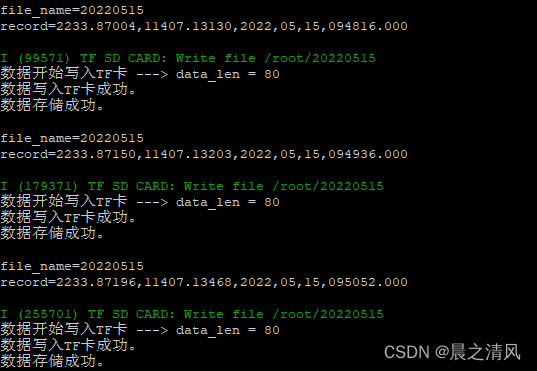
- 查看数据
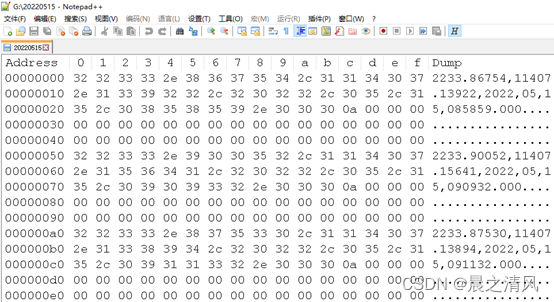
数据是以二进制方式保存的,查看也要用二进制方式:






 扫一扫
扫一扫


 被折叠的 条评论
为什么被折叠?
被折叠的 条评论
为什么被折叠?
 到【灌水乐园】发言





