






springboot041师生健康信息管理系统
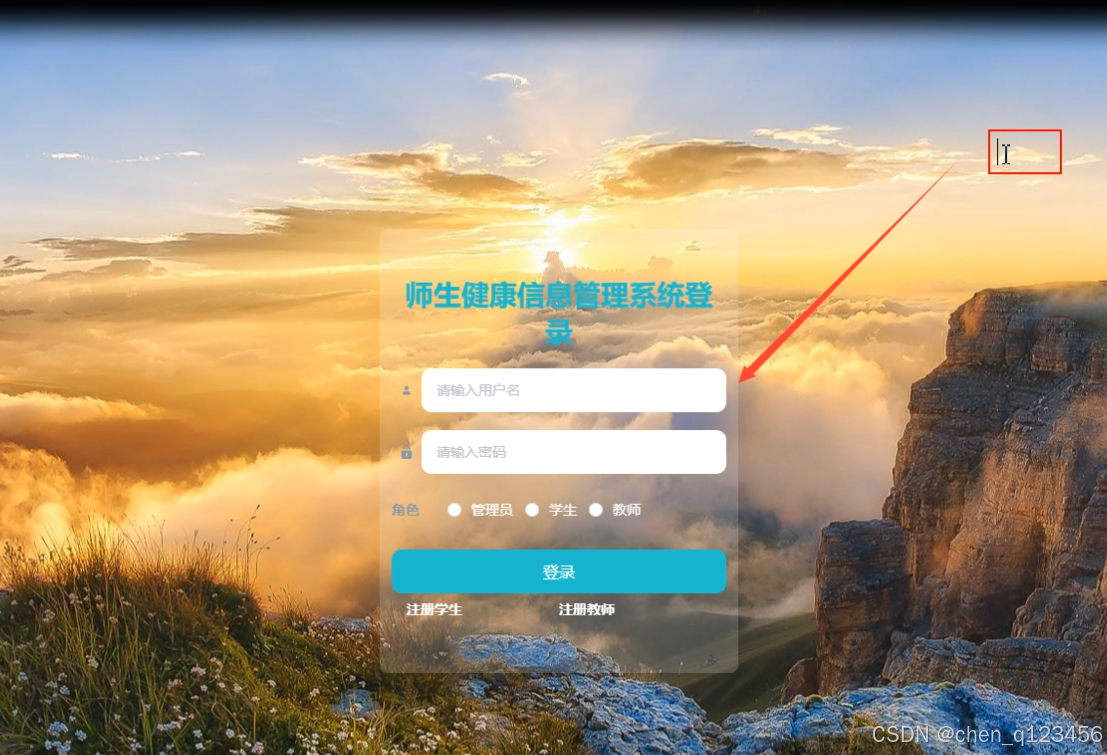
管理员登录,通过填写注册时输入的用户名、密码、角色进行登录,。
学生管理,管理员在用户管理页面中可以查看学号、姓名、性别、学院、专业、手机、邮箱、身份证、宿舍号、照片等信息,进行查看详情、新增或修改、删除操作,。
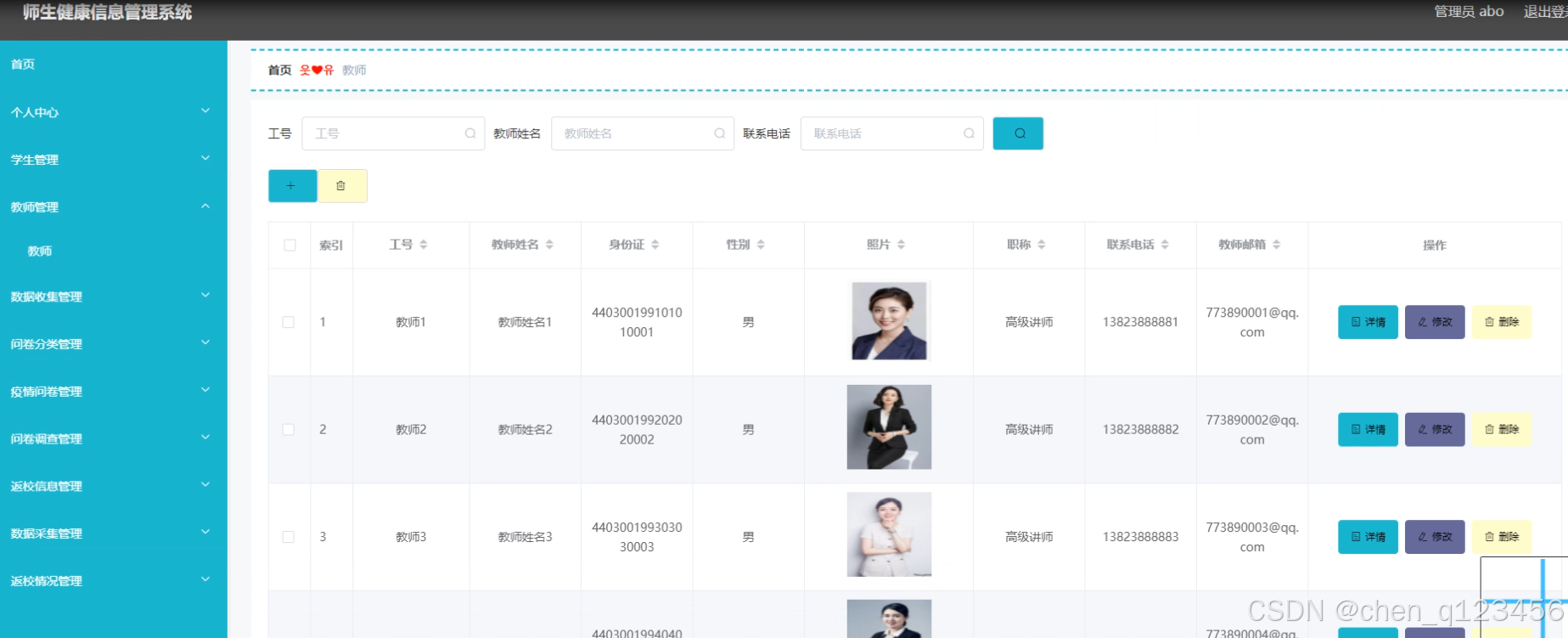
教师管理,管理员在用户管理页面中可以查看工号、教师姓名、身份证、性别、照片、职称、联系电话、教师邮箱等信息,进行查看详情、新增或修改、删除操作,。
数据收集管理:通过列表可以获取近期住址、家庭住址、体温、身体状况、登记时间、学号、姓名、性别等信息,并可根据需要对数据收集信息进行行查看详情、新增、修改或删除等操作,。
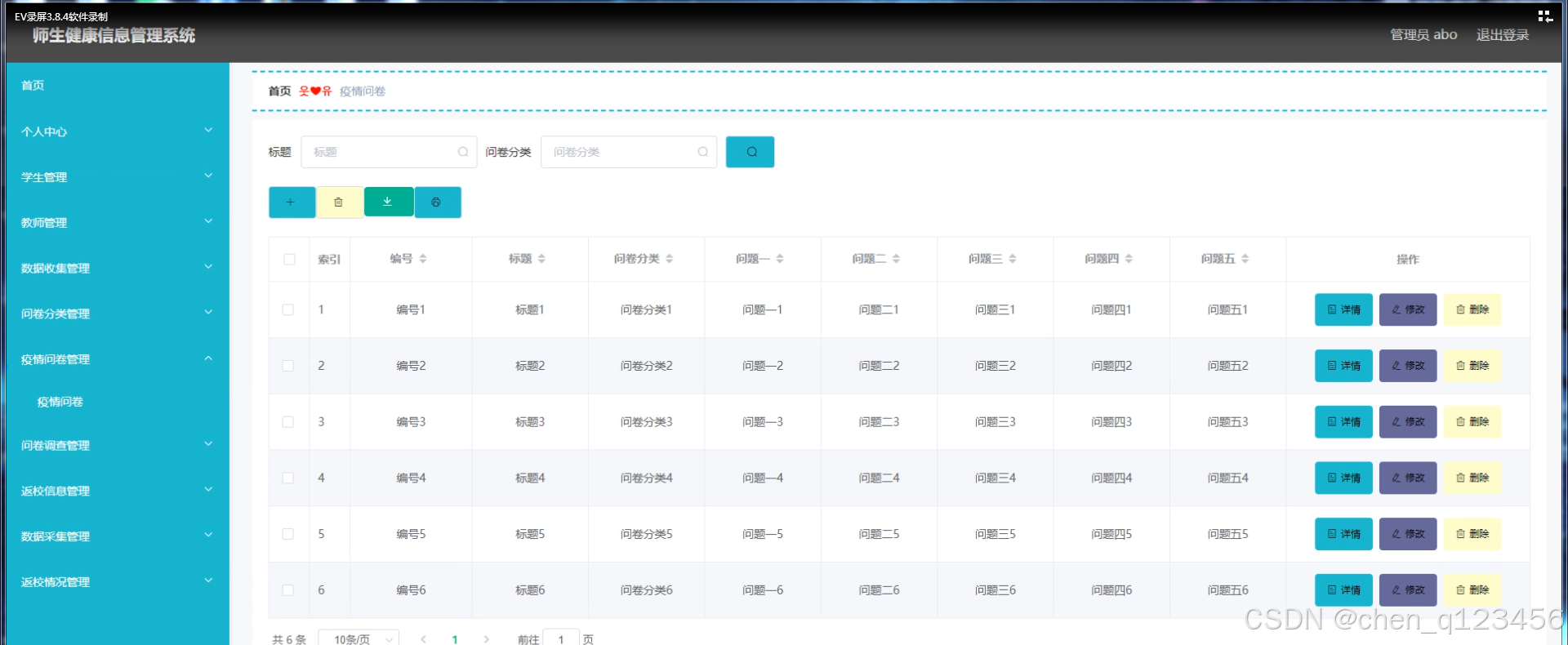
疫情问卷管理:通过页面可以获取编号、标题、问卷分类、问题等信息进行新增、查看详情、修改、删除操作,。
问卷调查管理:通过列表可以获取姓名、性别、身份、标题、填报状态、填报时间、问题等信息,进行查看修改或删除操作,如同5-6所示。
返校信息管理:通过列表可以获取返校状态、学号、姓名、学院、专业、宿舍号等信息,进行查看详情、下载或查看统计报表操作,。
数据采集管理:通过列表可以获取近期住址、家庭住址、体温、身体状况、工号、教师姓名、性别等信息,进行查看详情、修改、删除操作,。
返校情况管理:通过列表可以获取返校状态、工号、教师姓名、性别等信息,进行查看详情、修改、删除操作,。
数据收集管理:通过列表可以获取近期住址、家庭住址、体温、身体状况、登记时间、学号、姓名、性别等信息,并可根据需要对数据收集信息进行行查看详情、新增、修改或删除等操作,。
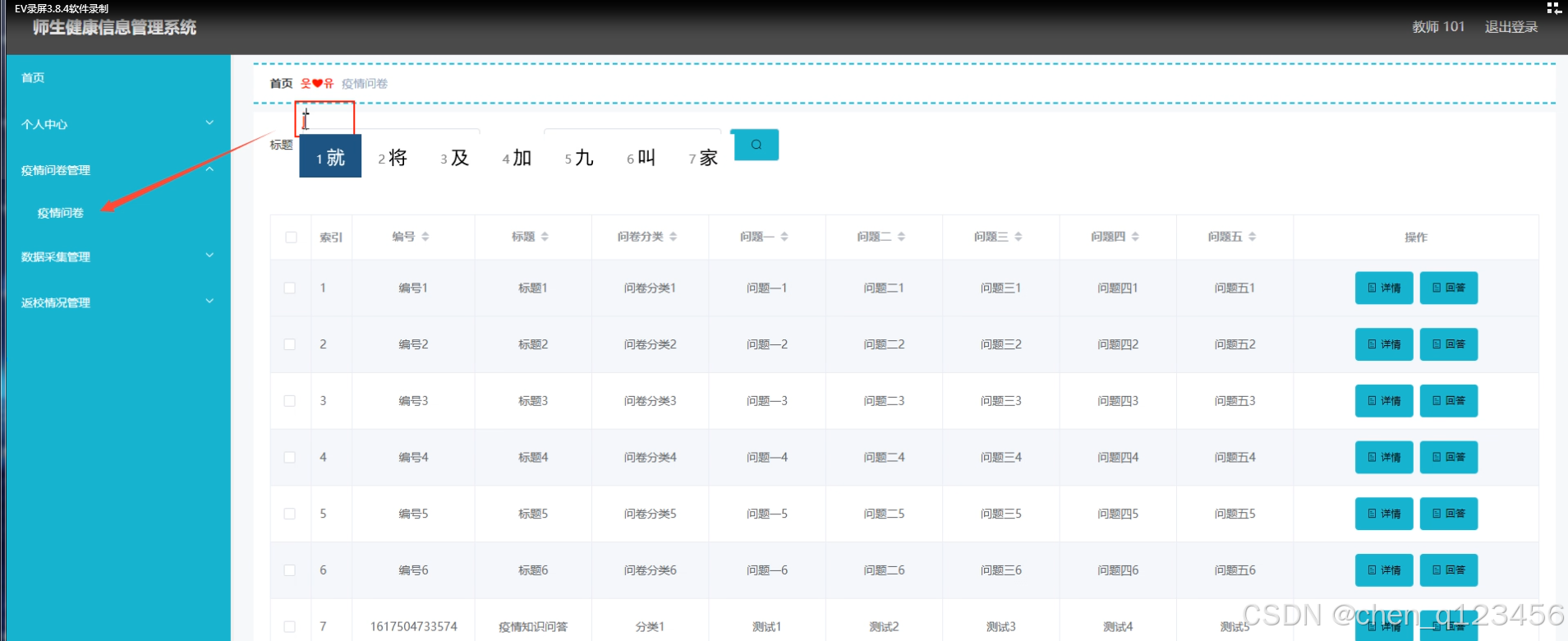
疫情问卷管理:通过页面可以获取编号、标题、问卷分类、问题等信息进行新增、查看详情、或回答操作,并通过输入标题、问卷分类进行搜索操作,。
返校信息管理:通过列表可以获取返校状态、学号、姓名、学院、专业、宿舍号等信息,进行查看详情、添加、修改、删除操作,。
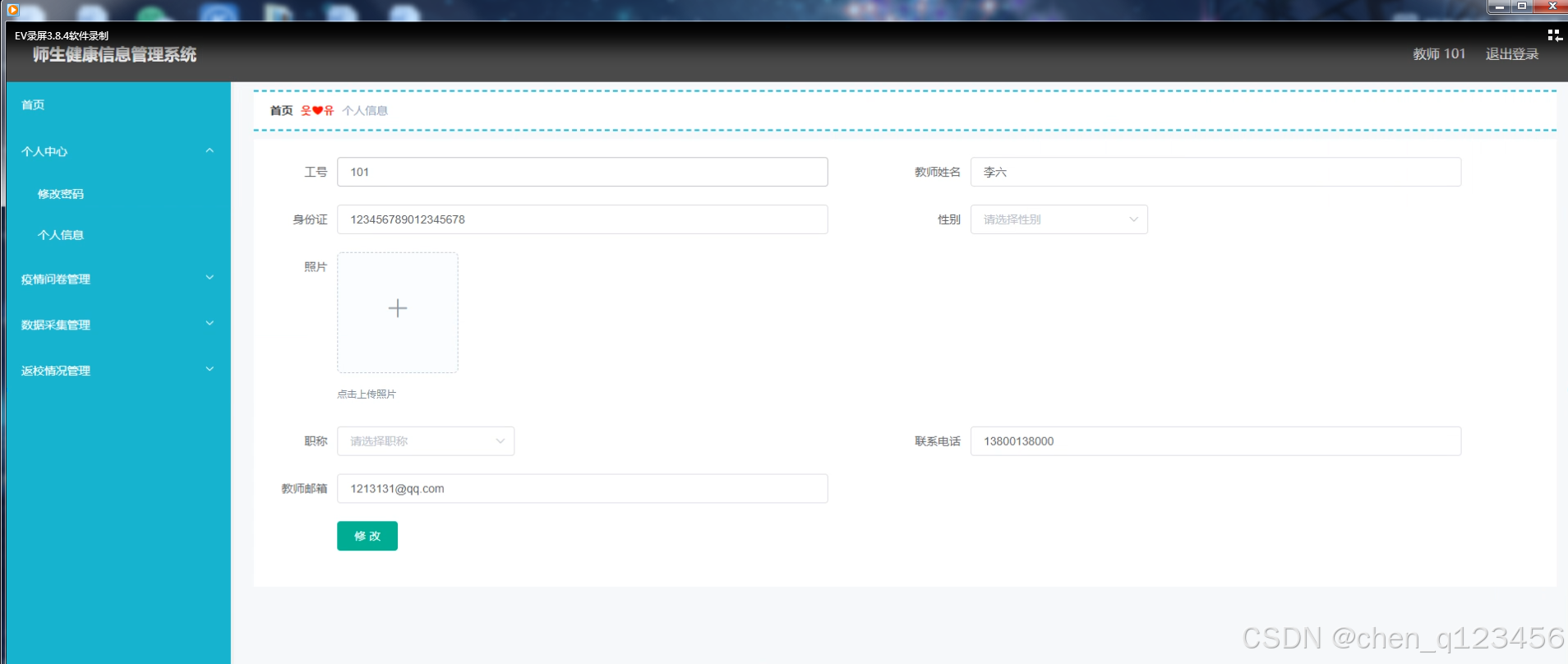
个人信息,教师通过页面可以在线输入工号、身份证、照片、职称、教师邮箱等信息,进行修改个人信息操作,。
疫情问卷管理:通过页面可以获取编号、标题、问卷分类、问题等信息进行新增、查看详情、在线回答操作,。
问卷调查管理:通过列表可以获取姓名、性别、身份、标题、填报状态、填报时间、问题等信息,进行查看修改或删除操作,如同5-15所示。
数据采集管理:通过列表可以获取近期住址、家庭住址、体温、身体状况、工号、教师姓名、性别等信息,进行查看详情操作,。
返校情况管理:通过列表可以获取返校状态、工号、教师姓名、性别等信息,进行查看详情、修改、删除操作,。
UserController.java
package com.controller;


import java.util.Arrays;
import java.util.Calendar;
import java.util.Date;
import java.util.Map;

import javax.servlet.http.HttpServletRequest;

import org.springframework.beans.factory.annotation.Autowired;
import org.springframework.stereotype.Controller;
import org.springframework.web.bind.annotation.GetMapping;
import org.springframework.web.bind.annotation.PathVariable;
import org.springframework.web.bind.annotation.PostMapping;
import org.springframework.web.bind.annotation.RequestBody;
import org.springframework.web.bind.annotation.RequestMapping;
import org.springframework.web.bind.annotation.RequestParam;
import org.springframework.web.bind.annotation.ResponseBody;
import org.springframework.web.bind.annotation.RestController;

import com.annotation.IgnoreAuth;
import com.baomidou.mybatisplus.mapper.EntityWrapper;
import com.entity.TokenEntity;
import com.entity.UserEntity;
import com.service.TokenService;
import com.service.UserService;
import com.utils.CommonUtil;
import com.utils.MPUtil;
import com.utils.PageUtils;
import com.utils.R;
import com.utils.ValidatorUtils;

/**
 * 登录相关
 */
@RequestMapping("users")
@RestController
public class UserController{

	@Autowired
	private UserService userService;

	@Autowired
	private TokenService tokenService;

	/**
	 * 登录
	 */
	@IgnoreAuth
	@PostMapping(value = "/login")
	public R login(String username, String password, String captcha, HttpServletRequest request) {
		UserEntity user = userService.selectOne(new EntityWrapper<UserEntity>().eq("username", username));
		if(user==null || !user.getPassword().equals(password)) {
			return R.error("账号或密码不正确");
		}
		String token = tokenService.generateToken(user.getId(),username, "users", user.getRole());
		return R.ok().put("token", token);
	}

	/**
	 * 注册
	 */
	@IgnoreAuth
	@PostMapping(value = "/register")
	public R register(@RequestBody UserEntity user){
//    	ValidatorUtils.validateEntity(user);
    	if(userService.selectOne(new EntityWrapper<UserEntity>().eq("username", user.getUsername())) !=null) {
    		return R.error("用户已存在");
    	}
        userService.insert(user);
        return R.ok();
    }

	/**
	 * 退出
	 */
	@GetMapping(value = "logout")
	public R logout(HttpServletRequest request) {
		request.getSession().invalidate();
		return R.ok("退出成功");
	}

	/**
     * 密码重置
     */
    @IgnoreAuth
	@RequestMapping(value = "/resetPass")
    public R resetPass(String username, HttpServletRequest request){
    	UserEntity user = userService.selectOne(new EntityWrapper<UserEntity>().eq("username", username));
    	if(user==null) {
    		return R.error("账号不存在");
    	}
    	user.setPassword("123456");
        userService.update(user,null);
        return R.ok("密码已重置为:123456");
    }

	/**
     * 列表
     */
    @RequestMapping("/page")
    public R page(@RequestParam Map<String, Object> params,UserEntity user){
        EntityWrapper<UserEntity> ew = new EntityWrapper<UserEntity>();
    	PageUtils page = userService.queryPage(params, MPUtil.sort(MPUtil.between(MPUtil.allLike(ew, user), params), params));
        return R.ok().put("data", page);
    }

	/**
     * 列表
     */
    @RequestMapping("/list")
    public R list( UserEntity user){
       	EntityWrapper<UserEntity> ew = new EntityWrapper<UserEntity>();
      	ew.allEq(MPUtil.allEQMapPre( user, "user"));
        return R.ok().put("data", userService.selectListView(ew));
    }

    /**
     * 信息
     */
    @RequestMapping("/info/{id}")
    public R info(@PathVariable("id") String id){
        UserEntity user = userService.selectById(id);
        return R.ok().put("data", user);
    }

    /**
     * 获取用户的session用户信息
     */
    @RequestMapping("/session")
    public R getCurrUser(HttpServletRequest request){
    	Long id = (Long)request.getSession().getAttribute("userId");
        UserEntity user = userService.selectById(id);
        return R.ok().put("data", user);
    }

    /**
     * 保存
     */
    @PostMapping("/save")
    public R save(@RequestBody UserEntity user){
//    	ValidatorUtils.validateEntity(user);
    	if(userService.selectOne(new EntityWrapper<UserEntity>().eq("username", user.getUsername())) !=null) {
    		return R.error("用户已存在");
    	}
        userService.insert(user);
        return R.ok();
    }

    /**
     * 修改
     */
    @RequestMapping("/update")
    public R update(@RequestBody UserEntity user){
//        ValidatorUtils.validateEntity(user);
    	UserEntity u = userService.selectOne(new EntityWrapper<UserEntity>().eq("username", user.getUsername()));
    	if(u!=null && u.getId()!=user.getId() && u.getUsername().equals(user.getUsername())) {
    		return R.error("用户名已存在。");
    	}
        userService.updateById(user);//全部更新
        return R.ok();
    }

    /**
     * 删除
     */
    @RequestMapping("/delete")
    public R delete(@RequestBody Long[] ids){
        userService.deleteBatchIds(Arrays.asList(ids));
        return R.ok();
    }
}
InterceptorConfig.java
package com.config;

import org.springframework.context.annotation.Bean;
import org.springframework.context.annotation.Configuration;
import org.springframework.web.servlet.config.annotation.InterceptorRegistry;
import org.springframework.web.servlet.config.annotation.ResourceHandlerRegistry;
import org.springframework.web.servlet.config.annotation.WebMvcConfigurationSupport;

import com.interceptor.AuthorizationInterceptor;

@Configuration
public class InterceptorConfig extends WebMvcConfigurationSupport{

	@Bean
    public AuthorizationInterceptor getAuthorizationInterceptor() {
        return new AuthorizationInterceptor();
    }

	@Override
    public void addInterceptors(InterceptorRegistry registry) {
        registry.addInterceptor(getAuthorizationInterceptor()).addPathPatterns("/**").excludePathPatterns("/static/**");
        super.addInterceptors(registry);
	}

	/**
	 * springboot 2.0配置WebMvcConfigurationSupport之后,会导致默认配置被覆盖,要访问静态资源需要重写addResourceHandlers方法
	 */
	@Override
    public void addResourceHandlers(ResourceHandlerRegistry registry) {
		registry.addResourceHandler("/**")
        .addResourceLocations("classpath:/resources/")
        .addResourceLocations("classpath:/static/")
        .addResourceLocations("classpath:/admin/")
        .addResourceLocations("classpath:/front/")
        .addResourceLocations("classpath:/public/");
		super.addResourceHandlers(registry);
    }
}
storage.js
const storage = {
    set(key, value) {
        localStorage.setItem(key, JSON.stringify(value));
    },
    get(key) {
        return localStorage.getItem(key)?localStorage.getItem(key).replace('"','').replace('"',''):"";
    },
    getObj(key) {
        return localStorage.getItem(key)?JSON.parse(localStorage.getItem(key)):null;
    },
    remove(key) {
        localStorage.removeItem(key);
    },
    clear() {
	localStorage.clear();
    }
}
export default storage;
validate.js
/**
 * 邮箱
 * @param {*} s
 */
export function isEmail (s) {
  return /^([a-zA-Z0-9_-])+@([a-zA-Z0-9_-])+((.[a-zA-Z0-9_-]{2,3}){1,2})$/.test(s)
}

/**
 * 手机号码
 * @param {*} s
 */
export function isMobile (s) {
  return /^1[0-9]{10}$/.test(s)
}

/**
 * 电话号码
 * @param {*} s
 */
export function isPhone (s) {
  return /^([0-9]{3,4}-)?[0-9]{7,8}$/.test(s)
}

/**
 * URL地址
 * @param {*} s
 */
export function isURL (s) {
  return /^http[s]?:\/\/.*/.test(s)
}

/**
 * 匹配数字,可以是小数,不可以是负数,可以为空
 * @param {*} s
 */
export function isNumber(s){
  return  /(^-?[+-]?([0-9]*\.?[0-9]+|[0-9]+\.?[0-9]*)([eE][+-]?[0-9]+)?$)|(^$)/.test(s);
}
/**
 * 匹配整数,可以为空
 * @param {*} s
 */
export function isIntNumer(s){
  return  /(^-?\d+$)|(^$)/.test(s);
}
/**
 * 身份证校验
 */
export function checkIdCard(idcard) {
  const regIdCard = /(^\d{15}$)|(^\d{18}$)|(^\d{17}(\d|X|x)$)/;
  if (!regIdCard.test(idcard)) {
      return false;
  } else {
      return true;
  }
}





 扫一扫
扫一扫


 1129
1129

 被折叠的 条评论
为什么被折叠?
被折叠的 条评论
为什么被折叠?
 到【灌水乐园】发言





