Vue中兄弟组件之间进行通信

本文详细介绍了如何在Vue应用中实现兄弟组件间的通信,通过实例展示了数据从组件1经父组件转发至组件2的过程,包括使用$emit触发事件和props接收数据的方法。

Vue中兄弟组件之间进行通信

1、 先将组件1的数据传给父组件
//组件1中定义方法send()将数据传给父组件
send(){
  this.$emit('data-msg',this.message);
}
// 父组件通过定义事件响应获取组件1数据
@data-msg="msg2($event)"
msg2(message){
  console.log(message);
  this.msgbro2 = message;
}
-->
2、 再将父组件的数据传给组件2

props属性获取父组件传入数据

props: {
      msgbro2: {
        type: String,
        default: ''
      }
    }

App.vue

<template>
  <div id="app">
    <brother1 @data-msg="msg2($event)"></brother1>
    <brother2  :msgbro2="msgbro2"></brother2>
  </div>
</template>

<script>
import Brother1 from "./components/Brother1";
import Brother2 from "./components/Brother2";

export default {
  name: 'app',
  data() {
    return {
      msgbro2:'',
    }
  },
  components: {
    Brother1,
    Brother2
  },
  methods: {
    msg2(message){
      console.log(message);
      this.msgbro2 = message;
    }
  }
}
</script>

<style>
#app {
  font-family: 'Avenir', Helvetica, Arial, sans-serif;
  -webkit-font-smoothing: antialiased;
  -moz-osx-font-smoothing: grayscale;
  text-align: center;
  color: #2c3e50;
  margin-top: 60px;
}
</style>

Brother1.vue

<template>
  <div id="b1">
    <h2>我是组件1</h2>
    <button @click="send">点击我:将数据发送个Brother2组件</button>
  </div>
</template>

<script>
  export default {
    name: "Brother1",
    data(){
      return {
        message:'我是组件1数据',
      }
    },
    methods: {
      send(){
        this.$emit('data-msg',this.message);
      }
    }
  }
</script>

<style scoped>

</style>

Brother2.vue

<template>
  <div id="b2">
    <h2>我是组件2</h2>
    <p>{{msgbro2}}<p/>
  </div>
</template>

<script>
  export default {
    name: "Brother2",
    props: {
      msgbro2: {
        type: String,
        default: ''
      }
    }

  }
</script>

<style scoped>

</style>

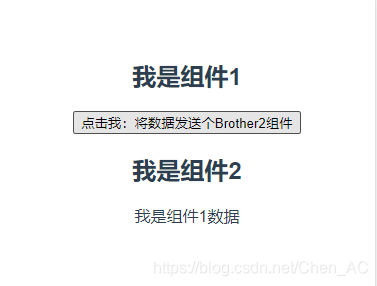
效果截图
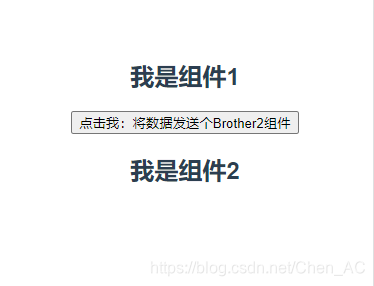
在这里插入图片描述在这里插入图片描述

Vue 3 中,实现兄弟组件之间通信有多种方式。以下是几种常见的方法: ### 使用事件总线(Event Bus) 使用 `mitt` 库可以创建一个全局的事件总线,从而实现组件间的通信。两个子组件都可以通过这个事件总线来发送监听事件。 **步骤:** 1. 创建一个 `mitt` 实例作为事件总线。 2. 在发送信息的组件中,使用 `$emit` 方法触发事件并传递数据。 3. 在接收信息的组件中,使用 `$on` 方法监听事件并处理接收到的数据。 ```javascript // utils/mitt.js import mitt from 'mitt'; const instance = mitt(); const eventBus = {}; eventBus.$on = instance.on; eventBus.$off = instance.off; eventBus.$emit = instance.emit; export default eventBus; ``` **发送组件 child2.vue:** ```vue <template> <div> <h3>兄弟组件间传值</h3> <el-button type="primary" @click="sendMsg">发送flag</el-button> </div> </template> <script setup> import $bus from '../utils/mitt'; const isRightClickVal = ref(false); const sendMsg = () => { console.log('通知兄弟组件'); $bus.emit('flag', 'isRightClickVal'); }; </script> ``` **接收组件 child1.vue:** ```vue <script setup> import $bus from '../utils/mitt'; let msg = ref('默认'); $bus.on('flag', (val) => { msg.value = val; console.log('msg:', msg.value); }); </script> ``` ### 使用自定义事件 如果两个组件有一个共同的父组件,可以通过父组件作为中介来传递数据[^2]。 **发送组件 A:** ```vue <template> <div @click="sendData">发送组件</div> </template> <script lang="ts" setup> import { ref } from 'vue'; import emitter from '@/utils/bus.js'; let a = ref<number>(1); const sendData = () => { emitter.emit('senda', a.value); }; </script> ``` **接收组件 B:** ```vue <script setup> import { ref, onMounted } from 'vue'; import emitter from '@/utils/bus.js'; let receivedData = ref(null); onMounted(() => { emitter.on('senda', (data) => { receivedData.value = data; }); }); </script> ``` ### 使用 Refs Props 如果组件之间存在父子关系,可以通过 `ref` 来直接访问另一个组件的方法或属性[^3]。 ```vue <template> <a1 ref='a1Ref'></a1> <a2 @a2Use='usea1Method'></a2> </template> <script setup> const a1Ref = ref(); const usea1Method = () => { a1Ref.value.a1Method(); }; </script> ``` ### 使用 Provide / Inject Vue 3 提供了 `provide` `inject` 功能,允许祖先组件向其所有子孙组件注入依赖[^4]。 ```vue <!-- 祖先组件 --> <script setup> import { provide, ref } from 'vue'; const message = ref('Hello from ancestor'); provide('message', message); </script> ``` ```vue <!-- 子孙组件 --> <script setup> import { inject } from 'vue'; const message = inject('message'); console.log(message.value); // 输出 "Hello from ancestor" </script> ``` ### 相关问题 1. 如何在 Vue 3 中使用 Vuex 进行状态管理? 2. Vue 3 中的 Composition API 是什么?如何使用它来组织代码逻辑? 3. 如何在 Vue 3 中使用 TypeScript 并确保类型安全? 4. Vue 3 的响应式系统是如何工作的?与 Vue 2 有何不同? 5. 在 Vue 3 中如何进行异步组件加载懒加载路由? 这些方法可以根据具体的应用场景个人偏好选择最适合的方式来实现兄弟组件之间通信
评论
添加红包

请填写红包祝福语或标题

红包个数最小为10个

红包金额最低5元

当前余额3.43前往充值 >
需支付:10.00
成就一亿技术人!
领取后你会自动成为博主和红包主的粉丝 规则
hope_wisdom
发出的红包

打赏作者

小灰灰学编程

你的鼓励将是我创作的最大动力

¥1 ¥2 ¥4 ¥6 ¥10 ¥20
扫码支付:¥1
获取中
扫码支付

您的余额不足,请更换扫码支付或充值

打赏作者

实付
使用余额支付
点击重新获取
扫码支付
钱包余额 0

抵扣说明:

1.余额是钱包充值的虚拟货币,按照1:1的比例进行支付金额的抵扣。
2.余额无法直接购买下载,可以购买VIP、付费专栏及课程。

余额充值