BugkuCTF:never give up(web)

本文详细解析了BugkuCTF中never give up的Web挑战。通过查看源码、利用view-source协议获取信息,以及分析PHP代码,讨论了如何构造payload来解决该问题。涉及到的知识点包括URL编码、PHP函数、正则表达式和文件读取等,同时也提到了一些错误的操作和尝试。

题目描述:
                                

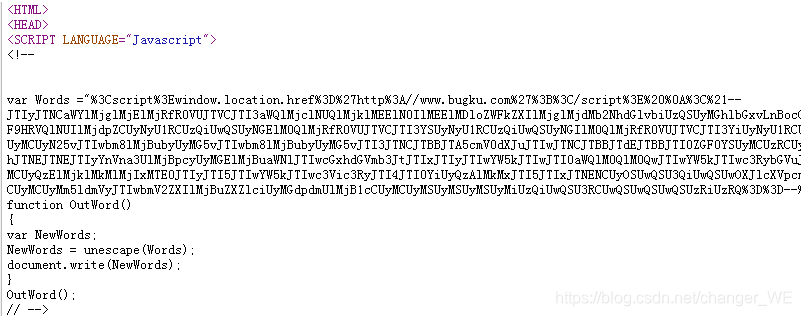
查看源码之后发现有个1p.html,访问一下,转到这???
  • view-source方式进行访问,这什么操作???(知识点view-source协议)



  1. "%3Cscript%3Ewindow.location.href%3D%27http%3A//www.bugku.com%27%3B%3C/script%3E%20%0A%3C%21--转化为ASCII去掉%后为(中间有换行符):
    "<script>window.location.href='http://www.bugku.com';</script> 
    <!--
  2. 将字符串末尾的%3D%3D--%3E转化为ASCII为%=%=--%>去掉%后为   ==-->
  3. 猜想中间的字符带上后面的两个等号后是base64编码,解码一下:
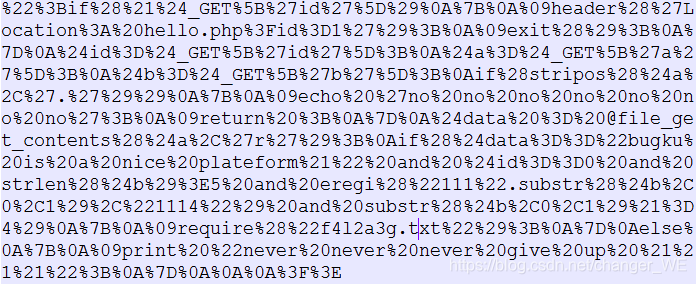
  4. 对其进行URL解码,得到php源码:
    ";if(!$_GET['id'])    //id不能为空和为0
    {
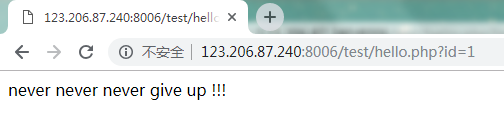
    	header('Location: hello.php?id=1');    //如果id为空,则我们看到的URL加上hello.php?id=1
    	exit();
    }
    $id=$_GET['id'];
    $a=$_GET['a'];
    $b=$_GET['b'];
    if(stripos($a,'.'))    //查找'.'在$a中出现的位置,只有a中没有'.
`imagePullPolicy: Never` 是 Kubernetes 中用于控制容器镜像拉取策略的字段,表示**强制使用本地已有的镜像,即使远程仓库有更新也不拉取**。以下是详细说明和配置示例: --- ### **1. `imagePullPolicy` 的作用** - **`Never`**:仅使用本地镜像,忽略远程仓库的更新(适用于本地调试或离线环境)。 - **`IfNotPresent`**(默认值):如果本地不存在镜像,则从远程拉取。 - **`Always`**:每次启动 Pod 时都从远程拉取镜像(适用于需要强制更新的场景)。 --- ### **2. 配置 `imagePullPolicy: Never` 的场景** - **本地镜像调试**:当镜像已通过 `docker build` 构建并加载到本地(如 Minikube 或 Kind 集群)时,避免重复拉取。 - **离线环境**:集群无法访问远程仓库时,强制使用本地镜像。 - **性能优化**:跳过镜像拉取步骤,加速 Pod 启动。 --- ### **3. 在 Deployment 中配置 `imagePullPolicy: Never`** #### **示例 YAML** ```yaml apiVersion: apps/v1 kind: Deployment metadata: name: helloworld-springboot spec: replicas: 1 selector: matchLabels: app: helloworld-springboot template: metadata: labels: app: helloworld-springboot spec: containers: - name: helloworld-springboot image: helloworld-springboot:latest # 必须确保本地存在此镜像 imagePullPolicy: Never # 强制使用本地镜像 ``` #### **关键点** - **镜像必须存在**:本地需已通过 `docker load` 或 `kind load` 加载镜像,否则 Pod 会启动失败(`ErrImageNeverPull` 错误)。 - **镜像标签**:建议使用固定标签(如 `v1`)而非 `latest`,避免因标签变化导致意外行为。 --- ### **4. 操作步骤** #### **(1) 构建并加载镜像到本地** ```bash # 构建镜像(假设 Dockerfile 在当前目录) docker build -t helloworld-springboot:latest . # 将镜像加载到 Minikube(如果使用 Minikube) minikube image load helloworld-springboot:latest # 或直接推送到 Kind 集群(如果使用 Kind) kind load docker-image helloworld-springboot:latest ``` #### **(2) 更新 Deployment 配置** 通过 `kubectl edit` 或直接修改 YAML 文件: ```bash kubectl edit deployment helloworld-springboot ``` 在 `containers` 部分添加 `imagePullPolicy: Never`。 #### **(3) 验证配置** ```bash kubectl get pods -o yaml | grep -A 5 "imagePullPolicy" ``` 输出应包含: ```yaml - image: helloworld-springboot:latest imagePullPolicy: Never ``` --- ### **5. 常见问题** #### **Q1: Pod 启动失败并报错 `ErrImageNeverPull`** - **原因**:本地不存在指定镜像。 - **解决**: 1. 确认镜像已加载到集群节点: ```bash docker images | grep helloworld-springboot # 检查本地镜像 ``` 2. 重新加载镜像到集群(如 Minikube/Kind)。 #### **Q2: 如何强制更新本地镜像?** - **步骤**: 1. 删除本地旧镜像: ```bash docker rmi helloworld-springboot:latest ``` 2. 重新构建并加载镜像: ```bash docker build -t helloworld-springboot:latest . minikube image load helloworld-springboot:latest ``` 3. 删除旧 Pod 以触发重新调度: ```bash kubectl delete pod -l app=helloworld-springboot ``` #### **Q3: `imagePullPolicy: Never` 与 `latest` 标签的冲突** - **问题**:`latest` 标签可能导致本地镜像版本混乱。 - **建议**: - 使用固定版本号(如 `v1.0.0`)替代 `latest`。 - 通过 `kubectl set image` 更新镜像时明确指定版本: ```bash kubectl set image deployment/helloworld-springboot helloworld-springboot=helloworld-springboot:v1.0.0 ``` --- ### **6. 替代方案:`imagePullSecrets`(私有仓库场景)** 如果镜像存储在私有仓库且需拉取,但希望减少拉取频率,可结合 `imagePullPolicy: IfNotPresent` 和 `imagePullSecrets`: ```yaml spec: containers: - name: helloworld-springboot image: private-registry.com/helloworld-springboot:v1 imagePullPolicy: IfNotPresent imagePullSecrets: - name: regcred # 提前创建包含仓库认证的 Secret ``` ---
评论 6
添加红包

请填写红包祝福语或标题

红包个数最小为10个

红包金额最低5元

当前余额3.43前往充值 >
需支付:10.00
成就一亿技术人!
领取后你会自动成为博主和红包主的粉丝 规则
hope_wisdom
发出的红包
实付
使用余额支付
点击重新获取
扫码支付
钱包余额 0

抵扣说明:

1.余额是钱包充值的虚拟货币,按照1:1的比例进行支付金额的抵扣。
2.余额无法直接购买下载,可以购买VIP、付费专栏及课程。

余额充值