What is svchost.exe And Why Is It Running?

揭秘svchost.exe异常联网:追踪隐藏服务与进程镂空 做病毒处置时,经常会遇到svchost.exe恶意外链,本文整理了如何找到svchost.exe的恶意托管服务和如何处置svchost.exe进程镂空的方法。 阅读详情

What is svchost.exe And Why Is It Running?

You are no doubt reading this article because you are wondering why on earth there are nearly a dozen processes running with the name svchost.exe. You can’t kill them, and you don’t remember starting them… so what are they?

This article is part of our series explaining various processes found in Task Manager, including: jusched.exe, dwm.exe, ctfmon.exe, wmpnetwk.exe, wmpnscfg.exe,mDNSResponder.exe, conhost.exe, rundll32.exe, Dpupdchk.exe, and Adobe_Updater.exe.

Do you know what those services are? Better start reading!

So What Is It?

According to Microsoft: “svchost.exe is a generic host process name for services that run from dynamic-link libraries”. Could we have that in english please?

Some time ago, Microsoft started moving all of the functionality from internal Windows services into .dll files instead of .exe files. From a programming perspective this makes more sense for reusability… but the problem is that you can’t launch a .dll file directly from Windows, it has to be loaded up from a running executable (.exe). Thus the svchost.exe process was born.

Why Are There So Many svchost.exes Running?

If you’ve ever taken a look at the Services section in control panel you might notice that there are a Lot of services required by Windows. If every single service ran under a single svchost.exe instance, a failure in one might bring down all of Windows… so they are separated out.

Those services are organized into logical groups, and then a single svchost.exe instance is created for each group. For instance, one svchost.exe instance runs the 3 services related to the firewall. Another svchost.exe instance might run all the services related to the user interface, and so on.

So What Can I Do About It?

You can trim down unneeded services by disabling or stopping the services that don’t absolutely need to be running. Additionally, if you are noticing very heavy CPU usage on a single svchost.exe instance you can restart the services running under that instance.

The biggest problem is identifying what services are being run on a particular svchost.exe instance… we’ll cover that below.

If you are curious what we’re talking about, just open up Task Manager and check the “Show processes from all users” box:

image

Checking From the Command Line (Vista or XP Pro)

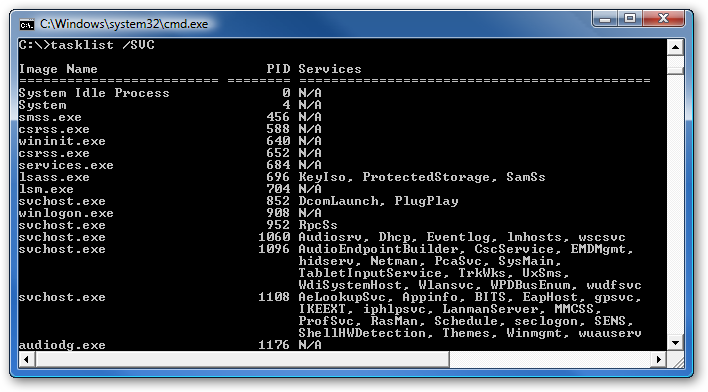
If you want to see what services are being hosted by a particular svchost.exe instance, you can use the tasklist command from the command prompt in order to see the list of services.

tasklist /SVC
image

The problem with using the command line method is that you don’t necessarily know what these cryptic names refer to.

Checking in Task Manager in Vista

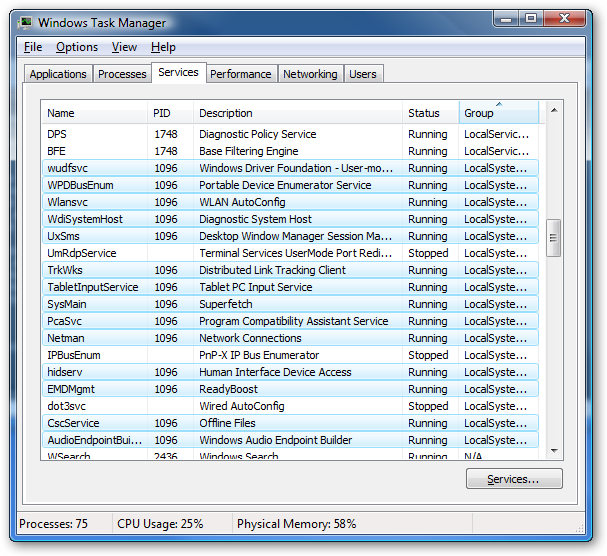
You can right-click on a particular svchost.exe process, and then choose the “Go to Service” option.

image

This will flip over to the Services tab, where the services running under that svchost.exe process will be selected:
image

The great thing about doing it this way is that you can see the real name under the Description column, so you can choose to disable the service if you don’t want it running.

Using Process Explorer in Vista or XP

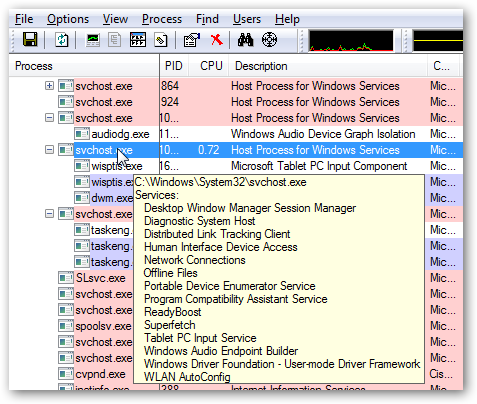
You can use the excellent Process Explorer utility from Microsoft/Sysinternals to see what services are running as a part of a svchost.exe process.

Hovering your mouse over one of the processes will show you a popup list of all the services:
image

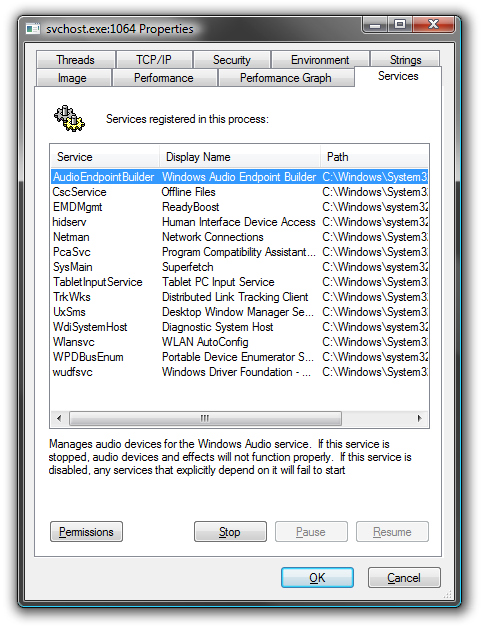
Or you can double-click on a svchost.exe instance and select the Services tab, where you can choose to stop one of the services if you choose.
image

Disabling Services

Open up Services from the administrative tools section of Control Panel, or typeservices.msc into the start menu search or run box.

Find the service in the list that you’d like to disable, and either double-click on it or right-click and choose Properties.

image

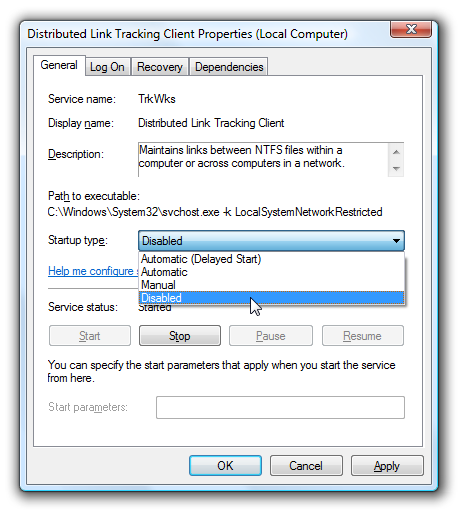
Change the Startup Type to Disabled, and then click the Stop button to immediately stop it.
image

You could also use the command prompt to disable the service if you choose. In this command “trkwks” is the Service name from the above dialog, but if you go back to the tasklist command at the beginning of this article you’ll notice you can find it there as well.

sc config trkwks start= disabled

Hopefully this helps somebody!


原文地址: http://www.cnblogs.com/technology/archive/2011/07/20/svchost_exe.html


华为HCIP-001:PPPOE配置模拟实验 华为HCIP01:PPPOE配置模拟实验 实验环境 pppoe-client上面的接口信息 [AR1]dis ip interface brief *down: administratively down ^down: standby (l): loopback (s): spoofing The number of interface that is UP in Physical is 2 The number of interface that is DOWN in Physical is 1 Th 阅读详情

相关推荐

GprMax正演模拟:为什么你的反射波‘消失’了?可能是直达波在捣鬼(附Python后处理脚本)

本文深入探讨了GprMax正演模拟中反射波信号被直达波淹没的现象,并提供了Python后处理脚本的实战指南。通过时域置零、自适应增益控制、频域滤波等多种技术,有效增强反射波信号,帮助用户解决探地雷达模拟中的常见问题。文章还包含详细的代码示例和效果评估方法,适合GPR数据处理的研究人员和工程师参考。

weixin_29305313的博客 232

What is this Process and Why is it Running【三】

audiodg.exe Windows音频设备图形隔离进程,是一个正常的系统进程,英文名称为audiodg.exe,windows7系统不会以英文名显示。 Windows音频设备图形隔离程序是一种系统保护进程,出于系统安全需要,用于防止未授权软件或硬件捕获高清晰度视频格式文件的内容,还可以大幅度的提升耳机音质。 对于此正常进程,一般情况下不会占用太多CPU,如果占用过高的情形一旦出现,按照这几...

RokoのBasilisk‘s Blog 1880

基于OkHttp3+Retrofit2+RxJava3搭建响应式网络框架

本文介绍了一个基于OkHttp3+Retrofit3+RxJava3的响应式网络框架设计。该框架采用分层架构,OkHttp3负责底层网络请求,Retrofit3封装HTTP接口,RxJava3实现响应式流处理。核心亮点包括:1)高度解耦的分层设计;2)统一的异常处理和响应体封装;3)RxJava3实现线程切换和请求管理;4)MVVM架构适配,业务层只需关注数据逻辑。框架提供了完整的实现方案,包括全局配置、拦截器、响应转换、接口声明、仓库封装等组件,并支持生产环境扩展功能如Cookie持久化、Token刷新等

fuge2008的博客 872

What is svchost.exe And Why Is It Running? :: the How-To Geek

导读:   You are no doubt reading this article because you are wondering why on earth there are nearly a dozen processes running with the name svchost.exe. You cant kill them, and you dont remember sta

i53nd的专栏 2279

Allegro 16.6 高级技巧实战:用Region规则和动态间距搞定高密度连接器布局布线

本文深入探讨了Allegro 16.6在高密度连接器布局布线中的高级技巧,重点介绍了Region规则和动态间距属性的应用。通过局部规则覆盖和分层控制,解决0.5mm以下引脚间距的布线难题,提升PCB设计效率和质量。

weixin_30352645的博客 440

MySQL服务启动失败?手把手教你排查NET HELPMSG 3534错误(附完整修复流程)

本文针对Windows平台上MySQL服务启动失败并提示NET HELPMSG 3534错误的常见问题,提供了系统性的排查与修复指南。文章深入剖析了错误本质,并手把手教你通过查看MySQL错误日志、检查并初始化数据目录、修正Windows服务配置、排查my.ini配置文件陷阱等核心步骤,彻底解决这一棘手问题,帮助开发者和运维人员快速恢复数据库服务。

wdx0123456的博客 895

Windows进程-svchost.exe

它的主要功能是“托管”系统中的 Windows 服务,避免每个服务单独启动一个进程,从而减少系统资源(内存、CPU)的占用,提升运行效率。例如,系统的自动更新服务(wuauserv)、网络连接服务(Netman)等,都需要依赖 svchost.exe 运行。,并非独立程序,而是负责承载多个系统服务(如自动更新、网络连接等)的“容器”,正常情况下会在任务管理器中显示多个实例,属于系统必需进程。svchost.exe 是 Windows 系统的。

徐子元 2068

VS code平台调试AutoLISP程序教程

VS code平台调试AutoLISP程序教程

BearElder的博客 3184

高手揭密svchost.exe是什么进程

网上有很多关于svchost.exe是什么进程,svchost.exe是什么病毒,svchost.exe占用cpu100%或占用大量内存,svchost.exe有十几个,svchost.exe偷偷连网很象木马的问题,本文提供关于svchost.exe进程的所有信息和用各种专业软件进行查杀的方法。   1)svchost.exe是什么进程   Svchost.exe是微软视窗操作系统里的一个

sky101010ws的专栏 1万+

【FOC无刷电机控制】六步换向、FOC,STM32cubemx从零开始搭建BLDC六步换相代码、FOC代码(基于霍尔传感器)

FOC、六步换相,无刷电机控制

xifan的博客 3万+

主成分分析(Principal Component Analysis,PCA)

主成分分析1.主成分分析1.1 降维(Dimensionality Reduction)1.2 均值(Mean)1.3 方差(Variance)1.4 协方差(Covariance)1.5 协方差矩阵(Covariance Matrix)1.6 线性变换(Linear Transformation)1.7 主成分分析(PCA)1.8 PCA和SVD的关系 1.主成分分析 关于PCA的介绍:用最直观的方式告诉你:什么是主成分分析PCA 笔记来源:Principal Component Analysis (PC

一个搬运知识的笨小孩 3230

那是什么进程 —— svchost.exe是什么? 它为何运行?

        你几乎毫不犹豫的来阅读这篇文章是因为你也觉得奇怪, 究竟为什么那里有一打正在运行的进程都叫做 svchost.exe. 你不能终止它们运行, 你也不记得什么时候开始运行它们的...那么它们究竟是什么呢?         我们写了一系列的文章用来解释在任务管理器里发现的各种进程, 这篇文章是其中的一个部分, 这个系列包括: jusched.exe, dwm.exe, ctfm...

weixin_34367257的博客 4万+

RAG效果调优清单(命中率提升3倍)

本文提出了一套工程可落地的RAG(检索增强生成)模型组合方案,强调通过最优组合实现效果、成本和扩展性的平衡。核心架构包括Embedding模型、向量数据库检索、Rerank模型和LLM生成四个环节,推荐了四种具体组合方案:本地最优性价比(bge+reranker+Qwen 7B)、效果优先(bge-large+reranker+14B模型)、高并发(轻量模型+vLLM)和中英混合(多语言模型)。文章指出Embedding决定检索下限,Rerank提升准确率上限,LLM影响最终体验,并提供了不同场景的优化策略

刘一说的IT专栏 523

如何查html病毒svchost.exe,svchost是什么?怎样清除svchost.exe病毒?

svchost是什么360流量系列软件最新版本下载Svchost.exe 是从动态链接库 (DLL) 中运行的服务的通用主机进程名称。这个程序对系统的正常运行是非常重要,而且是不能被结束的。svchost.exe在windows进程中占据很大一部分的资源,svchost.exe非常容易被病毒所利用。svchost.exe病毒利用之后,系统常会弹出svchost.exe错误,当然 svchost.e...

weixin_33469623的博客 1623

老版QQ原生表情gif动态

这是老版的QQ表情,不过全是动态的的,Windows照片查看器是不会动的,可以右击用浏览器打开查看,再说一遍是老版的,只是分享给宁愿用老版也要动态的人。

复分析 阿尔福斯(Ahlfors) 第三版答案 英文

答案分为十章,有部分习题没有答案,全英文复分析阿尔福斯(Ahlfors) 第三版答案

全面认识Svchost.exe进程

很多朋友对Svchost.exe进程都不太了解,有时在任务管理器中一旦看到有多个该进程(图1中有6个),就以为自己的电脑中了病毒或木马,其实并非如此!正常情况下,windows中可以有多个Svchost.exe进程同时运行,例如Windows 2000至少有2个Svchost进程,Windows XP中有4个以上,Windows 2003中则有更多,所以当你看到多个Svchost进程时,未必就是病

龙在天涯的专栏 2042

VB摄像头监控

该VB模块可对摄像头捕获的画面进行录像等,可在创建的窗口进行控制

解除对svchost.exe的疑惑

Svchost.exe、lsass.exe、wdfmgr.exe,打开进程列表后你会发现一大堆不知用途的进程,究竟是系统进程还是木马病毒?如果打开系统文件夹,一大堆奇奇怪怪名称的文件,更是会把你弄得晕头转向。很多朋友因此而始终抱有一种未知的恐惧,认为木马、黑客无处不在,即使是高手,也不能把这些陌生的系统文件说个明明白白。为消除大家的疑惑,从这期开始为大家带来一档新的连载栏目——系统蓝色档案为大家曝

yjmtv0817的专栏 3021

jdk-8u144-linux-x64.tar.gz.

该资源为搭建Linux系统Java环境用,资源的后缀为tar.gz格式的压缩包

svchost.exe是什么进程

svchost.exe是nt核心系统的非常重要的进程,对于2000、xp来说,不可或缺。很多病毒、木马也会调用它。所以,深入了解这个程序,是玩电脑的必修课之一。    大家对windows操作系统一定不陌生,但你是否注意到系统中“svchost.exe”这个文件呢?细心的朋友会发现windows中存在多个 “svchost”进程(通过“ctrl+alt+del”键打开任务管理器,这里的“进程”标

goodspringin的专栏 1118

svchost.exe 导致 CPU100%

Svchost.exe (进程名称:Microsoft Service Host Process )到底是做什么用的呢? 首先我们要了解一点那就是Windows系统的中的进程分为:独立进程和共享进程这两种。由于Windows系统中的服务越来越多,为了节约有限的系统资源微软把很多的系统服务做成了共享模式。那Svchost.exe在这中间是担任怎样一个角色呢? Svchost.exe的工作就是作为这些

田园 1441

php有个schost.exe_svchost.exe是什么

打开任务管理器通常会发现不少的svchost.exe进程?svchost.exe是什么?svchost.exe是病毒吗?一、svchost.exe是什么svchost.exe是windows操作系统一个非常重要的进程模块。因此很多病毒都利用svchost.exe来迷惑大家(有时候是svch0st.exe,在小写的时候0和o很难分辨)。通常XP操作系统下有五到六个svchost.exe进程,其中SY...

weixin_39978863的博客 322

注册表实战Svchost.exe,解开多个Svchost服务之谜

 以前见到svchost.exe的进程一律当是系统进程,虽然也知道有时候有些木马会调用,但懒得去深究,直到机器中了病毒....我的机器一直没有安装任何杀毒软件,都是靠自己对网络速度、机器运行速度的敏感来判断是否中毒,又或者简单的查找启动项,关联项等简单的手法,这里不罗嗦今天要详细说说的是svchost这个进程,出事的时候我发现我机器有6个svchost进程,因为一直比较关心我的进程,我知道

ph4studio的专栏 1万+

辨别亦真亦假的Svchost.exe

http://pfw.sky.net.cn/news/info/info.php?infoid=2600本文主要包括以下内容:  1、了解Svchost.exe的功能  2、判断真假Svchost.exe进程  3、清除伪装成Svchost.exe的病毒、木马  Svchost.exe、lsass.exe、wdfmgr.exe,打开进程列表后你会发现一大堆不知用途的进程,究竟是系统进程

1752

Svchost.exe服务

Svchost.exe、lsass.exe、wdfmgr.exe,打开进程列表后你会发现一大堆不知用途的进程,究竟是系统进程还是木马病毒?如果打开系统文件夹,一大堆奇奇怪怪名称的文件,更是会把你弄得晕头转向。很多朋友因此而始终抱有一种未知的恐惧,认为木马、黑客无处不在,即使是高手,也不能把这些陌生的系统文件说个明明白白。为消除大家的疑惑,从这期开始为大家带来一档新的连载栏目——系统蓝色档案为大家曝

Welcome to Vick's home! 1251

php有个schost.exe_全面认识Svchost.exe进程

很多朋友对svchost.exe进程都不太了解,有时在任务管理器中一旦看到有多个该进程(有6个),就以为自己的电脑中了病毒或木马,其实并非如此!正常情况下,windows中可以有多个svchost.exe进程同时运行,例如Windows2000至少有2个Svchost进程,WindowsXP中有4个以上,Windows2003中则有更多,所以当你看到多个svchost进程时,未必就是病毒!svch...

weixin_39607937的博客 339

Svchost.exe是病毒的两种情况

1.利用假冒Svchost.exe名称的病毒程序 这种方式运行的病毒并没有直接利用真正的Svchost.exe进程,而是启动了另外一个名称同样是Svchost.exe的病毒进程,由于这个假冒的病毒进程并没有加载系统服务,它和真正的Svchost.exe进程是不同的,只需在命令行窗口中运行一下“Tasklist /svc”,如果看到哪个Svchost.exe进程后面提示的服务信息是“暂缺”,而不

shirley的专栏 2万+

关于Svchost.exe的说明及可能出现的问题解答

Windows 2000 中的 Svchost.exe 说明Svchost.exe 是从动态链接库 (DLL) 中运行的服务的通用主机进程名称。Svchost.exe 文件位于 %SystemRoot%/System32 文件夹中。启动时,Svchost.exe 将检查注册表的服务部分,以构建需要加载的服务的列表。可以同时运行多个 Svchost.exe 实例。每个 Svchost.exe 会

2006,我们在一起! 4954

Svchost.exe病毒隐藏查杀

原文链接http://it.rising.com.cn/safe/protect/2009-11-24/5408.html   摘要:Svchost.exe在windows进程中占据很大一部分的资源,而且这个进程非常容易被病毒所利用。Svchost.exe被病毒利用之后,系统常会弹出Svchost.exe错误,当然Svchost病毒也有专杀工具。那么Svchost.exe是什么进程?Svchos...

weixin_34122810的博客 2006
上一篇: 子父类方法调用关系,内部类总结
下一篇: 那是什么进程 —— svchost.exe是什么? 它为何运行?
cdestiny
博客等级 码龄14年 12粉丝 42原创
评论
成就一亿技术人!
拼手气红包6.0元
还能输入1000个字符
 
 条评论被折叠 查看
添加红包

请填写红包祝福语或标题

个

红包个数最小为10个

元

红包金额最低5元

当前余额3.43元 前往充值 >
需支付:10.00元
成就一亿技术人!
领取后你会自动成为博主和红包主的粉丝 规则
hope_wisdom
发出的红包
实付元
使用余额支付
点击重新获取
扫码支付
钱包余额 0

抵扣说明:

1.余额是钱包充值的虚拟货币,按照1:1的比例进行支付金额的抵扣。
2.余额无法直接购买下载,可以购买VIP、付费专栏及课程。

余额充值