



点击首页病虫害图集列表项,跳转至具体病虫害的详细信息页,内容包括:病虫害图片、农作物品名、病虫害名称、防治办法等。
布局结构如下图所示:
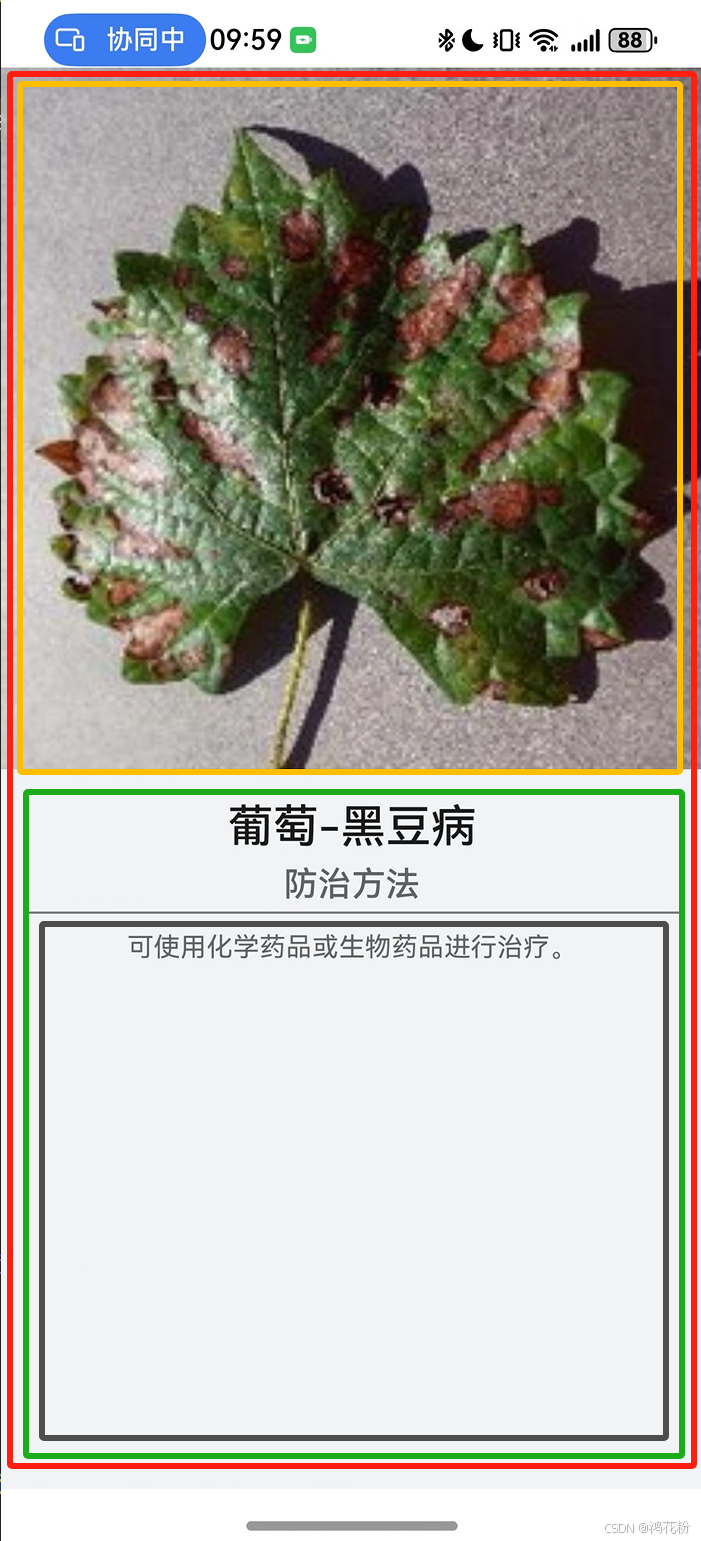 | 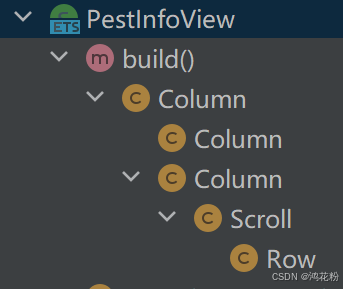 |
在PestInfoPage.ets文件中自定义病虫害详细信息视图组件PestInfoView,代码如下:
/**
 * 病虫害详细信息视图
 */
@Component
struct PestInfoView{
  private pestObj?:PestModel;
  private imgWidth?:number;

  build() {
    Column(){
      // 病害图片
      Column(){
        Image(this.pestObj?.Img)
          .width(this.imgWidth)
          .objectFit(ImageFit.Contain)
          .onClick(() => {
            router.back();
          })
      }
      .height('50%')
      .backgroundColor($r('sys.color.ohos_id_color_sub_background'))

      // 详细信息
      Column(){
        // 农作物名-病虫害名称
        Text(this.pestObj?.Type + '-' + this.pestObj?.PestName)
          .fontSize(24)
          .fontWeight(FontWeight.Medium)
          .margin({top:12})
          .fontColor($r('sys.color.ohos_id_color_text_primary'))

        // 标题
        Text('防治方法')
          .fontSize(18)
          .fontWeight(FontWeight.Medium)
          .margin({top:6})
          .fontColor($r('sys.color.ohos_id_color_text_secondary'))

        // 分割线
        Divider()
          .color($r('sys.color.ohos_id_color_card_bg'))
          .borderWidth(0.25)
          .margin({top:4,bottom:4})

        // 具体防治描述
        Scroll(){
          Row(){
            Text((this.pestObj?.PestCtrl !==undefined && this.pestObj?.PestCtrl?.toString()!='')
              ? this.pestObj?.PestCtrl
              : '暂无内容')
              .lineHeight(24)
              .fontSize(14)
              .fontColor($r('sys.color.ohos_id_color_text_secondary'))
          }
          .justifyContent(FlexAlign.Start)
        }
        .scrollBar(BarState.Off)
        .layoutWeight(1)
        .align(Alignment.TopStart)
      }
      .width('100%')
      .layoutWeight(1)
      .backgroundColor($r('sys.color.ohos_id_color_sub_background'))
      .padding({left:12,right:12})
    }
  }
}
病虫害信息页面加载时,根据病虫害实体对象的属性pestname病虫名称是否空,判断是新的诊断,还是已有的病虫害,对应显示AI诊断视图或信息视图。
build() {
    Column(){
      if(!DataUtil.isNull(this.pestObj.PestName)){
        // 已有病虫害详情
        PestInfoView({pestObj:this.pestObj,imgWidth:this.imgWidth});
      }else {
        // 新增病虫害图片,需诊断
        PestDiagnosisView({pestObj:this.pestObj,imgWidth:this.imgWidth});
      }
    }
  }
为了宽度满屏显示病虫害图片,需要用到系统能力的设备屏幕属性display,获取当前设备的屏幕宽度,并赋值给Image.width
@State deviceWidth:number =Constants.DEVICE_DEFAULT_WIDTH;
  @State imgWidth:number =this.deviceWidth;

  aboutToAppear(): void {
    let displayClass:display.Display=display.getDefaultDisplaySync();
    let width=displayClass?.width/displayClass.densityPixels ?? Constants.DEVICE_DEFAULT_WIDTH;
    this.deviceWidth=width;
    this.imgWidth =this.deviceWidth;
  }
屏幕属性可参加官方资料:





 扫一扫
扫一扫


 145
145

 被折叠的 条评论
为什么被折叠?
被折叠的 条评论
为什么被折叠?
 到【灌水乐园】发言





