


 本文介绍了如何在AntDesign库中缺少日期多选功能时,通过修改日历组件并添加复选框和下拉框,实现在Vue项目中实现日期的多选功能。作者分享了具体代码实现步骤。
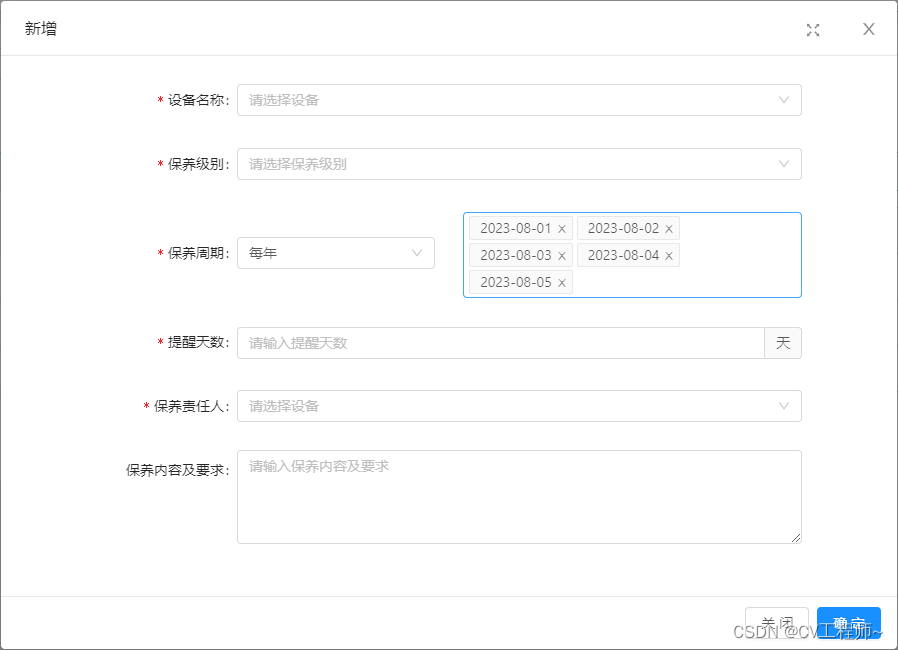
因项目需求 日期多选 UI组件使用的antd中没有该功能 本菜鸡就自己将日历修改为日期多选 具体思路为在每个日历格中插入复选框 外层使用下拉框来实现选中数据展示 以下为具体代码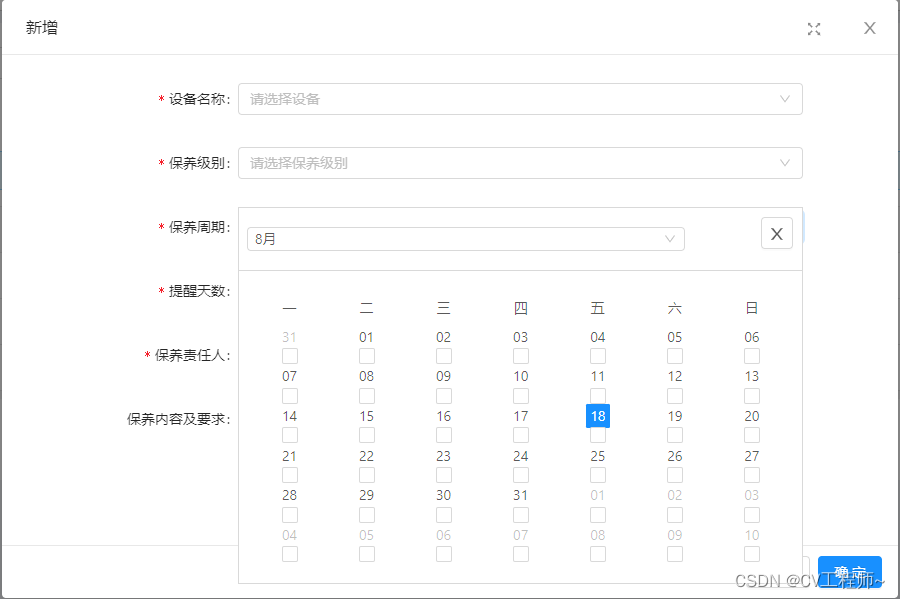
<template>
  <div class="container">
    <a-select
      :prop="prop"
      mode="multiple"
      v-model="dateList"
      placeholder="选择日期"
      @focus="handleDateFocus"
      :dropdownStyle="{ zIndex: 999 }"
    ></a-select>
    <div class="calendarMultiple_container">
      <!-- 日历关闭按钮 -->
      <a-button icon="close" v-if="dateVisible" @click="onCalendarClose" class="calendarMultiple_close" />
      <!-- 日历 -->
      <a-calendar :fullscreen="false" class="calendarMultiple" v-if="dateVisible">
        <template slot="dateCellRender" slot-scope="value">
          <a-checkbox
            :checked="isDateSelected(value)"
            :disabled="isDateDisabled(value)"
            @change="onDateCellCheckChange(value)"
          ></a-checkbox>
        </template>
      </a-calendar>
    </div>
  </div>
</template>

<script>
export default {
  name: 'datePickerMultiple',
  components: {},
  props: {
    prop: {
      type: String,
      default: '',
    },
    disabledList: {
      type: Array,
      default: () => []
    },
  },
  data() {
    return {
      dateList: [],
      dateVisible: false,
    }
  },
  computed: {},
  watch: {},
  created() {},
  mounted() {},
  methods: {
    handleDateFocus() {
      this.dateVisible = true
    },
    onCalendarClose() {
      this.dateVisible = false
    },
    handleDate(data) {
      const date = new Date(data)
      const year = date.getFullYear()
      const month = String(date.getMonth() + 1).padStart(2, '0')
      const day = String(date.getDate()).padStart(2, '0')
      return `${year}-${month}-${day}`
    },
    onDateCellCheckChange(value) {
      const dateString = this.handleDate(value)
      if (this.isDateSelected(dateString)) {
        this.dateList = this.dateList.filter((date) => date !== dateString)
      } else {
        this.dateList.push(dateString)
      }
      this.$emit('handleCalendarMultiple', this.dateList)
    },
    isDateSelected(date) {
      return this.dateList.includes(this.handleDate(date))
    },
    isDateDisabled(date) {
      return this.disabledList.includes(this.handleDate(date))
    },
  },
  beforeDestroy() {},
}
</script>

<style scoped lang="less">
.calendarMultiple_container {
  width: 100%;
  z-index: 9999;
  border-radius: 4px;
  background-color: #fff;
  position: absolute;
  top: 0;
  left: 0;
  // 关闭按钮
  .calendarMultiple_close {
    position: absolute;
    top: 10px;
    right: 10px;
  }
  // 日历
  .calendarMultiple {
    border: 1px solid #d9d9d9;
    .ant-fullcalendar-header {
      text-align: left;
      .ant-fullcalendar-year-select {
        display: none;
      }
      .ant-fullcalendar-month-select {
        width: 80%;
      }
      .ant-radio-group {
        display: none;
      }
    }
    .ant-fullcalendar {
      padding: 20px 0px;
    }
  }
}
</style>





 扫一扫
扫一扫


 383
383


 到【灌水乐园】发言



