



 本文详细介绍了CSS中List列表的样式设置,包括list-style-type用于改变列表项目符号的类型,list-style-position调整符号的位置,以及如何使用list-style-image设置自定义图片作为项目符号。还探讨了如何管理列表计数,如从非1开始计数,倒计数及指定数值。通过实例展示了不同CSS代码的效果。
List列表 列表特定样式
- list-style-type :设置用于列表的项目符号的类型,例如无序列表的方形或圆形项目符号,或有序列表的数字,字母或罗马数字。
- list-style-position :设置在每个项目开始之前,项目符号是出现在列表项内,还是出现在其外。
- list-style-image :允许您为项目符号使用自定义图片,而不是简单的方形或圆形。
符号样式list-style-type
list-style-type 属性允许你设置项目符号点的类型
css代码:

效果:

项目符号位置list-style-position
list-style-position 设置在每个项目开始之前,项目符号是出现在列表项内,还是出现在其外。 如上所示,默认值为 outside,这使项目符号位于列表项之外。
css代码:

效果:

使用自定义的项目符号图片list-style-image
list-style-image 属性允许对于项目符号使用自定义图片。
语法:
ul {
  list-style-image: url(star.svg);
}
然而,这个属性在控制项目符号的位置,大小等方面是有限的。 您最好使用background 系列属性
示例css代码:
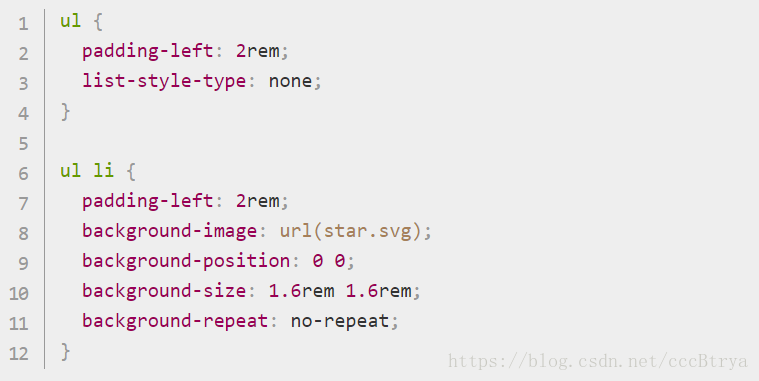
上面的代码做了什么?
- 将 <ul> 的 padding-left 从默认的 40px设置为 20px,然后在列表项上设置相同的数值。 这就是说,整个列表项仍然排列在有序列表项和描述列表中,但是列表项产生了一些用于背景图像的填充。 如果我们没有设置填充,背景图像将与列表项文本重叠,这看起来会很乱。
- 将 list-style-type 设置为none,以便默认情况下不会显示项目符号。 我们将使用 background 属性来代替项目符号。
- 为每个无序列表项插入项目符号,其相应的属性如下:
-
-
- background-image: 充当项目符号的图片文件的参考路径
- background-position: 这定义了所选元素背景中的图像将出现在哪里 - 在我们的示例中设置 0 0,这意味着项目符号将出现在每个列表项的最左上侧。
- background-size: 设置背景图片的大小。 理想条件下,我们想要项目符号与列表项的大小相同(比列表项稍大或稍小亦可)。 我们使用的尺寸为1.6rem(16px),它非常吻合我们为项目符号设置的 20px 的填充, 16px 加上 4px 的空格间距,可以使项目符号和列表项文本效果更好。
- background-repeat:默认条件下,背景图片不断复制直到填满整个背景空间,在我们的例子中,背景图片只需复制一次,所以我们设置值为 no-repeat。
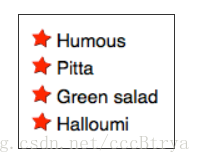
-
效果:
管理列表计数
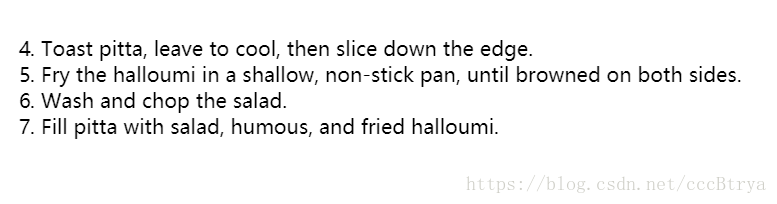
start 属性允许你从1 以外的数字开始计数
例如css代码:
<ol start="4">
  <li>Toast pitta, leave to cool, then slice down the edge.</li>
  <li>Fry the halloumi in a shallow, non-stick pan, until browned on both sides.</li>
  <li>Wash and chop the salad.</li>
  <li>Fill pitta with salad, humous, and fried halloumi.</li>
</ol>
效果:
reversed 属性将启动列表倒计数
示例css代码:
<ol start="4" reversed>
  <li>Toast pitta, leave to cool, then slice down the edge.</li>
  <li>Fry the halloumi in a shallow, non-stick pan, until browned on both sides.</li>
  <li>Wash and chop the salad.</li>
  <li>Fill pitta with salad, humous, and fried halloumi.</li>
</ol>
效果:

value 属性允许设置列表项指定数值
示例css代码:
<ol>
  <li value="2">Toast pitta, leave to cool, then slice down the edge.</li>
  <li value="4">Fry the halloumi in a shallow, non-stick pan, until browned on both sides.</li>
  <li value="6">Wash and chop the salad.</li>
  <li value="8">Fill pitta with salad, humous, and fried halloumi.</li>
</ol>
效果:

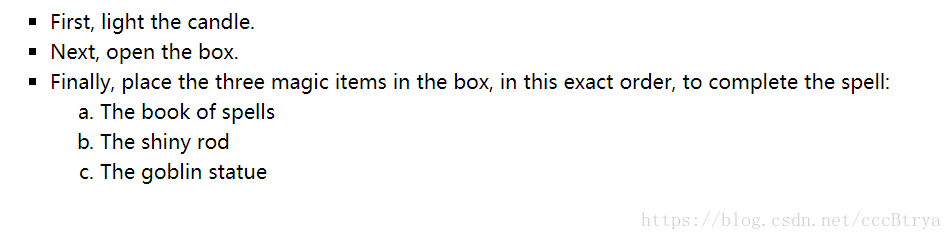
List练习实例:
html+css代码:
<!DOCTYPE html>
<html>
<head>
	<meta charset="utf-8">
	<title></title>
</head>
<style>
ul li{
line-height:1.5em;
list-style-type:square;
}
ol li{
list-style-type:lower-alpha;
}
</style>
<body>
<ul>
  <li>First, light the candle.</li>
  <li>Next, open the box.</li>
  <li>Finally, place the three magic items in the box, in this exact order, to complete the spell:
    <ol>
      <li>The book of spells</li>
      <li>The shiny rod</li>
      <li>The goblin statue</li>
    </ol>
  </li>
</ul>
</body>
</html>
效果:





 扫一扫
扫一扫


 1231
1231

 被折叠的 条评论
为什么被折叠?
被折叠的 条评论
为什么被折叠?
 到【灌水乐园】发言





