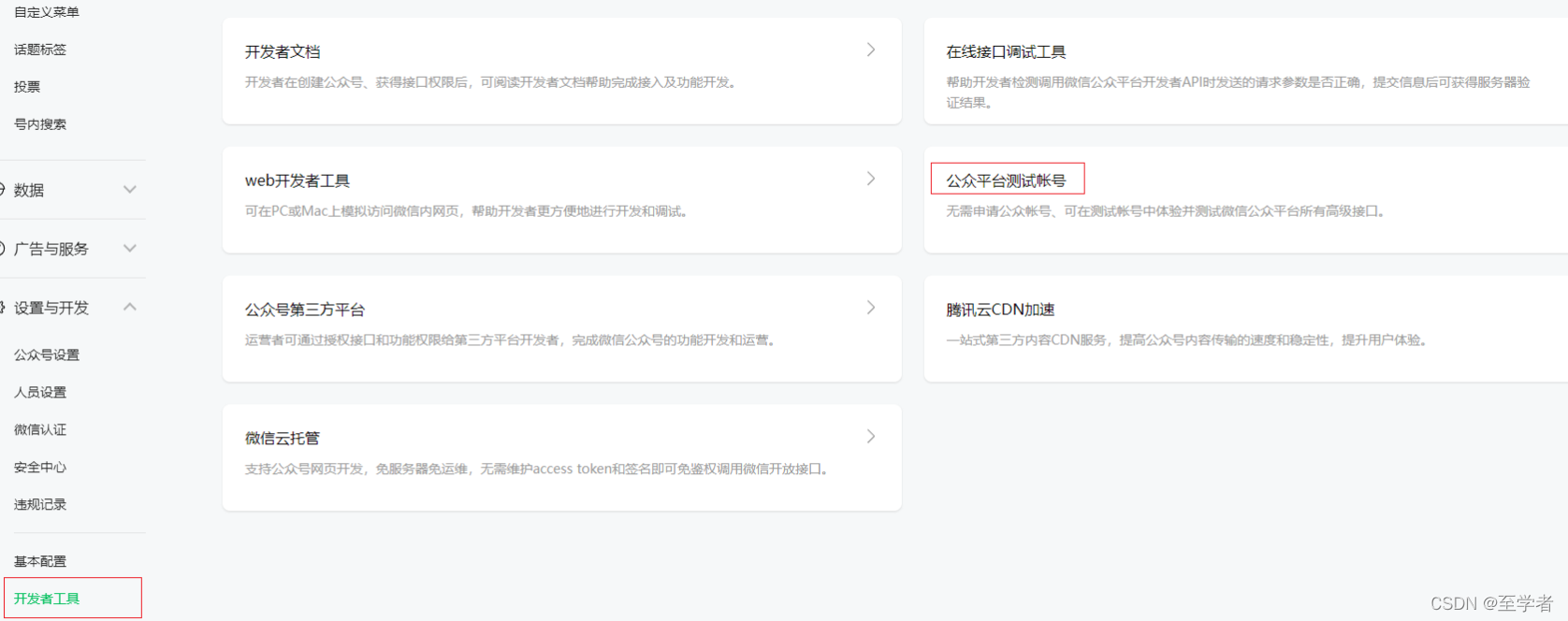
一 进入公众号平台找到开发者工具,然后进入公众号测试账号
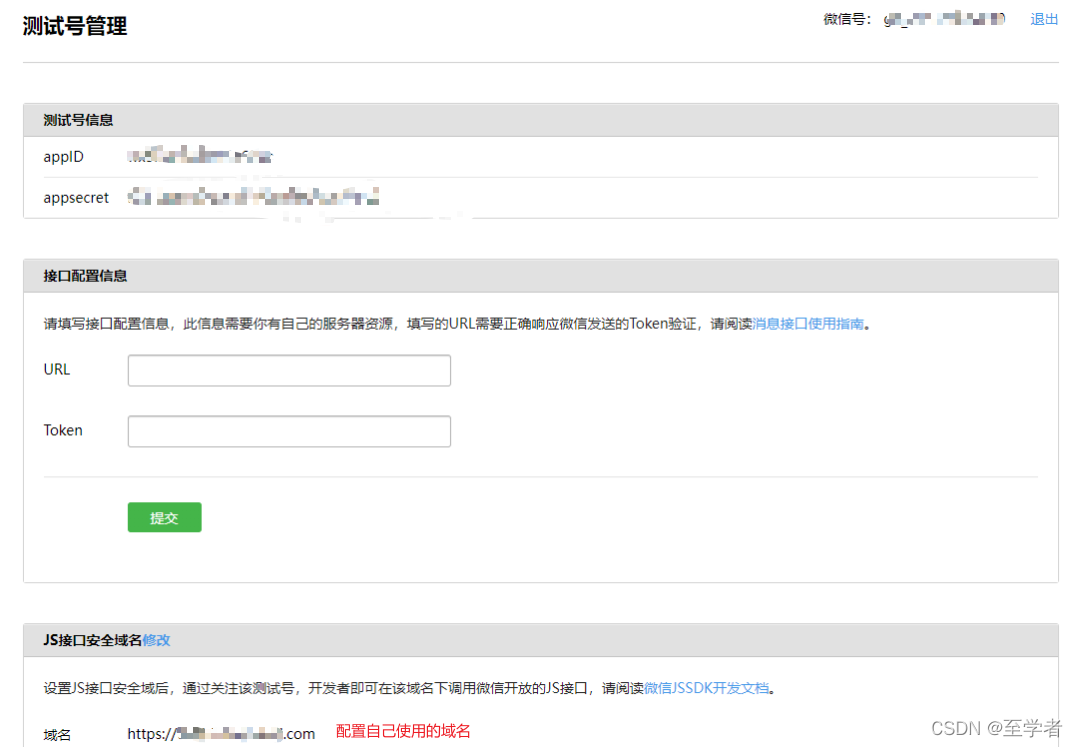
二 配置自己使用的域名
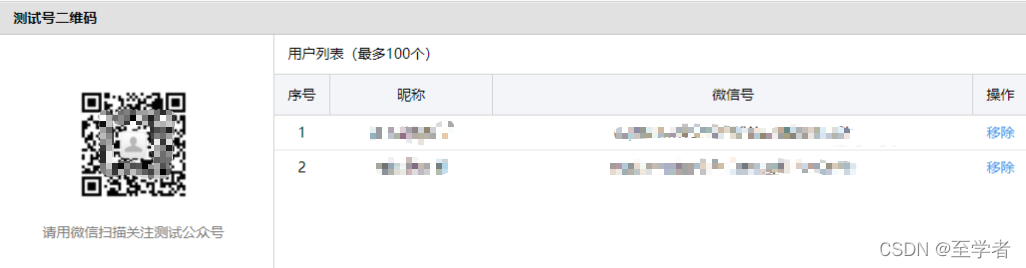
三 关注测试号
 这个只是大概配置,详细配置不方便给出,注意测试号是不可以测试支付功能。注意微信小程序支付和微信H5支付使用的OpenID不一样。


 墨衍会员
·
AI 创作全网分发
墨衍智能分发
本文由作者通过墨衍一键同步至各平台
1分发平台
1.4k累计阅读
1.4k平均单平台
已同步平台
优快云
微信公众号
微博
知乎
掘金
百家号
博客园
抖音
小红书
你的文章也可以这样分发
墨衍会员 ¥399起/年,写一次发全网
我也要
这个只是大概配置,详细配置不方便给出,注意测试号是不可以测试支付功能。注意微信小程序支付和微信H5支付使用的OpenID不一样。
在企业微信中自建应用的步骤及注意事项
背景:某项目分为PC端和移动端,移动端搭建在企业微信中,并且需要实现单点登录。 准备工作:企业在企业微信中备案审核通过。 搭建步骤: 进入企业微信管理后台,进入应用管理模块中的应用菜单。 在应用菜单中,选择自建应用,点击“创建应用”按钮,进入创建应用界面,填写目标创建的应用的logo和应用的名称,并选择可见范围。 创建应用后进入系统后台管理界面,点击编辑按钮,选择企业成员,配置应用可见范围。 在应用管理页面下方找到开发者接口-网页授权及JS-SDK模块,点击设置可信域名。 点击“设置可信域名”
如何使用微信开发者工具查看Appid以及SECRET
如何使用微信开发者工具查看Appid以及SECRET 步骤如下: (1)找到微信开发者工具顶部右上角的测试号单击。 (2)之后来到这个界面。 (3)申请测试号 申请测试号的过程非常简单。只需访问 申请地址 ,并扫码登录后,即可查看到已为自己分配好的测试帐号信息。 (3)微信扫描二维码 (4)之后就可以看到小程序测试号的消息了。 楠哥-------一心想为IT行业添砖加瓦,却总是面向cv编程的程序员。 谢谢阅读,无误点赞,有误还望评论区指正。 ...
外部浏览器H5跳转微信全通道:URL Link、Scheme与兜底埋点
在移动端 Web 生态中,从外部浏览器进入微信往往不是单一 API,而是由 HTTPS 短链、自定义协议、支付链接与客服链接等通道拼接而成。其原理是通过 URL Link、URL Scheme 等入口触发微信侧中转或协议唤起,再落到小程序页面、收银台或客服会话,同时受 iOS Safari 用户手势、Android WebView 白名单与协议拦截影响。工程上需服务端生成并缓存链接,前端做环境判断、超时兜底与埋点漏斗,以观测端到端成功率。典型场景包括活动落地页、报名转化、H5 支付和微信客服咨询,最终把外部
微信公众平台获取测试号的appID和appsecret
一、登录微信公众平台 二、获取appID和appsecret 1、获取正式的appID和appsecret 左侧菜单栏 --> 开发 --> 基本配置 -->获取 2、获取测试的appID和appsecret 左侧菜单栏 --> 开发 --> 开发者工具 --> 公众平台测试账号 三、测试号管理模块解析 1、测试号信息 通过appID和appsecre...
【微信授权登录】Scope 参数错误排查:从接口混淆到权限申请全解析
本文全面解析微信授权登录中Scope参数错误的排查方法,从接口混淆到权限申请的全流程。详细介绍了公众号与开放平台两套授权体系的区别,以及如何正确配置APPID、申请接口权限和核对授权域名。帮助开发者快速定位并解决Scope参数错误,提升微信登录功能的开发效率。
PID控制器(位置式和增量式)
PID控制算法
微信公众号接入开发
目录 前言: 一、公众号中配置 1、获取AppID、AppSecret: 2、配置IP白名单: 问题: 解决: 3、配置JS接口安全域名: 重要:认真阅读系统提示的注意事项: 问题: 解决: 二、前端页面开发: 三、后端服务开发: * 流程: 代码: (1)主要代码: (2)相关代码: 校验工具: 1、appId、secret校验及生成access_token工具:微信公众平台接口调试工具 2、 微信 JS 接口签名校验工具:微信 JS 接口签名校验工具 ..
中国知网文献引用导入EndNote9.X,Web of science导入endnote以及谷歌学术导入endnote图文详解,全网最细版本适用EndNote9.x,Endnote20版本
在科研中用到EndNote管理文献,遇到插入文献时,中国知网如何将参考文献导进Endnote9.x或者web of sicence,谷歌学术如何将文章,文献导入进文献管理软件EndNote的详细图文2022版本解释,全网最细的笔记教程,值得大家参考收藏学习
如何获取小程序测试号的appid和APPsecret
如何获取小程序测试号的appid和APPsecret 点击 微信开发者工具 右上角的 测试号 ,这时弹出浏览器页面,微信扫描二维码登录。 登录后,浏览器页面为 微信官方文档 小程序 开发 工具,看到如下文字: 申请测试号 申请测试号的过程非常简单。只需访问 申请地址 ,点击申请地址,弹出一个测试号管理浏览器页面 ,AppID 和 AppSecret 跃然其上。 ...
MeshLab新手必看:5分钟搞定泊松表面重建(附完整点云处理流程)
本文详细介绍了如何使用MeshLab进行泊松表面重建,从点云数据导入、预处理到核心参数设置,再到后处理与模型优化,提供了完整的3D重建流程指南。特别适合计算机视觉和3D重建领域的新手快速掌握泊松重建技术,提升工作效率。
匹配博弈双边选择算法
刚学图论匹配方面的一些知识,记录下来。
微信公众号获取用户openid通过公众号测试账号
公众号h5获取用户openID
基于深度学习的X光安检危险品检测系统(YOLOv8 + UI界面 + 数据集)
随着全球安全形势的变化,机场、车站、地铁等场所的安检工作日益重要。X光安检系统已经成为现代公共安全领域中不可或缺的部分,能够有效地检测物品的内部结构,识别潜在的危险品。然而,传统的X光图像分析方法仍然依赖人工操作,检测效率较低,并且易受到人为因素的影响。近年来,深度学习技术的应用在图像分析领域取得了显著的突破,特别是在目标检测任务中,YOLO(You Only Look Once)模型因其高效性和精度,成为了许多目标检测任务的首选模型。
H5 调用企业微信API
H5 调用企业微信API前言一、环境二、使用步骤1.js引用2.config接口注入权限验证配置3.生成access_token4.生成jsapi_ticket5.生成noncestr 随机字符串 (len随机字符串上度)(方法是复制过来的)5.生成timestamp时间戳6.生成signature 签名6.信息填入config 提示:文章写完后,目录可以自动生成,如何生成可参考右边的帮助文档 文章目录前言一、环境二、使用步骤1.js引用2.config接口注入权限验证配置3.生成access_token
vs code , 配置 claude code 插件, 默认选项 : --dangerously-skip-permission
摘要:本文介绍如何在VS Code中为Claude Code插件配置--dangerously-skip-permission参数,包含两种方法:图形界面设置(适合新手)和直接编辑settings.json(精准配置)。该参数会跳过权限检查,仅建议在本地测试环境中使用。配置后需通过命令面板验证参数是否生效,并注意安全风险,避免在生产环境使用。多参数配置时需用数组格式,不同版本插件可能键名略有差异。
手把手教你学veriolg(二十六)-- Verilog CIC 滤波器设计
目录 Verilog CIC 滤波器设计1. CIC 滤波器的基本原理2. Verilog 实现3. 说明4. 测试激励5. 总结 CIC(Cascade-Integrator-Comb)滤波器是一种特殊的数字滤波器,常用于多速率信号处理中,尤其是用于信号的上采样(插值)和下采样(抽取)。CIC 滤波器的特点在于它具有简单的硬件实现、不需要乘法器(仅使用加法器和延迟元件)、且具有线性相位特性。然而,CIC 滤波器的缺点是它会产生较大的量化误差,因此在设计时需要特别注意字长的选择以避免溢出。1. CIC 滤波
微信H5支付
本文就不说开户流程,域名绑定了, 直接认为 appid, 商户号, 密钥, 公众号的appsecret,等等全部都准备好了 微信H5支付 自行查看微信H5支付流程 1、用户在商户侧完成下单,使用微信支付进行支付 2、由商户后台向微信支付发起下单请求(调用统一下单接口)注:交易类型trade_type=MWEB 3、统一下单接口返回支付相关参数给商户后台,如支付跳转url(参数名“mweb_url”...
c#仿热血江湖
Int32_1 = (int) table.Rows[i]["FLD_初级附魂"],Int32_2 = (int) table.Rows[i]["FLD_中级附魂"],Int32_3 = (int) table.Rows[i]["FLD_是否绑定"],Int32_0 = (int) table.Rows[i]["FLD_进化"],Form1.smethod_1(2, "加载百宝阁物品----没有百宝阁数据");Form1.smethod_1(2, "加载物品商店----没有物品数据");
UniApp微信登录避坑指南:从AppID申请到后端接口联调的完整流程(附常见错误码排查)
本文详细解析了UniApp微信登录的全流程,从AppID申请到后端接口联调,涵盖了配置要点、授权实践、后端处理及错误码排查。特别针对uniapp开发者在微信授权登录过程中常见的问题提供了实用解决方案,帮助开发者高效完成第三方登录接入。
SAP B1中文培訓教材_SDK
公司内部培训资料,对开发工具 ,DIAPI, UIAPI,Add-ON有详细解说
NTscan扫描工具
ntscan是一个扫描器,可以扫描没有密码和弱密码的共享,先到配置文件中填写猜测的用户名和密码,扫描过程中右侧出现的是扫描日志。
java开发记录-微信H5支付
一点点关于微信H5支付开发的总结. 首先需要申请到响应的appid,key.具体申请方法前往官网:https://pay.weixin.qq.com/index.php/core/home/login?return_url=%2Findex.php 可以选择对应的接入方式进行接入. 接入成功后就可以进行代码设计啦. 此次测试开发是在springboot环境下完成的,下面列出微信支付用到的相关...
深度学习工具包 DeepLearningToolbox
深度学习工具包Deprecation notice.-----This toolbox is outdated and no longer maintained.There are much better tools available for deep learning than this toolbox, e.g. [Theano](http://deeplearning.net/software/theano/), [torch](http://torch.ch/) or [tensorflow](http://www.tensorflow.org/)I would suggest you use one of the tools mentioned above rather than use this toolbox.Best, Rasmus.DeepLearnToolbox================A Matlab toolbox for Deep Learning.Deep Learning is a new subfield of machine learning that focuses on learning deep hierarchical models of data.It is inspired by the human brain's apparent deep (layered, hierarchical) architecture.A good overview of the theory of Deep Learning theory is[Learning Deep Architectures for AI](http://www.iro.umontreal.ca/~bengioy/papers/ftml_book.pdf)For a more informal introduction, see the following videos by Geoffrey Hinton and Andrew Ng.* [The Next Generation of Neural Networks](http://www.youtube.com/watch?v=AyzOUbkUf3M) (Hinton, 2007)* [Recent Developments in Deep Learning](http://www.youtube.com/watch?v=VdIURAu1-aU) (Hinton, 2010)* [Unsupervised Feature Learning and Deep Learning](http://www.youtube.com/watch?v=ZmNOAtZIgIk) (Ng, 2011)If you use this toolbox in your research please cite [Prediction as a candidate for learning deep hierarchical models of data](http://www2.imm.dtu.dk/pubdb/views/publication_details.php?id=6284)```@MASTERSTHESIS\{IMM2012-06284, author = "R. B. Palm", title = "Prediction as a candidate for learning deep hierarchical models of data", year = "2012",}```Contact: rasmusbergpalm at gmail dot comDirectories included in the toolbox-----------------------------------`NN/` - A library for Feedforward Backpropagation Neural Networks`CNN/` - A library for Convolutional Neural Networks`DBN/` - A library for Deep Belief Networks`SAE/` - A library for Stacked Auto-Encoders`CAE/` - A library for Convolutional Auto-Encoders`util/` - Utility functions used by the libraries`data/` - Data used by the examples`tests/` - unit tests to verify toolbox is workingFor references on each library check REFS.mdSetup-----1. Download.2. addpath(genpath('DeepLearnToolbox'));Example: Deep Belief Network---------------------```matlabfunction test_example_DBNload mnist_uint8;train_x = double(train_x) / 255;test_x = double(test_x) / 255;train_y = double(train_y);test_y = double(test_y);%% ex1 train a 100 hidden unit RBM and visualize its weightsrand('state',0)dbn.sizes = [100];opts.numepochs = 1;opts.batchsize = 100;opts.momentum = 0;opts.alpha = 1;dbn = dbnsetup(dbn, train_x, opts);dbn = dbntrain(dbn, train_x, opts);figure; visualize(dbn.rbm{1}.W'); % Visualize the RBM weights%% ex2 train a 100-100 hidden unit DBN and use its weights to initialize a NNrand('state',0)%train dbndbn.sizes = [100 100];opts.numepochs = 1;opts.batchsize = 100;opts.momentum = 0;opts.alpha = 1;dbn = dbnsetup(dbn, train_x, opts);dbn = dbntrain(dbn, train_x, opts);%unfold dbn to nnnn = dbnunfoldtonn(dbn, 10);nn.activation_function = 'sigm';%train nnopts.numepochs = 1;opts.batchsize = 100;nn = nntrain(nn, train_x, train_y, opts);[er, bad] = nntest(nn, test_x, test_y);assert(er < 0.10, 'Too big error');```Example: Stacked Auto-Encoders---------------------```matlabfunction test_example_SAEload mnist_uint8;train_x = double(train_x)/255;test_x = double(test_x)/255;train_y = double(train_y);test_y = double(test_y);%% ex1 train a 100 hidden unit SDAE and use it to initialize a FFNN% Setup and train a stacked denoising autoencoder (SDAE)rand('state',0)sae = saesetup([784 100]);sae.ae{1}.activation_function = 'sigm';sae.ae{1}.learningRate = 1;sae.ae{1}.inputZeroMaskedFraction = 0.5;opts.numepochs = 1;opts.batchsize = 100;sae = saetrain(sae, train_x, opts);visualize(sae.ae{1}.W{1}(:,2:end)')% Use the SDAE to initialize a FFNNnn = nnsetup([784 100 10]);nn.activation_function = 'sigm';nn.learningRate = 1;nn.W{1} = sae.ae{1}.W{1};% Train the FFNNopts.numepochs = 1;opts.batchsize = 100;nn = nntrain(nn, train_x, train_y, opts);[er, bad] = nntest(nn, test_x, test_y);assert(er < 0.16, 'Too big error');```Example: Convolutional Neural Nets---------------------```matlabfunction test_example_CNNload mnist_uint8;train_x = double(reshape(train_x',28,28,60000))/255;test_x = double(reshape(test_x',28,28,10000))/255;train_y = double(train_y');test_y = double(test_y');%% ex1 Train a 6c-2s-12c-2s Convolutional neural network %will run 1 epoch in about 200 second and get around 11% error. %With 100 epochs you'll get around 1.2% errorrand('state',0)cnn.layers = { struct('type', 'i') %input layer struct('type', 'c', 'outputmaps', 6, 'kernelsize', 5) %convolution layer struct('type', 's', 'scale', 2) %sub sampling layer struct('type', 'c', 'outputmaps', 12, 'kernelsize', 5) %convolution layer struct('type', 's', 'scale', 2) %subsampling layer};cnn = cnnsetup(cnn, train_x, train_y);opts.alpha = 1;opts.batchsize = 50;opts.numepochs = 1;cnn = cnntrain(cnn, train_x, train_y, opts);[er, bad] = cnntest(cnn, test_x, test_y);%plot mean squared errorfigure; plot(cnn.rL);assert(er<0.12, 'Too big error');```Example: Neural Networks---------------------```matlabfunction test_example_NNload mnist_uint8;train_x = double(train_x) / 255;test_x = double(test_x) / 255;train_y = double(train_y);test_y = double(test_y);% normalize[train_x, mu, sigma] = zscore(train_x);test_x = normalize(test_x, mu, sigma);%% ex1 vanilla neural netrand('state',0)nn = nnsetup([784 100 10]);opts.numepochs = 1; % Number of full sweeps through dataopts.batchsize = 100; % Take a mean gradient step over this many samples[nn, L] = nntrain(nn, train_x, train_y, opts);[er, bad] = nntest(nn, test_x, test_y);assert(er < 0.08, 'Too big error');%% ex2 neural net with L2 weight decayrand('state',0)nn = nnsetup([784 100 10]);nn.weightPenaltyL2 = 1e-4; % L2 weight decayopts.numepochs = 1; % Number of full sweeps through dataopts.batchsize = 100; % Take a mean gradient step over this many samplesnn = nntrain(nn, train_x, train_y, opts);[er, bad] = nntest(nn, test_x, test_y);assert(er < 0.1, 'Too big error');%% ex3 neural net with dropoutrand('state',0)nn = nnsetup([784 100 10]);nn.dropoutFraction = 0.5; % Dropout fraction opts.numepochs = 1; % Number of full sweeps through dataopts.batchsize = 100; % Take a mean gradient step over this many samplesnn = nntrain(nn, train_x, train_y, opts);[er, bad] = nntest(nn, test_x, test_y);assert(er < 0.1, 'Too big error');%% ex4 neural net with sigmoid activation functionrand('state',0)nn = nnsetup([784 100 10]);nn.activation_function = 'sigm'; % Sigmoid activation functionnn.learningRate = 1; % Sigm require a lower learning rateopts.numepochs = 1; % Number of full sweeps through dataopts.batchsize = 100; % Take a mean gradient step over this many samplesnn = nntrain(nn, train_x, train_y, opts);[er, bad] = nntest(nn, test_x, test_y);assert(er < 0.1, 'Too big error');%% ex5 plotting functionalityrand('state',0)nn = nnsetup([784 20 10]);opts.numepochs = 5; % Number of full sweeps through datann.output = 'softmax'; % use softmax outputopts.batchsize = 1000; % Take a mean gradient step over this many samplesopts.plot = 1; % enable plottingnn = nntrain(nn, train_x, train_y, opts);[er, bad] = nntest(nn, test_x, test_y);assert(er < 0.1, 'Too big error');%% ex6 neural net with sigmoid activation and plotting of validation and training error% split training data into training and validation datavx = train_x(1:10000,:);tx = train_x(10001:end,:);vy = train_y(1:10000,:);ty = train_y(10001:end,:);rand('state',0)nn = nnsetup([784 20 10]); nn.output = 'softmax'; % use softmax outputopts.numepochs = 5; % Number of full sweeps through dataopts.batchsize = 1000; % Take a mean gradient step over this many samplesopts.plot = 1; % enable plottingnn = nntrain(nn, tx, ty, opts, vx, vy); % nntrain takes validation set as last two arguments (optionally)[er, bad] = nntest(nn, test_x, test_y);assert(er < 0.1, 'Too big error');```[](https://bitdeli.com/free "Bitdeli Badge")
企业微信自建应用单点登录
企业微信单点登录开发 公司目前做了一个基于Vuejs为前端加Java为后端的H5系统,公司很多客户希望对接企业微信单点登录。这里记录下开发企业微信单点登录模式。 为了测试方便,建立测试公司来做测试。 企业微信单点登录流程 要实现单点登录,先要注册公司企业微信,然后配置应用,并配置相关的URL,信任域名,回调地址等。 简单操作开发逻辑: image 配置企业微信单点登录 注册企业 首先需要注册一个测试的企业: 填写企业名称等基本信息 填写管理员信息 用微信扫码绑..
Data-Structures-and-Algorithm-Analysis-in-Java.pdf
作者: Weiss, Mark A. 出版社: Addison Wesley Data Structures and Algorithm Analysis in Java is an “advanced algorithms” book that fits between traditional CS2 and Algorithms Analysis courses. In the old ACM Curriculum Guidelines, this course was known as CS7. This text is for readers who want to learn good programming and algorithm analysis skills simultaneously so that they can develop such programs with the maximum amo...
微信中H5+java+vue获取微信定位等JS-SDK
微信测试key+secret获取定位等jsSDK
Spotube 插件系统快速上手:5分钟装好并选好默认音源的完整指南
Spotube 是一款开源跨平台 Spotify 客户端:你用 Spotify 数据浏览音乐,用 YouTube 音频播放。它的插件系统让你不改应用本体,就能接入更多音源、歌词、元数据等能力。跟着这篇指南,5 分钟装好并启用你的第一个插件,并搞清楚怎么切换默认音源。 [
官方文档 准备工作:已通过微信认证的公众号,必须通过ICP备案域名(否则会报支付失败) 借鉴了很多大神的文章,在此先谢过了 整个支付流程,看懂就很好写了 一、设置支付目录 在微信公众平台设置您的公众号支付支付目录,设置路径见下图。公众号支付在请求支付的时候会校验请求来源是否有在公众平台做了配置,所以必须确保支付目录已经正确的被配置,否则将验证失败,请求支付不成功。 支付授权目录就是...


 被折叠的 条评论
为什么被折叠?
 到【灌水乐园】发言


 5868


 扫一扫


