Day03-流程控制_分支结构

Dy03-分支结构

不论哪一种编程语言,都会提供两种基本的流程控制结构:分支结构和循环结构。其中分支结构用于实现根据条件来选择性地执行某段代码,循环结构则用于实现根据循环条件重复执行某段代码。

流程控制语句分类:

  1. 顺序结构:从上而下顺序执行每一行代码
  2. 分支结构:或选择结构,根据条件选择执行不同的代码
  3. 循环结构:重复执行某一些代码

1 顺序结构

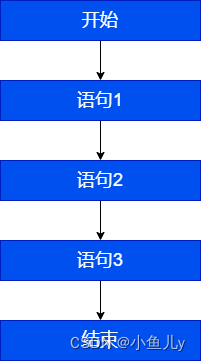
任何编程语言中最常见的程序结构就是顺序结构。顺序结构就是程序从上到下逐行地执行,中间没有任何判断和跳转。如果main方法的多行代码之间没有任何流程控制,则程序总是从上向下依次执行,排在前面的代码先执行,排在后面的代码后执行。

顺序结构代码执行流程图

在这里插入图片描述

顺序结构代码示例:

public static void main(String[] args){
    //顺序执行,根据编写的顺序,从上到下运行
    	System.out.println("程序开始:");
		int a=10;
		int b=20;
		int sum=a+b;
		System.out.println("sum="+sum);//求两个数的和
		System.out.println("程序结束!");
}

1.1 输出语句

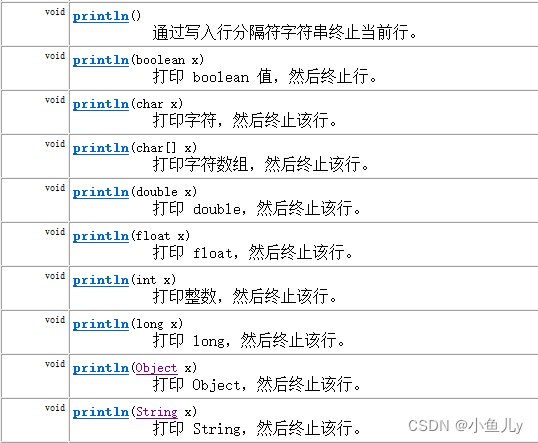
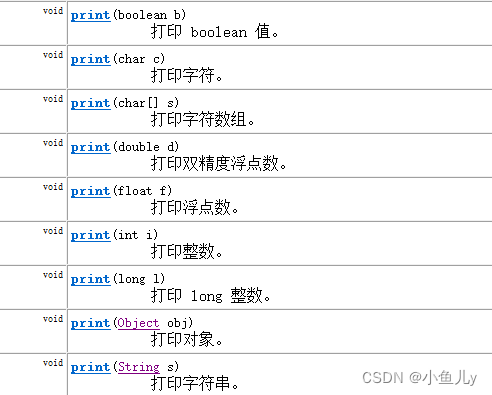
java里的常见输出语句分为 换行输出println和不换行输出print,以及格式化输出printf这三种

  • 换行输出:
System.out.println();

在这里插入图片描述

  • 不换行输出
System.out.print();

在这里插入图片描述

  • 格式化输出: 使用格式化占位符表示数据,再使用数据填充。
- %d:十进制整数
- %f:浮点数
- %c:单个字符
- %b:boolean- %s:字符串

示例代码:

/*
输出(打印) 语句的使用:
    System.out.println(内容): 打印内容以后换行
    System.out.print(内容): 打印内容以后不换行
    System.out.printf(): 使用%占位,进行格式化输出以后不换行
*/
public class PrintDemo {
    public static void main(String[] args) {
        System.out.println("hello");
        System.out.println("good");

        System.out.print("yes");
        System.out.println("ok");


        String name = "坤坤";
        int num = 8;
        double year = 2.5;
        String hobbies = "唱跳RAP篮球";
        // System.out.println("大家好,我是练习长达" + year + "年的" + num + "号选手" + name + ",我喜欢" + hobbies);

        /*%f 浮点数的占位符
            %.nf 四舍五入保留到小数点后n位
        %d 整数的占位符
            %0nd  如果整数不够n位,前面使用 0 补齐
            %nd   如果整数不够n位,前面使用 空格 补齐
            %-nd  如果整数不够n位,后面使用 空格 补齐
        %s 字符串的占位符
        %o 将数字转换成为八进制输出
        %x/%X 将数字转换成为十六进制输出
        %%   表示一个 % 字符*/
        System.out.printf("大家好,我是练习长达%.1f年的%-3d号选手%s,我喜欢%s\n", year, num, name, hobbies);

        System.out.printf("%.3f --- %o --- %X\n", 3.141592653, 2179, 831);

        System.out.printf("我的名字是%%d,我今年%d岁了",  18);
    }
}

在Java中,有多种方法可以格式化输出。以下是一些常见的方法:

  1. 使用 System.out.printf

Java的 System.out.printf 方法允许你使用格式化字符串来输出数据。它与C语言的 printf 函数非常相似。

int a = 10;  
double b = 20.5;  
String c = "Hello";  
  
System.out.printf("整数: %d, 浮点数: %.2f, 字符串: %s%n", a, b, c);

输出:

复制代码

整数: 10, 浮点数: 20.50, 字符串: Hello

其中,%d 表示整数,%.2f 表示保留两位小数的浮点数,%s 表示字符串,%n 表示换行。
\2. 使用 String.format

String.format 方法也可以用于格式化字符串。它返回一个格式化的字符串,而不是直接输出。

int a = 10;  
double b = 20.5;  
String c = "Hello";  
  
String formattedString = String.format("整数: %d, 浮点数: %.2f, 字符串: %s", a, b, c);  
System.out.println(formattedString);

输出与上面相同。
\3. 使用 DecimalFormat

DecimalFormatjava.text 包中的一个类,它允许你更精细地控制数字的格式。

import java.text.DecimalFormat;  
  
double number = 12345.6789;  
DecimalFormat df = new DecimalFormat("#,###.00");  
String formattedNumber = df.format(number);  
System.out.println(formattedNumber);

输出:

复制代码

12,345.00

在这个例子中,#,###.00 是一个模式字符串,其中 # 表示一个可选的数字,, 表示组分隔符(例如千位分隔符),而 .00 表示小数点后保留两位。
\4. 使用 SimpleDateFormat(对于日期和时间)

SimpleDateFormat 允许你格式化日期和时间。

import java.text.SimpleDateFormat;  
import java.util.Date;  
  
Date date = new Date();  
SimpleDateFormat sdf = new SimpleDateFormat("yyyy-MM-dd HH:mm:ss");  
String formattedDate = sdf.format(date);  
System.out.println(formattedDate);

1.2输入语句

以上程序是个求和的程序,我想在运行程序的时候,根据实际的输入的两个数,进行求和,就跟计算器一样,任意给两个数,计算得出结果,如何做?

  1. 完成键盘输入的代码步骤:

    • (1)准备一个键盘扫描器(先导包或直接使用包名+类名)
    • (2)提示要输入的信息
    • (3)接收输入内容

    示例代码:

    52//1、准备Scanner类型的变量
    //Scanner是一个引用数据类型,它的全名称是java.util.Scanner
    //input就是一个引用数据类型的变量了,赋给它的值是一个对象
    java.util.Scanner input = new java.util.Scanner(System.in);//System.in默认代表键盘输入
    
    //2、提示输入xx
    System.out.print("请输入一个整数:");
    
    //3、接收输入内容
    int num = input.nextInt();
    
    //列出各种数据类型的输入
    int num = input.nextInt();
    long bigNum = input.nextLong();
    double d = input.nextDouble();
    boolean b = input.nextBoolean();
    String s = input.next();
    char c = input.next().charAt(0);//先按照字符串接收,然后再取字符串的第一个字符(下标为0)
    
  2. 语法案例一:改造求和案例

    public static void main(String[] args){
        System.out.println("程序开始:");
        //创建一个扫描器
        java.util.Scanner sc=new java.util.Scanner(System.in);
    
        System.out.println("请输入第一个整数:");
        int a=sc.nextInt();//从键盘接收一个整数
    
        System.out.println("请输入第二个整数:");
        int b=sc.nextInt();//从键盘接收一个整数
    
        int sum=a+b;
        System.out.println("sum="+sum);
    
        System.out.println("程序结束");
    }
    
  3. 语法案例二:录入个人信息

    class Day03_Test02_Input{
    	public static void main(String[] args){
    		//这里变量取什么名,下面就用什么.
    		//例如:这里取名input,下面就用input.
    		java.util.Scanner input = new java.util.Scanner(System.in);
    		
    		System.out.print("请输入姓名:");
    		String name = input.next();
    		
    		System.out.print("请输入年龄:");
    		int age = input.nextInt();
    		
    		System.out.print("请输入性别:");
    		//input.next()得到字符串,不管你输入几个字符,
    		//.charAt(0):从字符串中取出一个字符,(0)表示取第一个字符,(1)表示取第二个字符
    		//charAt(index):也是一个方法,从第二个单词开始首字母大写,所以A是大写
    		char gender = input.next().charAt(0);
    		
    		System.out.print("请输入体重:");
    		double weight = input.nextDouble();
    		
    		System.out.print("请输入是否已婚(true/false):");
    		boolean isMarry = input.nextBoolean();
    		
    		System.out.println("姓名:" + name);
    		System.out.println("年龄:" + age);
    		System.out.println("性别:" + gender);
    		System.out.println("体重:" + weight);
    		System.out.println("婚否:" + (isMarry?"是":"否"));
    	}
    }
    
  4. 语法案例三:

    next()与nextLine()接收字符数据的区别

    /*
    next()方法:
    	遇到空格等空白符,就认为输入结束
    nextLine()方法:
    	遇到回车换行,就认为输入结束
    	
    如果你在键盘输入过程中,遇到java.util.InputMismatchException,
    说明你输入的数据类型与接收数据的变量的类型不匹配
    */
    class Day03_Test04_Input2{
    	public static void main(String[] args){
    		java.util.Scanner input = new java.util.Scanner(System.in);
    		
    		System.out.print("请输入姓名:");
    		//String name = input.next();//张 三  只能接收张,后面的空格和三无法接收,被下面的输入接收
    		String name = input.nextLine();
    		System.out.println("name = " + name);
    		
    		System.out.print("请输入年龄:");
    		int age = input.nextInt();	//23回车换行  这里只接收23,回车换行被下面的输入接收	
    		input.nextLine();//读取23后面的回车换行,但是这个不需要接收,只有下面一个输入是nextLine()情况下才需要这样,如果下面的输入是next()或者是nextInt(),nextDouble()等就不需要这么干
    		System.out.println("age = " + age);
    		
    		System.out.print("请输入电话号码:");
    		String tel = input.nextLine();
    		System.out.println("tel = " + tel);
    	}
    }
    

    练习:

    键盘录入两个数据,获取这两个数据中的最大值(使用三目运算符)

    键盘录入三个数据,获取这三个数据中的最大值(使用三目运算符)

    键盘录入两个数据,比较这两个数据是否相等(使用三目运算符)

1.3 Math类的使用

Java内置了Math工具类,我们可以直接进行调用,用来实现一些数学相关功能。

double d = Math.random();  // 用来生成 [0,1)的随机浮点数
System.out.println(d);

int i = (int)(Math.random() * 10);  // 生成 [0,10)的随机整数
System.out.println(i);

// 思考: 怎样生成 [23,89]的随机整数?

double x = Math.sqrt(16);  // 开平方根
double y = Math.pow(2,10);  // 计算2的10次方

2 分支结构(选择结构)

2.1 分支结构:if语句第一种格式

  1. if语句第一种格式: if

    if(关系表达式){
      	语句体;
  2. 执行流程

    ①首先判断条件表达式看其结果是true还是false

    ②如果是true就执行语句体

    ③如果是false就不执行语句体
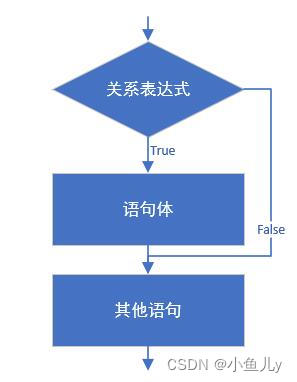
在这里插入图片描述

  1. 语法案例演示1:

  public static void main(String[] args){
      System.out.println("开始");
      // 定义两个变量
      int a = 10;
      int b = 20;
      //变量使用if判断
      if (a == b){
          System.out.println("a等于b");
      }
      int c = 10;
      if(a == c){
          System.out.println("a等于c");
      }
      System.out.println("结束");
  }
  1. 语法案例演示2

    案例:从键盘输入年份,请输出该年的2月份的总天数。闰年2月份29天,平年28天。

    闰年条件:(1)能被4整除,不能被100整除(2)能被400整除

    public class Test {
    	public static void main(String[] args) {
    		java.util.Scanner input = new java.util.Scanner(System.in);
    		System.out.print("请输入年份:");
    		int year = input.nextInt();
    		int days = 28;
    		
    		if(year%4==0 && year%100!=0 || year%400==0){
    			days++;
    		}
    		System.out.println(year + "年的2月份共" + days + "天");
    		input.close();
    	}
    }
    
    public class Test {
    	public static void main(String[] args) {
    		java.util.Scanner input = new java.util.Scanner(System.in);
    		System.out.print("请输入年份:");
    		int year = input.nextInt();
    		int days = 28;
    		
    		if(year%4==0 && year%100!=0 || year%400==0)
    			days++;//当语句块只有一句时,可以省略{},但是建议还是保留比较靠谱
    		
    		System.out.println(year + "年的2月份共" + days + "天");
    		input.close();
    	}
    }
    

2.2 分支结构:if语句第二种格式

  1. if语句第二种格式: if…else

    if(关系表达式) { 
      	语句体1;
    }else {
      	语句体2;
    }
    
  2. 执行流程

    ①首先判断关系表达式看其结果是true还是false

    ②如果是true就执行语句体1

    ③如果是false就执行语句体2
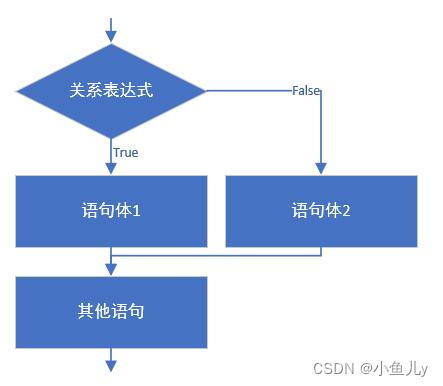
    在这里插入图片描述

  3. 语法案例演示1:

    输入一个整数,判断是奇数还是偶数?

       public static void main(String[] args){
           // 判断给定的数据是奇数还是偶数
           // 定义变量
           int a = 1;
           if(a % 2 == 0) {
               System.out.println("a是偶数");
           } else{
               System.out.println("a是奇数");
           }
           System.out.println("结束");
       }
    
    
  4. 语法案例演示2:if语句和三元运算符的互换

    在某些简单的应用中,if语句是可以和三元运算符互换使用的。

    求两个整数中大的一个

    public static void main(String[] args) {
        int a = 10;
        int b = 20;
        //定义变量,保存a和b的较大值
        int max;
        if(a > b) {
          	max = a;
        } else {
          	max = b;
        }
        //可以上述功能改写为三元运算符形式
        max = a > b ? a : b;
    }
    
    public static void main(String[] args) {
        int a = 10;
        int b = 20;
        //定义变量,保存a和b的较大值
        int max;
        if(a > b) 
          	max = a;//当语句块只有一个语句时,可以省略{},但是不建议省略{}
         else 
          	max = b;
        //输出大的值
        System.out.println(max);
    }
    
  • 练习:求出最大值

    从键盘输入三个数,求出最大值,用单分支if和双分支if…else来计算

    class Day03_Test08_MaxValueExer{
    	public static void main(String[] args){
    		java.util.Scanner input = new java.util.Scanner(System.in);
    		
    		System.out.print("请输入第1个整数:");
    		int a = input.nextInt();
    		
    		System.out.print("请输入第2个整数:");
    		int b = input.nextInt();
    		
    		System.out.print("请输入第3个整数:");
    		int c = input.nextInt();
    		
    		/*
    		int max;//存储三个数中的最大值
    		if(a > b){
    			max = a;
    		}else{
    			max = b;
    		}
    		if(c > max){
    			max = c;
    		}
    		*/
    		int max = a>b ? a : b;
    		max = max>c ? max : c;
    		System.out.println(a+","+b+","+c+"中最大的是:"+ max);
    	}
    }
    

2.3 分支结构:if语句第三种格式

  1. if语句第三种格式:

    if…else if …else

    if (判断条件1) {
      	执行语句1;
    } else if (判断条件2) {
      	执行语句2;
    }
    ...
    }else if (判断条件n) {
     	执行语句n;
    } else {
      	执行语句n+1;
    }
    
  2. 执行流程

    ①首先判断关系表达式1看其结果是true还是false

    ②如果是true就执行语句体1,然后结束当前多分支

    ③如果是false就继续判断关系表达式2看其结果是true还是false

    ④如果是true就执行语句体2,然后结束当前多分支

    ⑤如果是false就继续判断关系表达式…看其结果是true还是false

    ⑥…

    ⑦如果没有任何关系表达式为true,就执行语句体n+1,然后结束当前多分支。
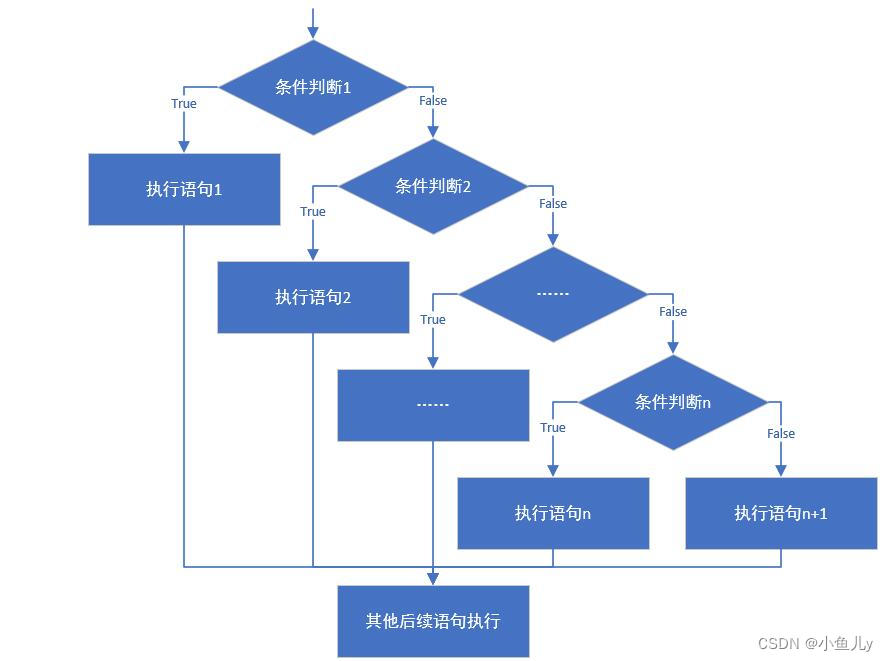
    在这里插入图片描述

  3. 语法案例演示1:

    计算如下函数:x和y的关系满足如下:
    (1)x>=3; y = 2x + 1;
    (2)-1<=x<3; y = 2x;
    (3)x<-1; y = 2x – 1;
    从键盘输入x的值,计算出y的值并输出。

    public static void main(String[] args) {
        java.util.Scanner input = new java.util.Scanner(System.in);
        System.out.print("请输入x的值:");
        int x = input.nextInt();
        int y;
        if (x>= 3) {
          	y = 2 * x + 1;
        } else if (x >= -1 && x < 3) {
          	y = 2 * x;
        } else  {
          	y = 2 * x - 1;
        }
        System.out.println("y的值是:"+y);
    }
    

    改造:

    public static void main(String[] args) {
        java.util.Scanner input = new java.util.Scanner(System.in);
        System.out.print("请输入x的值:");
        int x = input.nextInt();
        int y;
        if (x>= 3) {
          	y = 2 * x + 1;
        } else if (x >= -1) {//优化条件
          	y = 2 * x;
        } else  {
          	y = 2 * x - 1;
        }
        System.out.println("y的值是:"+y);
    }
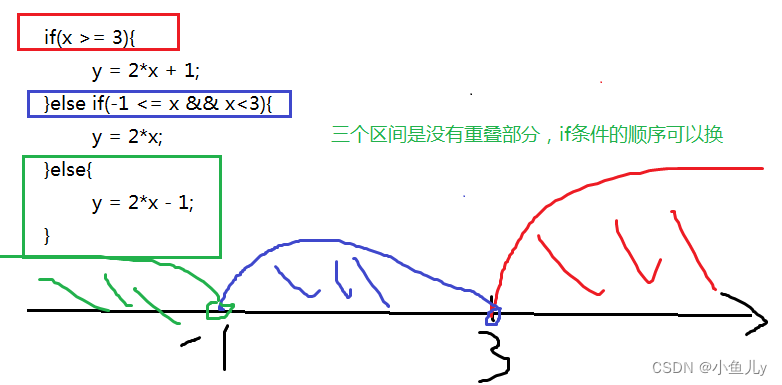
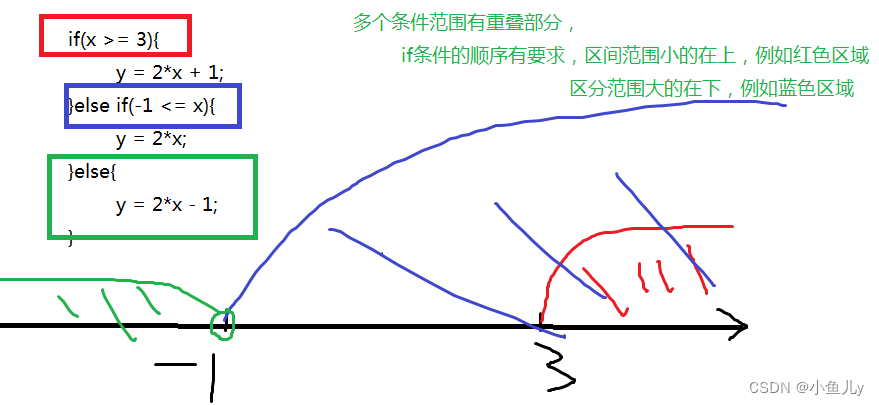
    

    在这里插入图片描述

在这里插入图片描述

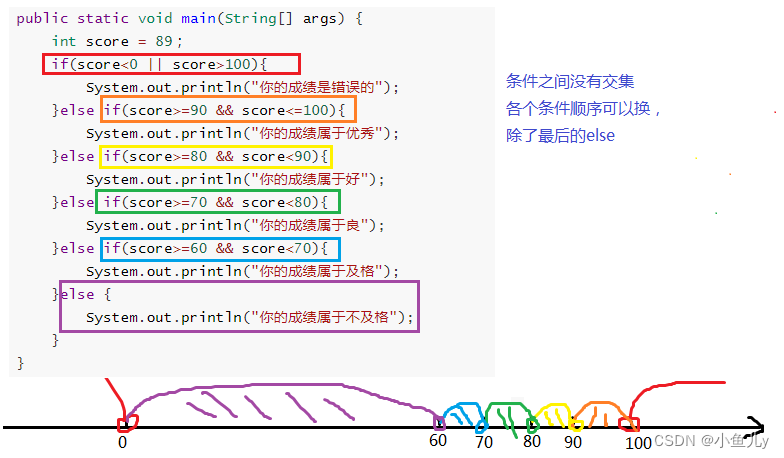
  1. 语法案例演示2:

    通过指定考试成绩,判断学生等级

    90-100 优秀

    80-89 好

    70-79 良

    60-69 及格

    60以下 不及格

    public static void main(String[] args) {	
        int score = 89if(score<0 || score>100){
          	System.out.println("你的成绩是错误的");
        }else if(score>=90 && score<=100){
          	System.out.println("你的成绩属于优秀");
        }else if(score>=80 && score<90){
          	System.out.println("你的成绩属于好");
        }else if(score>=70 && score<80){
          	System.out.println("你的成绩属于良");
        }else if(score>=60 && score<70){
          	System.out.println("你的成绩属于及格");
        }else {
          	System.out.println("你的成绩属于不及格");
        }	
    }
    

    在这里插入图片描述

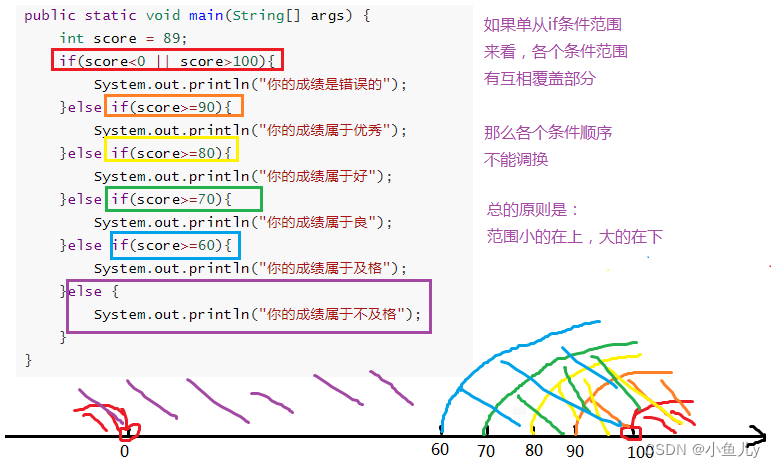
    	public static void main(String[] args) {	
    	    int score = 89;
    	    if(score<0 || score>100){
    	      	System.out.println("你的成绩是错误的");
    	    }else if(score>=90){
    	      	System.out.println("你的成绩属于优秀");
    	    }else if(score>=80){
    	      	System.out.println("你的成绩属于好");
    	    }else if(score>=70){
    	      	System.out.println("你的成绩属于良");
    	    }else if(score>=60){
    	      	System.out.println("你的成绩属于及格");
    	    }else {
    	      	System.out.println("你的成绩属于不及格");
    	    }	
    	}
    

    在这里插入图片描述

2.4 分支结构:if…else嵌套

在if的语句块中,或者是在else语句块中,
又包含了另外一个条件判断(可以是单分支、双分支、多分支)

执行的特点:
(1)如果是嵌套在if语句块中的
只有当外部的if条件满足,才会去判断内部的条件
(2)如果是嵌套在else语句块中的
只有当外部的if条件不满足,进入else后,才会去判断内部的条件

  1. 语法案例演示1:

    	public static void main(String[] args) {	
    	    int score = 89;
    	    if(score<0 || score>100){
    	      	System.out.println("你的成绩是错误的");
    	    }else{
    	    	if(score>=90){
    		      	System.out.println("你的成绩属于优秀");
    		    }else if(score>=80){
    		      	System.out.println("你的成绩属于好");
    		    }else if(score>=70){
    		      	System.out.println("你的成绩属于良");
    		    }else if(score>=60){
    		      	System.out.println("你的成绩属于及格");
    		    }else {
    		      	System.out.println("你的成绩属于不及格");
    		    }	
    	    }
    	}
    
    	//省略{}的情况,else中嵌套了一个完整的多分支结构,也算是一个语句,称为复合语句,所以也可以省略{}
    	public static void main(String[] args) {	
    	    int score = 89;
    	    if(score<0 || score>100)
    	      	System.out.println("你的成绩是错误的");
    	    else
    	    	if(score>=90){
    		      	System.out.println("你的成绩属于优秀");
    		    }else if(score>=80){
    		      	System.out.println("你的成绩属于好");
    		    }else if(score>=70){
    		      	System.out.println("你的成绩属于良");
    		    }else if(score>=60){
    		      	System.out.println("你的成绩属于及格");
    		    }else {
    		      	System.out.println("你的成绩属于不及格");
    		    }
    	}
    
  2. 语法案例演示2:

    从键盘输入一个年份,和月份,输出该年份该月的总天数

    要求:年份为正数,月份1-12

    	public static void main(String[] args){
    		//从键盘输入一个年份,和月份
    		java.util.Scanner input = new java.util.Scanner(System.in);
    		
    		System.out.print("年份:");
    		int year = input.nextInt();
    		
    		System.out.print("月份:");
    		int month = input.nextInt();
    		
    		if(year>0){
    			if(month>=1 && month<=12){
    				//合法的情况
    				int days;
    				if(month==2){
    					if(year%4==0 && year%100!=0 || year%400==0){
    						days = 29;
    					}else{
    						days = 28;
    					}
    				}else if(month==4 || month==6  || month==9 || month==11){
    					days = 30;
    				}else{
    					days = 31;
    				}
    				System.out.println(year+"年" + month + "月有" + days +"天");
    			}else{
    				System.out.println("月份输入不合法");
    			}
    		}else{
    			System.out.println("年份输入不合法");
    		}
    	}
    

2.5 分支结构:switch选择结构

  1. 语法格式:

    switch(表达式){
        case 常量值1:
            语句块1;
            break;
        case 常量值2:
            语句块2;
            break;  
        ...
       	default:
            语句块n+1;
            break;  
    }
    
  2. 执行过程:

    • (1)入口

      • ①当switch(表达式)的值与case后面的某个常量值匹配,就从这个case进入;

      • ②当switch(表达式)的值与case后面的所有常量值都不匹配,寻找default分支进入;不管default在哪里

    • (2)一旦从“入口”进入switch,就会顺序往下执行,直到遇到“出口”,即可能发生贯穿

    • (3)出口

      • ①自然出口:遇到了switch的结束}

      • ②中断出口:遇到了break等

    注意:

    (1)switch(表达式)的值的类型,只能是:4种基本数据类型(byte,short,int,char),两种引用数据类型(JDK1.5之后枚举、JDK1.7之后String)

    (2)case后面必须是常量值,而且不能重复

  3. 语法案例演示1:

    public class SwitchDemo01 {
    	public static void main(String[] args) {
    		//定义指定的星期
    		int weekday = 5;
    		
    		//switch语句实现选择
    		switch(weekday) {
                case 1:
                    System.out.println("星期一");
                    break;
                case 2:
                    System.out.println("星期二");
                    break;
                case 3:
                    System.out.println("星期三");
                    break;
                case 4:
                    System.out.println("星期四");
                    break;
                case 5:
                    System.out.println("星期五");
                    break;
                case 6:
                    System.out.println("星期六");
                    break;
                case 7:
                    System.out.println("星期日");
                    break;
                default:
                    System.out.println("你的数字有误");
                    break;
    		}
    	}
    }
    
  4. 语法案例演示2:case的穿透性

    在switch语句中,如果case的后面不写break,将出现穿透现象,也就是一旦匹配成功,不会在判断下一个case的值,直接向后运行,直到遇到break或者整个switch语句结束,switch语句执行终止。

    练习:根据指定的月份输出对应季节(if语句)

    /*
     * 需求:定义一个月份,输出该月份对应的季节。
     * 		一年有四季
     * 		3,4,5	春季
     * 		6,7,8	夏季
     * 		9,10,11	秋季
     * 		12,1,2	冬季
     * 
     * 分析:
     * 		A:指定一个月份
     * 		B:判断该月份是几月,根据月份输出对应的季节
     * 			if
     * 			switch
     */
    public class SwitchTest01 {
    	public static void main(String[] args) {
    		//指定一个月份
    		int month = 5;
    		
    		/*
    		if (month == 1) {
    			System.out.println("冬季");
    		} else if (month == 2) {
    			System.out.println("冬季");
    		} else if (month == 3) {
    			System.out.println("春季");
    		} else if (month == 4) {
    			System.out.println("春季");
    		} else if (month == 5) {
    			System.out.println("春季");
    		} else if (month == 6) {
    			System.out.println("夏季");
    		} else if (month == 7) {
    			System.out.println("夏季");
    		} else if (month == 8) {
    			System.out.println("夏季");
    		} else if (month == 9) {
    			System.out.println("秋季");
    		} else if (month == 10) {
    			System.out.println("秋季");
    		} else if (month == 11) {
    			System.out.println("秋季");
    		} else if (mouth == 12) {
    			System.out.println("冬季");
            } else {
                System.out.println("你输入的月份有误");
            }
    		*/
    		
    		// 改进版
    		if ((month == 1) || (month == 2) || (month == 12)) {
    			System.out.println("冬季");
    		} else if ((month == 3) || (month == 4) || (month == 5)) {
    			System.out.println("春季");
    		} else if ((month == 6) || (month == 7) || (month == 8)) {
    			System.out.println("夏季");
    		} else if ((month == 9) || (month == 10) || (month == 11)) {
    			System.out.println("秋季");
    		} else {
    			System.out.println("你输入的月份有误");
    		}
    	}
    }
    

    练习:根据指定的月份输出对应季节(switch语句)

    /*
     * 需求:指定一个月份,输出该月份对应的季节。
     * 		一年有四季
     * 		3,4,5	春季
     * 		6,7,8	夏季
     * 		9,10,11	秋季
     * 		12,1,2	冬季
     * 
     * 分析:
     * 		A:指定一个月份
     * 		B:判断该月份是几月,根据月份输出对应的季节
     * 			if
     * 			switch
     */
    public class SwitchTest02 {
    	public static void main(String[] args) {
    		//指定一个月份
    		int month = 5;
    		
    		/*
    		switch(month) {
                case 1:
                    System.out.println("冬季");
                    break;
                case 2:
                    System.out.println("冬季");
                    break;
                case 3:
                    System.out.println("春季");
                    break;
                case 4:
                    System.out.println("春季");
                    break;
                case 5:
                    System.out.println("春季");
                    break;
                case 6:
                    System.out.println("夏季");
                    break;
                case 7:
                    System.out.println("夏季");
                    break;
                case 8:
                    System.out.println("夏季");
                    break;
                case 9:
                    System.out.println("秋季");
                    break;
                case 10:
                    System.out.println("秋季");
                    break;
                case 11:
                    System.out.println("秋季");
                    break;
                case 12:
                    System.out.println("冬季");
                    break;
                default:
                    System.out.println("你输入的月份有误");
                    break;
    		}
    		*/
    	
            // 改进版 
    		switch(month) {
                case 1:
                case 2:
                case 12:
                    System.out.println("冬季");
                    break;
                case 3:
                case 4:
                case 5:
                    System.out.println("春季");
                    break;
                case 6:
                case 7:
                case 8:
                    System.out.println("夏季");
                    break;
                case 9:
                case 10:
                case 11:
                    System.out.println("秋季");
                    break;
                default:
                    System.out.println("你输入的月份有误");
                    break;
    		}
    	}
    }
    
  5. 常见错误实现1:

    switch(month){
        case 3|4|5://3|4|5 用了位运算符,11 | 100 | 101结果是 1117
            System.out.println("春季");
            break;
        case 6|7|8://6|7|8用了位运算符,110 | 111 | 1000结果是111115
            System.out.println("夏季");
            break;
        case 9|10|11://9|10|11用了位运算符,1001 | 1010 | 1011结果是101111
            System.out.println("秋季");
            break;
        case 12|1|2://12|1|2 用了位运算符,1100 | 1 | 10 结果是1111,是15
            System.out.println("冬季");
            break;
        default:
            System.out.println("输入有误");
    }
    
  6. 常见错误实现2:

    //编译不通过
    switch(month){
        case 3,4,5:
            System.out.println("春季");
            break;
        case 6,7,8:
            System.out.println("夏季");
            break;
        case 9,10,11:
            System.out.println("秋季");
            break;
        case 12,1,2:
            System.out.println("冬季");
            break;
        default:
            System.out.println("输入有误");
    }
    

2.6 if语句与switch语句比较

  • if语句的条件是一个布尔类型值,通常根据某个判断结果进入分支,使用范围更广。

  • switch语句的条件是一个常量值(byte,short,int,char,枚举,String),一般条件是几个固定的常量值时使用switch语句。

  • 如果根据进入分支的条件是几个固定的常量值,这时使用if和switch都可以,如果条件选项比较多时,适合使用switch语句(效率高)。

        if是逐行判断
        switch因为case后面是不变的常量 不会逐个判断直接定位相等的值
    

比如:当条件是x>0时,进入某分支执行代码,这时适合使用if语句,不适合使用switch语句。

声明:本人还是一个Java学习者如果有错误的地方还请指正,望各位大佬不吝赐教

int HTTPSessionExecute(TPHTTPSERVERSESSION *pSession) { int iRet, iGot; unsigned long long ullCurTime = tpgetboottime(); pSession->reply_error_code = 0; RETURN_IVALID_IF(!pSession) /* 非P2P方式拉流且在规定时间内未完成HTTP的完整消息交互,则断开 */ if ((pSession->p2p_connection == NULL) && (pSession->iSessionState != TPHTTP_SESSION_STATE_PLAYING)) { if (pSession->ulTime4LastHTTPMsg == 0) { pSession->ulTime4LastHTTPMsg = ullCurTime; } if ((ullCurTime - pSession->ulTime4LastHTTPMsg) > pSession->ullRecvTimeout) { HTTP_ERROR("HTTP: session timeout"); return(TPHTTPSERVER_EC_RTP_FAILURE); } } if((eConnType_Relay == pSession->conn_type) && (TPHTTP_SESSION_STATE_INIT == pSession->iSessionState)) {/* relay的init状态才判断是否需要发送心跳包 */ HTTPRelayPreHeatBeat(pSession, (S32)(ullCurTime/1000)); } /* p2p方式拉流,先判断UDT的状态,UDT状态异常则返回 TPRTSPSERVER_EC_SOCKET_CLOSE */ if(pSession->p2p_connection != NULL) { int udt_state = P2PUdt_GetState(pSession->p2p_connection); if(udt_state != CONNECTING && udt_state != CONNECTED) { HTTP_ERROR_LOG("[p2p dbg] UDT state(%d)", udt_state); return TPRTSPSERVER_EC_SOCKET_CLOSE; } else if (udt_state == CONNECTING) { /*如果为connecting状态,则判断是否超时*/ if ((ullCurTime - pSession->startconnectTime) > P2P_UDT_SETUP_TIMEOUT) { HTTP_ERROR_LOG("[p2p dbg] UDT connecting time out"); return TPRTSPSERVER_EC_SOCKET_CLOSE; } } } //没有正在发送的http报文,则尝试发送响应信令/通知数据 if (!HttpStreamCtx_IsSendPending(&pSession->stream_ctx)) { HttpSession_TrySendReplyData(pSession); } /* 直接推流功能:根据字段及连接类型 */ if (pSession->is_directly_push_stream && pSession->conn_type == eConnType_Relay) { /* 直接推流:将填充拉流参数,跳到取流处*/ pSession->is_directly_push_stream = 0; pSession->iSessionStream = HTTP_STREAM_PREVIEW; /* 监听客户端预览拉流请求 */ PREVIEW_STREAM_TYPE_MSG msg = {0}; msg.type = HTTP_STREAM_PREVIEW; msg_send(PREVIEW_HTTP_STREAM_MID, (uint8_t *)&msg, sizeof(PREVIEW_STREAM_TYPE_MSG)); /* 流数限制判断: 若码流数已达上限,不直接推流 */ int is_up_to_limit = SessionStream_IsUpToLimit(pSession->iCurStreamID, pSession->iSessionStream); if (is_up_to_limit) { HTTPSession_SetState(pSession, TPHTTP_SESSION_STATE_INIT); } else { HTTPSession_SetState(pSession, TPHTTP_SESSION_STATE_READY); HttpStreamCtx_Init(&pSession->stream_ctx, pSession->iSessionStream, pSession->uSessionID, 0, 0, pSession); goto Push_Stream_Handle; } } iGot = HTTPSessionRecv(pSession); if ((TP_TCP_EC_FAILURE == iGot) || (TP_TCP_EC_SOCKET_CLOSE == iGot) || (iGot == TP_TCP_EC_BUFF_FULL)) { HTTP_ERROR_LOG("HTTP: iGot=%d", iGot); if(TPHTTP_SESSION_STATE_PLAYING == pSession->iSessionState && HTTP_STREAM_TALK == pSession->iSessionStream) { TALK_MASK_RELOAD_MSG msg = {0}; msg.enabled = 0; msg_send(TALK_MASK_RELOAD, (uint8_t *)&msg, sizeof(TALK_MASK_RELOAD_MSG)); } return(TPHTTPSERVER_EC_FAILURE); } /* relay首个报文为boundary */ if (pSession->conn_type == eConnType_Relay && pSession->is_relay_boundary_msg) { return HTTPHandleRelayBoundaryMsg(pSession); } if ((iGot > 0) || (MBUFFERByteArrayCurPos(&pSession->RXBuffer) > 0 && pSession->iSessionParseState != HTTP_EC_NEED_MORE_DATA)) { iRet = HTTPSessionParse(pSession); if (iRet == TPHTTPSERVER_EC_FAILURE) { HTTP_ERROR_LOG("Session %d recv invalid HTTP Msg", pSession->iSessionID); if (pSession->conn_type != eConnType_Relay) { HTTPSessionReplyBadRequest(pSession); } /* 消息错误,清空接收缓存数据 */ MBUFFERByteArrayReset(&pSession->RXBuffer); return (TPHTTPSERVER_EC_OK); } else if (iRet == HTTP_EC_NEED_MORE_DATA) { return (TPHTTPSERVER_EC_OK); } /* 未知的消息类型,或者是RTCP报文,更新心跳,忽略后续解析 */ if (pSession->Method.iMethod == HTTP_UN_SUPPORT) { pSession->ulTime4LastHTTPMsg = ullCurTime; return (TPHTTPSERVER_EC_OK); } pSession->ulTime4LastHTTPMsg = ullCurTime; switch (pSession->Method.iMethod) { case HTTP_POST: HTTP_DEBUG("Session %d receive POST, current state %d", pSession->iSessionID, pSession->iSessionState); if (pSession->iSessionState == TPHTTP_SESSION_STATE_READY) { int is_up_to_limit = SessionStream_IsUpToLimit(pSession->iCurStreamID, pSession->iSessionStream); if (is_up_to_limit) { #ifdef INAPP_DIAGNOSE /* 若主子码流都满了诊断流将无法进入playing,则在此处将流数情况通知diagnose模块,同时还原相关变量 */ if (eStreamDiagnose_ON == pSession->diag_mode && SessionStream_IsUpToLimit(TPRTP_STREAM_ID_MAIN, HTTP_STREAM_PREVIEW) && SessionStream_IsUpToLimit(TPRTP_STREAM_ID_SUB, HTTP_STREAM_PREVIEW)) { diagnose_reply_bitrate(pSession->conn_type, pSession->bitrate, IPC_DIAGNOSE_STREAM_FULL); pSession->diag_mode = eStreamDiagnose_INIT; pSession->diag_start_time = 0; pSession->trans_byte_total = 0; pSession->bitrate = 0; } #endif int reply_code = TPPLAYER_SESSION_UP_TO_LIMIT; #ifdef DOORBELL_FUNCTION_SUPPORT if (HTTP_STREAM_TALK != pSession->iSessionStream || ERROR == srtp_session_free_talk()) #endif { if (HTTP_STREAM_TALK == pSession->iSessionStream) { reply_code = TPPLAYER_EC_AUDIO_DEVICE_BUSY; } pSession->reply_error_code = reply_code; iRet = HTTPSessionReplyPOST(pSession); if (iRet != TPHTTPSERVER_EC_OK) { return(TPHTTPSERVER_EC_FAILURE); } HTTPSession_SetState(pSession, TPHTTP_SESSION_STATE_INIT); return TPHTTPSERVER_EC_OK; } } if (pSession->iSessionStream == HTTP_STREAM_PLAYBACK || pSession->iSessionStream == HTTP_STREAM_DOWNLOAD || pSession->iSessionStream == HTTP_STREAM_RECORD_DOWNLOAD) { /* 回放/下载录像/下载缩略图信令,若sd卡状态异常(不可用),则在回复中带上sd卡状态信息 */ if (!is_sd_card_available()) { pSession->reply_error_code = TPPLAYER_EC_STORAGE_UNAVAILABLE; iRet = HTTPSessionReplyPOST(pSession); if (iRet != TPHTTPSERVER_EC_OK) { return(TPHTTPSERVER_EC_FAILURE); } HTTPSession_SetState(pSession, TPHTTP_SESSION_STATE_INIT); return TPHTTPSERVER_EC_OK; } } #ifdef TAPO_USR_DEF_AUDIO_UPLOAD if (HTTP_STREAM_USR_DEF_AUDIO == pSession->iSessionStream) { if (pSession->file_ops.fd < 0) { int reply_code = 0; switch (pSession->file_ops.fd) { case USR_DEF_AUDIO_FILE_ID_FULL_FD: reply_code = TPPLAYER_EC_USR_DEF_AUDIO_FULL; break; case USR_DEF_AUDIO_DEVICE_BUSY_FD: reply_code = TPPLAYER_EC_AUDIO_DEVICE_BUSY; break; case USR_DEF_AUDIO_NAME_DUPLICATE_FD: reply_code = TPPLAYER_EC_NAME_DUPLICATE; break; default: break; } pSession->reply_error_code = reply_code; iRet = HTTPSessionReplyPOST(pSession); if (iRet != TPHTTPSERVER_EC_OK) { return (TPHTTPSERVER_EC_FAILURE); } HTTPSession_SetState(pSession, TPHTTP_SESSION_STATE_INIT); return TPHTTPSERVER_EC_OK; } } #endif } iRet = HTTPSessionReplyPOST(pSession); if (iRet != TPHTTPSERVER_EC_OK) { return(TPHTTPSERVER_EC_FAILURE); } //HTTP_DEBUG("Session %d receive SETUP, current state %d", pSession->iSessionID, pSession->iSessionState); if (pSession->iSessionState == TPHTTP_SESSION_STATE_READY) { if (pSession->iSessionStream == HTTP_STREAM_DOWNLOAD || pSession->iSessionStream == HTTP_STREAM_REALTIME_PHOTO_DOWNLOAD) { TPSendDownloadData(pSession); return(TPHTTPSERVER_EC_OK); } #ifdef SPLENDID_MOMENT else if (pSession->iSessionStream == HTTP_STREAM_SPLMOM_DOWNLOAD) { TPSendSplendidMomentData(pSession); return(TPHTTPSERVER_EC_OK); } #endif #ifdef DETECTION_FSS_SUPPORT if (pSession->iSessionStream == HTTP_STREAM_GET_FACE) { if (pSession->face_info.all_trans_finish == FALSE && pSession->face_info.image_status_check_finish == IMG_CHECK_DONE) { if( pSession->face_info.trans_num < pSession->face_info.count && pSession->face_info.face_items[pSession->face_info.trans_num].trans_status == IMG_TRANS_SEND_PROCESSING) { TPSendFaceimgData(pSession,pSession->face_info.face_items[pSession->face_info.trans_num].face_id); } else { //当前列表请求的图片全部发完后,face_id=0,发送finished TPSendFaceimgData(pSession, 0); } } return(TPHTTPSERVER_EC_OK); } #endif Push_Stream_Handle: if (pSession->iSessionStream == HTTP_STREAM_PREVIEW) { if (pSession->iStreamType == TPRTP_STREAM_TYPE_VIDEO_MAIN #ifdef DUAL_CAM || pSession->iStreamType == TPRTP_STREAM_TYPE_VIDEO_MAIN2 #endif ) { pSession->video_desc.priv = (void *)pSession; pSession->video_desc.stream_id = get_http_main_stream_id(); #ifdef DUAL_CAM if (pSession->iStreamType == TPRTP_STREAM_TYPE_VIDEO_MAIN2) { pSession->video_desc.stream_id = get_http_main2_stream_id(); } else { pSession->video2_desc.priv = (void *)pSession; pSession->video2_desc.stream_id = get_http_main2_stream_id(); pSession->video2_desc.stream_ctx = &pSession->stream_ctx; pSession->video2_desc.stream_ctx->session_ctx = (void *)pSession; trans_attach_to_stream(&pSession->video2_desc, NULL); } #endif pSession->video_desc.stream_ctx = &pSession->stream_ctx; pSession->video_desc.stream_ctx->session_ctx = (void *)pSession; trans_attach_to_stream(&pSession->video_desc, NULL); } else { S32 stream_video_id; #ifdef DUAL_CAM if (pSession->iStreamType == TPRTP_STREAM_TYPE_VIDEO_MINOR2) stream_video_id = trans_register_stream_http(AVDM_TYPE_MINOR2, NULL, NULL); else #endif stream_video_id = trans_register_stream_http(AVDM_TYPE_SUB, NULL, NULL); if(stream_video_id == -1) { HTTP_ERROR_LOG("attach stream fail"); return (TPHTTPSERVER_EC_FAILURE); } pSession->video_desc.priv = (void *)pSession; pSession->video_desc.stream_id = stream_video_id; pSession->video_desc.stream_ctx = &pSession->stream_ctx; pSession->video_desc.stream_ctx->session_ctx = (void *)pSession; trans_attach_to_stream(&pSession->video_desc, NULL); #ifdef DUAL_CAM if (pSession->iStreamType == TPRTP_STREAM_TYPE_VIDEO_MINOR) // DC_TODO 根据streams判断 { stream_video_id = trans_register_stream_http(AVDM_TYPE_MINOR2, NULL, NULL); pSession->video2_desc.priv = (void *)pSession; pSession->video2_desc.stream_id = stream_video_id; pSession->video2_desc.stream_ctx = &pSession->stream_ctx; pSession->video2_desc.stream_ctx->session_ctx = (void *)pSession; trans_attach_to_stream(&pSession->video2_desc, NULL); } #endif } { pSession->audio_desc.priv = (void *)pSession; pSession->audio_desc.stream_id = get_http_audio_stream_id(); pSession->audio_desc.stream_ctx = &pSession->stream_ctx; pSession->audio_desc.stream_ctx->session_ctx = (void *)pSession; trans_attach_to_stream(&pSession->audio_desc, NULL); } } #ifdef DOORBELL_FUNCTION_SUPPORT else if (pSession->iSessionStream == HTTP_STREAM_AUDIO_ONLY) { pSession->audio_desc.priv = (void *)pSession; pSession->audio_desc.stream_id = get_http_audio_stream_id(); pSession->audio_desc.stream_ctx = &pSession->stream_ctx; pSession->audio_desc.stream_ctx->session_ctx = (void *)pSession; trans_attach_to_stream(&pSession->audio_desc, NULL); } #endif else if (pSession->iSessionStream == HTTP_STREAM_PLAYBACK && NULL == pSession->video_desc.priv) { { S32 stream_id; trans_attach_param_t attach_param; attach_param.version = pSession->playback_ver; if (pSession->playback_ver == PLAYBACK_VERSION_WITH_PLAYER_ID) { attach_param.data = (void *)pSession->player_id; } else { attach_param.data = (void *)&pSession->client_id; } stream_id = trans_register_stream_http(TRANS_STREAM_TYPE_PLAYBACK, NULL, &attach_param); if(stream_id == -1) { HTTP_ERROR_LOG("attach stream fail"); return (TPHTTPSERVER_EC_FAILURE); } pSession->video_desc.priv = (void *)pSession; pSession->video_desc.stream_id = stream_id; pSession->video_desc.stream_ctx = &pSession->stream_ctx; pSession->video_desc.stream_ctx->session_ctx = (void *)pSession; trans_attach_to_stream(&pSession->video_desc, NULL); } } else if (pSession->iSessionStream == HTTP_STREAM_RECORD_DOWNLOAD && NULL == pSession->video_desc.priv) { { S32 stream_id; trans_attach_param_t attach_param; attach_param.version = pSession->playback_ver; if (pSession->playback_ver == PLAYBACK_VERSION_WITH_PLAYER_ID) { attach_param.data = (void *)pSession->player_id; } else { attach_param.data = (void *)&pSession->client_id; } stream_id = trans_register_stream_http(TRANS_STREAM_TYPE_RECORD_DOWNLOAD, NULL, &attach_param); if(stream_id == -1) { HTTP_ERROR("attach stream fail"); return (TPHTTPSERVER_EC_FAILURE); } pSession->video_desc.priv = (void *)pSession; pSession->video_desc.stream_id = stream_id; pSession->video_desc.stream_ctx = &pSession->stream_ctx; pSession->video_desc.stream_ctx->session_ctx = (void *)pSession; trans_attach_to_stream(&pSession->video_desc, NULL); } } //HTTP_DEBUG("Session: %d receive PLAY, current state %d", pSession->iSessionID, pSession->iSessionState); pSession->video_desc.param.start_time = (pSession->npt == -1 || pSession->npt == 0) ? pSession->start_time : pSession->npt; pSession->video_desc.param.timestamp = pSession->timestamp; pSession->video_desc.param.change_day = pSession->change_day; if(TPHTTP_SESSION_STATE_PAUSE == pSession->iSessionState && pSession->npt == -1) pSession->video_desc.param.start_time = -1; pSession->video_desc.param.client_id = pSession->video_desc.stream_id; if(pSession->scale - 1 > 0.0) { pSession->video_desc.param.scale.denominator = 1; //默认倍速为1 pSession->video_desc.param.scale.numerator = pSession->scale; } else { pSession->video_desc.param.scale.denominator = 1 / pSession->scale; //默认倍速为1 pSession->video_desc.param.scale.numerator = 1; } pSession->video_desc.param.is_end = 0; pSession->video_desc.param.type_bitmap = 1; pSession->video_desc.param.task_type = 1; pSession->video_desc.param.type_bitmap = 6; #ifdef DUAL_CAM //HTTP_DEBUG("Session: %d receive PLAY, current state %d", pSession->iSessionID, pSession->iSessionState); pSession->video2_desc.param.start_time = (pSession->npt == -1 || pSession->npt == 0) ? pSession->start_time : pSession->npt; pSession->video2_desc.param.timestamp = pSession->timestamp; pSession->video2_desc.param.change_day = pSession->change_day; if(TPHTTP_SESSION_STATE_PAUSE == pSession->iSessionState && pSession->npt == -1) pSession->video2_desc.param.start_time = -1; pSession->video2_desc.param.client_id = pSession->video2_desc.stream_id; if(pSession->scale - 1 > 0.0) { pSession->video2_desc.param.scale.denominator = 1; //默认倍速为1 pSession->video2_desc.param.scale.numerator = pSession->scale; } else { pSession->video2_desc.param.scale.denominator = 1 / pSession->scale; //默认倍速为1 pSession->video2_desc.param.scale.numerator = 1; } pSession->video2_desc.param.is_end = 0; pSession->video2_desc.param.type_bitmap = 1; pSession->video2_desc.param.task_type = 1; pSession->video2_desc.param.type_bitmap = 6; #endif if (pSession->iSessionStream == HTTP_STREAM_PLAYBACK) { pSession->video_desc.param.vod_type = pSession->vod_type; pSession->video_desc.param.auto_seek = pSession->auto_seek; pSession->video_desc.param.auto_switch_date = pSession->auto_switch_date; pSession->vod_type = 0; pSession->auto_seek = 0; } if (pSession->iSessionStream == HTTP_STREAM_RECORD_DOWNLOAD) { pSession->video_desc.param.end_time = pSession->end_time; //录像下载需要传入结束时间 pSession->video_desc.param.task_type = 2; //录像下载的task_type为2 trans_start_download(&pSession->video_desc); } else { trans_start_play(&pSession->video_desc); #ifdef DUAL_CAM trans_start_play(&pSession->video2_desc); #endif } if (pSession->web_connection != NULL) { pSession->webparam->if_attach = 1; } #ifndef HOMEKIT_ONBOARDING_SUPPORT SessionAllowConnection(pSession->iCurStreamID, pSession->iSessionStream); #else /* 如果添加一路直播流 */ if (SessionAllowConnection(pSession->iCurStreamID, pSession->iSessionStream) && pSession->iSessionStream == HTTP_STREAM_PREVIEW) { g_http_stream_count++; LED_TRIGGER_MSG led_trigger; memset(&led_trigger, 0, sizeof(led_trigger)); led_trigger.trigger_mask = LED_TRIGGER_START_GENMASK(LED_TRIGGER_TYPE_TAPO_STREAMING); msg_send(LED_HOMEKIT_TRIGGER_MID, (U8 *)&led_trigger, sizeof(led_trigger)); } #endif if(HTTP_STREAM_TALK == pSession->iSessionStream) { TALK_MASK_RELOAD_MSG msg = {0}; msg.enabled = 1; msg_send(TALK_MASK_RELOAD, (uint8_t *)&msg, sizeof(TALK_MASK_RELOAD_MSG)); } HTTPSession_SetState(pSession, TPHTTP_SESSION_STATE_PLAYING); #if defined(TELEMETRY_SUPPORT) pSession->conn_start_time = nvmp_get_us(); #endif } if (pSession->bIsSessionON == 0) { HTTP_ERROR("Setup exit During CloseSession %d", pSession->iSessionID); return TPHTTPSERVER_EC_STATE_NONFATAL; } break; default: HTTP_INFO_LOG("TPHTTPSERVER_EC_FAILURE"); return (TPHTTPSERVER_EC_FAILURE); } } else if(TP_TCP_EC_WAIT == iGot) { return TPHTTPSERVER_EC_GOTNOTING; } return(TPHTTPSERVER_EC_OK); } 解释代码,详细一点
最新发布
10-15
评论
成就一亿技术人!
拼手气红包6.0元
还能输入1000个字符
 
红包 添加红包
表情包 插入表情
 条评论被折叠 查看
添加红包

请填写红包祝福语或标题

红包个数最小为10个

红包金额最低5元

当前余额3.43前往充值 >
需支付:10.00
成就一亿技术人!
领取后你会自动成为博主和红包主的粉丝 规则
hope_wisdom
发出的红包
实付
使用余额支付
点击重新获取
扫码支付
钱包余额 0

抵扣说明:

1.余额是钱包充值的虚拟货币,按照1:1的比例进行支付金额的抵扣。
2.余额无法直接购买下载,可以购买VIP、付费专栏及课程。

余额充值