


Microsoft.Office.Interop.Word 和 VBA 这俩货绝对是一样的
需要编辑格式如下
使用 此处下划线 、方法实现与HomeKey、EndKey类似的效果。

查了若干资料后
- 逻辑就是光标移动到最后 EndKey代码段 unit用到的是第二段代码块
- 在向做移动若干个字符 object count1 字符串长度
- 最后在定义selection的字体 MSWord.WdUnderline.wdUnderlineSingle; 下划线
- object wdExtend = 1; 此参数表示向左 选定
wordDoc.Paragraphs.Last.Range.InsertAfter(item);
strContent = " ( " + key++.ToString() + " )";
wordDoc.Paragraphs.Last.Range.InsertAfter(strContent);

object count1 = strContent.Length - 1;
object wdExtend = 1;
wordApp.Selection.EndKey(ref unite, ref Nothing);//将光标移到文本末尾
wordApp.Selection.MoveLeft(ref unitec, ref count1,ref wdExtend);
wordApp.Selection.Font.Underline = MSWord.WdUnderline.wdUnderlineSingle;
//取消前一个空格的下划线
count1 = 1;
wordApp.Selection.EndKey(ref unite, ref Nothing);//将光标移到文本末尾
wordApp.Selection.MoveLeft(ref unitec, ref count1, ref wdExtend);
wordApp.Selection.Font.Underline = MSWord.WdUnderline.wdUnderlineNone;
object unite = MSWord.WdUnits.wdStory;//全文单元
object unitec = MSWord.WdUnits.wdCharacter;//字符单元
参考资料如下
如何在word中用Selection对象快速选中内容区域?如何在word中用Selection对象快速选中内容区域? http://www.360doc.com/content/20/0802/19/70193489_928171881.shtmlC#导出word word导出带样式生成word(二)_我笔记的博客-优快云博客_c# 导出word本文中用C#来操作Word,包括:创建Word;插入文字,选择文字,编辑文字的字号、粗细、颜色、下划线等;设置段落的首行缩进、行距;设置页面页边距和纸张大小;设置页眉、页码;插入图片,设置图片宽高以及给图片添加标题;插入表格,格式化表格,往表格中插入数据;保存Word,打印Word;重新打开Word等。Visual studio版本:Visual Studio 2012(2010应该也可以)准备工作:/*1. 添加引用COM里面的 Microso
 https://blog.youkuaiyun.com/y1535623813/article/details/120348824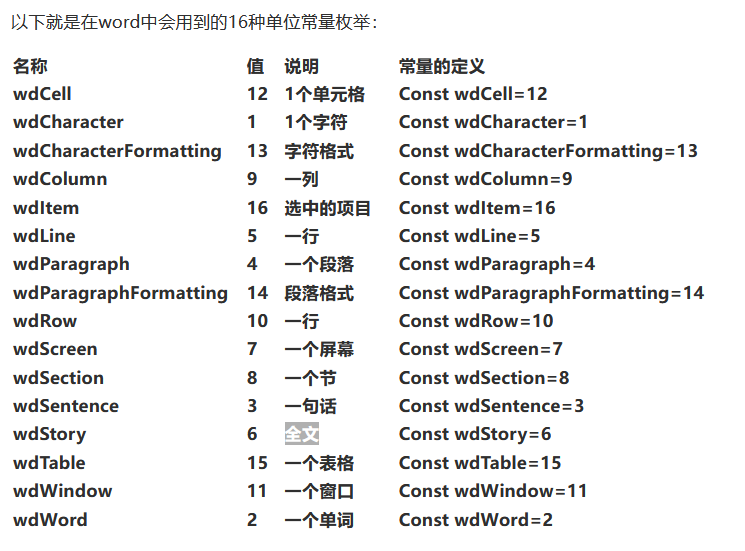





 扫一扫
扫一扫


 7229
7229

 被折叠的 条评论
为什么被折叠?
被折叠的 条评论
为什么被折叠?
 到【灌水乐园】发言





