


一、安卓
下载uniapp 离线打包SDK
下载地址:https://nativesupport.dcloud.net.cn/AppDocs/download/android.html#
以下是我下载的sdk配置,我的sdk版本是:3.6.4
使用android studio IDE 导入Hbuilder-HelloUniApp 项目目录如下
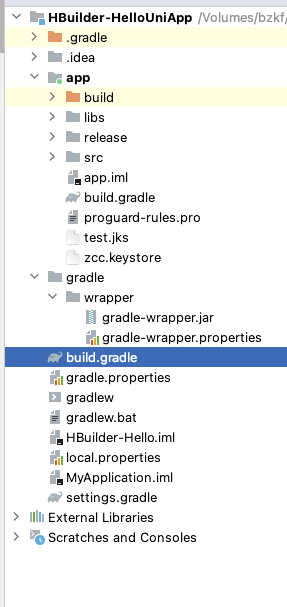
a、修改build.gradle 文件加入谷歌谷歌的sdk
在build.gradle 文件中加入,classpath 'com.google.gms:google-services:4.3.10'

b、在app/src/AdroidManifest.xml 中 application节点加入
<meta-data
android:name="com.google.android.gms.ads.APPLICATION_ID"
android:value="谷歌广告应用id"/>
谷歌银行id在google Admob平台注册申请
c、在layout 中创建bannerAd.xml
<?xml version="1.0" encoding="utf-8"?>
<LinearLayout xmlns:android="http://schemas.android.com/apk/res/android"
android:layout_width="match_parent"
android:layout_height="100dp">
<Button
android:id="@+id/btn1"
android:text="Button1"
android:layout_width="wrap_content"
android:layout_height="wrap_content"/>
<Button
android:id="@+id/btn2"
android:text="Button2"
android:layout_width="wrap_content"
android:layout_height="wrap_content"/>
<com.google.android.gms.ads.AdView
xmlns:ads="http://schemas.android.com/apk/res-auto"
android:id="@+id/adView"
android:layout_width="wrap_content"
android:layout_height="wrap_content"
android:layout_centerHorizontal="true"
android:layout_alignParentBottom="true"
ads:adSize="BANNER"
ads:adUnitId="广告单元id">
</com.google.android.gms.ads.AdView>
</LinearLayout>
d、在java/com下面创建一个目录googleAdView,再创建一个ad.java 文件
ad.java 文件代码如下
public class ad extends Activity {
private AdView mAdView;
private WebView webView;
@Override
public void onCreate(Bundle savedInstanceState) {
super.onCreate(savedInstanceState);
DisplayMetrics dm = new DisplayMetrics();
getWindow().getWindowManager().getDefaultDisplay().getMetrics(dm);
WindowManager.LayoutParams p = getWindow().getAttributes();
p.gravity = Gravity.BOTTOM;
p.y = 140;
getWindow().setBackgroundDrawableResource(android.R.color.transparent);
getWindow().setAttributes(p);
WindowManager.LayoutParams layoutParams = getWindow().getAttributes();
layoutParams.flags = WindowManager.LayoutParams.FLAG_LAYOUT_NO_LIMITS |
WindowManager.LayoutParams.FLAG_NOT_TOUCH_MODAL;
setContentView(R.layout.googlead);
mAdView = findViewById(R.id.adView);
}
}
e、在AndroidManifest.xml中暴露出广告 Activity
<activity android:name="com.googleAdView.ad"
android:theme="@style/MyDialogStyle"
android:exported="false"
>
</activity>
f、在values 中创建一个style.xml
<!-- 自定义dialog的样式 -->
<style name="MyDialogStyle" parent="@style/Theme.AppCompat.NoActionBar">
<item name="android:windowIsFloating">true</item>
<item name="android:windowIsTranslucent">true</item>
<item name="android:windowBackground">@android:color/transparent</item>
<item name="android:backgroundDimAmount">0</item>
<item name="android:windowCloseOnTouchOutside">false</item>
</style>
以上安卓原生代码就配置完了
在uniapp代码中调用就可以了
uniapp 代码调用如下
var main = plus.android.runtimeMainActivity();
//通过反射获取Android的Intent对象
var Intent = plus.android.importClass("android.content.Intent");
//通过宿主上下文创建 intent
var intent = new Intent(main.getIntent());
//设置要开启的Activity包类路径 com.HBuilder.integrate.MainActivity换掉你自己的界面
intent.setClassName(main, "com.googleAdView.ad");
//开启新的任务栈 (跨进程)
intent.setFlags(Intent.FLAG_ACTIVITY_NEW_TASK);
//uni向android原生界面传值
// intent.putExtra("uni_key","来自uniapp的值");
//请求码保证了,开始的新界面和返回的是同一个操作
// var CODE_REQUEST=1000
//采用startActivityForResult开启新的界面,当界面关闭时可以处理返回结果, CODE_REQUEST请求码是唯一标识
main.startActivity(intent);
这样谷歌广告就弹出拉!





 扫一扫
扫一扫


 2854
2854

 被折叠的 条评论
为什么被折叠?
被折叠的 条评论
为什么被折叠?
 到【灌水乐园】发言





